
CENMATE Aluminum 4 Bay Hard Drive Enclosure
4.3Editor score
Supports up to 80TB total capacity
Built-in aluminum-alloy cooling fan
USB 3.0 with up to 5Gbps speed
Direct Attached Storage provides a fast, reliable way to expand your computer storage without network complexity. These enclosures connect via USB or Thunderbolt, offering high-speed data access for professionals and enthusiasts alike.
We evaluated ten top models based on transfer speed, drive capacity, build quality, and compatibility. Each unit supports multiple drives and includes features like cooling fans and hot-swappable bays for flexible storage expansion.
Every pick highlights key specs and ideal use cases. Note that product prices and availability change frequently, so verify current deals before purchasing to ensure you get the best value for your needs.
4.3Editor score

4.2Editor score

5.0Editor score
As an Amazon Associate we earn from qualifying purchases.
This table compares all ten enclosures side by side. It highlights their drive bays, interface type, cooling methods, and RAID support to help you find the perfect DAS unit for your setup.




The TERRAMASTER D4-320 is a powerful 4-bay DAS enclosure offering up to 120TB capacity. It earns our Editor's Choice for its balance of speed, capacity, and user-friendly design.
We may earn a commission when you buy through this link, at no additional cost to you.
Its USB 3.2 Gen2 interface delivers up to 10Gbps transfer speeds. The tool-free push-lock bays make drive swaps easy without needing any screwdrivers or extra tools.
While it lacks hardware RAID, this keeps costs low and maintains flexibility. The smart fan may produce some noise under load, but it ensures drives stay cool.
This unit is ideal for users needing fast access to large files without network complexity. It works great with Windows, macOS, and Linux systems for versatile compatibility.
Achieves read/write speeds up to 1,016 MB/s with four 8TB HDDs.
Temperature-controlled fan reduces noise by up to 50 percent in standby.
We may earn a commission when you buy through this link, at no additional cost to you.
The QNAP TR-004 delivers reliable storage with hardware RAID options. It is perfect for users who want redundancy and seamless expansion into a QNAP NAS environment.
We may earn a commission when you buy through this link, at no additional cost to you.
RAID 0, 1, and 5 options protect your data against drive failures. The lockable bays add an extra layer of security for shared or office environments.
However, its RAID features are limited to specific QNAP models and require updated software. Migrating drives between units can be tricky due to storage pool restrictions.
This model suits professionals using QNAP NAS systems who need a reliable external backup solution. Its sturdy build and robust security features make it a premium choice.
Supports RAID 0, 1, 5, JBOD, and individual disk modes.
Lockable bays prevent unauthorized access to installed hard drives.
We may earn a commission when you buy through this link, at no additional cost to you.
The TERRAMASTER D8 Hybrid offers unique hybrid storage with four HDD and four NVMe bays. It stands out for flexibility, allowing you to balance speed and capacity.
We may earn a commission when you buy through this link, at no additional cost to you.
Hot data on NVMe SSDs reaches up to 980MB/s speeds. HDDs provide massive capacity at lower cost, making it ideal for tiered storage workflows.
However, you must manually organize data between drive types. This manual management can be time-consuming compared to automated tiering systems in higher-end solutions.
This enclosure is perfect for editors who want fast access to active projects and cheap storage for archives. Its hybrid design provides excellent value for power users.
Combines 4 SATA HDDs with 4 M.2 NVMe SSDs.
TPC Backupper software allows easy scheduled backups.
We may earn a commission when you buy through this link, at no additional cost to you.
The CENMATE Aluminum 4 Bay is an affordable DAS solution. It offers solid build quality and supports up to 80TB capacity for home or office storage expansion.
We may earn a commission when you buy through this link, at no additional cost to you.
Its aluminum alloy housing aids heat dissipation. The tool-free design lets you swap drives without tools, making maintenance quick and convenient.
The fan noise may be noticeable in quiet environments. While it limits speeds to 5Gbps, this is still much faster than USB 2.0 options available today.
Buy this if you need a budget-friendly option for bulk storage. Its reliability and ease of use make it a great starter enclosure for personal use.
Aluminum alloy materials enhance durability and cooling efficiency.
Hot-swappable design allows drive changes without powering down.
We may earn a commission when you buy through this link, at no additional cost to you.
The SABRENT 5-Bay USB-C dock offers reliable access to five drives. Its unique controller setup provides stable independent connections for each bay.
We may earn a commission when you buy through this link, at no additional cost to you.
Individual power switches let you control each drive separately. Internal auto-switching power supply eliminates the need for an external power brick.
The dock is slightly pricey but worth it for its stability. You cannot add more than five drives, but daisy-chaining allows you to expand with another dock.
This unit is best for users needing robust, independent drive control. It suits creators who want to manage large video files across multiple disks easily.
Dedicated controller for each bay ensures stable access.
Internal power supply removes the need for an external adapter.
We may earn a commission when you buy through this link, at no additional cost to you.
The TERRAMASTER D8 Hybrid 2 has a perfect 5.0 rating. It improves on the earlier model with TPM power management for better efficiency and faster wake-up.
We may earn a commission when you buy through this link, at no additional cost to you.
It supports up to 152TB total storage with hybrid bays. Users can switch between power save and active modes to balance energy use and performance.
Like other hybrids, you must manually sort hot and cold data. This offers full control but requires more setup effort from the user.
This enclosure suits professionals needing both speed and capacity in one box. Its high rating and advanced power features make it a standout high-end choice.
Proprietary power management optimizes energy and performance.
Read speeds reach up to 1020 MB/s with single NVMe SSD.
We may earn a commission when you buy through this link, at no additional cost to you.
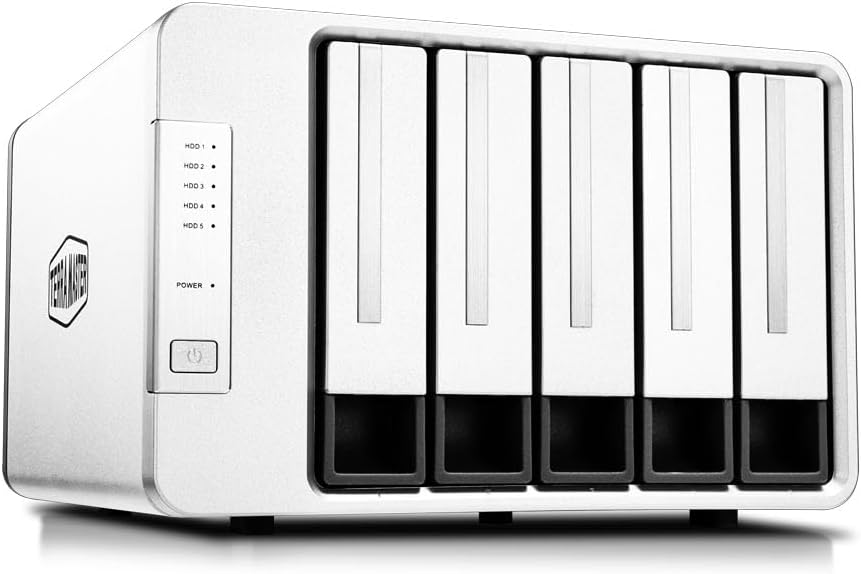
The TERRAMASTER D5-310 features a dedicated RAID knob for easy switching. It supports RAID 5, 0, 1, 10, and single disk modes for flexible data protection.
We may earn a commission when you buy through this link, at no additional cost to you.
Its hot spare feature automatically replaces failed drives in supported RAID modes. The included backup software helps keep your data secure and organized.
MacOS compatibility is excellent, but performance is lower than USB 3.2 options. Users should expect slower transfer speeds compared to newer USB standards.
This unit is ideal for users prioritizing hardware RAID redundancy. Its ease of use and cross-platform compatibility make it a solid choice for offices.
Quick switch between RAID modes using the rear knob.
Hot spare disk minimizes downtime if a drive fails.
We may earn a commission when you buy through this link, at no additional cost to you.
The WAVLINK 4-Bay enclosure stands out with its built-in 4K HDMI port. This makes it a great dock for connecting displays alongside your storage drives.
We may earn a commission when you buy through this link, at no additional cost to you.
Its 10Gbps USB 3.2 interface ensures fast data transfers. Dual fans activate automatically at 48 degrees to keep drives cool under heavy use.
You must verify your host supports video output for HDMI to work. Also, 2.5-inch drives need mounting brackets that are not included in the box.
Buy this if you want to declutter your workspace with a single dock. It is excellent for media centers or workstations needing display and storage in one.
HDMI port supports up to 4K at 60Hz resolution.
Dual fans activate automatically based on temperature thresholds.
We may earn a commission when you buy through this link, at no additional cost to you.
The ORICO 5 Bay uses a magnetic cover for tool-free access. This design makes installing or replacing drives quick and hassle-free for any user.
We may earn a commission when you buy through this link, at no additional cost to you.
It supports up to 110TB capacity across five bays. Over voltage and overheat protection ensures data safety during high-speed transfers.
Linux users should note that only one drive reads at a time. This limits multi-drive setups on Linux compared to Windows or macOS.
This model is perfect for home users needing simple, high-capacity storage. Its magnetic design and multiple protections make it a reliable choice for backup.
Screwless cover lets you access drives in seconds.
Multiple protection circuits prevent over voltage and overheat.
We may earn a commission when you buy through this link, at no additional cost to you.
The QNAP TR-002 is a compact 2-bay option perfect for limited space. It supports hardware RAID 0, 1, and JBOD for flexible data protection.
We may earn a commission when you buy through this link, at no additional cost to you.
Lockable bays add security to the storage. Its USB Type-C connection ensures compatibility with modern laptops and desktops.
Only two bays limit total capacity. If you need massive storage, this may not suffice. For backups of critical files it is excellent.
Buy this if you need a reliable NAS backup tool. Its small size and RAID support make it ideal for users with basic storage needs.
Small footprint fits easily on crowded desks.
Lockable bays prevent unauthorized access to drives.
We may earn a commission when you buy through this link, at no additional cost to you.
Choosing the right DAS enclosure involves evaluating speed, capacity, and features. These factors determine performance and compatibility with your current setup.
USB 3.2 Gen2 and Thunderbolt provide up to 10Gbps speeds. Older USB 3.0 caps at 5Gbps. Faster interfaces reduce transfer times for large video or design files.
Prioritize USB 3.2 Gen2 or Thunderbolt if speed is critical for your workflow.
Enclosures offer 2 to 8 drive bays. Each bay supports drives up to 20TB or more. Total capacity equals bays times max drive size.
Choose enough bays to handle your current and future storage needs without frequent upgrades.
Hardware RAID provides redundancy for data protection. JBOD lets you access drives independently. Some units offer RAID, others do not.
Select hardware RAID if data safety is a priority. Otherwise JBOD gives full flexibility per drive.
Multiple drives generate heat. Cooling fans prevent overheating but may create noise. Look for temp-controlled fans for balanced performance.
If your DAS sits near your desk, choose units with quiet operation ratings and smart fan controls.
Aluminum alloys offer better heat dissipation and durability than plastic. Tool-free bays simplify drive maintenance. Ensure bays lock securely to prevent accidental drops.
Invest in sturdy metal enclosures for long-term reliability and safer drive protection.
Ensure support for your operating system. Most DAS units work with Windows and macOS. Some require specific updates for NAS expansion.
Check vendor documentation to confirm your OS and NAS system compatibility before buying.
Some enclosures use external power bricks while others support internal power supplies. External supplies are common for high-drive counts.
Consider power cable management and the availability of replacement adapters when selecting a model.
Look for HDMI outputs, USB-C hubs, or daisy-chaining. Extra ports reduce cable clutter. Backup software may also be included for data security.
Prioritize features that streamline your setup like HDMI or hub ports for a cleaner workspace.
Install drives by sliding them into bays and securing trays. Connect the enclosure to your computer via USB-C cable. The OS should detect drives within seconds.
Keep firmware updated via vendor apps to ensure stability. Place the unit where fans have airflow to avoid overheating. Dust buildup can reduce cooling efficiency.
Back up critical data regularly even with RAID. Sudden failures can still occur. Use external software to automate your backup tasks.
DAS connects directly to one computer via USB or Thunderbolt. NAS connects to a network via Ethernet for multi-user access. DAS is faster for single-user workflows while NAS supports shared file access.
Many drives come unformatted. Check vendor info. macOS and Windows usually handle formatting automatically. Use exFAT for cross-platform compatibility if needed.
Most modern enclosures support macOS. Verify compatibility for older OS versions. Some units may require reformatting for APFS or HFS+ file systems.
Without RAID you lose data on that drive. With RAID 1 or 5 other drives keep your data safe. Always keep a separate backup for critical files.
Swap drives for higher capacity ones. Ensure the enclosure supports the new drive size. RAID arrays may need rebuilding after upgrades.
RAID protects against drive failure. For home users, RAID 1 is cost-effective. If you maintain separate backups, RAID adds extra peace of mind.
The TERRAMASTER D4-320 leads with its speed and flexible design. The QNAP TR-004 adds premium RAID security. The CENMATE Aluminum delivers solid budget performance.
Consider your workflow needs. Fast interfaces suit video editors while RAID suits data safety. Capacity needs dictate the bay count you choose.
Verify current prices and availability before buying. DAS technology evolves quickly. Regular updates ensure your setup stays efficient and reliable.