
Microsoft Surface Dock
4.5Editor score
Magnetic Surface Connect
Four USB 3.0 ports
Dual mini display ports
This guide compares the top 10 docking stations for Surface Pro to help you choose the right hub for productivity connectivity and performance.
Finding the right docking station for your Surface Pro is essential for turning your portable device into a full desktop workstation. A good dock provides multiple ports, high-resolution video output, and reliable charging to keep you productive throughout the day.
We have analyzed the best available options based on port variety, charging speed, display support, and compatibility with the entire Surface ecosystem. Our list includes official Microsoft docks and high-quality third-party alternatives that offer unique features for different workflows.
Each pick in this guide highlights key strengths, pros, and cons to help you make an informed decision for your specific needs. Remember that availability and pricing can change over time, so check the latest details before purchasing.
4.5Editor score

4.4Editor score

4.5Editor score
The following table provides a side-by-side comparison of all ten products featured in this guide. Use this overview to quickly identify which dock matches your port requirements and budget constraints.




The Microsoft Surface Thunderbolt 4 Docking Station stands out as a top choice for professionals needing high-speed connectivity and multi-monitor support. With a solid 4.4 rating, it delivers reliable performance for users who demand premium features from their docking solution.
We may earn a commission when you buy through this link, at no additional cost to you.
Its standout feature is the Thunderbolt 4 technology, which enables lightning-fast data transfers and supports up to two 4K monitors simultaneously. The included 2.5G Ethernet port ensures stable network connections, while the rapid charging capability can power up your laptop in just 2.5 hours.
While the price is higher than many third-party alternatives, the build quality and official Microsoft compatibility justify the investment for many users. The tactile port indicators make it easy to find the right connection quickly, reducing clutter and frustration on your desk.
If you need the best performance and official support for your Surface Pro, this is the dock to get. It is ideal for power users who work with large files or multiple high-resolution displays daily and value sustainability in their tech accessories.
Thunderbolt 4 offers up to 40Gbps data transfer speeds, allowing you to move large files quickly and connect to high-end peripherals without bottlenecks.
Connect up to two 4K monitors to expand your workspace significantly, which is perfect for multitasking, coding, or video editing workflows.
We may earn a commission when you buy through this link, at no additional cost to you.
The original Microsoft Surface Dock remains a popular choice for users looking for an affordable and reliable way to expand their Surface device. With a 4.5 rating, it is known for its straightforward setup and broad compatibility across multiple Surface models.
We may earn a commission when you buy through this link, at no additional cost to you.
Its magnetic Surface Connect cable makes it incredibly easy to dock and undock your device without fumbling with ports. The four USB 3.0 ports and gigabit Ethernet connection provide essential connectivity for most standard office peripherals and networking needs.
While it lacks modern USB-C ports and relies on older mini displayport technology, it is still highly effective for basic setups. The price point makes it accessible for students or home users who do not need the latest high-speed video standards.
For anyone on a budget who wants an official Microsoft solution, this dock is a smart buy. It transforms your Surface into a desktop PC quickly and keeps your workspace organized with minimal setup effort.
This dock works with a wide range of Surface devices including Surface Pro, Surface Book, and Surface Laptop models from several generations.
The magnetic cable snaps into place effortlessly, and the dock powers up automatically to connect your peripherals with no software installation.
We may earn a commission when you buy through this link, at no additional cost to you.
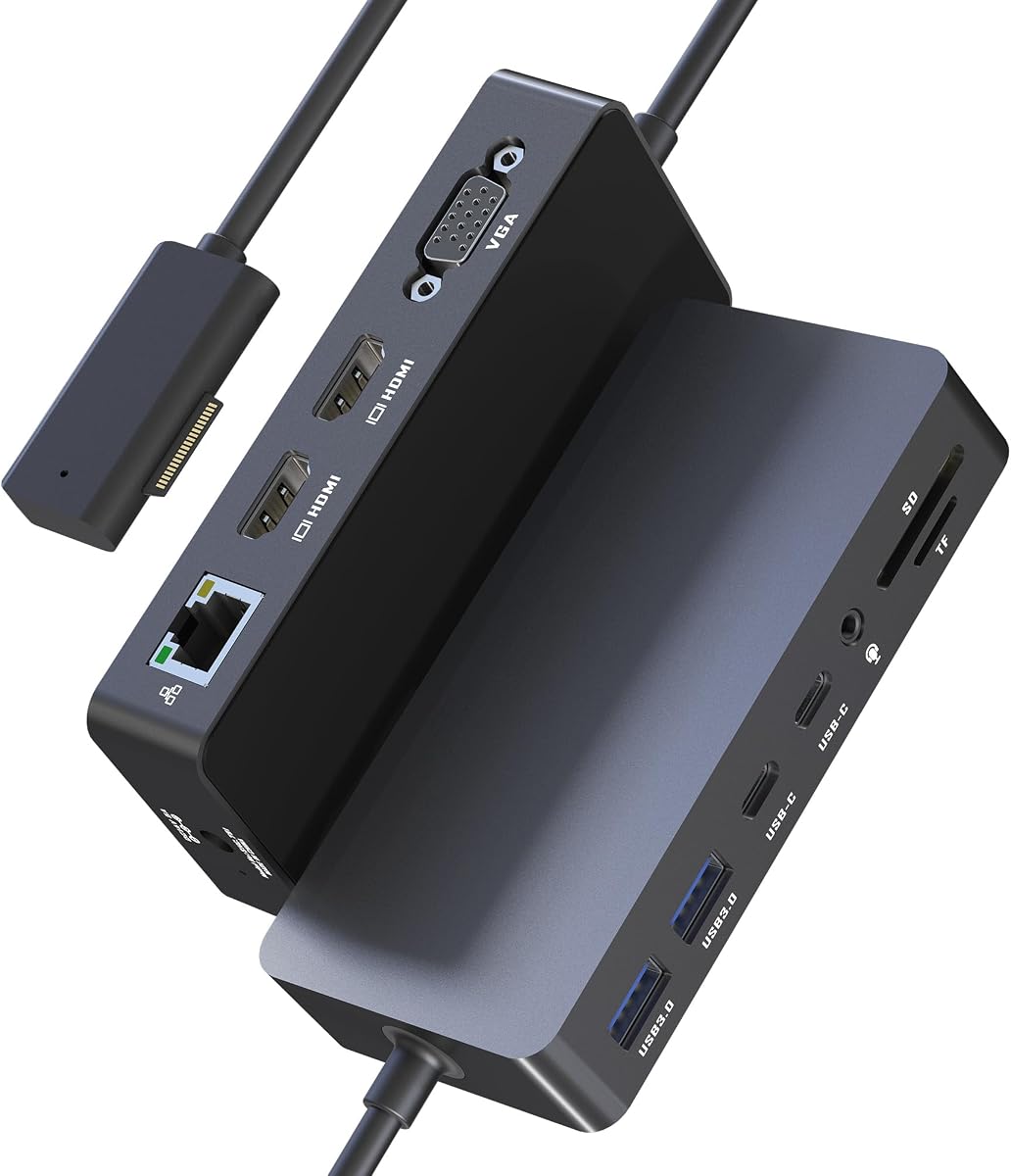
This 12-in-1 Surface Docking Station offers exceptional value for users who need multiple display outputs without breaking the bank. With a 4.1 rating, it provides a versatile array of ports suitable for diverse connectivity needs in home or office settings.
We may earn a commission when you buy through this link, at no additional cost to you.
The ability to connect up to three external displays using two HDMI ports and one VGA port is its most impressive feature. It includes a 72W power adapter to charge your device while connected, and the SD TF card slots are useful for photographers.
The build quality and performance can vary compared to official Microsoft docks, but it covers all the essential bases for a functional desktop setup. The simple plug-and-play connectivity means you do not need to install drivers to get started immediately.
If you need to extend your workspace across three screens and want plenty of USB ports, this dock is a strong contender. It is a practical choice for users who want maximum connectivity options at a reasonable price point.
You can connect three monitors simultaneously to multitask across different applications, which is ideal for trading, research, or content creation.
The USB 3.0 ports allow for data transfer speeds up to 5Gbps, so you can move files to and from external drives quickly.
We may earn a commission when you buy through this link, at no additional cost to you.
With an impressive 4.8 rating, this dock is a favorite among users who need reliable triple display support for their work. It combines a wide range of ports with a modern design that fits well on any office desk or home workspace.
We may earn a commission when you buy through this link, at no additional cost to you.
The inclusion of a 72W power supply ensures your Surface device stays charged while you use connected peripherals, which is a key requirement for productivity. The triple display setup boosts efficiency by allowing you to keep reference materials open while working on your main task.
While it does not support the latest Thunderbolt speeds, it is fast enough for most standard file transfers and everyday tasks. The minimalist design helps reduce desk clutter while maximizing functionality for busy professionals and remote workers.
For those seeking a well-rated dock that supports multiple screens and offers good build quality, this is a great option. It is particularly useful for hybrid workers who move between home and office and need consistent performance.
Using three screens allows you to keep email, documents, and your main project visible at once, significantly speeding up your workflow.
The dock ensures stable network connections via Ethernet and supports audio and video for clear communication during remote meetings.
We may earn a commission when you buy through this link, at no additional cost to you.
This docking station is tailored for creative professionals who need high-resolution displays and quick access to camera cards. It offers a 12-in-1 configuration that includes dual 4K HDMI outputs and a 72W power adapter to keep your device running all day.
We may earn a commission when you buy through this link, at no additional cost to you.
The SD and TF card slots support up to 2TB capacities and allow you to offload photos and videos directly from your camera. This is a major benefit for photographers and videographers who want to avoid extra adapters during their workflow.
While the HDMI output is capped at 30Hz, which is standard for many docking hubs at this price, it still provides a clear and stable image for editing and review. The universal compatibility with various Surface models ensures it works well with your specific device.
If you are a creative professional looking for a hub that handles media cards and multiple screens, this is a solid pick. It simplifies your workspace by consolidating all your connections into one tidy docking station.
The dedicated card slots let you import footage directly without needing a separate reader, saving time and reducing cable clutter.
Designed to work with Surface Pro 12 down to older models, ensuring you can use it across different generations of devices.
We may earn a commission when you buy through this link, at no additional cost to you.
The Microsoft Surface Dock 2 is the ultimate dock for users who demand the highest performance and compatibility from their Surface devices. With a 4.5 rating, it offers next-gen ports and robust power delivery to turn your laptop into a powerful desktop PC.
We may earn a commission when you buy through this link, at no additional cost to you.
Its standout feature is the support for dual 4K monitors at 60Hz, which ensures smooth scrolling and motion for high-resolution displays. The included 199W power supply can charge your laptop and power high-demand peripherals simultaneously without any issues.
While it uses mini displayport instead of HDMI and comes at a premium price, the reliability and performance are unmatched for official support users. The front and rear USB-C ports provide flexible connectivity for modern devices and accessories without adapters.
If you are willing to invest in the best possible docking experience, this is the one to choose. It is perfect for professionals who need reliable performance, high-speed connectivity, and a seamless integration with their Surface ecosystem.
The 60Hz refresh rate on 4K displays makes animations and scrolling look fluid, which improves the overall user experience.
The high-wattage power supply ensures your device charges quickly and can handle power-hungry peripherals like external hard drives.
We may earn a commission when you buy through this link, at no additional cost to you.
This version of the Surface Dock 2 comes with a USB-C cable and maintains the high-quality features of the official Microsoft dock. With a 4.8 rating, it is a top choice for users who want modern connectivity options and reliable performance.
We may earn a commission when you buy through this link, at no additional cost to you.
The 199W power supply and dual 4K 60Hz support ensure that you get top-tier performance for both work and entertainment. It is compatible with a wide range of Surface devices, making it a versatile upgrade for those with older models.
The inclusion of the USB-C cable simplifies the setup process for users with newer Surface models that support USB-C charging. The compact design and integrated security lock slot also add practical value for office environments.
For users seeking a reliable dock with strong ratings and modern features, this is a great option. It provides a seamless desktop experience and ensures your device and peripherals stay powered and connected throughout the day.
The dock integrates perfectly with Surface devices, offering simple plug-and-play functionality without the need for additional drivers.
You get a mix of USB-C and USB-A ports to connect to both modern and legacy devices without needing extra adapters.
We may earn a commission when you buy through this link, at no additional cost to you.
This docking station stands out for its ability to support three monitors with dual HDMI and a VGA port. It includes a 100W power adapter to charge your device while connected, which is essential for powering high-performance workloads.
We may earn a commission when you buy through this link, at no additional cost to you.
The gigabit Ethernet port ensures a stable network connection for video conferencing and large file transfers without lag. It also features SD and TF card readers, making it convenient for users who need quick access to camera media.
While it may not have the polished build of official Microsoft products, it offers a cost-effective solution for multi-monitor setups. The high resolution support at 60Hz is a significant advantage for productivity and multimedia tasks.
If you need to drive three screens and want strong power delivery at a competitive price, this is a good pick. It is a practical choice for traders, designers, or anyone who needs extra screen real estate.
Supporting 4K at 60Hz ensures your display looks sharp and smooth, which is important for detailed design or trading work.
The gigabit Ethernet port provides a faster and more reliable internet connection than Wi-Fi, reducing latency during online tasks.
We may earn a commission when you buy through this link, at no additional cost to you.
This renewed version of the Microsoft Surface Dock 2 offers the same high-performance features as a new unit at a lower price. It comes with a 199W power adapter and USB-C cable, and has a 4.7 rating for reliability and performance.
We may earn a commission when you buy through this link, at no additional cost to you.
The dock supports dual 4K at 60Hz and provides robust power delivery for your Surface device. It has undergone rigorous testing to ensure durability and consistent performance in various workspaces.
Buying renewed is an excellent way to access premium features while reducing your environmental footprint. The one-year limited hardware warranty gives you confidence in the quality of the product.
If you want top-tier docking features and a reasonable price, this renewed option is a smart choice. It delivers the same desktop transformation experience as a new dock with the added benefit of eco-friendly consumption.
You get all the advanced features of the latest dock at a lower cost, making high-end tech more accessible.
Choosing a renewed product helps reduce electronic waste and supports more sustainable consumer habits.
We may earn a commission when you buy through this link, at no additional cost to you.
This Surface Dock offers a clean and minimalist design that keeps your desk tidy while providing essential connectivity. With a 4.2 rating, it is compatible with many Surface devices and includes a 90W power supply for reliable charging.
We may earn a commission when you buy through this link, at no additional cost to you.
The two mini DP ports allow you to connect external monitors, and the four USB 3.0 ports provide plenty of space for peripherals. It also includes a gigabit Ethernet port for stable network connectivity in office environments.
While it uses older DisplayPort technology and may not support the highest resolutions, it is sufficient for standard dual-monitor setups. The compact size makes it easy to fit on any desk without taking up too much space.
If you prefer a simple and tidy setup without excessive features, this dock is a good choice. It covers the basics well and ensures your Surface device remains powered and connected to your essential peripherals.
The small size of the dock ensures it fits easily on any desk without obstructing other items.
It includes all the standard ports you need for daily use, such as USB, Ethernet, and video output.
We may earn a commission when you buy through this link, at no additional cost to you.
Choosing the right docking station involves considering your specific port needs, display requirements, and budget. Use this guide to understand the key factors that affect performance and usability.
Check how many USB-A and USB-C ports you need for your peripherals like keyboards, mice, and external drives. Ensure there are enough ports to connect all your devices without needing extra hubs.
Prioritize docks that offer a mix of port types to accommodate both modern and legacy devices.
Determine how many monitors you need to connect and what resolution they support. Some docks only support one external monitor while others can drive dual or triple screens.
Look for docks with HDMI or DisplayPort outputs that match your monitor capabilities for the best visual experience.
Ensure the dock includes a power supply with enough wattage to charge your Surface device while connected to multiple peripherals. Lower wattage adapters may lead to slow charging or battery drain.
Choose a dock with high-wattage delivery to keep your device fully powered during heavy workloads.
If you use your monitors for fast-paced tasks like gaming or trading, look for a dock that supports 60Hz or higher refresh rates. Lower rates may cause visible lag on the screen.
Higher refresh rates provide a smoother viewing experience for demanding applications.
Consider the length and quality of the included cables to ensure they reach your desk setup comfortably. Magnetic connectors or secure clips can help keep your workspace tidy.
A dock with a sturdy and long cable will reduce frustration during daily use.
Invest in docks made from durable materials that can withstand daily handling and heat generation. Official Microsoft docks typically have better build quality than third-party options.
Good build quality ensures longevity and consistent performance over time.
Verify that the dock is compatible with your specific Surface model to avoid connection issues. Some docks work best with newer models or require specific ports like Thunderbolt.
Check the manufacturer's compatibility list to ensure your device is supported.
Set a budget that balances cost with the features you need. Official docks are pricier but offer better support and reliability than cheaper alternatives.
Choose a dock that fits your budget while meeting your essential requirements.
To set up your dock, plug all your peripherals into the available ports before connecting the dock to your Surface device. This ensures the dock recognizes all devices upon connection.
For daily use, simply connect the Surface cable or USB-C connector to the device. The dock will automatically charge your laptop and extend your displays without needing additional software.
To maintain your dock, keep it in a well-ventilated area to prevent overheating. Clean the ports periodically with compressed air to remove dust and debris that may interfere with connections.
Most Surface docks are plug-and-play and do not require additional drivers. They are designed to work instantly with your device upon connection.
Yes, you can connect multiple USB keyboards and mice to the docking station. Just plug them into the available USB ports.
Yes, all the docks listed include a power supply that charges your Surface device while connected to the dock.
Thunderbolt 4 supports faster data transfer speeds and higher display resolutions compared to standard USB-C connections.
Some docks support three monitors, but most standard docks support two. Check the specifications for triple monitor support.
Third-party docks can work well but may lack the same level of optimization and support. Official docks ensure the best compatibility.
Many docks are compatible with older Surface models like Surface Pro 3 or 4. Always check the compatibility list for specific devices.
Most docks turn on automatically when connected to your Surface device. They draw power from the connected device or the included adapter.
We have reviewed the top 10 docking stations for Surface Pro, offering options for every budget and need. Whether you need triple monitor support or just a few extra USB ports, there is a dock on this list for you.
Prioritize ports and power delivery when making your choice to ensure your setup remains reliable and efficient. Investing in a quality dock will improve your daily workflow significantly.
Remember to check current availability and prices before buying. Deals change often so finding the best time to purchase can save you money.