
Plaud Note Pro
4.5Editor score
Enhanced context with multimodal input
Chat with recordings using Ask Plaud
AI directional audio with noise minimization
This guide compares the top AI meeting transcription devices for professionals, students, and journalists, evaluating accuracy, battery life, and privacy
AI meeting transcription devices have revolutionized how we capture conversations by combining hardware with intelligent software to automate note-taking. These tools allow users to focus on the discussion rather than scribbling notes manually during critical meetings or interviews.
We evaluated ten leading models based on transcription accuracy, battery endurance, privacy standards, and ease of integration into daily workflows. Each device offers unique features like offline processing, multi-language support, and seamless cloud synchronization to suit different professional needs.
Every pick highlights key strengths, limitations, and ideal use cases to help you find the perfect assistant for your specific environment. Note that specific capabilities and subscription terms may vary, so always verify current details before making your final purchase decision.
4.5Editor score

4.8Editor score

4.4Editor score
This side-by-side comparison evaluates ten top AI meeting transcription devices across key performance metrics including accuracy, privacy, battery life, and ecosystem features to help you choose the right tool for your workflow.


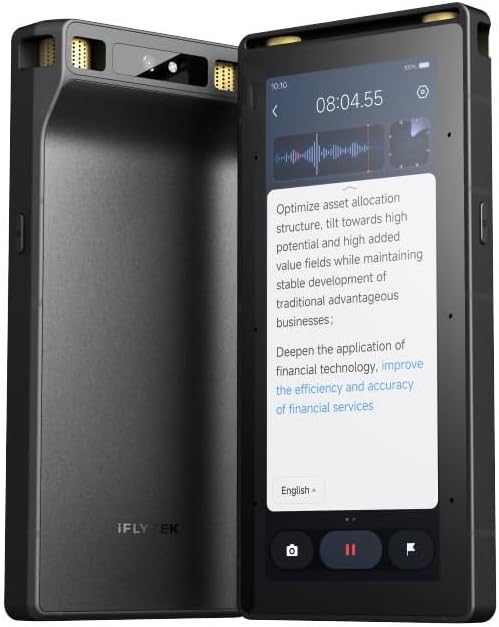

The Comu Action Pro delivers exceptional value with its ability to auto-generate editable documents like slides and emails from conversations. It stands out with a highly versatile six-mic setup that adapts to interviews, meetings, and calls with precision.
We may earn a commission when you buy through this link, at no additional cost to you.
Its AI capabilities are robust, allowing you to turn words into action items and follow-ups without needing complex prompts. The 70-hour battery life ensures it lasts through extended periods of travel or multiple back-to-back meetings without frequent recharging.
One trade-off is the reliance on connectivity for full cloud features, though offline recording still works. The AI features are powerful but may require a brief learning curve to master all the automation possibilities effectively.
This device is ideal for professionals who need quick, editable summaries and presentations directly from audio. It is highly recommended for anyone seeking a comprehensive AI assistant that simplifies documentation tasks significantly.
Comu decides on suitable models to turn conversations into presentations, emails, and reminders automatically.
Four omnidirectional mics, one directional, and one bone-conduction mic capture clearest sound.
We may earn a commission when you buy through this link, at no additional cost to you.
EurekaMind Lite offers an impressive free plan with unlimited transcription and AI summaries, making it accessible for budget-conscious users. It functions as a personal assistant with web search to go beyond your recordings for added context.
We may earn a commission when you buy through this link, at no additional cost to you.
The device supports dual capture modes for ambient and call recording, ensuring versatility across scenarios. Its smart AI summary identifies speakers and highlights action items, streamlining the review process significantly.
Trade-offs include needing a premium upgrade for calendar sync and advanced tools, but the free features are robust enough for daily use. The privacy certifications provide assurance for handling sensitive data securely.
Ideal for students and professionals needing affordable, reliable transcription with AI insights. It is highly recommended for anyone prioritizing cost-effective solutions without sacrificing core functionality.
Built-in Ask AI allows you to search the web for deeper insights beyond recordings.
Enterprise-level security standards protect your recordings with encrypted processing.
We may earn a commission when you buy through this link, at no additional cost to you.
Plaud Note Pro combines hardware and software excellence with multimodal input allowing you to add notes and images during recording. It features Ask Plaud, an interactive AI that unlocks deeper insights from your conversations.
We may earn a commission when you buy through this link, at no additional cost to you.
The directional audio technology minimizes noise for crystal clear voice capture. Its premium design is ultra-slim with an AMOLED display, ensuring status is visible at a glance and device security is maintained.
Trade-offs include a subscription model for extensive features, but the starter plan offers generous minutes. The global security standards make it a trusted choice for professionals handling sensitive information securely.
Perfect for executives and professionals needing comprehensive context and secure handling of meeting data. It is highly recommended for those who value detailed context and privacy above all.
Ask questions and extract key points grounded in your original audio for reliable answers.
Built to highest standards including ISO 27001 SOC 2 HIPAA GDPR compliance.
We may earn a commission when you buy through this link, at no additional cost to you.
Pocket AI Voice Recorder stands out with MagSafe compatibility allowing convenient hands-free recording on the go. It functions as a personal assistant to capture, transcribe, and summarize meetings instantly.
We may earn a commission when you buy through this link, at no additional cost to you.
Smart AI insights turn recordings into summaries and key items maps helping you review what matters quickly. The one-tap recording ensures you never miss a moment without interruptions during conversations.
Trade-offs include needing a subscription for premium tools, but core features are included out of the box. The four-day battery life makes it reliable for travel and extended daily use.
Ideal for iPhone users and mobile professionals seeking effortless note-taking. It is highly recommended for those prioritizing convenience and seamless integration with mobile workflows.
Easily attach to iPhone or MagSafe compatible devices for convenient hands-free recording.
Long lasting 4-day battery life supports travel and daily use effectively.
We may earn a commission when you buy through this link, at no additional cost to you.
Comulytic Note Pro offers a lifetime free starter plan with unlimited transcription which is rare in this category. Its Wi-Fi sync is ten times faster than Bluetooth ensuring seamless real-time backup while recording.
We may earn a commission when you buy through this link, at no additional cost to you.
A vertical knowledge base captures industry terms precisely improving accuracy for professionals in specific fields. The adaptive recording with triple-mic array and noise cancellation ensures crystal clear audio capture anywhere.
Trade-offs include advanced features requiring a premium upgrade, but core transcription remains free. The privacy controls ensure your files remain exclusive and encrypted for secure handling of sensitive data.
Perfect for professionals seeking affordable unlimited transcription with advanced AI. It is highly recommended for users needing efficient sync and industry-specific transcription capabilities.
Captures industry terms precisely for fields like law finance and insurance.
Wi-Fi sync pushes recordings to cloud ten times faster than Bluetooth.
We may earn a commission when you buy through this link, at no additional cost to you.
RECPOINT delivers industry-leading accuracy powered by GPT-5.5 engine performing deep conversation analysis. It supports an industry-leading 150 languages making it ideal for global collaboration and research.
We may earn a commission when you buy through this link, at no additional cost to you.
The included desktop software allows advanced audio management and editing. The 30-hour battery life ensures it lasts through long lectures or meetings without recharging issues.
Trade-offs include needing desktop software for advanced features, but hardware handles core tasks well. The 1080 free minutes monthly offer significant value without hidden fees for transcription.
Ideal for users prioritizing accuracy and language support. It is highly recommended for international professionals or students needing extensive language capabilities.
Powered by cutting-edge GPT-5.5 engine for high transcription accuracy.
Full data control to access manage and export securely across devices.
We may earn a commission when you buy through this link, at no additional cost to you.
Plaud Note Non-Pro maintains the ultra-slim design while using Plaud Intelligence models like GPT-5.5 for accurate transcripts. It features multimodal input and dual-mode recording for versatile capture.
We may earn a commission when you buy through this link, at no additional cost to you.
Local 64GB storage ensures security without internet connection. The global security standards protect sensitive data effectively for professionals needing privacy compliance.
Trade-offs include needing subscription for unlimited features, but starter plan is included. The design ensures portability making it easy to carry daily without bulk.
Ideal for users prioritizing design and privacy compliance. It is highly recommended for those needing a sleek and secure note-taking solution.
Store up to 64GB of audio locally to record securely without internet.
Uses leading models like GPT-5.5 and Gemini for structured insights.
We may earn a commission when you buy through this link, at no additional cost to you.
Offline AI Recorder processes information anywhere without internet dependency using offline AI transcription and translation. It features a twenty meter pickup range for large hall and professional-grade recording.
We may earn a commission when you buy through this link, at no additional cost to you.
Five-year Pro membership unlocks premium AI features and cloud services. The hardware-level security ensures data is safe with three-tier encryption for sensitive business scenarios.
Trade-offs include higher price point but the included membership adds significant value. The offline capabilities make it ideal for secure cross-border business where internet is unavailable.
Ideal for users needing offline processing and large range capture. It is highly recommended for secure cross-border or offline environments.
Process information anywhere without internet dependency with offline transcription.
Three-tier hardware encryption safeguards sensitive data effectively.
We may earn a commission when you buy through this link, at no additional cost to you.
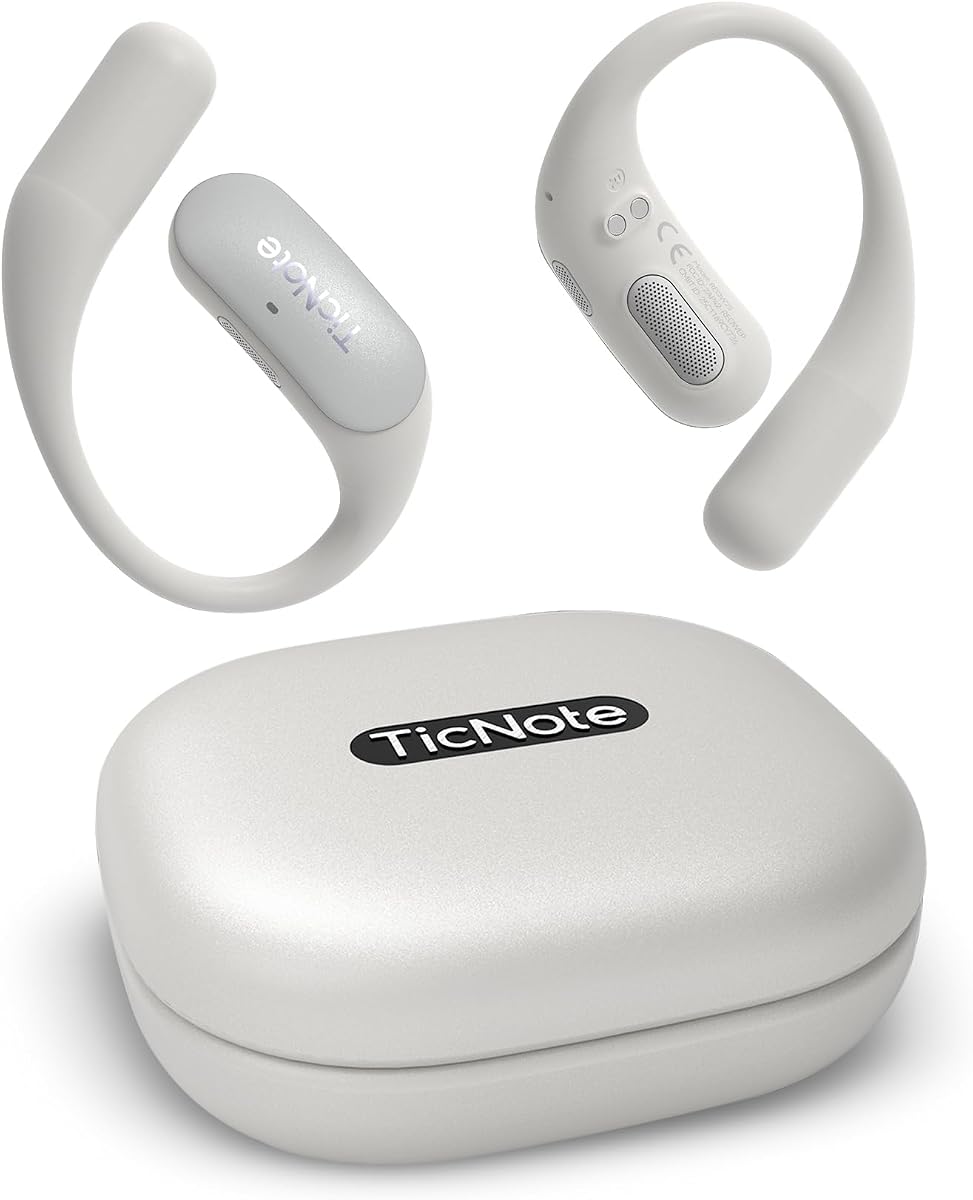
TicNote Pods are designed as wearable voice recorders allowing you to focus on conversations. It generates structured summaries and meeting notes with Shadow AI to organize information for work.
We may earn a commission when you buy through this link, at no additional cost to you.
Team collaboration features allow sharing notes and transcripts securely. The 120+ language support ensures multilingual teams can communicate and transcribe seamlessly.
Trade-offs include limited battery life compared to portable devices, but design prioritizes usability. The cloud storage ensures notes are accessible and encrypted for privacy.
Ideal for teams needing collaborative workflows and wearable tech. It is highly recommended for users prioritizing focus and structured content.
Designed for meetings and daily business communication letting AI handle notes.
Shadow AI helps organize information into more useful outputs.
We may earn a commission when you buy through this link, at no additional cost to you.
Comulytic Note Pro offers unlimited free transcription with advanced AI models ensuring accuracy across many languages. The ultra-slim design makes it easy to carry and use anywhere.
We may earn a commission when you buy through this link, at no additional cost to you.
Blazing-fast Wi-Fi sync ensures data is backed up quickly. The complete package includes accessories making it ready to use out of the box.
Trade-offs include needing upgrade for advanced tools, but core features remain free. The privacy protection ensures your data is safe and encrypted for secure handling.
Ideal for users seeking affordable unlimited transcription with fast sync. It is highly recommended for professionals prioritizing data security and ease.
Enjoy unlimited free transcription and basic summaries powered by advanced AI.
AES technology and CCPA protection ensure your data stays private.
We may earn a commission when you buy through this link, at no additional cost to you.
Choosing the right AI meeting transcription device involves evaluating features like transcription accuracy, battery life, privacy standards, and ecosystem support to match your specific needs.
Transcription accuracy is critical for professional use as errors can lead to misunderstandings. Look for devices with high accuracy rates and support for your specific language needs.
Prioritize models with proven accuracy and advanced AI models for best results.
Long battery life ensures uninterrupted recording during extended meetings or travel. Devices offering 30+ hours reduce the need for frequent recharging.
Choose models with endurance modes or quick charge capabilities for reliability.
Privacy and security are paramount when handling sensitive business conversations. Check for certifications like ISO or GDPR compliance and AES encryption.
Select devices with clear data policies and encryption standards for safety.
Seamless integration with your existing tools like calendars and cloud storage enhances productivity. Look for cross-device sync and team collaboration features.
Ensure the device supports your workflow through apps and integrations.
Many devices offer free starter plans but require subscriptions for advanced features. Evaluate if the included features meet your needs or if you need premium access.
Consider the long-term cost of subscriptions when comparing models.
Global professionals need devices supporting multiple languages for accurate transcription. Check for language coverage and real-time translation capabilities.
Prioritize models with wide language support for multilingual environments.
A sleek and lightweight design ensures comfort during extended use. Look for slim profiles that fit easily in pockets or bags.
Choose portable devices that don't obstruct your workflow or comfort.
Advanced AI features like automatic summarization and action item extraction save time. Evaluate if these automation tools align with your productivity goals.
Opt for devices offering actionable AI insights beyond simple transcription.
Before recording always ensure you inform participants and obtain consent where required by local laws. Place the device in a location away from background noise for best audio capture.
After recording sync your files to the cloud or your preferred device immediately for safe storage. Review transcripts to verify accuracy and edit summaries as needed.
Keep the device clean and charge it regularly to maintain battery health. Avoid exposure to extreme temperatures or moisture to prolong its lifespan.
Most devices claim high accuracy rates around 98 percent but should be reviewed for legal use. They can assist with drafts but official transcripts may require human verification.
Some models offer offline recording but AI transcription usually requires an internet connection. Always check specific device capabilities for offline features before relying on them.
Many devices support team plans allowing multiple users to share data securely. Verify the team features or multi-user capabilities with the provider.
Leading models offer encryption and compliance certifications for data privacy. Always review the privacy policy to understand how your data is handled.
Battery life varies from 5 to 70 hours depending on the model. Look for endurance modes or quick charging to support extended use.
Many devices include free starter plans with basic transcription but require subscriptions for advanced features. Evaluate your needs before committing to paid tiers.
The top picks like Comu Action Pro and Plaud Note Pro offer exceptional AI features and reliability for professionals. Each model provides unique strengths depending on your workflow and privacy needs.
Prioritize features like accuracy, battery life, and privacy to ensure the device fits your daily requirements. Consider subscription costs and integration options when making your decision.
Always verify current specifications and availability before purchasing since features may change. Select a model that balances cost, performance, and security for the best experience.