
RubensTab T11 Pro
4.4Editor score
Standalone drawing tablet
10.1-inch Full HD screen
Battery-free pressure pen
Finding the right tool for digital creativity can be challenging when you want to break away from traditional devices. Many artists seek standalone tablets that offer pen precision without needing a computer. These devices provide freedom and flexibility for sketching on the go.
We have carefully evaluated ten leading options to help you find the perfect match for your artistic needs. Each product was assessed based on screen quality, pen performance, and overall usability. This list covers a range of devices from budget-friendly to premium choices.
Each selection highlights specific strengths to help you decide which device fits your workflow best. Please note that product availability and terms may vary over time. We recommend checking the latest details before making your final purchase decision.
4.4Editor score

4.5Editor score

4.4Editor score
As an Amazon Associate we earn from qualifying purchases.
The following table provides a side-by-side overview of key specifications for each device. This helps you quickly compare screen sizes, connectivity options, and unique features across all ten models.


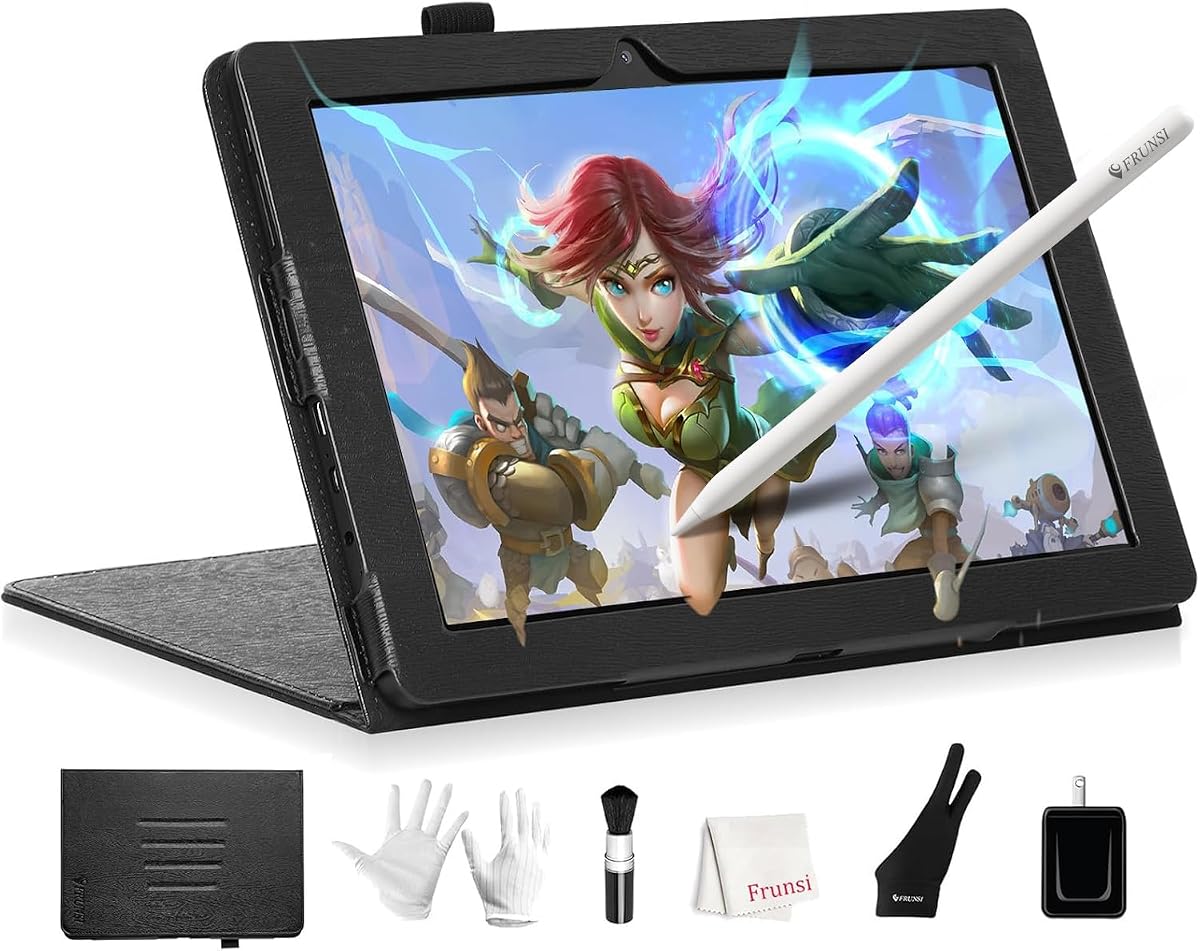

The RubensTab T11 Pro is designed as a fully independent drawing device for artists on a budget. It receives a solid rating from users who value portability and ease of use. The standout quality is its ability to function without any external hardware connection.
We may earn a commission when you buy through this link, at no additional cost to you.
Its 10.1-inch Full HD IPS screen delivers vibrant colors and sharp details ideal for digital art. The high-sensitivity pressure-sensitive pen allows for natural strokes without needing a battery. The built-in 5800mAh battery supports up to five hours of continuous creative work.
The device offers a versatile experience that doubles as a note-taking tool for meetings or classes. While the resolution is not the highest available, it remains sufficient for most hobbyists and students. The included stand adds convenience for various working positions.
This tablet is best for beginners or those seeking a simple entry into digital art. It is also a great gift for students needing a portable tool for creative projects. We recommend it for anyone wanting immediate creative access without technical setup.
You can start drawing the moment you power on the device. No setup or drivers are needed for basic creative tasks.
The standalone design means you can work in cafes or parks without carrying a laptop. This freedom encourages spontaneous creativity.
We may earn a commission when you buy through this link, at no additional cost to you.
The HUION Kamvas Pro 16 is a top-rated pen display for professional illustrators and graphic designers. It earns high marks for its color accuracy and screen clarity. The device stands out for its ability to show true-to-life colors in vibrant detail.
We may earn a commission when you buy through this link, at no additional cost to you.
Its 120% sRGB color gamut ensures that your creations look exactly as intended on the screen. The full-laminated screen reduces parallax and improves the drawing experience. The adjustable stand helps reduce neck strain during long sessions.
Artists benefit from the six express keys and touch bar which streamline common tasks like zooming. The pen provides accurate tilt recognition and pressure sensitivity without needing a battery. Compatibility with Windows and macOS makes it a versatile choice.
This device is ideal for professionals who need reliable color management and workflow efficiency. It is best suited for users who have a dedicated desktop or laptop. We recommend it for serious artists working on commercial projects.
The wide color gamut ensures your artwork translates well to print or web. This accuracy is crucial for professional designers.
The express keys allow you to access shortcuts without interrupting your flow. This speeds up your creation process significantly.
We may earn a commission when you buy through this link, at no additional cost to you.
The Wacom MovinkPad 11 is a premium Android tablet designed specifically for mobile artists. It is highly regarded for its exceptional pen performance and screen texture. The device offers a unique blend of tablet flexibility and professional drawing tools.
We may earn a commission when you buy through this link, at no additional cost to you.
Its Pro Pen 3 delivers 8,192 pressure levels and a slim barrel for comfortable handling. The matte etched glass surface reduces glare and provides a natural paper-like feel. This design minimizes distractions and enhances focus on creation.
The lightweight design makes it easy to carry in a backpack for on-the-go sketching. It includes trials of industry-standard software like Clip Studio Paint to help you get started. The battery-free pen is convenient for uninterrupted use.
This device is best for professionals and enthusiasts who value portability without sacrificing quality. It is perfect for artists who work in varied environments and need a reliable tool. We recommend it for those seeking a top-tier mobile drawing experience.
The etched glass mimics the friction of real paper for a comfortable drawing experience. This helps traditional artists adapt easily to digital.
Weighing less than most laptops, it fits easily into small bags. This allows you to take your studio anywhere you go.
We may earn a commission when you buy through this link, at no additional cost to you.
The RubensTab T14 offers a spacious 14.1-inch screen for artists needing more room. It is designed to work independently without a computer. The device is well-suited for students and beginners who need an all-in-one solution.
We may earn a commission when you buy through this link, at no additional cost to you.
Its large display provides ample space for intricate sketches and detailed work. The 10000mAh battery ensures long sessions without frequent charging. The Octa-Core CPU supports smooth performance across creative apps and multitasking.
Pre-installed drawing apps and tutorials make it easy to start creating immediately. The device supports Wi-Fi for accessing online resources directly. It is ideal for educational settings or personal creative work.
This tablet is best for users who prioritize screen size and independence. It works well for classroom use and personal projects. We recommend it for students who need a portable tool for both art and notes.
The larger screen allows for better detail work and reduces the need for zooming. This improves the precision of your strokes.
Pre-installed tutorials help beginners learn techniques without external help. This accelerates the learning curve for new artists.
We may earn a commission when you buy through this link, at no additional cost to you.
The PicassoTab 10 A10 is a dedicated drawing device built for beginners. It comes preloaded with apps and lessons to get you started quickly. The device focuses on providing a comprehensive package for new users.
We may earn a commission when you buy through this link, at no additional cost to you.
Its laminated display reduces glare for a smoother drawing experience. The included VIP tutorials offer step-by-step guidance for various styles. This is a major benefit for those just entering digital art.
The tablet is lightweight and travel-friendly for use anywhere. Bonus items like a case and glove add value to the purchase. It runs on an Octa-Core processor for basic creative tasks.
This device is best for hobbyists and students starting their journey. It is a great entry point into digital illustration without high costs. We recommend it for anyone seeking guided learning tools.
Step-by-step lessons help you improve skills systematically. This structured approach is ideal for beginners.
Included accessories and upgrades add significant value to the device. This makes it a budget-friendly choice for new artists.
We may earn a commission when you buy through this link, at no additional cost to you.
The XPPen Artist 13.3 Pro V2 offers a balanced experience for intermediate artists. It features a high-quality screen with excellent color gamut coverage. The device is popular for its responsive performance and ease of use.
We may earn a commission when you buy through this link, at no additional cost to you.
Its fully laminated screen minimizes parallax for a direct drawing feel. The Red Dial allows quick adjustments to brush size and zoom. Tilt recognition helps add natural shading to your strokes.
The stylus is battery-free and ergonomic for long use. It is compatible with Windows and macOS for broad software support. The included cable keeps connections simple and tidy.
This device is best for artists upgrading from basic tools. It provides a solid balance of quality and affordability. We recommend it for illustrators and designers seeking better control.
The Red Dial provides quick access to essential settings. This keeps your focus on the creative work.
The color gamut ensures accurate representation of your work. This is vital for professional digital output.
We may earn a commission when you buy through this link, at no additional cost to you.
The PicassoTab X14 is the largest standalone option in the list. It provides a premium canvas for detailed artistic work. The device is designed for artists who need space without tethering to a computer.
We may earn a commission when you buy through this link, at no additional cost to you.
Its 14-inch laminated screen offers a smooth, paper-like feel for natural strokes. The device supports multitasking with a powerful Octa-Core CPU. Pre-loaded apps cover drawing, painting, and animation needs.
It comes with bonus accessories that enhance the user experience. The 128GB storage handles multiple projects efficiently. It is certified for quality and safety standards.
This tablet is best for users wanting maximum screen size on the go. It is ideal for illustrators who need room for complex compositions. We recommend it for serious hobbyists and students.
The larger screen reduces the need to zoom out frequently. This improves the comfort of long work sessions.
Included accessories provide everything needed to start. This adds value to the purchase.
We may earn a commission when you buy through this link, at no additional cost to you.
The HUION KAMVAS Pad 12 is a powerful standalone tablet with advanced specs. It features a high refresh rate for smooth drawing experiences. The device is well-suited for professionals who want mobile performance.
We may earn a commission when you buy through this link, at no additional cost to you.
Its 2K+ screen delivers sharp visuals and accurate color representation. The battery-free pen offers 16K pressure levels for precise control. The Android 16 system supports a wide range of apps.
The 8GB RAM and 256GB storage allow for heavy multitasking. It supports parental controls for healthy screen habits. The design is thin and lightweight for portability.
This device is best for users needing a robust standalone alternative to laptops. It is great for illustrators who work on complex files. We recommend it for tech-savvy creatives.
The 90Hz refresh rate reduces lag during strokes. This makes drawing feel more natural and responsive.
Ample storage and RAM handle large files and multiple apps. This ensures smooth performance during complex work.
We may earn a commission when you buy through this link, at no additional cost to you.
The T8 Standalone Drawing Tablet is designed for extreme portability. It fits easily into small bags for artists on the move. The device offers a simple way to draw anywhere without a computer.
We may earn a commission when you buy through this link, at no additional cost to you.
Its 8-inch screen is compact but functional for sketches. The long battery life supports extended creative sessions. It runs on Android 13 for access to many apps.
The MTK Quad-Core processor handles basic creative tasks efficiently. It is a great choice for quick note-taking or doodling. The included tutorials help beginners get started.
This device is best for users who prioritize mobility above all. It is ideal for travelers or students in small spaces. We recommend it for casual use and sketching.
The small size makes it easy to carry everywhere. This ensures you never miss a moment of inspiration.
The large battery ensures you can draw for hours. This keeps your creative flow uninterrupted.
We may earn a commission when you buy through this link, at no additional cost to you.
The Callsky-Tab 12 Inch is a powerful Android tablet suitable for various uses. It offers high performance and a sharp display for creative work. The device is versatile for both art and productivity.
We may earn a commission when you buy through this link, at no additional cost to you.
Its 16GB RAM ensures smooth multitasking for demanding apps. The 2K display provides vibrant visuals and color accuracy. The included flip case protects the device and offers multiple viewing angles.
The long-lasting battery supports a full day of use. It supports a rechargeable stylus for creative tasks. This is a great all-rounder for users needing multiple functions.
This device is best for users seeking a general-purpose tablet with strong specs. It is ideal for those who need performance beyond drawing. We recommend it for students and professionals.
High RAM ensures apps run smoothly. This helps with complex tasks and heavy software.
The large battery supports extended use on a single charge. This is perfect for long work sessions.
We may earn a commission when you buy through this link, at no additional cost to you.
Choosing the right device involves understanding your specific needs and workflow preferences. This guide explains key factors to consider before purchasing.
Standalone tablets run on their own operating system and do not require a computer. This offers portability and convenience for working anywhere. Connected devices, often called pen displays, rely on a host computer for processing. These often offer higher performance for complex software.
If you travel frequently or prefer a simplified setup, choose a standalone tablet. If you need professional-grade rendering power, a connected display may be better.
Larger screens provide more workspace and reduce the need to zoom in and out. A 12-inch or larger display is ideal for detailed work. Higher resolution ensures sharp lines and accurate colors. Check for laminated screens to reduce parallax and improve touch accuracy.
Select a size that balances portability with creative space. Laminated screens offer a more natural drawing experience.
The pen is your primary tool for creating art. Look for devices with battery-free pens to avoid interruptions. Pressure sensitivity allows for natural stroke variation, while tilt recognition supports shading. A high number of pressure levels enhances control.
Always check if the pen includes extra nibs or supports shortcuts. Comfort is crucial for long drawing sessions.
Android operating systems are common for standalone tablets and offer access to many apps. Ensure the device supports your preferred software. Some devices come pre-installed with creative tools which speeds up setup. Check for compatibility with your workflow and file formats.
Verify that essential apps like Clip Studio Paint or Photoshop are supported. Pre-installed software can be a major benefit.
USB-C is the standard for charging and data transfer. Ensure the device includes all necessary cables for connection. Some standalone tablets rely on Wi-Fi for cloud access. Connected displays need HDMI or USB connections to a host.
Check for ports that match your accessories. Wireless connectivity can help manage cable clutter effectively.
For standalone devices, battery life is critical for on-the-go use. Look for devices with at least six hours of use. USB-C charging is preferred for convenience. Some tablets may support power banks for extended trips.
Evaluate your typical usage time before purchasing. Longer battery life provides greater freedom during travel.
A durable build ensures the device survives travel and daily use. Lightweight designs are easier to carry in bags. Some models include protective cases to prevent damage. Consider the weight if you plan to draw for hours.
Choose a model that feels sturdy and comfortable to hold. A protective case is often included or recommended.
Prices vary widely based on features and screen size. Higher-end devices offer better color accuracy and performance. Budget-friendly options still provide good tools for beginners. Always consider the value of included accessories or trials.
Determine your budget before shopping to find the best fit. Often, mid-range options offer the best balance.
Start by charging your device fully before first use. Ensure all drivers or software are installed for connected models. Download your preferred drawing apps from the store.
Keep the screen clean with a soft, dry cloth. Avoid using harsh chemicals that could damage the coating. Replace nibs regularly if the pen starts to feel rough.
Store your tablet in a protective case when not in use. Avoid extreme temperatures to maintain battery health. Update the system regularly for the best performance.
It depends on the device. Standalone tablets do not need a computer and can run independently. However, pen displays like the Kamvas Pro must be connected to a computer to function. Always check the product details.
Pressure sensitivity allows the pen to detect how hard you press. Tilt recognition detects the angle at which you hold the pen. Both features help create natural shading and line thickness variations.
Most connected drawing tablets work with both Mac and Windows. Some standalone devices run on Android which is universal. Always check compatibility lists on the product page to confirm.
Usually you must use the included stylus for best performance. These tablets often rely on specific electromagnetic resonance. Third-party pens may not work correctly with the sensor.
Many standalone tablets come with pre-installed apps like Sketchbook. Connected tablets rely on external software you install on your computer. Check the product description for included trials or apps.
Most pen displays use a USB-C or HDMI connection. Some models include a 3-in-1 cable for easier setup. Ensure your computer has compatible ports or use a suitable adapter.
We have reviewed ten diverse options ranging from portable standalone tablets to professional displays. Each device offers unique strengths for different types of artists and users. Your final choice depends on your workflow and specific needs.
Prioritize features like screen quality and pen performance over price alone. A device that fits your style will help you create better work. Consider future needs when selecting storage and processing power.
Remember to check the latest product details before making a purchase. Availability and accessories may change over time. We hope this guide helps you find the perfect tool for your art.