
INSWAN INS-1 Classic USB Document Camera/Webcam
4.6Editor score
Built-in LED light
Multi-joint design
Free software included
Discover the top 10 document cameras for teaching and presentations. This guide compares features, image quality, and compatibility to help you choose the
Document cameras have become essential tools for modern classrooms and professional presentations. They allow users to display physical documents, objects, and demonstrations in real time. Choosing the right model depends on your specific needs and budget constraints.
We have evaluated ten top-rated document cameras based on image resolution, connectivity options, and software features. Our analysis focuses on performance in various lighting conditions and ease of setup for teachers. Each product offers unique advantages for different use cases.
This guide provides detailed reviews and a comparison table to simplify your decision-making process. You will find information on build quality, compatibility with devices, and included accessories. Please note that product prices may vary over time.
4.6Editor score
4.5Editor score

4.6Editor score
This table provides a side-by-side overview of the top document cameras available today. Compare key specifications and features to find the model that best fits your educational or professional requirements.


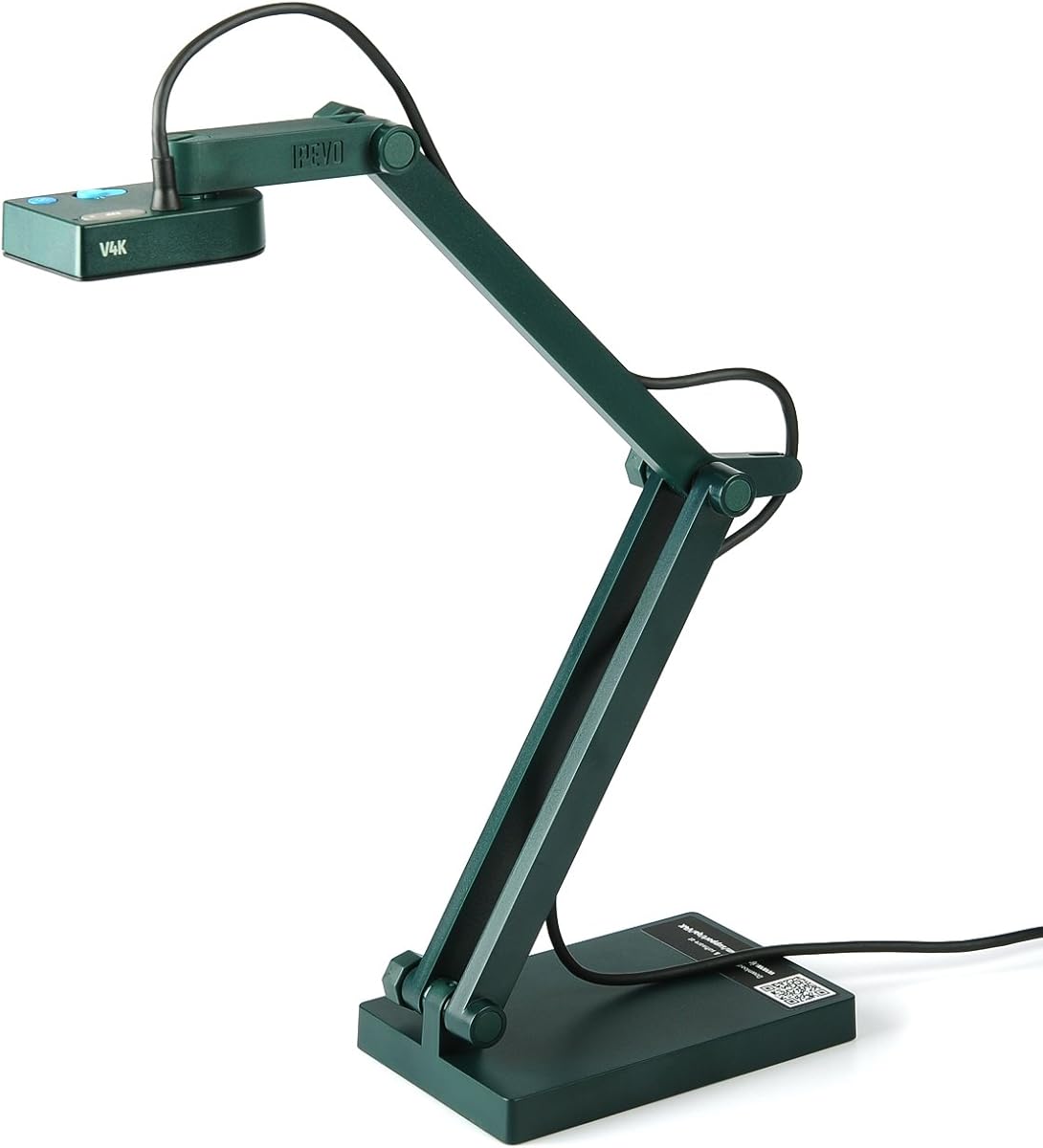
The IPEVO V4K stands out as a top choice for educators needing high-quality live images. It features an 8 Megapixel camera that captures Ultra High Definition images up to 3264 x 2448 pixels. With a 4.5 rating, it is a reliable option for various teaching scenarios.
We may earn a commission when you buy through this link, at no additional cost to you.
Its high frame rate ensures lag-free live streaming at up to 30 fps in full HD. The Sony CMOS Image Sensor provides exceptional noise reduction and color reproduction, making it great for dimly lit environments. The fast focusing speed helps minimize interruptions during frequent switching between materials.
While the multi-jointed stand is designed for durability, heavy daily use can cause loose joints over time. Users should also ensure their system meets the recommended requirements for lag-free streaming, which includes dedicated video memory. These trade-offs are acceptable given the overall performance.
This document camera is ideal for teachers and remote professionals who prioritize image quality and reliability. Its compatibility with Mac, PC, and Chromebook makes it versatile for different classroom setups. We recommend it for those seeking a balance of performance and usability.
The 8MP sensor delivers crisp details essential for displaying text and images clearly during lessons.
Works with a variety of software and applications on Mac, PC, and Chromebook for flexible use cases.
We may earn a commission when you buy through this link, at no additional cost to you.
The INSWAN INS-1 offers impressive features for its price point, earning a 4.6 rating. It features an 8 Megapixel Ultra-High definition SONY camera that captures live images at up to 3264 x 2448 pixels. The bundled INSWAN Documate software adds significant value to this budget-friendly option.
We may earn a commission when you buy through this link, at no additional cost to you.
Its multi-joint design provides a generous viewing size of 14.72 x 11 inches while remaining compact. The built-in LED and anti-glare sheet help manage exposure challenges in varying lighting conditions. Users benefit from plug-and-play operation across PC, Mac, iPad, and Chromebook platforms.
While it lacks HDMI output, the USB connection supports seamless conferencing with most webinar software. The camera may not have premium materials, but it withstands daily use well. This makes it a practical choice for schools with limited budgets.
We recommend this camera for teachers and presenters seeking essential functionality without high costs. Its ease of setup and included software make it accessible for beginners. It is a solid pick for those needing reliable performance on a budget.
The bundled software offers digital zoom, annotation, and video recording to enhance presentations.
The multi-joint camera is durable and offers a generous viewing size suitable for desktop setups.
We may earn a commission when you buy through this link, at no additional cost to you.
The THUSTAR 8MP document camera provides flexible options for live demonstrations. It features an 8MP resolution with 30fps output for ultra-high-definition live transmission. Users can manually adjust image reversal, which is helpful for video chats or specific projection needs.
We may earn a commission when you buy through this link, at no additional cost to you.
Its design includes 14 ring lamp beads with 3 levels of brightness adjustable to handle difficult lighting. The foldable structure occupies a small space when not in use, making it easy to carry. It covers an area of 16.5 x 11.6 inches, accommodating A3 paper.
While the dual microphones reduce noise, the device lacks HDMI support. This limits connectivity options compared to some higher-end models. The manual adjustments are useful but require more interaction during use. These limitations are acceptable for the price.
This model suits teachers and classroom users needing a portable and functional document camera. It works well with popular video chat apps like Zoom and Google Meet. We suggest it for those prioritizing portability and manual control features.
Adjustable LED lights help eliminate shooting problems in both dark and bright environments.
The embedded foldable design allows for easy transport and space-saving storage on desks.
We may earn a commission when you buy through this link, at no additional cost to you.
This 4K USB Document Camera offers practical features for teaching and web conferencing. It includes an adjustable image reversal function, allowing users to adjust left or right and up or down. The camera comes with a USB-C cable for instant plug-and-play operation.
We may earn a commission when you buy through this link, at no additional cost to you.
Its 8MP visualiser outputs ultra-high-definition images at 2448P megapixels with 30fps. The 3 levels of brightness adjustable help eliminate shooting problems under difficult lighting. The multi-joint support allows multi-angle rotation for capturing both 2D and 3D objects effectively.
The camera is compatible with Windows, Mac, and Chrome OS systems without needing extra drivers. While it lacks HDMI, the USB connection suffices for most online meeting setups. The manual brightness buttons ensure clear images in varying conditions.
We recommend this camera for educators needing a straightforward and versatile visualiser. It is particularly useful for distance education and remote teaching scenarios. Its ease of use and portability make it a valuable tool for modern classrooms.
Manual brightness buttons allow users to ensure they get the clear image without software reliance.
Comes with a USB-C cable that allows for instant plug-and-play operation on modern devices.
We may earn a commission when you buy through this link, at no additional cost to you.
The PAKOTOO document camera offers a functional solution for classroom use. It features an image reversal function that can be realized through the button without software. The 3 levels of brightness adjustment and 10 levels of exposure adjustment help ensure clearer images.
We may earn a commission when you buy through this link, at no additional cost to you.
Its foldable design takes up little space after folding, making it easy to carry. The multi-joint supports multi-angle free rotation, allowing better capture of 2D and 3D objects. The autofocus feature prevents blurring when moving objects under the lens.
Users should note that this camera is not plug and play and requires manual selection. It lacks HDMI features and is not compatible with iPad directly. Despite these limitations, it works well with standard video conferencing tools.
We suggest this camera for users who need manual control and portability. It is a good option for budget-conscious educators. The support team provides assistance if the computer does not recognize the camera.
Button-based adjustments provide direct control over image settings without needing software.
The embedded design allows for easy transport and minimal desk space usage.
We may earn a commission when you buy through this link, at no additional cost to you.
The OKIOCAM S-4K offers advanced AI features in a portable design. It features an 8MP Sony Exmor R Sensor that captures real-time images at Ultra High Definition. The included OKIOPoint allows for AI-tracking of documents, making lessons engaging and interactive.
We may earn a commission when you buy through this link, at no additional cost to you.
This camera is capable of viewing Letter-size materials in LANDSCAPE orientation. Its durability is tested with over 10,000 rotations in lab testing. The lag-free streaming ensures smooth presentations at up to 30fps in full HD.
While the portable size is a benefit, the viewing area is smaller than other models. However, the AI pointer adds value for digital presentations. It is plug and play compatible with multiple operating systems.
We recommend this camera for teachers who need a portable and interactive tool. The AI software enhances student engagement significantly. It is a strong choice for modern digital teaching environments.
OKIOPoint visually tracks your pointer on screen to zoom in and focus on specific parts.
The camera hinges endure over 10,000 rotations in lab testing to ensure long-term reliability.
We may earn a commission when you buy through this link, at no additional cost to you.
The IPEVO VZ-X provides unparalleled flexibility with three connectivity modes. It can connect via Wi-Fi, HDMI, or USB, allowing direct connection to projectors or monitors. The 8MP sensor captures images in high definition with near 4K quality in USB mode.
We may earn a commission when you buy through this link, at no additional cost to you.
Its 9-12 hours of battery life ensures complete class sessions without interruptions. Up to 33-feet of wireless range gives teachers freedom to move around the room. Buttons on the camera body allow for instant adjustments without a computer.
While the price is higher, the wireless capabilities and battery life justify the cost. The viewing area is limited compared to some larger models, but it is portable. This premium feature set is ideal for dynamic classrooms.
We recommend this camera for users needing maximum flexibility and high mobility. It eliminates cable clutter and supports various devices. It is a top choice for those prioritizing wireless functionality.
Up to 33-feet of wireless range allows presenters to capture objects all over the room.
Three modes of connectivity allow use with various displays without a central computer.
We may earn a commission when you buy through this link, at no additional cost to you.
The OKIOCAM S2 Pro delivers true 4K resolutions with a 13MP CMOS image sensor. It allows users to view documents with true-to-life colors and minimal graininess in low light. The 4K video at 30 fps offers detailed and clear display of presented materials.
We may earn a commission when you buy through this link, at no additional cost to you.
Its design includes a high-quality metal weighted base and a reinforced arm made in Taiwan. The OKIOPoint visual pointer enhances presentations by zooming in on your pointer. It is plug and play and compatible with Windows, Mac, Chrome, and interactive displays.
While the viewing area is smaller, the resolution quality is superior. The camera offers fast focusing speed for smooth switching between materials. It is a solid choice for high-detail presentation requirements.
We suggest this camera for users needing high resolution and durability. It is suitable for remote teaching and live demos. The included software adds value for professional presentations.
13MP resolution up to 3840×2160 ensures exceptional detail for professional use.
The metal weighted base ensures stability during use for clear image capture.
We may earn a commission when you buy through this link, at no additional cost to you.
The OKIOCAM T-4K is a compact option designed for Ledger-size materials. It captures full Ledger-size materials or both pages of an open book at once. The max view of 13.86 x 18.11 inches makes it suitable for maps and blueprints.
We may earn a commission when you buy through this link, at no additional cost to you.
It features an 8MP Exmor R sensor that provides enhanced low-light performance. The software supports live image annotation and digital zoom. It is plug and play and compatible with Windows, Mac, and interactive display systems.
While the footprint is small, it handles large documents efficiently. The camera supports lag-free streaming at 30fps. The OKIOPoint allows for AI-tracking to navigate presentations effortlessly.
We recommend this camera for users with limited space but large document needs. It balances portability with functionality. It is a strong option for teachers and designers.
Capable of viewing full Ledger-size materials despite its portable and compact size.
Includes comprehensive software for live image annotation, digital zoom, and recording.
We may earn a commission when you buy through this link, at no additional cost to you.
The OKIOCAM S2-4K excels in low-light environments with its back-illuminated sensor. It doubles light sensitivity and reduces noise for vibrant color reproduction. Users capture near-Ledger size documents with ease. The camera supports iPad via the included USB-C adapter.
We may earn a commission when you buy through this link, at no additional cost to you.
Its AI-pointer feature enhances engagement during presentations. The multi-joint design is durable and supports over 10,000 rotations. It works effortlessly with Windows, Mac, iOS, and Chromebook systems without extra software.
While it lacks supplemental LEDs, the sensor performance minimizes the need for extra light. The 10x digital zoom allows for detailed viewing. It supports popular platforms like Google Meet and Teams.
We recommend this camera for users prioritizing low-light performance. It is suitable for hybrid classrooms and professional setups. The iPad support adds value for mobile teaching.
The back-illuminated design reduces noise for clear images even under faint projector light.
Optimized iPad support allows mobile teaching and interaction with the OKIOCAM Live app.
We may earn a commission when you buy through this link, at no additional cost to you.
Choosing the right document camera involves evaluating several technical and practical factors. This guide outlines the key considerations to ensure you select a model that meets your needs.
Resolution determines the clarity of the text and images displayed. Look for 8MP or higher sensors to ensure sharp details for classroom use or presentations.
Prioritize cameras with high resolution to ensure all details are visible to your audience.
Consider how the camera will connect to your display or computer. USB is standard, but HDMI allows direct projector connections. Wireless models offer flexibility but may require a stable network.
Choose connectivity that matches your existing hardware and teaching environment needs.
Included software should support annotation, recording, and digital zoom. AI pointers and image inversion add value for interactive teaching. Check compatibility with your OS.
Ensure the software offers tools that enhance your specific presentation workflow.
Built-in LEDs are crucial for consistent lighting in varying environments. Cameras with adjustable brightness or low-light sensors perform better in dim classrooms.
Opt for models with adjustable lighting to avoid glare and ensure clarity.
If you move between classrooms, a foldable design and lightweight build are essential. Durability features like reinforced hinges ensure longevity.
Select a camera that balances size with durability for easy transport.
Prices vary based on features like resolution and connectivity. Determine if premium features like wireless or 4K justify the extra cost for your usage.
Balance features with your budget to find the best value for your needs.
Connect the camera to your computer via USB and allow it to install drivers if needed. Ensure your operating system recognizes the device before launching your presentation software.
Adjust the height and angle of the stand to fit your documents or objects. Use the brightness controls to manage lighting and avoid glare on the screen.
Keep the lens clean with a soft cloth and store the camera in a protective case. Regularly check for firmware updates to maintain optimal performance.
Document cameras allow users to display physical documents, books, and objects on a screen in real time. They are essential for teachers, presenters, and professionals needing to share physical materials digitally.
Yes, most modern document cameras are compatible with both Mac and PC systems. Always check the specific system requirements for your chosen model to ensure smooth operation.
Some models support HDMI connections to projectors or TVs directly without needing a computer. Wireless models also allow for display on various devices independently of a laptop.
Resolution is critical for clarity, especially for text or detailed images. A higher resolution ensures that the audience can read and see details without distortion or blurriness.
Most cameras are plug-and-play, meaning they work immediately after connecting via USB. Some require installing specific software to access advanced features like recording or annotation.
The viewing area varies by model but often covers Letter or A3 paper sizes. It is important to check the dimensions to ensure it fits the materials you plan to display regularly.
We have reviewed ten top-rated document cameras that cater to different needs and budgets. Models like the IPEVO V4K and INSWAN INS-1 offer excellent value and performance.
When selecting a camera, prioritize resolution and connectivity options that align with your teaching or professional workflow. Portability and lighting features should also influence your decision.
Remember that product specifications and prices may change over time. Always verify current details before making a purchase to ensure you get the best fit.