
HP Chromebook 14 Laptop
4.3Editor score
Long battery life up to 14 hours
Thin and lightweight portable design
Secure Chrome OS with Android apps
Finding a reliable computer that does not cost a fortune is essential for students and professionals alike. A cheap laptop for everyday use can handle web browsing, document editing, and streaming without breaking the bank. We focus on models that balance performance with affordability to ensure you get value for your money.
Our team analyzed current market offerings to identify the top contenders in the budget category. We evaluated processors, memory, storage options, and build quality to compile this comprehensive list. Each product was selected based on user feedback, technical specifications, and overall reliability for daily tasks.
This guide presents ten distinct options ranging from Chromebooks to Windows laptops. Each pick includes detailed insights on performance and suitability for specific needs. Prices and availability change frequently, so verify current details before purchasing to ensure you get the best deal available today.
4.3Editor score

4.8Editor score
4.2Editor score
As an Amazon Associate we earn from qualifying purchases.
This table provides a side-by-side view of the ten selected laptops. It highlights key specifications such as processor type, memory capacity, storage solution, and operating system. Use this comparison to quickly identify which model matches your specific daily computing requirements.


The HP Chromebook 14 Laptop stands out as a top budget option for everyday users. With a rating of 4.3 stars, it offers reliable performance for school and work tasks. Its standout quality lies in its exceptional battery life and lightweight build.
We may earn a commission when you buy through this link, at no additional cost to you.
This device features an Intel Celeron N4120 processor paired with 4 GB of RAM. It handles web browsing and document editing efficiently. The 64 GB eMMC storage provides quick access to essential files while maintaining fast boot times.
While the storage is limited compared to traditional laptops, the Chrome OS ecosystem compensates with cloud integration. The HD display is sufficient for streaming content. Users should be aware of the lower resolution if they need detailed visuals.
This laptop is ideal for students and casual users who prioritize portability and battery life. Its secure operating system ensures safe browsing without complex maintenance. For basic daily tasks, this model delivers exceptional value for the price.
The laptop offers up to 14 hours of battery life, making it perfect for long workdays or school sessions without needing a charger. Fast charge technology also allows quick power-ups when needed.
Chrome OS provides a streamlined and secure experience with automatic updates and access to millions of Android apps via the Google Play Store for enhanced versatility.
We may earn a commission when you buy through this link, at no additional cost to you.
The Amzboy 15.6 Laptop earns the Editor's Choice badge for its balance of features and affordability. It features an immersive 15.6-inch FHD display that enhances viewing experiences. The high rating of 4.8 reflects user satisfaction with its performance.
We may earn a commission when you buy through this link, at no additional cost to you.
Powered by an efficient N4020 CPU, this device handles daily tasks smoothly. The fanless design ensures silent operation which is ideal for quiet environments. Storage can be expanded easily without technical tools using an external slot.
While the 4GB RAM is standard for budget devices, it handles most everyday applications well. The Type-C PD fast charging adds modern convenience for users on the go. The Windows 11 OS provides a familiar interface for most users.
This laptop is excellent for students and home office users needing a full Windows experience. The large screen and expansion options make it versatile for media consumption. Its quiet operation makes it a great choice for libraries or shared spaces.
The Full HD anti-glare display provides clear and vibrant visuals suitable for both work documents and streaming movies comfortably.
Multiple USB ports and a Type-C connector allow easy linking of peripherals without extra hubs for streamlined connectivity.
We may earn a commission when you buy through this link, at no additional cost to you.
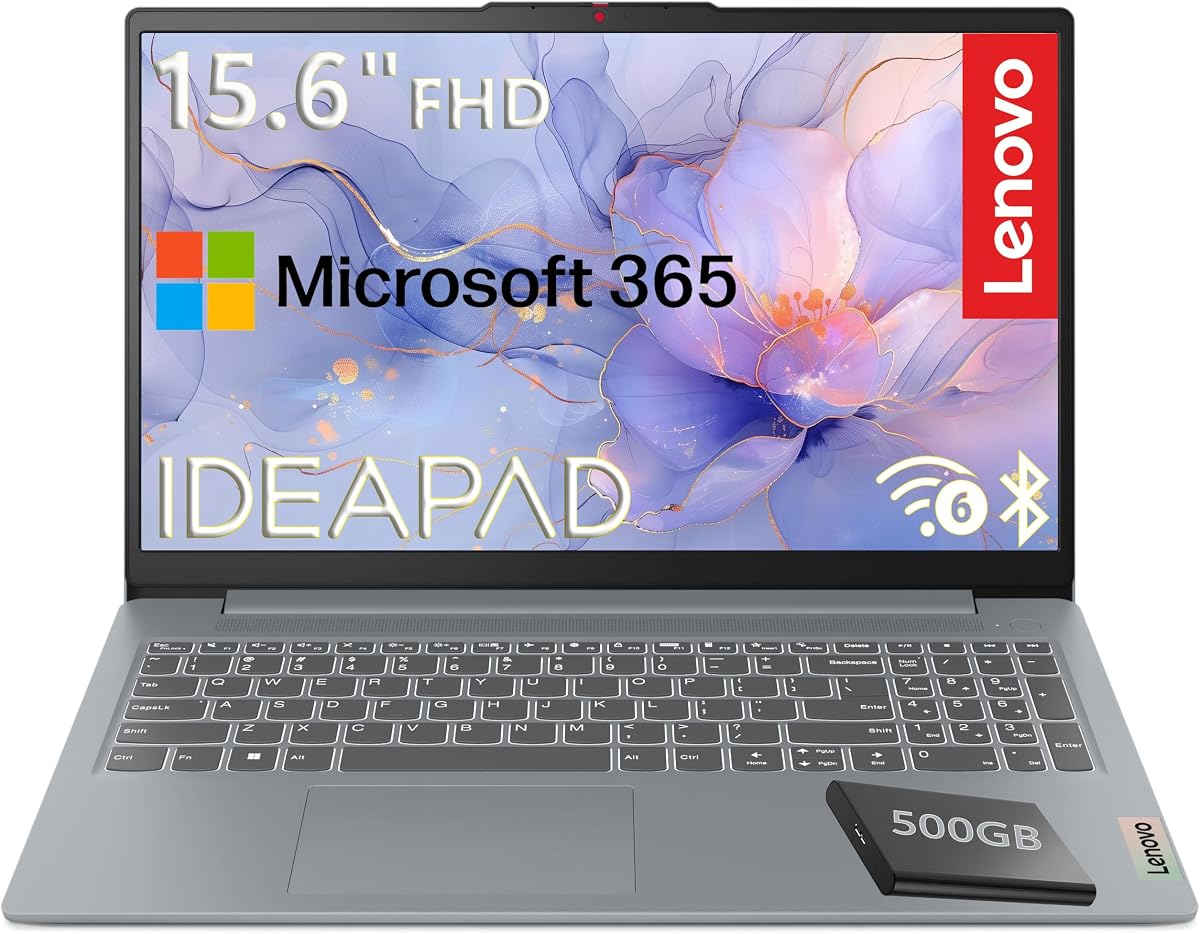
The Lenovo 15.6 FHD Laptop offers a premium experience with military-grade durability and reliable performance. It combines an Intel N100 processor with fast LPDDR5 RAM for smooth multitasking. Users appreciate the included Microsoft 365 Personal subscription for productivity.
We may earn a commission when you buy through this link, at no additional cost to you.
This model includes a unique storage solution with 128GB UFS for speed and a 500GB external HDD for capacity. The Wi-Fi 6 support ensures fast and reliable wireless connections. A physical camera shutter adds an extra layer of privacy.
The TN display is functional but lacks the color vibrancy of IPS panels. However, the anti-glare coating helps reduce eye strain during long sessions. The build quality ensures it can withstand the rigors of daily use and travel.
This laptop is best for users who need robust build quality and full productivity software. The combination of security features and performance makes it suitable for professionals and families. It stands out for offering premium features at a competitive price.
Certified to MIL-STD-810H standards, this laptop undergoes rigorous testing to ensure it withstands harsh conditions better than typical consumer devices.
Access to Word, Excel, and OneDrive cloud storage is included with a one-year Microsoft 365 subscription to maximize workflow efficiency.
We may earn a commission when you buy through this link, at no additional cost to you.
The HP Everyday Laptop 2026 Edition delivers efficient performance for routine tasks. It is powered by the Intel N150 processor which balances power consumption and speed. The natural silver finish adds an elegant look to any workspace.
We may earn a commission when you buy through this link, at no additional cost to you.
Featuring 128GB SSD storage, this laptop ensures faster boot times compared to traditional hard drives. Windows 11 provides a modern interface with enhanced features for productivity. The device supports Wi-Fi 6 for stable and quick internet connectivity.
Battery life is optimized for all-day usage allowing users to work unplugged for extended periods. The anti-glare display ensures comfortable viewing even in bright environments. However the screen resolution is basic compared to higher-end models.
This model is suitable for professionals needing a stylish and reliable daily driver. The inclusion of Microsoft 365 adds significant value for office work. Its lightweight design makes it easy to carry between meetings or classes.
The Intel N150 processor ensures smooth performance for browsing and streaming while conserving battery life for longer operation on the go.
An SSD provides rapid access to files and applications making the system feel responsive and quick to start up.
We may earn a commission when you buy through this link, at no additional cost to you.
This HP Chromebook 14 inch model improves on the basics with 8 GB of RAM. This allows for smoother multitasking and better handling of multiple browser tabs. The Intel N100 processor ensures responsive performance for everyday activities.
We may earn a commission when you buy through this link, at no additional cost to you.
The 128 GB UFS storage is faster than typical eMMC options found in budget devices. It provides ample space for essential downloads and offline apps. The non-reflective anti-glare panel reduces eye strain during long viewing sessions.
Chrome OS remains a strong choice for users focused on web-based applications and cloud storage. The system updates automatically to keep security intact without user intervention. While storage is limited, cloud integration makes up for it effectively.
Ideal for students and home users, this Chromebook offers a solid balance of specs and cost. The 8 GB RAM is a significant upgrade over standard 4 GB models. It delivers a fast and reliable experience for daily digital tasks.
With 8 GB of LPDDR5 RAM, this Chromebook handles multiple apps and tabs efficiently without slowing down during standard use.
Universal Flash Storage offers faster speeds and lower power consumption ensuring quick boot times and responsive performance.
We may earn a commission when you buy through this link, at no additional cost to you.
The Lenovo Chromebook S330 is a compact and stylish choice for basic computing needs. It weighs just 3.3 pounds making it easy to carry anywhere. The MediaTek processor provides sufficient power for web browsing and document editing.
We may earn a commission when you buy through this link, at no additional cost to you.
This device comes with 32 GB of eMMC storage which is minimal for local files. However Google Drive provides 100 GB of cloud storage for two years to supplement it. The Chrome OS offers built-in protection against viruses automatically.
Battery life reaches up to 10 hours which is adequate for most school or work days. Connectivity includes USB-C and standard USB ports for versatile device linking. The design is sleek and fits well in a backpack.
This laptop is perfect for light users who rely primarily on web apps. Its simplicity and speed make it a good secondary device. While specs are basic, it fulfills the core requirement of an affordable everyday computer.
With a thickness of less than 1 inch and a light frame this device is ideal for students and travelers moving frequently.
Chrome OS provides automatic updates and built-in virus protection ensuring the system remains safe from threats without user intervention.
We may earn a commission when you buy through this link, at no additional cost to you.
The HP Essential Laptop 2026 combines modern features with essential performance metrics. It runs on Windows 11 Home which offers a clean and intuitive interface. The Intel N150 processor provides responsive speed for daily applications and web usage.
We may earn a commission when you buy through this link, at no additional cost to you.
Storage is handled via 128GB UFS which is efficient for quick access to files and booting the system. Microsoft 365 Personal is included for one year providing access to Word and Excel. Connectivity is enhanced with Wi-Fi 6 technology.
Battery life supports up to 11 hours of video playback making it reliable for travel. The 14-inch display has micro-edge bezels for a more immersive look. Audio and video calls are supported by a quality HD camera with noise reduction.
This laptop is great for general home and office productivity. The combination of a newer processor and cloud software makes it a solid choice. It offers a modern computing experience without a premium price tag.
Wi-Fi 6 and Bluetooth 5.4 ensure faster wireless speeds and better pairing with modern accessories and peripherals.
Up to 11 hours of video playback means you can watch content or work through the day without needing a power outlet.
We may earn a commission when you buy through this link, at no additional cost to you.
The Lenovo Flagship Chromebook offers a versatile touchscreen experience in a slim package. Its 14-inch Full HD display is perfect for interactive tasks and media. The MediaTek Kompanio 520 processor is designed for class-leading battery life and performance.
We may earn a commission when you buy through this link, at no additional cost to you.
Chrome OS works naturally with the touchscreen allowing for easy navigation and gestures. This makes it suitable for note-taking or browsing where touch is convenient. The device is lightweight at 2.86 lbs making it easy to hold in hand.
Wi-Fi 6 ensures stable internet connections which is crucial for cloud-based workflows. The 64GB eMMC storage is modest but adequate for online users. The Abyss Blue color adds a unique aesthetic compared to standard silver or black laptops.
This device is excellent for creative tasks or interactive learning environments. The touch capability sets it apart from standard keyboards only laptops. It provides a robust and stylish option for those who want extra functionality on a budget.
The natural finger-touch navigation makes browsing and content consumption intuitive and engaging for all users.
The Kompanio 520 processor upgrades CPU and graphics performance significantly in everyday activities for better responsiveness.
We may earn a commission when you buy through this link, at no additional cost to you.
The HP Slim Laptop 2026 focuses on portability and modern specs. It features a sleek natural silver chassis that weighs only 3.24 lbs. The Intel N150 processor ensures it handles daily computing tasks with ease.
We may earn a commission when you buy through this link, at no additional cost to you.
DDR5 RAM is a standout feature offering faster data speeds than previous generations. This contributes to a snappy experience when opening apps or switching tabs. The 128GB SSD provides quick boot times and ample space for essential software.
Connectivity is managed through Wi-Fi 6 for faster wireless performance. The device includes essential ports like USB-C and HDMI for external displays. Battery life supports extended use making it suitable for travel or long work sessions.
This laptop is ideal for users prioritizing a slim profile and reliable performance. The combination of DDR5 memory and SSD storage is rare at this price point. It delivers a modern and efficient computing experience for everyday users.
Weighing just 3.24 lbs with a sleek chassis this laptop is incredibly easy to carry around for daily use.
DDR5 RAM provides power efficient and speedy performance ensuring applications run smoothly without lag.
We may earn a commission when you buy through this link, at no additional cost to you.
The Laptop 15.6 Inch stands out with a high amount of 12GB RAM for its class. This allows for significantly faster multitasking compared to standard entry-level laptops. The Pentium Gold 6500Y processor supports efficient processing for everyday tasks.
We may earn a commission when you buy through this link, at no additional cost to you.
Visuals are enhanced by a FHD IPS screen which offers vibrant colors and wide viewing angles. This is beneficial for media consumption and detailed work. Privacy protection is a built-in feature with a physical camera slider.
Connectivity is rich with USB 3.2 ports and a full-function USB-C port. Users can connect monitors and peripherals without extra adapters. The lightweight design ensures portability despite the larger 15.6-inch form factor.
This device is perfect for users who need extra memory for browser tabs. The combination of RAM and screen quality makes it a strong contender. It provides a robust setup for home and school use at a budget price.
With 12GB high-speed memory this notebook runs up to 1.5 times faster than entry-level 8GB laptops during multitasking.
The Full HD IPS display delivers vibrant colors and wide angles ensuring comfortable viewing from any position.
We may earn a commission when you buy through this link, at no additional cost to you.
Choosing the right laptop involves understanding your specific needs and the trade-offs of budget models.
The operating system dictates what software you can run. Chrome OS is ideal for web-based tasks and is often faster on lower specs. Windows 11 offers broader compatibility with desktop applications and traditional file management systems.
Choose Chrome OS for simplicity and battery life or Windows for versatility and software access.
Processors like Intel N100 or Pentium Gold are sufficient for browsing and document editing. Avoid older Celeron models if you need smoother multitasking. The N-series processors provide a good balance of speed and power efficiency.
Prioritize newer generation processors to ensure the laptop remains responsive for years.
RAM affects how many programs you can run simultaneously. 8 GB is a good target for comfortable multitasking. 4 GB is workable but may struggle if many tabs are open at once.
If budget allows choose at least 8 GB RAM for a better long-term experience.
Solid State Drives (SSD) are much faster than traditional hard drives. Look for eMMC or UFS as minimum standards in budget laptops. Avoid mechanical drives as they are slower and more prone to failure.
A 128GB SSD is a practical minimum for daily use and software installations.
A Full HD resolution ensures text is sharp and images are clear. IPS panels offer better colors and viewing angles than TN panels. Screen size impacts portability so weigh 13-inch vs 15-inch options carefully.
Select a 14-inch Full HD IPS screen for a balance of clarity and portability.
Long battery life is crucial for users who move between locations. Look for claims of 10 hours or more of video playback. Fast charging capabilities can also be a lifesaver when outlets are scarce.
Verify real-world battery reviews as manufacturer claims often vary from actual usage.
Modern laptops should include USB-C for charging and data transfer. Wi-Fi 6 support ensures faster and more stable internet connections. A variety of USB-A ports help connect older peripherals without dongles.
Ensure the laptop has the necessary ports for your specific devices and monitors.
To extend the life of your laptop keep it clean and free of dust. Use a microfiber cloth to wipe the screen and keyboard regularly. Avoid using harsh chemicals that could damage the coating or keys.
Manage your storage by regularly deleting unused files and clearing cache. Since budget laptops often have limited local storage utilizing cloud services is essential. This prevents the drive from becoming full and slowing down performance.
Protect your device from physical damage by using a carrying case or sleeve. Avoid exposing it to extreme temperatures or humidity. Keeping it away from liquids and dust can prevent internal hardware failures.
Most budget laptops are not designed for intensive video editing due to limited RAM and processor power. However for simple cuts and exports of short 1080p clips the higher spec models in this list can manage basic tasks. For professional work it is better to invest in a machine with dedicated graphics.
Chromebooks are excellent for everyday use if your work is primarily web-based. They offer fast boot times, strong security, and long battery life. You can access apps via the Google Play Store but cannot run traditional Windows software without complex workarounds.
For daily web browsing and document handling 128GB of storage is usually sufficient if you use cloud storage. Many budget laptops pair smaller local storage with free cloud accounts. If you download large media files regularly consider a model with expansion options.
Yes most modern budget laptops include HDMI or USB-C ports that support external monitors. This allows you to expand your workspace for productivity. Always check the specific ports listed in the product specifications before purchasing.
Typical battery life for these models ranges from 10 to 14 hours depending on usage. Light tasks like web browsing tend to maximize the battery. Video streaming may drain it faster but it is still adequate for most travel needs.
Most budget laptops have soldered RAM which means it cannot be upgraded later. It is important to choose the right amount of memory at the time of purchase. Some specific models allow adding external storage via slots but this does not increase RAM.
This guide has explored ten solid options that balance cost and performance. The HP Chromebook 14 and Amzboy 15.6 stand out for their specific strengths in battery and display quality. The Lenovo 15.6 FHD offers a robust experience for those needing Windows compatibility.
When selecting a model consider what matters most to your daily workflow. Battery life and portability are key for students while storage and OS might matter more for professionals. Ensure the specs match your typical usage to avoid frustration.
Prices and availability fluctuate so checking current details is essential before buying. Always compare features and warranties to make an informed decision. With the right choice you can get a reliable computer that serves your everyday needs well.