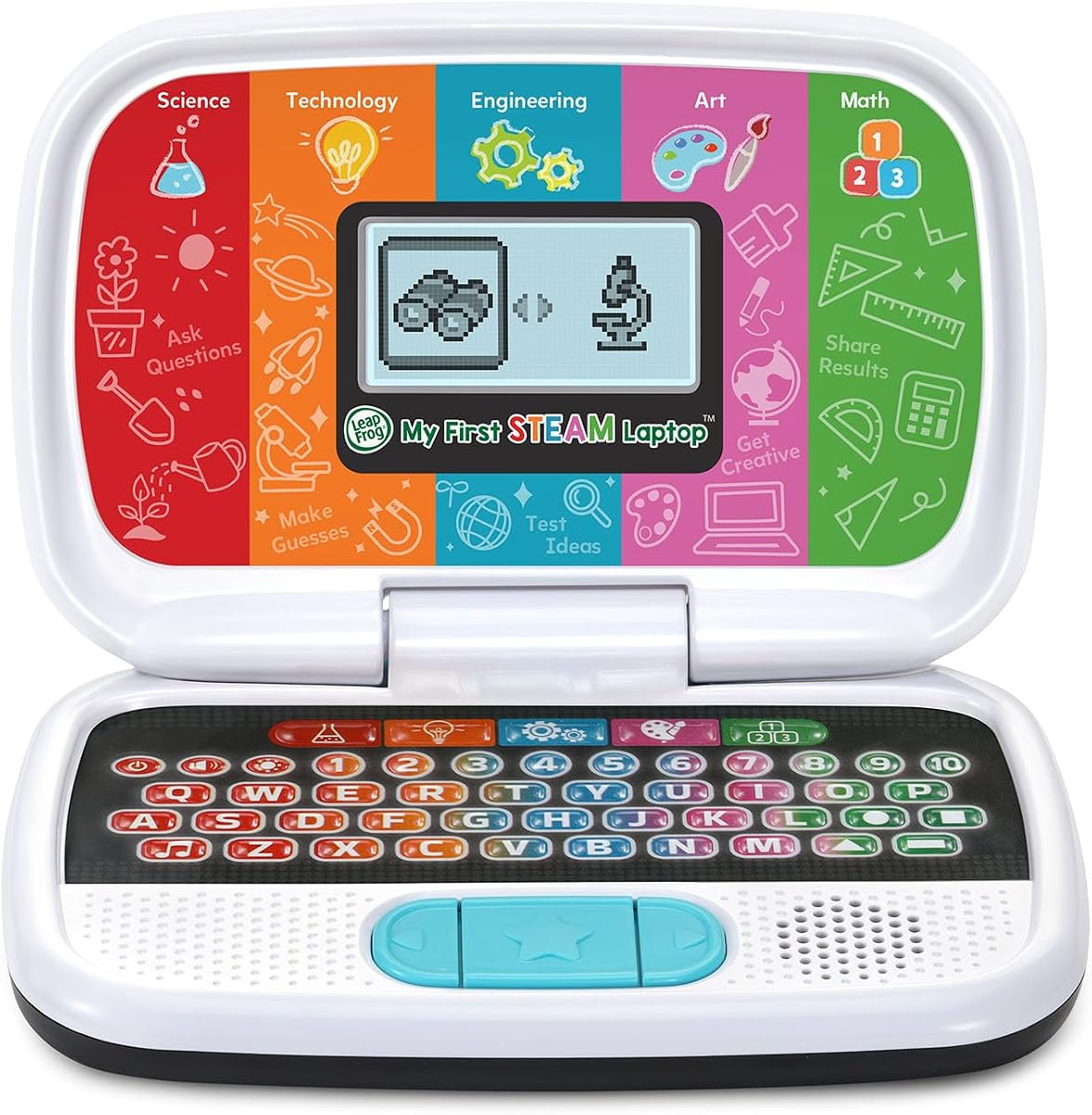
LeapFrog My First STEAM Laptop
4.5Editor score
Introduces STEAM concepts early
Lightweight and easy for kids to hold
Fun interactive games and activities
Finding the right first laptop for kids involves balancing fun and function. Young learners need devices that are durable enough to handle drops and simple enough to navigate independently. A good choice fosters curiosity while building essential digital literacy skills from an early age.
We compared ten real products based on educational content, build quality, and parental controls. Our analysis covers toy laptops for toddlers and more advanced netbooks for school-age children. Each option offers unique features designed to engage young minds safely and effectively.
Each pick shows key specs, ratings, and ideal age ranges to help you decide. Note that prices and availability can change frequently on Amazon. Check the current links for the most up-to-date information before making your final selection for your child.
4.5Editor score

4.5Editor score

4.2Editor score
As an Amazon Associate we earn from qualifying purchases.
This side-by-side comparison highlights the key differences between each of the top ten options. Use these specs to match a device to your child's age and learning needs.



This laptop from VTech stands out as a top choice for young learners ready to explore computers. With a rating of 4.5 stars it offers a realistic computing experience without needing internet access. The bilingual support makes it unique among early learning tools.
We may earn a commission when you buy through this link, at no additional cost to you.
The full-size QWERTY keyboard helps children build typing habits early on. Over eighty preloaded activities cover math science music and more to keep engagement high. Each task can switch between English and Spanish allowing flexible language immersion at home.
While the screen is compact and the device relies on batteries the offline functionality is a strong benefit. Parents appreciate that no Wi-Fi setup is required which simplifies use. Battery life depends on usage but new cells are recommended for regular play.
Ideal for kids five and older this laptop bridges toy computers and real devices. It is best for families wanting early typing and language skills without screen time complexity. The design feels sturdy enough for classroom or home use alike.
Every activity can be played in English or Spanish to help kids learn vocabulary naturally.
A full QWERTY layout helps children learn proper finger placement for future typing.
We may earn a commission when you buy through this link, at no additional cost to you.
The LEXiBOOK LAPTAB offers a near-real laptop experience for children who need more than a toy. With a 4.2 star rating it balances education and entertainment on a 10.1 inch HD touchscreen. The ability to access Google Play makes it versatile for various learning needs.
We may earn a commission when you buy through this link, at no additional cost to you.
This device includes powerful features like an octa-core processor and 128GB storage for apps and ebooks. Parental controls and a safe browser keep browsing secure while allowing flexibility. Video call cameras and Google Suite tools help with remote learning tasks.
The main trade-off is the higher cost compared to toy laptops but the functionality justifies it for many families. It requires internet for some apps yet works with offline content too. The slim build makes it easy to carry between rooms or to school.
Best for older kids this laptop supports growing independence in a safe environment. Choose it when you need a device that can evolve with your child over years. The quality and safety certifications add peace of mind for everyday use.
Qwant Junior browser and parental controls ensure a secure online environment for kids.
Access Power Academy and Google Play to find age-appropriate learning tools.
We may earn a commission when you buy through this link, at no additional cost to you.
LeapFrog My First STEAM Laptop is designed to introduce very young children to science technology and math concepts. With a 4.5 star rating it uses fun characters like Dr. Frankensteam to guide learning. The content focuses on hands-on thinking and curiosity building.
We may earn a commission when you buy through this link, at no additional cost to you.
Kids can grow plants in the game or build robots matching shapes to parts. These activities mimic real-world experiments and engineering challenges in a simplified format. The device is small enough for little hands to hold and carry around easily.
While it lacks a touchscreen or advanced features its simplicity is a strength for preschoolers. Battery life is decent but new AA batteries are recommended for regular play. The price makes it an easy add-on to other early learning toys at home.
Perfect for ages three and up this laptop is best for introducing STEM themes early. It works well for short play sessions and creative thinking. Parents looking for an entry-level educational toy will find this option reliable and fun.
Activities guide kids through science technology engineering art and math fundamentals.
Friendly guides like STEAM-Bot make lessons feel like fun adventures.
We may earn a commission when you buy through this link, at no additional cost to you.
This educational laptop offers forty-eight different learning modes to keep children engaged for hours. With a 4.0 rating it covers subjects like alphabet math music and logic games. The TFT color screen provides clear visuals that enhance the experience for young eyes.
We may earn a commission when you buy through this link, at no additional cost to you.
The ergonomic design mimics real laptops with a realistic mouse and keyboard for typing practice. Its slim form factor makes it easy to carry to the dinner table or couch. The protective film on the screen ensures clarity until it is removed by users.
While the device is simple it delivers on its promise of fun educational play. Some parents note the plastic feel but the price reflects the budget nature. It is best for kids who need a toy that simulates real computer work.
Ideal for ages five and up this laptop is a solid choice for early tech play. It encourages curiosity through varied activities and games. Consider this if you want an affordable device that offers many options in one package.
The TFT color screen makes visuals clearer and more engaging for learning.
Test memory speed and logic with fun games after completing lessons.
We may earn a commission when you buy through this link, at no additional cost to you.
This mini laptop runs on Android 12 allowing access to Google Docs Play Store and more apps. With a 3.4 rating it offers a budget-friendly way to use a real operating system. The 10.1 inch IPS display provides decent screen quality for video and reading.
We may earn a commission when you buy through this link, at no additional cost to you.
It includes useful ports like USB and Type-C for peripherals along with a keyboard and trackpad. Battery life can last five to seven hours which is enough for a day of light use. The package comes with a mouse and carrying bag for convenience.
Parents should note that setup might need adult help since it requires internet for full use. The hardware is basic so expect simple performance for media and learning tasks. It is a good step toward real computing without the cost of a full laptop.
Best for tech-savvy families this device offers flexibility for learning and entertainment. Choose it if you want app access on a budget. The lightweight design makes it easy to move around the house for different activities.
Use Google Docs Drive and Play Store to access a wide range of tools.
Lightweight frame and included bag make it easy to carry anywhere.
We may earn a commission when you buy through this link, at no additional cost to you.
This mini laptop offers a compact solution for kids who need portability for learning. With a 4.0 rating it runs Android 12 on a seven inch display. The smaller size makes it easy to hold and store in a backpack for travel.
We may earn a commission when you buy through this link, at no additional cost to you.
It includes 32GB storage and WiFi for YouTube and other streaming or learning apps. An optical mouse is included to help kids learn cursor control. The bright screen ensures good visibility for videos or reading text.
The trade-off is the smaller screen which may not suit all video or reading tasks. It is best for short sessions or when carrying weight matters. Parents looking for a toy that behaves like a real device will find it useful.
Best for ages five and up this netbook balances portability and function well. Consider it for travel or small hands needing a device to carry. The included mouse and light make it ready to use right out of the box.
Compact design fits easily in bags for kids to carry around.
Optical mouse helps kids practice real computer control skills.
We may earn a commission when you buy through this link, at no additional cost to you.
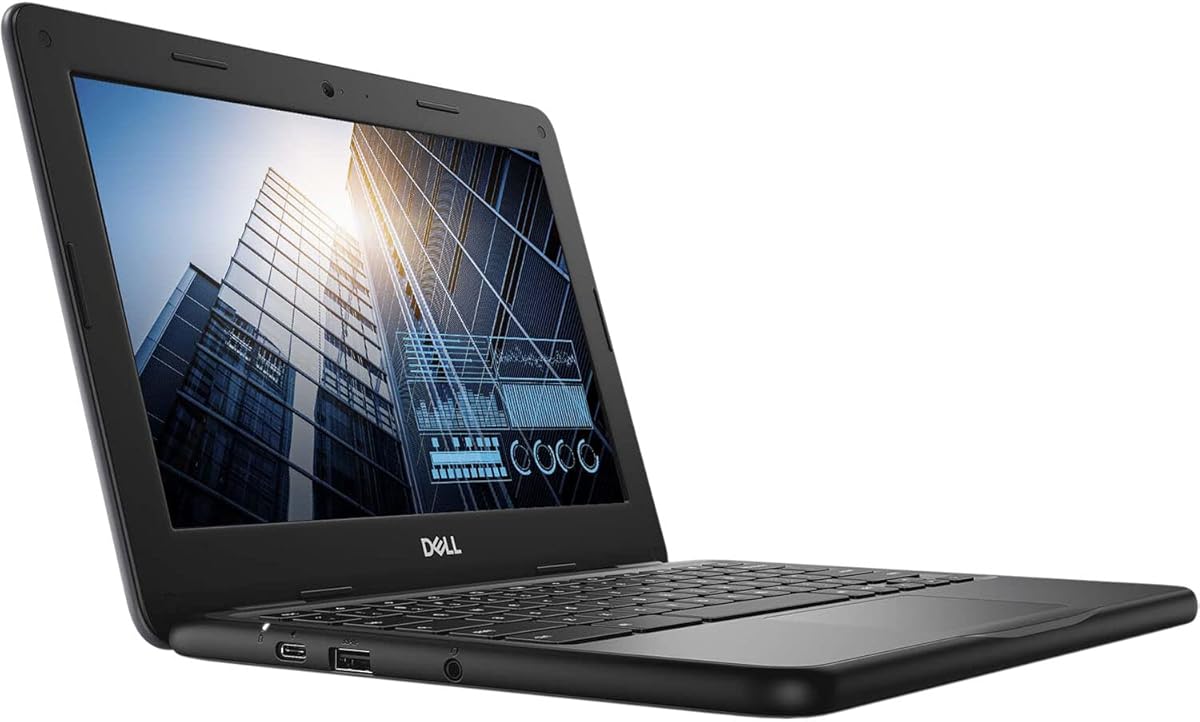
This Chromebook offers a genuine school experience for kids ready for serious learning. With a 4.3 rating it runs Chrome OS which is standard in many classrooms. The 11.6 inch touchscreen and convertible design allow flexible use in laptop or tablet mode.
We may earn a commission when you buy through this link, at no additional cost to you.
The Intel Celeron processor and 4GB RAM handle basic apps and documents smoothly. Bluetooth connectivity lets kids pair mice or headphones for a better experience. As a renewed device it provides reliable performance at a lower cost than new models.
Keep in mind that Chrome OS relies heavily on internet connectivity which may limit offline use. Battery life and setup depend on the specific refurbished unit. It is best for families comfortable with basic tech setup and online learning tools.
Best for older kids this Chromebook bridges play and real academic work. Choose it if you need a device that works with school portals. The durable build and screen size make it suitable for daily homework tasks.
Chrome OS is widely used in schools so kids get familiar with real software.
Flip the screen back to use it as a tablet for reading or games.
We may earn a commission when you buy through this link, at no additional cost to you.
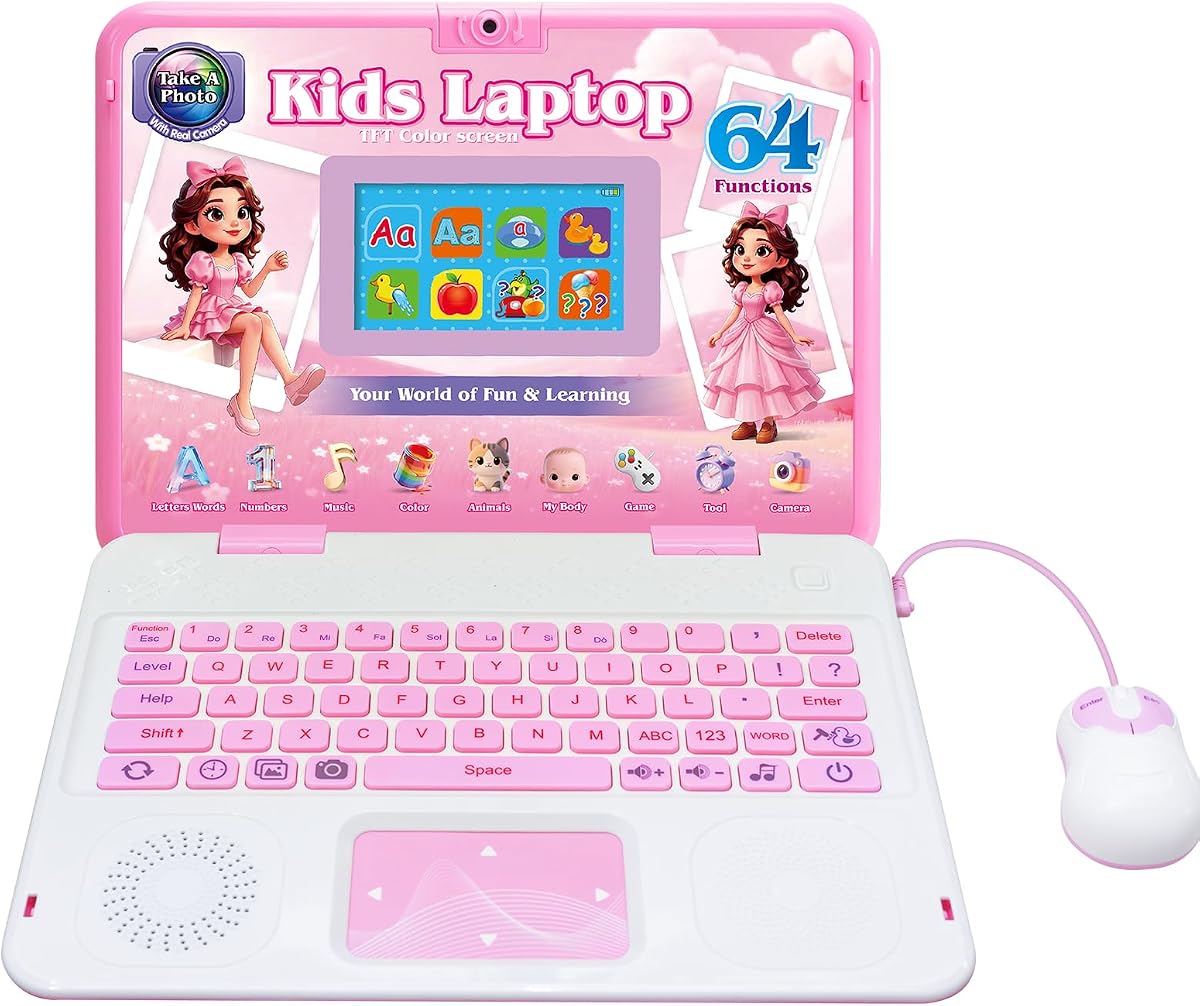
This educational laptop combines learning with creative photography features that kids love. With a 4.6 rating it offers sixty-four activities including alphabet math and music. The built-in camera lets children take fun photos with frames and filters.
We may earn a commission when you buy through this link, at no additional cost to you.
The TFT color display provides vivid visuals that help keep attention focused on tasks. Designed with ergonomic curves the device is easy for small hands to hold and use. Realistic mouse and keyboard elements help with early motor skill development.
While it does not connect to the internet the offline nature makes it safe for young users. Parents can let kids play without worrying about online content. The battery life supports hours of fun but new batteries may be needed often.
Best for ages five and up this laptop is perfect for imaginative play and learning. Choose it if you want a device that encourages creativity beyond just lessons. The camera feature adds a unique touch that kids find exciting.
Take photos with cute frames and filters to express creativity.
Explore math letters music and general knowledge in a fun way.
We may earn a commission when you buy through this link, at no additional cost to you.
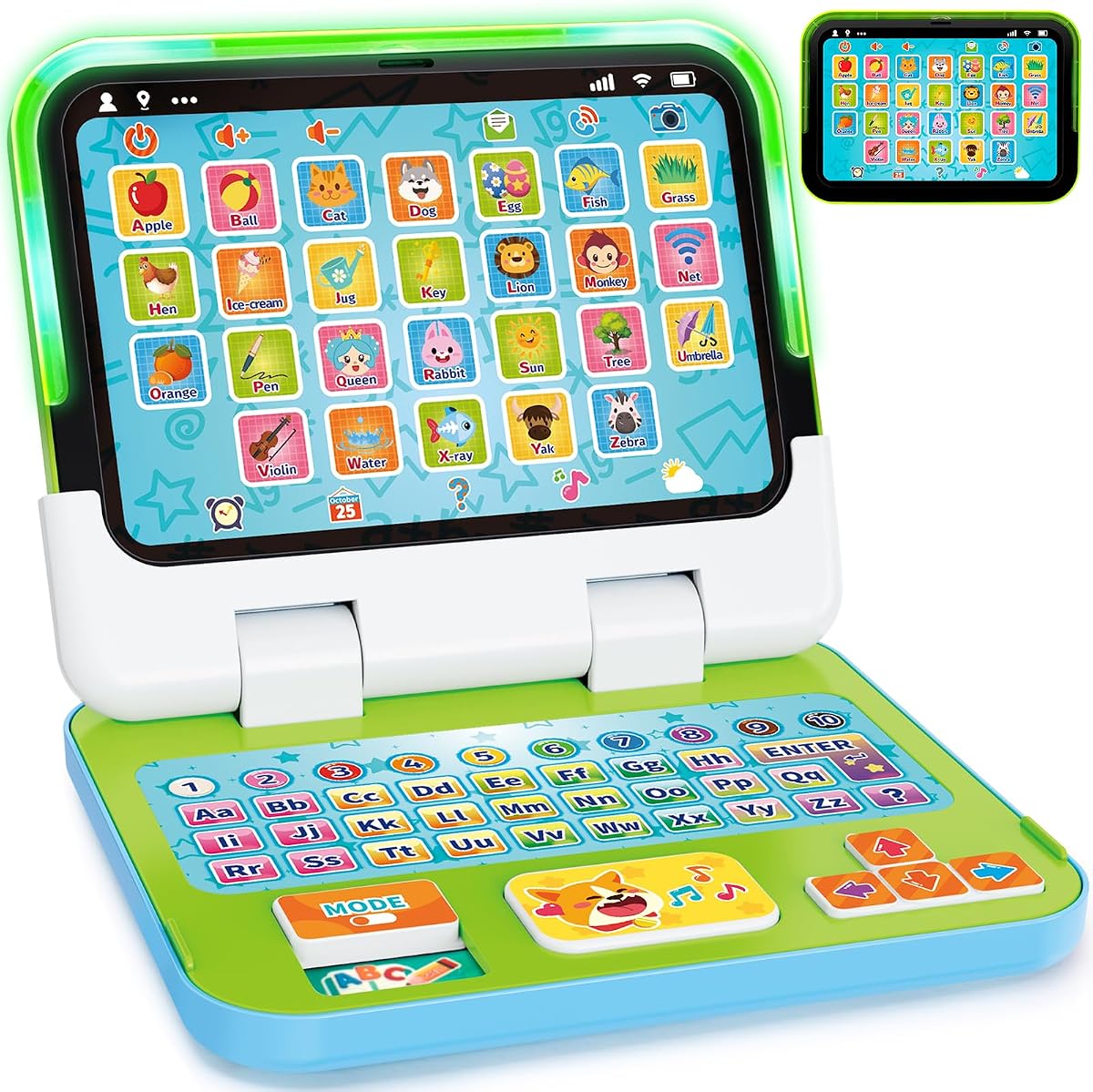
This toy is designed specifically for toddlers who are just starting to explore technology. With a 4.4 rating it offers a 2-in-1 design that switches between laptop and tablet modes. The content focuses on early concepts like letters numbers and colors.
We may earn a commission when you buy through this link, at no additional cost to you.
Kids can press keys to hear sounds spell words or play music modes. The sturdy ABS plastic and chew-resistant material make it safe for little hands and mouths. It is built to survive drops and rough handling typical of young children.
The device does not connect to the internet which keeps it simple and safe. Battery compartments are secure so toddlers cannot access them easily. This makes it ideal for supervised play or when parents want controlled screen time.
Best for ages one to three this laptop helps build early vocabulary and motor skills. Choose it for preschoolers or younger siblings who need a sturdy toy. The interactive play supports confidence and communication in a fun format.
Strong ABS plastic and rounded edges protect kids from bumps and drops.
Four playful modes let kids learn through sounds letters and music.
We may earn a commission when you buy through this link, at no additional cost to you.
This Lexibook laptop brings a fun theme to learning that many kids enjoy. With a 4.3 rating it offers activities in English and Spanish plus music and logic. The unicorn design appeals to those who love characters and colorful visuals.
We may earn a commission when you buy through this link, at no additional cost to you.
The ergonomic shape and realistic mouse help kids feel like they are using a real device. Music activities teach notes and melodies to build early artistic skills. It supports logic and memory games to challenge the brain after learning.
While the theme is specific it does not reduce the educational value of the device. Battery life depends on usage and new cells are recommended for regular play. The price is affordable making it an easy gift for special occasions.
Best for kids who love themed toys this laptop combines fun with practical learning. Choose it if you want to make learning more engaging with design. It works well as a first computer simulation for young children at home.
Learn notes and create melodies to spark early interest in music.
English and Spanish activities help build language skills early.
We may earn a commission when you buy through this link, at no additional cost to you.
Choosing the right first laptop for kids requires balancing educational value safety and budget. We break down the key factors to help you find the best match.
Select a device that matches your child's developmental stage. Toddlers need durable toys with simple sounds while older kids may benefit from real OS features.
Match the laptop to the child's age range to ensure content is engaging and not too advanced.
Look for laptops that cover subjects like math science and language arts. Bilingual options can add extra value for language learning at home.
Prioritize devices that offer a variety of activities to keep learning fresh and fun.
Children's devices should be built to withstand drops and rough handling. Plastic casings and rounded edges are safer and more resilient.
Check materials and construction to ensure the laptop lasts through active play.
Ensure the laptop has parental controls or safe browsing features if it connects to the internet. Battery compartments should be secure from little hands.
Safety should be a top priority to protect kids from unwanted online content.
Some laptops require AA batteries while others plug in or recharge. Consider how often you are willing to change batteries or charge the device.
Check power requirements to avoid interruptions during play or learning sessions.
Realistic QWERTY keyboards help children learn typing skills early. Touchscreens make navigation easier for younger users.
Choose an interface that matches your child's motor skill level and learning goals.
Prices vary widely between toy laptops and real mini computers. Decide your budget and focus on features that offer the best long-term use.
Balance cost with functionality to get the best value for your family.
Toy laptops work offline without internet while mini computers may need Wi-Fi. Consider your home internet setup and screen time goals.
Offline devices are simpler and safer while online devices offer more app variety.
Start by removing any protective films from the screen and ensuring the battery compartment is secured. Teach your child how to hold the device and press keys gently to avoid damage.
Keep the laptop away from water or sticky foods and clean the screen with a soft dry cloth. Charge or replace batteries regularly to ensure the device stays ready for use.
Use parental controls to set time limits and review apps if the laptop connects to the internet. Regularly update software to keep the system safe and running smoothly.
Most manufacturers recommend starting with toy laptops around age one to three for simple interaction. For more advanced models with typing or OS features wait until age five or older when fine motor skills are developed.
Toy laptops typically work offline without Wi-Fi making them safe and simple for young kids. Mini computers or Chromebooks usually need internet for full functionality and app access.
Many models feature realistic QWERTY layouts to teach typing but they may not output text to a screen. Only full OS laptops produce real typing results in documents or apps.
Use built-in parental controls and safe browsers available on mini computers. Toy laptops that do not connect to the internet eliminate this risk entirely for peace of mind.
Toy laptops are built from hard ABS plastic to withstand drops and rough play. Real computers are less rugged so use protective cases if your child is very active.
Mini computers and Chromebooks support word processing and web-based homework. Toy laptops are better for play and early skills rather than formal assignments.
Bilingual laptops expose children to vocabulary in two languages through songs and games. This helps build language flexibility and cultural awareness from an early age.
Battery life varies by model with some lasting five to seven hours on a charge. Toy laptops may need battery changes every few weeks depending on daily use.
We reviewed ten top options for first laptops for kids ranging from toddler toys to school-ready Chromebooks. Our picks highlight devices that balance safety learning value and fun.
Prioritize durability age appropriateness and parental controls when making your choice. For younger kids focus on toy laptops while older ones may benefit from mini computer features.
Prices and availability can change so check the links above for current deals before buying. Finding the right laptop will help your child enjoy learning while exploring technology safely.