
LG 24U411A-B
4.5Editor score
120Hz refresh rate
Full HD resolution
Slim borderless design
Finding a monitor that works in bright sunlight is challenging. Most screens wash out under direct sun. You need high brightness and anti glare coatings to stay productive outdoors.
We evaluated ten top models based on specs and user feedback. Our list includes portable screens and desktop displays designed for visibility. Each option balances performance with practical features for varied uses.
Every pick highlights key strengths and potential trade offs. Prices change frequently so verify current deals before buying. These monitors deliver clear visuals even when ambient light is intense.
4.5Editor score
4.8Editor score

4.2Editor score
As an Amazon Associate we earn from qualifying purchases.
This side by side comparison highlights key specs for each monitor. We focus on brightness, resolution, and connectivity options to help you choose quickly.




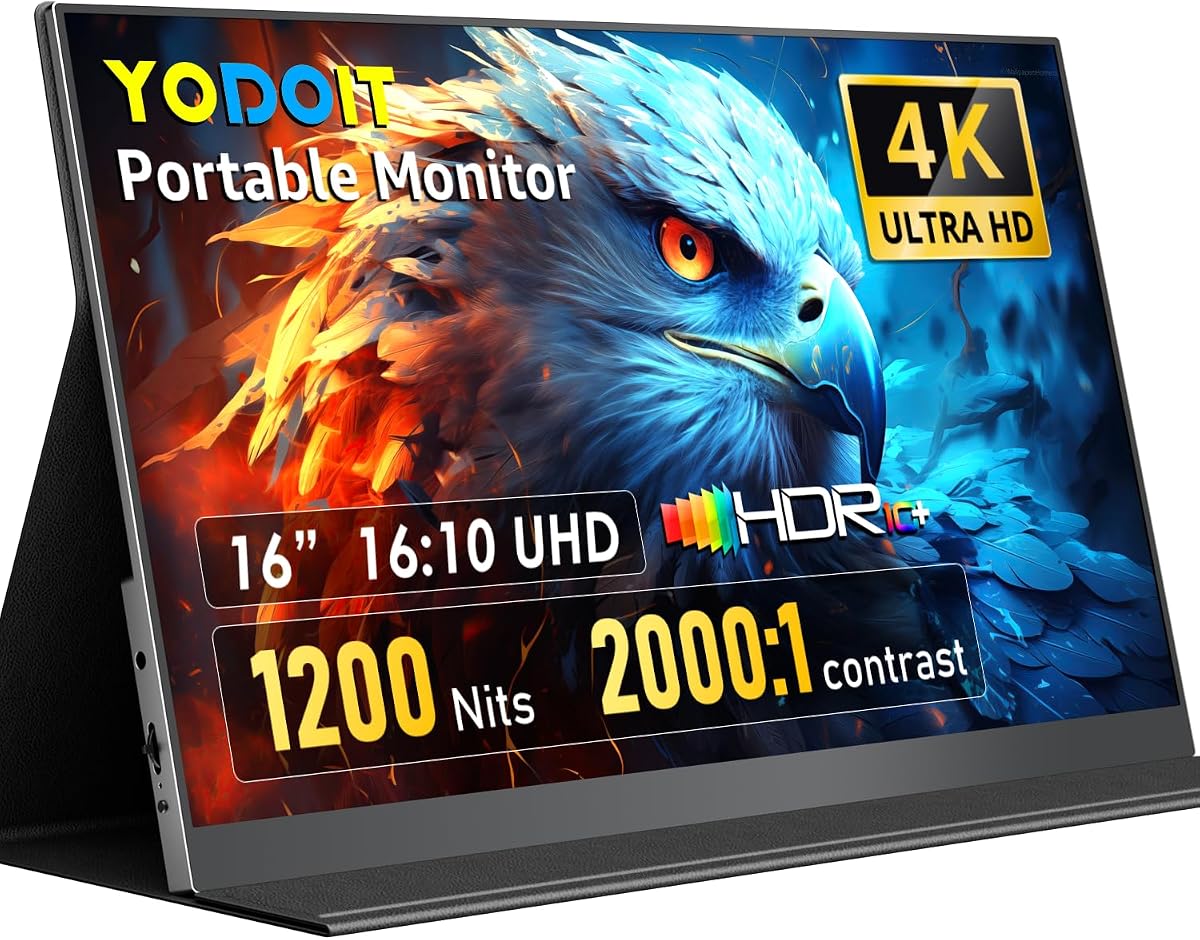
The Yodoit 4K Portable Monitor stands out with its 1200nit brightness. It delivers clear visuals even in direct sunlight. Rated highly by users, it suits outdoor professionals well.
We may earn a commission when you buy through this link, at no additional cost to you.
Its 4K resolution and 145% sRGB coverage ensure sharp images and accurate colors. The matte anti-glare coating reduces reflections effectively. Dual connectivity options allow versatile setup.
While it needs external power for peak performance, this trade-off ensures stability. The mini HDMI port requires an adapter which adds slight bulk. Still performance performance justifies these minor issues.
Outdoor photographers and digital nomads will appreciate this monitor. It bridges the gap between portability and desktop-quality visuals. We recommend it for anyone needing sunlight-readable displays.
The 1200nit brightness makes this monitor usable outdoors without squinting or seeking shade. This ensures continuous work flow in varying lighting conditions.
With 145% sRGB coverage, photo editors and designers get true-to-life colors. The IPS panel maintains accuracy across wide viewing angles too.
We may earn a commission when you buy through this link, at no additional cost to you.
The Dell 24 Monitor offers a smooth viewing experience with its 144Hz refresh rate. It is ideal for office tasks and casual gaming. Users appreciate its eye comfort features.
We may earn a commission when you buy through this link, at no additional cost to you.
Its IPS panel ensures consistent colors from various angles. The TUV certified protection reduces blue light for long sessions. Thin bezels enhance the visual appeal significantly.
However, its brightness level may struggle in direct sunlight. The stand only offers tilt adjustment limiting ergonomic options. These limitations fit its budget-friendly positioning.
For indoor workstations, this monitor delivers solid performance. It balances cost with useful features effectively. We suggest it for general users prioritizing comfort.
The TUV Rheinland 3-star certification reduces harmful blue light. This helps prevent eye strain during extended usage periods.
A 144Hz refresh rate delivers smooth visuals for work and gaming. The 1ms response time minimizes motion blur effectively.
We may earn a commission when you buy through this link, at no additional cost to you.
The Dell 27 Monitor S2725QS provides ample screen real estate. Its 4K resolution is perfect for detailed work. The 120Hz rate ensures smooth scrolling.
We may earn a commission when you buy through this link, at no additional cost to you.
ComfortView Plus technology maintains color accuracy while reducing blue light. The re-engineered sound offers decent audio quality. Ultra-thin bezels enhance the aesthetic appeal.
The price reflects its premium specs but may be steep for some. Its size makes it less portable compared to travel screens. These factors limit its flexibility.
Creative professionals benefit from the high resolution. We recommend it for fixed desk setups. It delivers quality visuals for demanding tasks effectively.
4K UHD resolution offers sharp text and detailed images. This is ideal for design work and multitasking efficiently.
ComfortView Plus reduces blue light emissions significantly. This ensures comfort during long work sessions without color loss.
We may earn a commission when you buy through this link, at no additional cost to you.
The Dell 24 Plus stands out with its adjustable stand. Users can easily set the height and angle. This improves posture during long work hours.
We may earn a commission when you buy through this link, at no additional cost to you.
Dual 3W speakers add convenience for media playback. The 4-star TUV certification ensures eye safety. Dell software helps manage performance settings well.
Its brightness might not suffice in bright sunlight. The FHD resolution is standard but not exceptional. These aspects define its mid-range positioning.
Office workers needing flexibility will find it useful. We recommend it for comfortable desk setups. It balances ergonomics with practical features.
Height, tilt, pivot, and swivel adjustments allow custom views. This reduces strain and promotes healthy posture.
Dual speakers deliver clear sound without extra gear. This simplifies setups for video calls and media.
We may earn a commission when you buy through this link, at no additional cost to you.
The LG 24U411A-B offers great value for its price. It delivers 120Hz refresh rates smoothly. Users find the slim design visually appealing.
We may earn a commission when you buy through this link, at no additional cost to you.
Flicker Safe and Reader Mode protect eyes during long use. HDR10 support enhances color depth. The slim base minimizes desk clutter.
However, the stand lacks height or swivel adjustment. Brightness is standard which may limit outdoor use. These trade-offs reflect its budget nature.
For students and home users, this is a strong pick. We recommend it for general productivity. It meets basic needs efficiently.
Flicker Safe and Reader Mode reduce strain significantly. This helps maintain comfort during extended reading or work.
120Hz refresh rate minimizes blur during fast motion. This enhances gaming and video playback experiences.
We may earn a commission when you buy through this link, at no additional cost to you.
The Acer SB273 offers a generous 27-inch screen. Its zero-frame design maximizes viewing space. Users appreciate the smooth 120Hz performance.
We may earn a commission when you buy through this link, at no additional cost to you.
IPS technology ensures wide viewing angles and color consistency. FreeSync support helps gaming performance. It fits well in office settings.
Brightness is limited for sunlight viewing. The stand provides minimal adjustment options. These constraints limit its versatility.
For desk users needing space, this works well. We recommend it for document-heavy tasks. It provides a clean visual experience.
The 27-inch canvas offers room for multitasking. This improves workflow efficiency significantly.
Zero-frame bezels reduce distractions during use. This enhances immersion and focus on content.
We may earn a commission when you buy through this link, at no additional cost to you.
The Newsoul 4K delivers exceptional brightness at 1200nits. It rivals desktop monitors in outdoor visibility. Its premium build stands out.
We may earn a commission when you buy through this link, at no additional cost to you.
145% sRGB coverage ensures vivid colors. The VESA mount allows flexible setups. Protective case adds travel value.
It requires power for peak brightness. The aluminum body adds weight slightly. These are minor cons for the benefits.
Professionals needing robust portable displays should choose this. We recommend it for high-end needs. It delivers superior quality.
Aluminum alloy ensures durability and heat dissipation. This extends lifespan and reliability under load.
VESA compatibility supports wall or arm mounting. This optimizes space and viewing angles.
We may earn a commission when you buy through this link, at no additional cost to you.
The Dell 27 Plus offers sharp QHD visuals. Its 144Hz rate supports both work and gaming. Adjustability features are comprehensive.
We may earn a commission when you buy through this link, at no additional cost to you.
Dual speakers simplify setup. The ergonomic stand supports comfort. Ash White finish adds elegance.
It is heavier than smaller models. Price is moderate compared to entry level. These factors influence choice.
For versatile setups, this is ideal. We recommend it for users needing flexibility. It balances performance and comfort well.
QHD resolution provides crisp text and images. This benefits detailed work and content viewing.
Height tilt and swivel options promote health. This reduces strain during long hours.
We may earn a commission when you buy through this link, at no additional cost to you.
The Acer KB242Y fits small desks well. Its zero-frame design offers maximum visibility. Users like the responsiveness.
We may earn a commission when you buy through this link, at no additional cost to you.
120Hz refresh rate minimizes stutter. IPS ensures clear colors. The design suits modern spaces.
Brightness limits outdoor use. Stand options are basic. These are expected for this category.
It suits general work tasks. We recommend it for limited spaces. It delivers value effectively.
Compact size saves valuable desk space. This suits small home offices well.
Zero-frame bezels enhance immersion. This creates a cleaner look.
We may earn a commission when you buy through this link, at no additional cost to you.
The Dell 27 Monitor delivers ultra-sharp 4K visuals. Its refresh rate ensures smooth motion. Users enjoy the clarity.
We may earn a commission when you buy through this link, at no additional cost to you.
ComfortView Plus protects eyes. HDR readiness aids detail. Built-in audio is decent.
It is not portable. Needs stable power. These are standard desktop limitations.
For desktop work, it excels. We recommend it for visual tasks. It delivers premium quality.
4K resolution offers fine detail. This is excellent for media and design.
ComfortView Plus reduces strain. This supports long-term eye health.
We may earn a commission when you buy through this link, at no additional cost to you.
Choosing a monitor for bright sunlight requires attention to specific technical details. Brightness, contrast, and coatings are critical for outdoor visibility.
Brightness is measured in nits and determines visibility in light. For sunlight readability, look for 1000 nits or higher. Standard monitors around 250 nits wash out easily.
Aim for high nit counts to ensure clarity outdoors.
Anti-glare coatings reduce reflections from light sources. Matte finishes prevent distracting glares during work. Glossy screens struggle in bright environments.
Matte coatings are essential for consistent viewing in sunlight.
Contrast ratio affects detail in shadows and highlights. Higher ratios like 2000:1 offer deeper blacks. Low contrast makes images look washed out in light.
Prioritize high contrast for better depth and clarity.
Resolution dictates text sharpness and detail. 4K is ideal for precise tasks. Screen size balances portability and workspace.
Choose resolution based on your workload needs.
Portable monitors must balance size with weight. Lightweight models like 16 inch are easier to transport. Heavier units suit fixed desks.
Consider weight if you travel frequently.
Connectivity includes USB-C HDMI and others. USB-C simplifies setups with laptops. Verify port compatibility before buying.
Check ports match your devices.
High brightness requires stable power. Some portable units need external adapters. Ensure you have power sources during use.
Factor in power needs for outdoor sessions.
Color accuracy matters for design work. Look for sRGB or DCI-P3 coverage. Good color ensures faithful output.
Prioritize color gamut for creative tasks.
Position the monitor to minimize direct light on the screen. Angle it slightly downward or use shades. This helps maintain visibility and reduces glare.
Clean the screen with microfiber cloths only. Avoid harsh chemicals that damage coatings. Keep dust off to preserve performance.
Store the monitor in a protective case when traveling. Avoid dropping or bending cables. Proper care extends lifespan significantly.
For reliable sunlight visibility, monitors should have at least 1000 nits of brightness. Lower brightness levels struggle against direct sun. High nit counts ensure clear images outdoors.
Matte screens are generally better for sunlight. They reduce reflections significantly. Glossy screens tend to mirror light sources causing distraction.
Many high-brightness portable monitors require external power. Some draw power from devices but limits peak performance. Always check power requirements.
Use a soft microfiber cloth to remove dust. Avoid sprays unless they are screen-safe. Gently wipe to protect the anti-glare layer.
Yes but response times vary. Higher refresh rates support gaming better. Sunlight models focus on visibility not speed.
16 inch screens offer great portability. They fit in backpacks easily. Larger sizes suit desk use better.
USB-C is versatile as it carries video and power. HDMI is common for consoles. Dual ports add flexibility.
With proper care, they last 3 to 5 years. Avoid drops and extreme heat. Regular maintenance helps longevity.
The Yodoit 4K leads this list for outdoor work. It balances brightness and resolution effectively. Portable needs are well met.
Prioritize brightness and coatings when buying. Consider size and connectivity too. Your needs dictate the best choice.
Prices fluctuate so check current deals. These monitors deliver value in various settings. Invest wisely for best results.