
Redragon K617 Wired 60% Compact Hot-Swap RGB Gaming Mechanical Keyboard
4.6Editor score
60 percent compact layout
RGB lighting modes
Hot swap compatible switches
Discover the top 5 pin hot swappable keyboards for gaming and typing. We compare build quality, switch compatibility, and customization features to help you
Finding the right mechanical keyboard can transform your daily computing experience. A 5 pin hot swappable keyboard offers the freedom to change switches without soldering. This flexibility allows users to tailor their typing feel to their exact preferences.
We have evaluated ten leading models based on build quality, switch compatibility, and feature sets. Our analysis covers everything from compact 60 percent layouts to full-size options. Each product was selected for its ability to support 5 pin switches effectively.
Every pick in this guide highlights unique strengths for different user needs. You will find budget-friendly options alongside premium models with advanced customization. Note that availability and pricing may vary over time as products update.
4.6Editor score

4.7Editor score

4.5Editor score
This comparison table provides a side-by-side overview of the top ten 5 pin hot swappable keyboards. Each entry includes key specifications to help you quickly identify the model that best fits your workflow and budget requirements.


The Keychron C1 stands out as a top contender for users seeking a reliable 5 pin hot swappable keyboard. With a high rating of 4.7 stars, it offers a tenkeyless layout that balances functionality and desk space efficiency. The white backlight provides a clean aesthetic suitable for various environments.
We may earn a commission when you buy through this link, at no additional cost to you.
Its hot-swappable design supports both 3 and 5 pin mechanical switches, giving you the freedom to customize your typing experience without soldering. The included extra keycaps for Mac and Windows ensure seamless compatibility across operating systems. The USB Type-C wired connection ensures stable performance during intensive tasks.
While the white backlight is limiting for those who prefer RGB effects, the simplicity suits users who value minimalism. The price is higher than budget options, but the build quality and versatility justify the investment for professionals and enthusiasts who need reliability.
If you need a keyboard that works equally well with macOS and Windows while allowing switch customization, the Keychron C1 is an excellent choice. It delivers a premium typing experience with durable keycaps and a solid frame that withstands daily use.
The C1 comes with keycaps for both Mac and Windows, making it ideal for multi-device setups.
Hot-swappable sockets allow you to swap switches easily to match your preferred tactile or linear feel.
We may earn a commission when you buy through this link, at no additional cost to you.
The Redragon K617 is a fantastic entry-level option for anyone looking to experience 5 pin hot swappable technology without spending a fortune. With a 4.6 rating, it delivers impressive value through its compact 60% layout and vibrant RGB lighting. It is designed for gamers who need speed and precision on a budget.
We may earn a commission when you buy through this link, at no additional cost to you.
Its hot-swap sockets accept almost any 3-pin or 5-pin switch, allowing you to experiment with different mechanical profiles easily. The software lets you program advanced macros and customize lighting effects to match your gaming rig. The switches are rated for 50 million keystrokes ensuring long-lasting durability.
The main trade-off is the 60% layout which removes dedicated arrow keys and function rows. You will need to use key combinations to access these functions which might frustrate some users. However, for gamers prioritizing mouse space and RGB aesthetics, this is a minor inconvenience.
For budget-conscious buyers wanting a customizable mechanical keyboard, the Redragon K617 is highly recommended. It offers a robust feature set including hot-swap compatibility and extensive RGB options that rival more expensive boards in the market today.
The 60% layout frees up desk space for wide mouse swipes which is crucial for FPS games.
Up to 20 preset lighting modes allow you to create a vibrant and immersive desk setup.
We may earn a commission when you buy through this link, at no additional cost to you.
The Keychron V6 8K represents the pinnacle of performance for enthusiasts who demand speed and customization. With a 4.5 rating and a massive 8000 Hz polling rate, it offers ultra-low latency for competitive gaming and professional typing. The full-size layout ensures all keys are readily accessible without key combinations.
We may earn a commission when you buy through this link, at no additional cost to you.
Its hot-swappable design supports most 3-pin and 5-pin MX-style switches allowing you to dial in your perfect feel. The OSA profile PBT keycaps provide a premium typing texture that resists shine and wear over time. The programmable knob adds convenience for volume control or scrolling without touching the mouse.
The high polling rate and QMK support are powerful features that come at a higher price point. While full-size users will appreciate the layout, those with limited desk space might find it bulky. The investment is worth it for power users who prioritize performance and deep customization.
If you need a top-tier keyboard with advanced features like programmable macros and high-speed polling the Keychron V6 8K is the clear choice. It combines premium build quality with exceptional versatility making it a future-proof option for serious computer users.
The 8000 Hz polling rate ensures near-instantaneous response which is ideal for competitive gaming.
Open-source QMK firmware allows for deep macro programming and key remapping capabilities.
We may earn a commission when you buy through this link, at no additional cost to you.
The TECWARE Phantom+ Elite TKL is a versatile choice for users who want wireless freedom without sacrificing mechanical customization. Rated at 4.4 stars, it supports 5-pin hot-swappable switches allowing you to change your feel easily. The three connection modes offer flexibility for both gaming and productivity tasks.
We may earn a commission when you buy through this link, at no additional cost to you.
Its 250-hour battery life ensures you can work or play for days without needing a recharge. The PBT keycaps provide a durable surface that resists wear while the per-key RGB adds a vibrant touch to your setup. The 5-pin sockets make it easy to swap to any preferred switch type.
While the pre-installed tactile switches are good for typing they might not suit gamers who prefer linear switches. The wireless mode can have minimal latency compared to wired but it is negligible for most tasks. This balance makes it a strong contender for hybrid users.
If you need a keyboard that seamlessly switches between devices and offers long battery life the TECWARE Phantom+ Elite is highly recommended. It combines modern connectivity features with traditional mechanical switch customization effectively.
Switch between up to three paired devices instantly with a single keystroke for enhanced productivity.
Double-shot PBT keycaps ensure legends stay crisp while RGB lighting adds a dynamic visual element.
We may earn a commission when you buy through this link, at no additional cost to you.
The RK ROYAL KLUDGE RK61 is an ideal choice for travelers or minimalists who need a compact 5 pin hot swappable keyboard. With a 4.6 rating, it offers a 60% layout that saves space while maintaining essential functions. Its QMK and VIA compatibility allows for deep customization of keymaps.
We may earn a commission when you buy through this link, at no additional cost to you.
The hot-swappable PCB supports both 3 and 5 pin switches meaning you can upgrade your experience without replacing the board. The detachable Type-C cable ensures it fits easily into backpacks. RGB lighting provides visual feedback during gaming or typing at night.
Users accustomed to full-size layouts may miss dedicated arrow keys and function rows initially. Learning the function layer takes time but becomes second nature with use. The lack of a numpad is a necessary trade-off for such a compact footprint.
If you prioritize portability and customization options in a small form factor the RK61 is an excellent pick. It balances performance and versatility making it suitable for both gaming on the go and daily desk use.
The compact size concentrates essential keys into a minimalist design perfect for small desks or travel.
QMK and VIA programmability let you remap keys for complex macros and shortcuts easily.
We may earn a commission when you buy through this link, at no additional cost to you.
The X82 Wired Gaming Keyboard offers unique features like a metal volume knob at an affordable price point. Rated at 4.6 stars, it includes a 66-key layout that keeps arrow keys while remaining compact. The hot-swap PCB supports 3 and 5 pin switches for easy customization.
We may earn a commission when you buy through this link, at no additional cost to you.
Its linear red switches are pre-lubed for smooth and quiet operation making it suitable for shared workspaces. The RGB backlighting provides multiple dynamic effects to enhance your desk setup. The inclusion of a volume knob adds convenient media control without software.
Some users may find the non-standard key mapping requires an adjustment period. The brand has less community support compared to major manufacturers which could affect long-term software updates. However, the build quality remains solid for the price.
If you want extra features like a volume knob on a budget the X82 is a smart choice. It provides essential mechanical functionality and customization options that compete with more expensive models effectively.
The built-in mechanical volume knob allows quick adjustment of audio levels without interrupting your workflow.
The 66-key design balances space savings with access to arrow keys and numbers for typing tasks.
We may earn a commission when you buy through this link, at no additional cost to you.
The FANTECH Maxfit61 is an excellent entry-level option for those new to mechanical keyboards. Rated at 4.6 stars, it features a 60% layout with hot-swappable sockets that support 3 and 5 pin switches. It provides a classic gaming setup with essential functionality and RGB effects.
We may earn a commission when you buy through this link, at no additional cost to you.
Its pre-lubed stabilizers ensure smooth key presses on larger keys like shift and space. The included switch and keycap pullers help you swap switches easily to customize the sound. The 18 RGB backlight modes let you personalize the look without software.
The blue clicky switches might be too loud for quiet offices or shared spaces. The software capabilities are basic compared to high-end boards but sufficient for standard lighting adjustments. This makes it a solid choice for home gaming setups.
If you want to try a 5 pin hot swappable keyboard without a big investment the FANTECH Maxfit61 is recommended. It offers core customization features in a reliable package ideal for beginners.
Included tools make it simple to swap switches or keycaps to tailor the board to your preferences.
Pre-lubed stabilizers reduce rattle on large keys for a more consistent typing experience.
We may earn a commission when you buy through this link, at no additional cost to you.
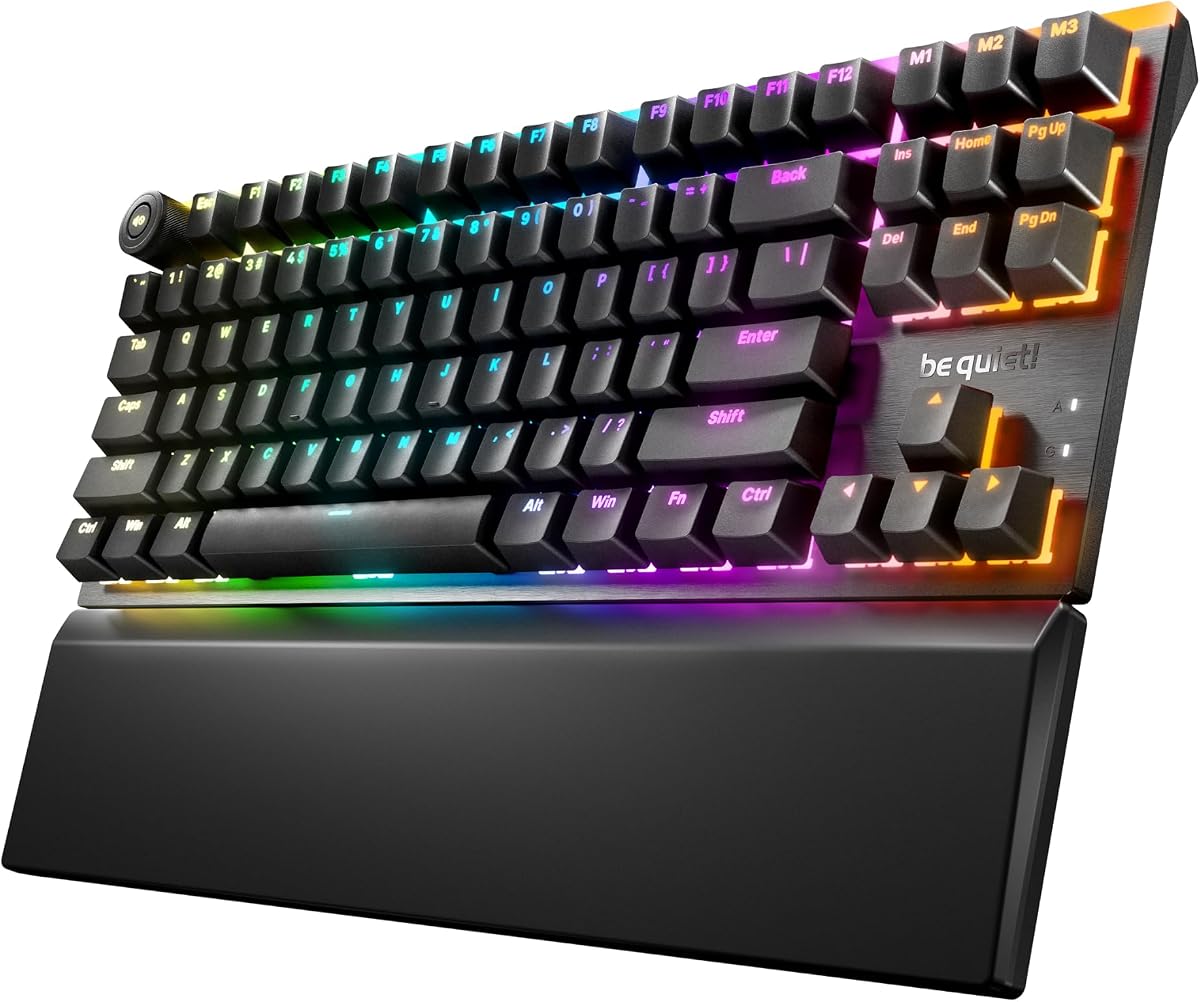
The be quiet! Light Mount TKL is designed for users who value silence and build quality. Rated at 4.4 stars, it features a tenkeyless layout that saves space while offering mechanical switch hot-swap compatibility. The pre-lubricated silent switches ensure a quiet typing experience.
We may earn a commission when you buy through this link, at no additional cost to you.
Its sound dampening layers reduce noise and resonance making it ideal for shared offices or late-night gaming. The 5-pin sockets allow you to swap to other silent or standard switches as needed. The magnetic palm rest adds comfort for long sessions.
The price is higher than average but justified by the premium materials and sound design. While the pre-installed switches are silent you can swap to others if you prefer clicky options. The software for customization is functional but standard.
If you need a quiet mechanical keyboard that allows future customization the be quiet! Light Mount TKL is a great pick. It combines acoustic engineering with reliable hot-swap functionality for a refined user experience.
Multiple layers of noise reduction foam minimize typing noise for a calm environment.
High-quality double-shot PBT keycaps ensure legends remain visible and durable over time.
We may earn a commission when you buy through this link, at no additional cost to you.
The aikeec Black OSU keyboard is a specialized option for gamers who need unique layouts for games like OSU. Rated at 4.4 stars, it allows hot-swappable switches to customize the feel of each key. The macro programming capability adds versatility for complex inputs.
We may earn a commission when you buy through this link, at no additional cost to you.
Its compact design focuses on essential keys making it easy to reach all buttons quickly. The RGB LED upgrade provides visual customization to suit your personal style. USB HID standard ensures plug-and-play compatibility without extra drivers.
Because it is a niche product standard Windows may be limited for general typing. The software setup requires some technical know-how to configure properly. It is best suited for users with specific gaming needs rather than daily typing.
If you need a highly specialized keypad for gaming the aikeec Black OSU offers great value. Its switch customization support provides flexibility even in this unique form factor.
The OSU layout optimizes key placement for rhythm games and specialized gameplay styles.
Each button can be set to a different function mode via software for complex macro commands.
We may earn a commission when you buy through this link, at no additional cost to you.
The Keyboard Versatile Hotswap 5Pin is a straightforward choice for users focused on pure switch modularity. Rated at 4.3 stars, it emphasizes universal compatibility and smooth operation. The hot-swap design allows quick customization without soldering or technical tools.
We may earn a commission when you buy through this link, at no additional cost to you.
It uses high-quality PA66 and POM materials for durability and consistent performance over time. The switches are lubricated to reduce noise making it suitable for shared environments. Its compatibility with most mechanical keyboards ensures wide usability.
While it lacks advanced features like RGB or complex software its simplicity is a strength. It provides a reliable base for custom keyboard builds without the cost of extra features. This makes it ideal for DIY enthusiasts and repairers.
If you need a reliable hot-swap component for customization the Keyboard Versatile Hotswap is a solid option. It balances quality materials with ease of use for practical keyboard building projects.
Compatible with most mechanical keyboards ensuring you can upgrade or repair your existing setup easily.
High-quality materials ensure consistent performance and longevity even after multiple switch swaps.
We may earn a commission when you buy through this link, at no additional cost to you.
Selecting the right 5 pin hot swappable keyboard involves considering several key factors to ensure it meets your needs and preferences.
Ensure the keyboard explicitly supports 5-pin hot-swap sockets to avoid compatibility issues with your preferred switch brand. Most modern boards accept both 3 and 5 pins but verification is essential before purchasing to prevent fitting problems.
Always confirm that the PCB sockets are designed for MX-style switches to maximize your customization options.
Choose a layout such as 60% TKL or Full Size based on your desk space and need for a numpad. Compact boards save mouse room but require function layers for arrows while full sizes offer convenience.
Consider how much space you have on your desk before committing to a specific form factor.
Look for materials like aluminum or thick plastic that provide stability during intense typing or gaming sessions. A sturdy case prevents flexing which helps maintain consistent switch actuation over time.
Heavier boards generally offer a more premium feel and reduce movement on the desk surface.
PBT keycaps are generally more durable and resistant to shine than ABS keycaps over extended periods. They provide a textured surface that can enhance grip and typing comfort during long sessions.
Investing in a board with PBT caps ensures the legends stay crisp and clear longer.
Decide whether you need RGB customization or prefer simple white backlight for a minimalist aesthetic. RGB allows for visual feedback and personalization while white lighting offers a clean and professional look.
Check if the lighting is per-key or zone-based depending on how much control you need.
Determine if you need a wired connection for zero latency or wireless for a cleaner desk setup. Wired USB Type-C is standard for gaming while wireless offers flexibility for productivity setups.
Wireless options may have higher latency or require battery management compared to wired models.
Review the software support for macro programming and key remapping to ensure it meets your workflow. Open-source firmware like QMK allows deep customization while proprietary software is often user-friendly.
Ensure the software supports your operating system to avoid driver issues during setup.
Set a budget that balances features with price since hot-swap keyboards vary widely in cost. Budget models may lack premium features but still offer excellent core functionality for users.
Higher prices usually reflect better build materials and advanced software capabilities.
To swap switches safely turn off the keyboard and use a dedicated switch puller to remove existing switches gently. Insert new switches until the pins align perfectly with the sockets to avoid damage to the PCB.
Keep your keyboard clean by using compressed air to remove dust from between keys and the switch area. Avoid spilling liquids near the board as even water-resistant keyboards can be damaged by moisture.
Store your unused switches in a cool dry place to prevent the lubrication from drying out. This ensures that when you are ready to swap you get the same smooth feel you expected.
No 5 pin switches require keyboards specifically designed with 5-pin hot-swap sockets. While some boards accept both 3 and 5 pins you should always check compatibility before buying. Using the wrong switch type can cause fitting issues or damage the PCB.
Hot swapping does not typically damage the PCB if done correctly using a proper switch puller. The sockets are designed for multiple insertions and removals without wear. Avoid forcing switches into sockets to prevent bending pins or loosening the PCB connections.
The main difference is that 5-pin switches have two additional plastic pins for extra stability during keypresses. These pins prevent wobble and improve tactile feel but they are only compatible with boards that support 5 pins.
No the entire purpose of hot-swappable keyboards is to eliminate the need for soldering. You can remove and install switches by hand which makes customization accessible even to beginners without specialized tools.
Yes as long as the switches are MX-style and match the pin count of your board you can mix brands. This allows you to test different switch profiles without buying entirely new keyboards.
Count the metal legs at the bottom of the switch. A 3-pin switch has three legs while a 5-pin switch has five legs with two additional plastic stabilizers on the sides.
We have reviewed ten top options for 5 pin hot swappable keyboards each offering unique strengths for different users. The Keychron C1 and K617 offer distinct value points for premium and budget needs respectively.
Prioritize what matters most to you such as layout size switch compatibility or wireless connectivity. A well-chosen board will enhance your typing experience and grow with your customization needs over time.
Always check current availability and specs before purchasing since product details may change. This guide aims to help you make an informed decision that fits your workspace requirements.