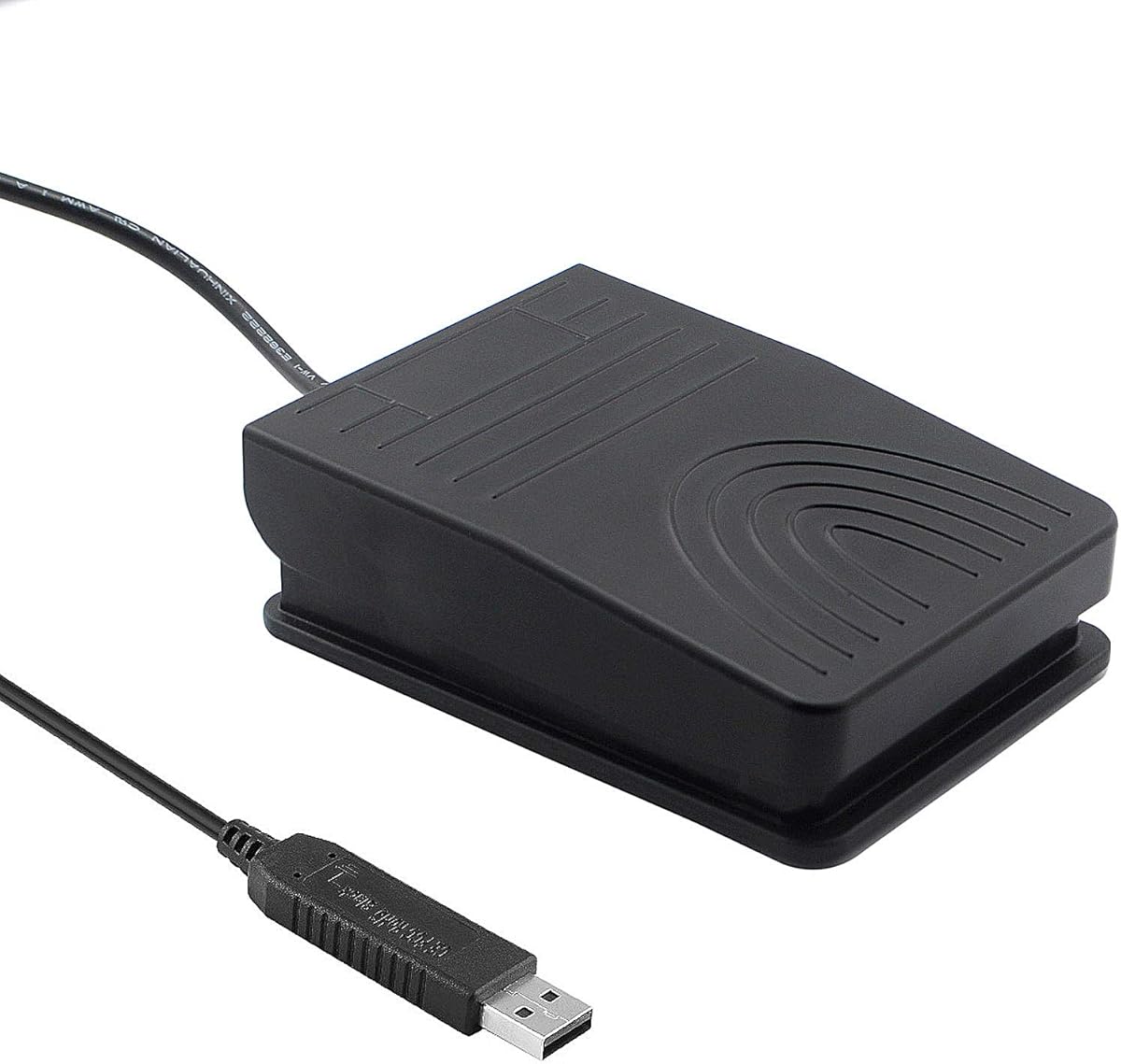
[Upgraded] iKKEGOL USB Foot Pedal Switch Video Game
4.3Editor score
Affordable price point
Plug and play setup
Compatible with many systems
Discover the best foot pedals for Star Citizen to enhance gameplay with hands-free controls, macros, and ergonomic designs for immersive space simulation.
Finding the right foot pedals for Star Citizen can transform your space flight simulation experience. These devices allow you to manage complex controls without removing your hands from the keyboard and mouse setup.
We compared ten highly rated USB foot pedals based on durability, switch type, programmability, and ergonomic design. Our analysis focuses on how well each model supports gaming workflows and customization needs.
Each pick highlights specific strengths and ideal use cases for Star Citizen pilots. Remember that availability and pricing may fluctuate, so check current listings before making your final decision.
4.3Editor score
4.4Editor score

4.5Editor score
This side-by-side comparison helps you quickly evaluate the key specifications and capabilities of each foot pedal model available for Star Citizen pilots.


This pedal from iKKEGOL is a top choice for Star Citizen pilots seeking reliable foot control. It holds a strong rating from users who value precision and comfort during long simulation sessions.
We may earn a commission when you buy through this link, at no additional cost to you.
The optical switch technology ensures minimal noise and fast response times, which is crucial for in-game communication and action triggers. Its wide pedal design supports various foot sizes comfortably.
While the software offers extensive customization, it requires an initial setup step. This trade-off is acceptable given the flexibility it provides for mapping complex key combinations.
Ideal for players who want a hands-free experience without breaking the bank. This model delivers a balanced mix of features, build quality, and ease of use.
The optical switches produce very little sound, ensuring your team communication remains clear without clicky distractions during missions.
With a weight capacity exceeding 100kg and TPU rubber feet, this pedal stays firmly in place even during intense gameplay moments.
We may earn a commission when you buy through this link, at no additional cost to you.
For budget-conscious pilots, this single-key pedal offers excellent value. It simplifies tasks like Push to Talk or simple macros without demanding extra desk space.
We may earn a commission when you buy through this link, at no additional cost to you.
Users appreciate the free software that allows customization of key commands. The pedal feels sturdy and remains stable thanks to its rubber feet and ergonomic shape.
The main limitation is its single key design which may not suit complex setups. However, for specific tasks it remains highly effective and reliable over time.
This model is perfect for those starting their foot pedal journey. It balances cost and functionality well for basic Star Citizen control needs.
You get reliable performance without the premium price tag, making it accessible for casual gamers or those testing foot controls.
Even with one key, you can program it to handle frequent actions like voice comms or menu navigation efficiently.
We may earn a commission when you buy through this link, at no additional cost to you.
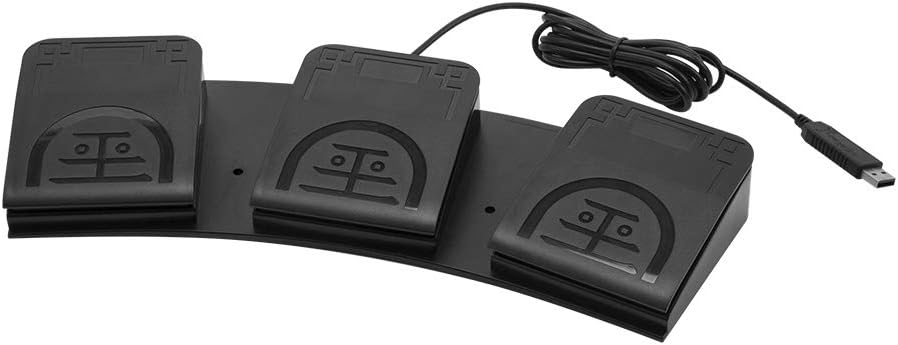
This triple pedal variant expands your control options with three programmable keys. It is ideal for managing multiple actions like weapon selection, shields, and comms simultaneously.
We may earn a commission when you buy through this link, at no additional cost to you.
The photoelectric mechanism ensures durability and responsiveness. Users report it stays well in place during use due to the rubber feet and solid chassis design.
Some users note occasional software challenges on different systems. Once configured however, it works seamlessly as a plug-and-play device across operating systems.
Pilots needing more inputs than a single key will find this useful. It offers good value for multi-action workflows without requiring expensive hardware.
Three keys allow you to map common commands, reducing reliance on keyboard shortcuts during critical flight maneuvers.
Once set up on a primary system, the pedal functions universally, making it flexible for diverse PC environments.
We may earn a commission when you buy through this link, at no additional cost to you.
This model combines optical precision with a triple key setup for enhanced control. It is particularly suited for pilots who need distinct foot inputs for different ship systems.
We may earn a commission when you buy through this link, at no additional cost to you.
The wide pedal design provides comfort during extended use. The optical switches ensure silent operation, which helps maintain focus without distracting clicking sounds.
Users mention that initial software configuration takes time. Once set up though, the device is robust and dependable for daily use.
A solid choice for those prioritizing quiet and durable inputs. This pedal supports complex control schemes effectively for Star Citizen.
Optical switches eliminate noise that could interfere with voice comms, creating a smoother team experience during missions.
The wide design and rubber feet prevent slipping, ensuring consistent input even when wearing shoes during gameplay.
We may earn a commission when you buy through this link, at no additional cost to you.
This pedal features a robust design built to withstand heavy use. Its photoelectric switches ensure durability and quiet performance during active gameplay.
We may earn a commission when you buy through this link, at no additional cost to you.
The shaftless design adds flexibility to the joints, improving ergonomics. Users appreciate that once configured it works across many operating systems without extra drivers.
While the software is functional it may lack advanced features found in premium models. Still, it provides reliable functionality for standard Star Citizen macros.
Great for pilots seeking a sturdy and quiet input method. This model offers solid performance for repetitive tasks like comms or menu shortcuts.
The waterproof and moistureproof design adds resilience, protecting the device from spills or humid gaming setups.
You can configure once and use on Linux or Mac, making it versatile for diverse workstation setups.
We may earn a commission when you buy through this link, at no additional cost to you.
The Elgato Stream Deck Pedal stands out for its premium construction and integration with popular tools. It offers three customizable pedals that adapt to specific workflows easily.
We may earn a commission when you buy through this link, at no additional cost to you.
Its heavy-duty chassis and interchangeable springs allow precise pressure adjustments. This ensures consistent triggering without accidental activations during intense gaming.
The main drawback is the cost and reliance on the Stream Deck software ecosystem. However, the flexibility it offers often justifies the investment.
Perfect for power users wanting seamless app control. It bridges the gap between hardware input and software macros effectively for Star Citizen.
Plugins for Discord, OBS, and other tools let you control multiple apps from your feet effortlessly.
Adjustable springs mean you can tailor the pedal resistance to match your preferred foot comfort level.
We may earn a commission when you buy through this link, at no additional cost to you.
For those who prefer tactile feedback, this mechanical switch model delivers. The spring-loaded levers provide a distinct click that confirms input reliably.
We may earn a commission when you buy through this link, at no additional cost to you.
It supports complex macros and key combinations effectively. Users find it helpful for managing multiple tasks like music page turning or in-game actions.
The mechanical switches are slightly louder than optical ones. This may not suit those in shared spaces but offers satisfying feedback for solo play.
Ideal for pilots valuing responsive input. This model combines durability with the tactile feel many gamers appreciate.
Mechanical switches give clear feedback, reducing uncertainty when pressing keys during critical gameplay moments.
The robust design handles repetitive use well, ensuring long-term performance without losing sensitivity.
We may earn a commission when you buy through this link, at no additional cost to you.
This 2023 model builds on previous designs with refined optical switches. It continues to offer silent operation and comfortable foot placement for long sessions.
We may earn a commission when you buy through this link, at no additional cost to you.
The ergonomic design minimizes strain during repetitive inputs. Users find it reliable for tasks like Push to Talk or simple command execution.
Software options remain standard, lacking advanced features. For basic gaming needs though, the performance is consistent and user-friendly.
A steady choice for pilots who prioritize silence. This pedal offers dependable performance for standard control workflows.
Optical switches keep noise to a minimum, ensuring your mic stays clear during team coordination.
The wide pedal surface accommodates various foot sizes, reducing pressure points during extended use.
We may earn a commission when you buy through this link, at no additional cost to you.
This variant adds a splash of color with its blue casing while maintaining functional strengths. It offers three keys for efficient macro management.
We may earn a commission when you buy through this link, at no additional cost to you.
The optical switches ensure quiet operation, ideal for streaming or shared setups. Users appreciate the wide pedal for comfort during long flights.
Software setup requires initial effort to map keys effectively. Once configured though, it runs smoothly across various operating systems without issues.
Great for pilots who want style and function. This model is reliable for repetitive tasks in Star Citizen.
The blue color helps it stand out on your desk, making it easy to locate quickly.
Rubber feet and wide design ensure it stays put and feels comfortable during extended gaming sessions.
We may earn a commission when you buy through this link, at no additional cost to you.
This pedal offers mechanical switches for responsive tactile feedback. It supports various uses from gaming to office tasks efficiently.
We may earn a commission when you buy through this link, at no additional cost to you.
The ergonomic wide design ensures comfort during long use. Users find it dependable for repetitive actions like volume control or voice chat.
Customization options are limited compared to higher-end models. Still, it serves basic needs well with consistent performance.
Ideal for straightforward workflow improvements. This pedal delivers reliable input for common Star Citizen control tasks.
Mechanical switches confirm each press clearly, which helps reduce missed inputs during fast-paced gameplay.
Beyond gaming, it supports office and creative tasks, making it a versatile addition to your desk setup.
We may earn a commission when you buy through this link, at no additional cost to you.
Selecting the right foot pedal requires balancing switch type, ergonomics, and programmability to suit your specific in-game needs.
Optical switches provide quiet and fast actuation, ideal for voice comms. Mechanical switches offer tactile feedback which some users prefer for confirmation.
Choose based on whether silence or feedback is more important for your gaming style.
Single key pedals simplify tasks like Push to Talk, while triple key models support complex macros for shield toggling or weapon switches.
Consider how many unique actions you need to trigger from your feet during gameplay.
Wide pedals and non-slip rubber feet ensure comfort and stability during extended use. Look for designs that support your natural foot position.
Comfort should be a priority to avoid strain during long simulation sessions.
Software quality determines how easily you can map commands. Some models offer advanced scripting while others are basic plug-and-play devices.
Ensure the software matches your technical comfort level for customization.
Durable materials and high weight capacity contribute to longevity. Plastic builds are common, but reinforced designs resist wear better over time.
Invest in a sturdy build to avoid frequent replacements due to wear and tear.
Most pedals work via USB HID, but software support for Mac or Linux can vary. Verify system compatibility before purchasing.
Cross-platform support adds flexibility for diverse PC setups.
Longer USB cables provide flexibility in placement without needing extenders. Fixed cables can limit where the pedal sits on your floor.
Check cable length to ensure it reaches your setup comfortably.
Budget models offer basic functionality while premium options include advanced software integration. Determine what features are essential for your use case.
Balancing cost with needed features ensures value without overspending.
Place the pedal on a flat, hard surface to ensure stability. Use the rubber feet to prevent sliding during active gameplay.
Install the provided software to map key commands. Test mappings in a safe environment before using them in missions.
Clean the pedal regularly with a dry cloth to remove dust. Avoid liquids to protect the internal switches and wiring.
Yes, foot pedals work with Star Citizen as they emulate keyboard inputs. Map them to in-game actions via the game settings or keyboard remapping tools.
Most foot pedals are HID devices requiring no drivers. Some advanced features need software, but basic plug-and-play setup is typical.
You can map actions like Push to Talk, shield toggling, or menu navigation. Avoid mapping critical safety functions to avoid accidental activation.
Optical switches offer quieter operation and faster response times. Mechanical switches provide tactile feedback which some prefer for input confirmation.
Use the manufacturer's software to assign keys and macros. Save settings and test in-game to ensure mappings work correctly during use.
Yes, USB foot pedals work with laptops as long as they have available USB ports. Use a USB hub if necessary for extra connections.
Use a dry cloth to wipe the surface and remove dust. Avoid liquids to protect the internal components and maintain switch reliability.
Yes, most systems support multiple HID devices. Connect each via USB and configure them individually to avoid input conflicts.
The iKKEGOL Optical Switch leads for balance while the Elgato Stream Deck offers premium integration. Both deliver reliable control for immersive flight simulation.
Prioritize switch type and ergonomics to match your setup. Comfort and noise levels significantly impact your gameplay experience during long sessions.
Check current availability before purchase to ensure you get the right model. Prices and stock may vary, so verify details before buying.