
Canon PIXMA TR4720
3.9Editor score
Wireless 4-in-1 capabilities
Auto document feeder included
Affordable entry level price
This guide compares the top all in one printer with fax models for home and office use, evaluating speed, quality, and connectivity features for 2026.
Finding the right all in one printer with fax can streamline your workflow and save valuable desk space in any home office or small business setting.
We evaluated ten leading models based on print quality, scanning capabilities, fax reliability, and connectivity options to help you make an informed decision today.
Each product entry highlights key specifications, real-world performance notes, and pros and cons so you can choose the best fit for your specific needs and budget.
3.9Editor score

4.0Editor score

3.9Editor score
Below is a side-by-side comparison of all ten selected models highlighting their core specifications and key capabilities for your review.






The HP OfficeJet Pro 9135 stands out as a top contender for offices needing speed and reliability. It holds a strong rating and delivers professional results consistently.
We may earn a commission when you buy through this link, at no additional cost to you.
Its 25 ppm black print speed ensures tasks are completed quickly. The dual 250-sheet trays minimize refills. HP AI helps optimize formatting for cleaner prints.
While the cost is higher, the efficiency gains justify it. Security features protect network data effectively. The single-pass duplex scanning saves significant time.
Ideal for busy home offices or small businesses, this printer balances performance with smart connectivity. It is a robust choice for high volume needs.
With 25 ppm black speed and auto document feeding, workflows remain uninterrupted during peak hours.
HP Wolf Pro Security safeguards data while dual-band Wi-Fi ensures stable connections across devices.
We may earn a commission when you buy through this link, at no additional cost to you.
The Canon PIXMA TR4720 offers an entry point for those needing fax and print without breaking the bank. It is highly rated for home users.
We may earn a commission when you buy through this link, at no additional cost to you.
Its compact design fits easily in small spaces. Alexa integration simplifies ink management. Wireless connectivity makes remote printing simple.
Speed is limited compared to premium models, but adequate for casual use. The 100-sheet tray requires more frequent refills.
Perfect for students or light home office use, this model delivers essential functions efficiently. It balances cost and convenience well.
Alexa smart reorders ensure you never run out of ink unexpectedly or face downtime.
The compact footprint allows placement on tight desks without sacrificing core functionality.
We may earn a commission when you buy through this link, at no additional cost to you.
The HP Smart Tank 7603 is designed for high volume printing needs. With up to three years of ink included, it offers exceptional value over time.
We may earn a commission when you buy through this link, at no additional cost to you.
Mess-free refill bottles make maintenance easy. The auto document feeder handles multi-page tasks quickly. Borderless printing supports creative tasks.
The initial investment is higher, but long-term savings on ink are substantial. It requires more desk space due to its tank design.
Ideal for heavy users who prioritize cost efficiency, this printer handles volume effortlessly. It is a premium solution for demanding environments.
Cartridge-free tanks reduce waste and lower the cost per page significantly over the lifecycle.
The easy-access refill system prevents spills and simplifies the process for any user.
We may earn a commission when you buy through this link, at no additional cost to you.
The HP OfficeJet Pro 9125 delivers professional-quality documents ideal for presentations. It includes robust security features for office environments.
We may earn a commission when you buy through this link, at no additional cost to you.
Speeds reach up to 22 ppm black. The large touchscreen simplifies navigation. HP AI removes unwanted content from web prints automatically.
Third-party cartridges may be blocked by firmware. Users must plan for genuine HP ink. The 3-month trial helps offset initial costs.
Best for offices needing reliable output and security, this model performs consistently. It balances speed with smart connectivity features.
HP Wolf Pro Security bolsters network protection against cyber threats effectively.
AI tools optimize web and email printing to avoid wasted pages or awkward layouts.
We may earn a commission when you buy through this link, at no additional cost to you.
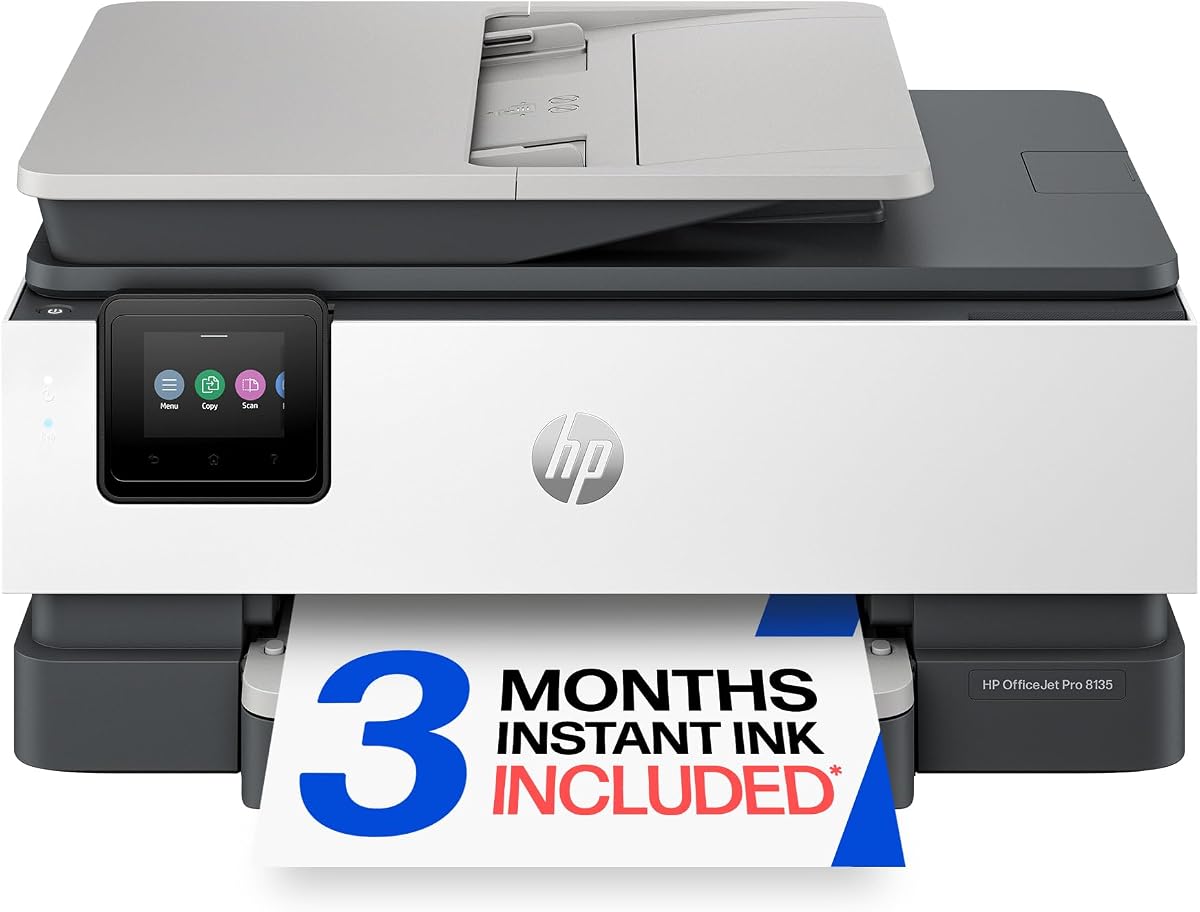
Designed specifically for home offices, the HP OfficeJet Pro 8135 handles business documents well. It provides reliable connectivity and printing quality.
We may earn a commission when you buy through this link, at no additional cost to you.
With 20 ppm speeds, daily tasks are manageable. The 225-sheet tray reduces refills. HP Essential Security protects your network data.
Performance is solid but not top-tier. The Instant Ink trial helps with costs. Users should expect firmware updates for chip security.
A balanced choice for home professionals needing fax and print, this model offers ease of use. It fits well in residential setups.
Compact design and smart features suit residential workspaces requiring professional output.
Dual-band Wi-Fi ensures stable connection for mobile printing from anywhere.
We may earn a commission when you buy through this link, at no additional cost to you.
The Epson EcoTank ET-4800 eliminates traditional cartridges with its supertank system. It is ideal for reducing waste and ink costs.
We may earn a commission when you buy through this link, at no additional cost to you.
High-capacity bottles provide long-term supply. Micro Piezo technology ensures sharp text without heat. Photo quality is impressive for the class.
Initial cost is higher than standard printers. Refilling is easy with EcoFit bottles. Long-term savings on ink are significant.
Best for eco-conscious users needing volume, this printer avoids cartridge reliance. It balances sustainability with professional output.
Zero cartridge waste helps reduce landfill impact while maintaining high print standards.
Exclusive EcoFit bottles make refilling straightforward and mess-free for users.
We may earn a commission when you buy through this link, at no additional cost to you.
The HP OfficeJet Pro 8125 provides excellent value for home offices needing reliable performance. It supports standard printing tasks with AI features.
We may earn a commission when you buy through this link, at no additional cost to you.
Prints up to 20 ppm black. The 225-sheet tray handles moderate volume. HP AI optimizes web pages for clean results.
Check specific SKUs for fax support. Ink subscription is included initially. Performance is consistent for daily documents.
A solid choice for general home use, this model balances cost and features. It meets most professional printing needs.
Lower entry cost without sacrificing core productivity features like duplex and fax.
AI assists in formatting to reduce wasted paper and improve readability.
We may earn a commission when you buy through this link, at no additional cost to you.
The Canon PIXMA TR8620a excels in photo and document quality. It features voice commands and an SD slot for direct printing.
We may earn a commission when you buy through this link, at no additional cost to you.
With 200 sheets capacity, it handles moderate loads. Voice control simplifies operation. The dual feed allows flexible media types.
Speed is moderate at 15 ppm. Ink costs can add up over time. The SD slot is useful for quick photo transfers.
Best for those prioritizing photo prints, this printer delivers rich colors. It is well-suited for home creative needs.
Canon's color engine produces vibrant and sharp images for personal and professional projects.
AirPrint and Alexa support ensure seamless integration with smart home ecosystems.
We may earn a commission when you buy through this link, at no additional cost to you.
The HP OfficeJet Pro 8139 offers a generous one-year Instant Ink trial. It performs well for standard home office documents and fax.
We may earn a commission when you buy through this link, at no additional cost to you.
With 20 ppm speed, tasks are timely. The HP AI tools optimize layouts automatically. Security features protect network data.
Post-trial costs must be considered. Firmware restricts third-party cartridges. The input tray supports 225 sheets comfortably.
Ideal for long-term ink savings, this model balances cost and utility. It provides robust features for daily workflows.
A full year of Instant Ink helps offset initial costs and supports cash flow.
AI tools remove unwanted web content for cleaner prints and reduced waste.
We may earn a commission when you buy through this link, at no additional cost to you.
The Brother MFC-L2820DW offers fast monochrome laser printing for text-focused tasks. It is compact and includes a Refresh trial.
We may earn a commission when you buy through this link, at no additional cost to you.
Speeds reach 36 ppm, making it one of the fastest. It supports fax and scanning. The footprint is space-saving for small desks.
It is limited to black and white. Color needs require another device. The Refresh trial offers cost savings on toner.
Best for text-heavy office work, this laser printer delivers speed and reliability. It is an efficient tool for budget-conscious users.
Laser technology ensures quick output and consistent quality for high-volume black documents.
The subscription trial helps manage toner expenses and simplifies supply management.
We may earn a commission when you buy through this link, at no additional cost to you.
Choosing the right printer requires evaluating speed, ink costs, and fax needs to match your workflow demands.
Print speed impacts how quickly you can complete jobs. Look for models with at least 20 ppm for black text to avoid bottlenecks in busy environments. If you regularly print large documents or invoices, faster models like laser or high-speed inkjets will save time.
Cartridge-based printers have lower upfront costs but higher ongoing expenses. Tank systems and laser printers often offer lower cost per page. Calculate long-term needs to choose between Instant Ink subscriptions or bulk toner refills.
Fax remains essential in many industries. Ensure the model has built-in fax support, not just fax-on-demand software. Auto send and receive features save time and prevent missed documents in busy workflows.
Modern printers need wireless and mobile support. Dual-band Wi-Fi reduces connection dropouts. Check for AirPrint, Google Cloud Print, and app support to print from phones or tablets without a PC.
Input tray size dictates how often you refill paper. Look for at least 200 sheets for small offices. Auto document feeders simplify scanning and faxing multi-page documents efficiently.
Protect sensitive documents with security protocols. HP Wolf Security or similar features prevent unauthorized access. Encryption and secure print options are vital for business environments handling confidential data.
Space is often limited in home offices. Compact models like the Canon PIXMA series fit smaller desks. Check dimensions and consider if dual trays or tanks will require more space.
Standard warranties cover defects but may not include on-site service. Extended plans help for businesses. Check manufacturer support channels for troubleshooting firmware or connectivity issues.
Start by connecting the printer to your network via Wi-Fi or Ethernet. Use the provided app to register the device and install drivers. Ensure the fax line is connected to the phone port for reliable transmission.
Regularly clean the scanner glass and print heads to maintain quality. Use the cleaning utility in the printer menu. Run test pages periodically to ensure colors and black align correctly.
Keep firmware updated through the manufacturer's website or app to fix bugs and maintain security. Monitor ink or toner levels to avoid unexpected shortages. Use genuine supplies to prevent warranty issues.
Yes, most modern all-in-one printers still include a dedicated fax port for traditional phone lines. Some models offer fax-to-email services as an alternative. Always verify the product details for fax capabilities before purchasing.
Inkjet printers are versatile and handle color photos well, making them ideal for mixed media. Laser printers excel at text speed and lower cost per page. Choose based on your primary content type.
HP and Canon often block third-party cartridges via firmware updates. Brother models sometimes allow them. To avoid issues, check manufacturer restrictions before buying compatible inks.
Instant Ink monitors your usage and ships cartridges before you run out. You pay based on pages printed rather than ink volume. This helps lower costs but requires a stable internet connection.
Dual-band Wi-Fi ensures stable connections on crowded networks. It supports both 2.4GHz and 5GHz frequencies. This reduces lag and improves mobile printing reliability in busy households.
Traditional fax requires a dedicated phone line for analog signals. VoIP adapters can work but sometimes cause errors. Check if your service supports fax before connecting the printer.
We reviewed ten top models ranging from budget-friendly inkjets to high-speed lasers. Each option balances speed, fax needs, and cost differently.
Prioritize speed if you handle high volumes, or choose tank systems to save on ink. Security features are vital for professional environments handling sensitive documents.
Prices fluctuate frequently so check current deals before buying. Use this guide to find a printer that supports your specific workflow and budget.