
Redragon K617 HE Wired Hall-Effect Rapid Trigger Magnetic Gaming Keyboard
4.3Editor score
Hall Effect Magnetic Switches
8000Hz Hyper-Polling
Software-Adjustable Actuation
Compact 60% Layout
Find the best Keyboard for CS2 with rapid trigger and low latency. We compare ten top models for performance, durability, and precision in competitive gaming.
Finding the right keyboard for CS2 is essential for competitive success. Players need fast actuation, reliable switches, and precise control to execute moves instantly during intense matches.
We evaluated ten top keyboards based on speed, build quality, and features like rapid trigger and adjustable actuation. Each model offers unique benefits for different playstyles and budgets.
This guide details each pick’s strengths and trade-offs to help you choose wisely. Remember that availability and costs may vary, so verify current options before purchasing.
4.3Editor score
4.4Editor score
4.5Editor score
The following table compares all ten models side by side. It highlights key specs like polling rate, switch type, and layout to help you find the ideal match for your needs.


The Redragon K617 HE stands out as an excellent budget option for CS2 players. With a solid rating, it delivers Hall Effect magnetic switches that eliminate physical contact for faster response.
We may earn a commission when you buy through this link, at no additional cost to you.
Its standout feature is the rapid trigger capability combined with 8,000Hz hyper-polling. This means inputs register instantly, giving you an edge in stop-and-shoot moments common in competitive play.
While it lacks the premium build of high-end models, the trade-off is its low cost. The compact layout saves desk space, allowing larger mouse movements essential for low-sensitivity aiming.
If you are seeking a reliable performance keyboard without spending a fortune, this model is a strong contender. It proves that budget-friendly options can still offer advanced tech for serious players.
The magnetic switches allow you to set actuation points as low as 0.1mm, ensuring every keystroke counts when timing your shots perfectly.
Removing the numpad frees up significant room, ideal for gamers who rely on wide mouse swipes for precise aiming.
We may earn a commission when you buy through this link, at no additional cost to you.
The Redragon K686 HE offers a slight step up with better feel and controls. Its rating reflects high satisfaction, particularly for players wanting magnetic performance with added convenience.
We may earn a commission when you buy through this link, at no additional cost to you.
A single control knob lets you adjust brightness and media without stopping your game. This usability boost pairs well with UltraMag POM magnetic switches that provide a soft, Hi-Fi bounce.
Compared to other models, it retains rapid trigger and high polling rates. The noise dampening layers reduce harsh clacking, making it suitable for shared environments or long sessions.
This keyboard balances price and features effectively. If you value a smooth typing experience alongside gaming performance, the K686 HE is a reliable choice for CS2 setups.
Anti-wobble independent switch plates paired with dampening layers create a refined sound profile that enhances focus during intense rounds.
The knob simplifies lighting and media tweaks, saving time and keeping your attention on the match rather than software menus.
We may earn a commission when you buy through this link, at no additional cost to you.
The K673 HE delivers similar core features to the K686 with a slightly different market positioning. Its rating suggests strong performance for CS2 enthusiasts seeking magnetic tech at value.
We may earn a commission when you buy through this link, at no additional cost to you.
Key strengths include the magnetic switches for instant response and the media knob for quick adjustments. The dual-module structure ensures a stable typing feel that reduces fatigue over time.
Users appreciate the ability to tailor actuation profiles for different games. This flexibility makes it a versatile tool for players who switch between competitive shooters and other tasks.
This model is a great option if you want reliability without overspending. It provides the essential tools needed to improve your CS2 gameplay through fast and accurate inputs.
The floating structure minimizes wobble, ensuring that every keystroke registers precisely during rapid movements in-game.
Save multiple actuation settings to switch between gaming and typing modes quickly without rebooting or reinstalling software.
We may earn a commission when you buy through this link, at no additional cost to you.
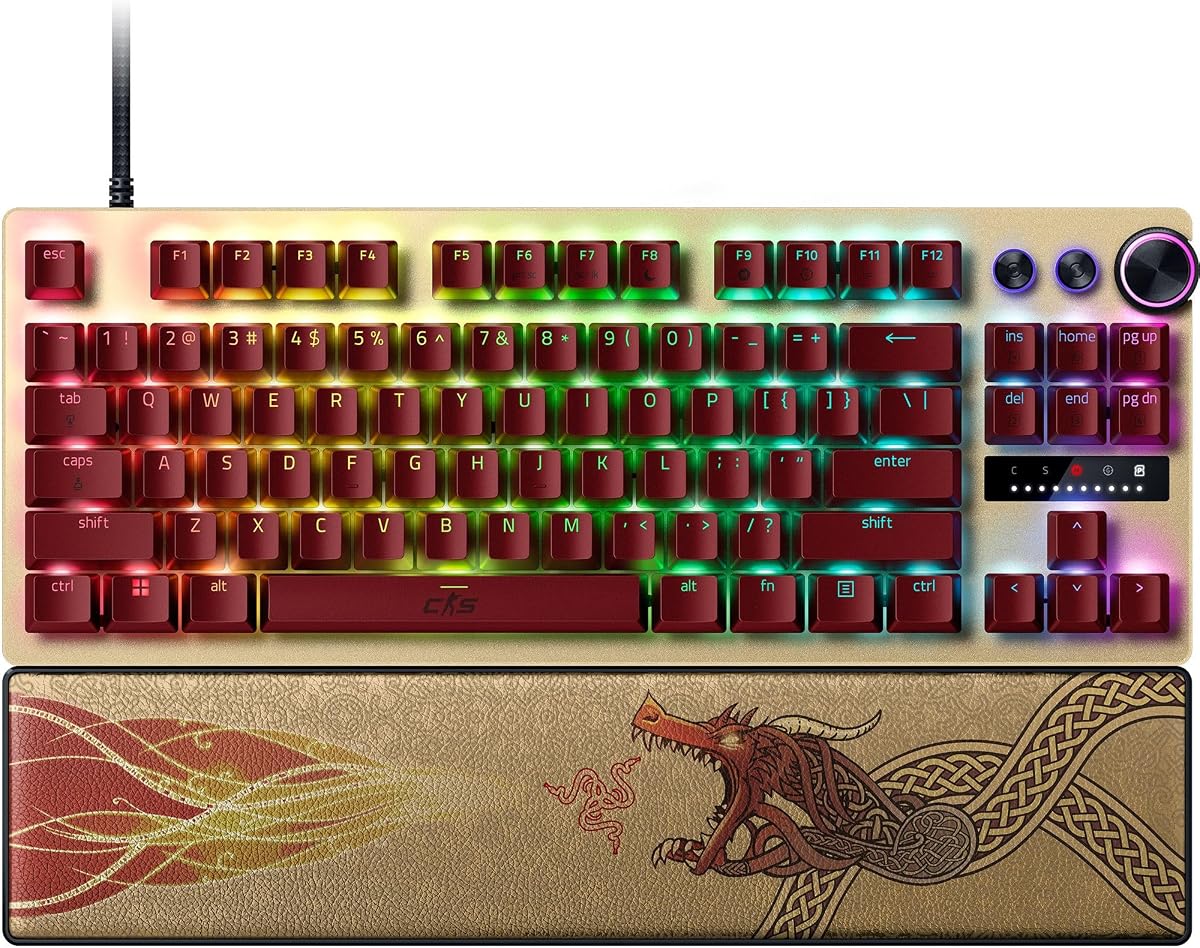
The Razer Huntsman V3 Pro TKL Counter Strike 2 Edition is engineered specifically for elite play. Its rating highlights top-tier performance valued by professional and amateur competitive players alike.
We may earn a commission when you buy through this link, at no additional cost to you.
Its unique Snap Tap mode prioritizes the latest input between keys for instant directional changes. Combined with analog optical switches, it offers unmatched precision for movement and shooting mechanics.
While expensive, the build quality with PBT keycaps and leatherette wrist rest ensures longevity. The onboard LED array helps you make adjustments without software, enhancing on-the-fly customization.
For those dedicated to improving their CS2 skills, this keyboard is a top investment. It delivers the speed and control needed to compete at the highest levels of the game.
Analog optical switches allow for a 0.1 to 4.0 mm adjustable range, letting you fine-tune sensitivity for every scenario.
Textured double-shot PBT keycaps resist wear and shine, maintaining a premium look through intense daily usage sessions.
We may earn a commission when you buy through this link, at no additional cost to you.
The Corsair Clipper PRO MINI 60 is a standout for its durability and precision. It receives high ratings for combining Hall Effect performance with rugged build qualities suited for travel.
We may earn a commission when you buy through this link, at no additional cost to you.
IP57 rating protects against spills and dust, making it safe for intense environments. Its MGX switches offer rapid trigger with multi-action capabilities like Smart Tap and Tap Lock.
The compact design ensures maximum desk space for mouse movement. Dual-layer sound dampening keeps noise low, helping you stay focused on audio cues during matches.
If you need a keyboard that can withstand heavy use while delivering competitive features, this model is ideal. It is perfect for portable setups without sacrificing core performance.
Resistant to spills and dust, this keyboard is ready for messy desks or travel scenarios where accidents are more likely.
Features like Smart Tap ensure cleaner directional inputs by preventing conflicting key presses during rapid movements.
We may earn a commission when you buy through this link, at no additional cost to you.
The Redragon K745 HE offers strong performance despite a slightly lower rating. It focuses on providing a clean sound and responsive magnetic switches at an affordable price point.
We may earn a commission when you buy through this link, at no additional cost to you.
Its 5-layer noise dampening structure creates a soft, Hi-Fi bounce that reduces harsh feedback. The switches detect keypresses without contact for precise timing in peek-and-fire moments.
While software tuning is required, the flexibility to adjust actuation is a major plus. RGB lighting adds a visual edge to your desk setup during night sessions.
This keyboard is a good choice for gamers wanting magnetic tech without high costs. It balances build quality and responsiveness effectively for casual and competitive players.
Multiple dampening layers help eliminate harsh clacks, making it quieter and more pleasant for long gaming sessions.
Adjustable brightness and lighting modes allow you to match your setup with other peripherals for a cohesive look.
We may earn a commission when you buy through this link, at no additional cost to you.
The Keychron C0 HE 8K is a unique tool for specialized playstyles. Rated well for its magnetic technology, it provides an alternative to full keyboards for players who prefer dedicated keypads.
We may earn a commission when you buy through this link, at no additional cost to you.
Its magnetic switches support 0.01mm precision for instant reset. The one-handed layout keeps essential commands close while freeing up the main hand for other tasks or larger mouse movements.
Web-based customization simplifies setup across Windows and macOS. This accessibility ensures you can quickly map macros or shortcuts for complex commands without software installation.
If you want a compact or supplementary device for advanced control, this keypad is compelling. It complements existing setups for power users who need tailored input options.
The web-based configurator works on both Windows and macOS, offering flexible customization without extra software downloads.
Essential commands are placed within easy reach to reduce hand movement and fatigue during extended competitive sessions.
We may earn a commission when you buy through this link, at no additional cost to you.
This renewed option brings Razer’s premium features to a wider audience. While ratings vary due to product condition, the underlying tech delivers high-end competitive tools for CS2.
We may earn a commission when you buy through this link, at no additional cost to you.
Snap Tap mode and analog switches allow for rapid directional changes and precise inputs. The aluminum plate ensures stability during aggressive play, and the leatherette wrist rest provides comfort.
Buying renewed can offer significant savings while keeping the functionality intact. It is a strategic choice for players who want top tech without paying full retail price.
Check product details carefully before purchasing to ensure condition meets your needs. For those comfortable with renewed items, it is a smart way to access elite hardware.
Even in renewed form, the keyboard retains advanced capabilities like Rapid Trigger and adjustable actuation ranges.
The brushed aluminum top plate provides resistance against warping, ensuring a stable platform for rapid inputs.
We may earn a commission when you buy through this link, at no additional cost to you.
The Corsair K55 RGB PRO is a traditional membrane keyboard that still offers value for casual gamers. With a high rating, it stands out for its practical features and durability.
We may earn a commission when you buy through this link, at no additional cost to you.
IP42 resistance guards against accidental spills. Six dedicated macro keys can be set up through iCUE software for streaming commands or shortcuts, enhancing your workflow.
While it lacks the rapid trigger of magnetic models, it remains responsive for general play. The detachable palm rest adds comfort for long sessions, and media keys allow quick volume control.
If you prefer simplicity or have a limited budget, this is a solid option. It provides essential tools for comfortable and functional gameplay without complex setups.
Dust and spill-resistant design ensures accidental accidents won’t interrupt your gameplay or damage the keyboard permanently.
Six dedicated macro keys enable custom commands, while media keys allow you to adjust audio settings on the fly.
We may earn a commission when you buy through this link, at no additional cost to you.
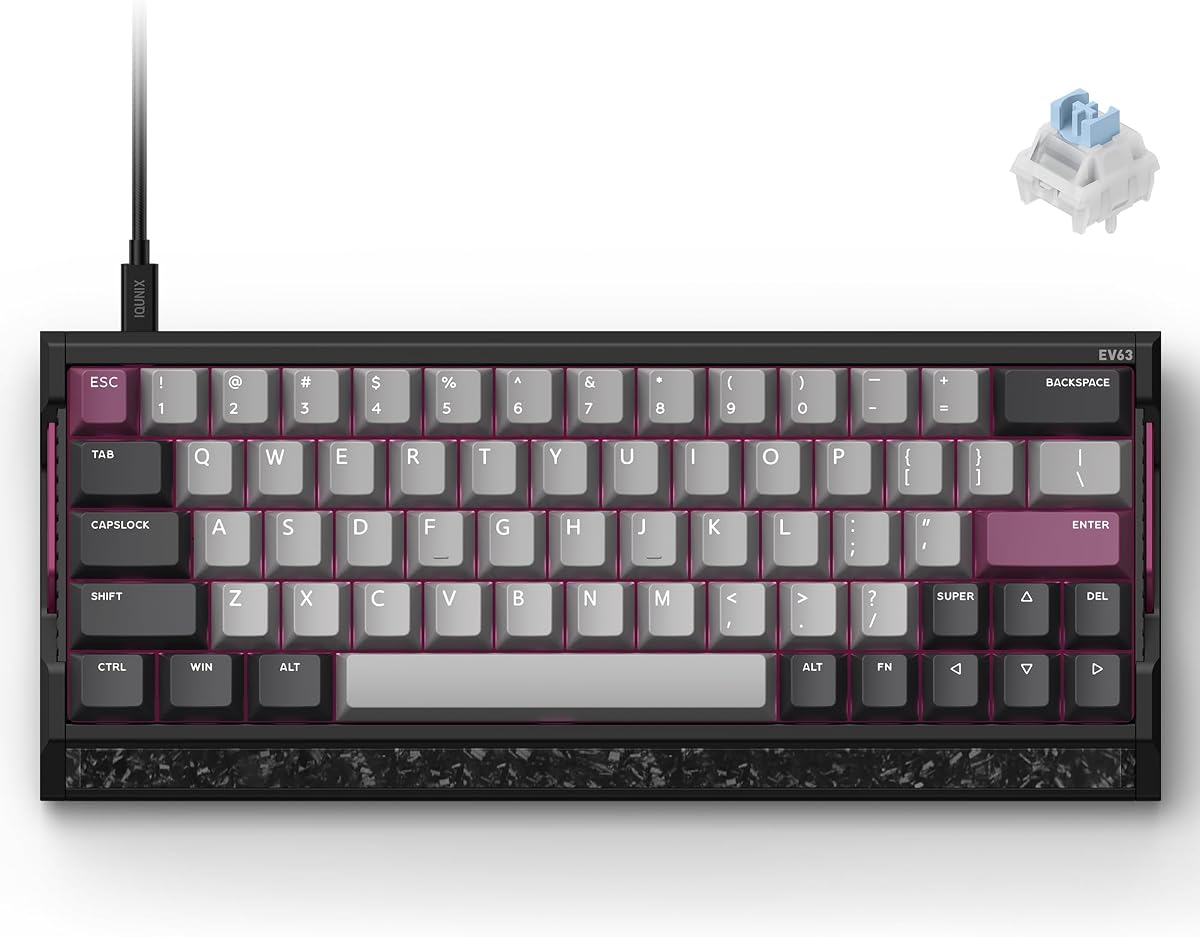
The IQUNIX EV63 Hall Effect delivers top-tier performance and build quality. With the highest rating, it appeals to enthusiasts who want advanced magnetic technology paired with premium materials.
We may earn a commission when you buy through this link, at no additional cost to you.
Its M.A.T. 2.0 algorithm reduces missed inputs and sticky behavior during rapid movement. The aluminum chassis with forged carbon plate provides stability and a distinct custom-like feel.
Driver 3.0 offers pro-tuned FPS presets for quick setup, but advanced players can fine-tune everything. This flexibility makes it a versatile tool for both newcomers and veterans.
If budget allows, this keyboard stands out as a flagship option. It combines engineering excellence with premium materials to deliver an unmatched CS2 experience.
Real-time magnetic auto-tune ensures consistent sensing without voltage fluctuation issues during high-speed movement.
Forged carbon front plate and aircraft-grade aluminum chassis reduce vibration and offer a unique, solid typing feel.
We may earn a commission when you buy through this link, at no additional cost to you.
Choosing the right keyboard for CS2 requires considering key features that impact performance. Below are essential factors to evaluate before making your final decision.
Magnetic Hall Effect switches are currently leading for CS2. They offer rapid trigger and adjustable actuation points which help with movement and precise timing.
Prioritize magnetic switches for the best performance in competitive play.
Polling rate determines how often the keyboard sends inputs to the PC. Higher rates like 8000Hz reduce input lag and provide smoother registration.
Look for keyboards with high polling rates for competitive advantage.
Compact layouts like 60% or TKL free up desk space for larger mouse movements. This is vital for low-sensitivity aimers in FPS games.
Choose a compact layout if you value space for aiming.
Materials like PBT keycaps and aluminum cases ensure the keyboard withstands intense use. Dust and spill resistance add extra protection.
Select models with robust materials for longevity.
Good software allows you to adjust actuation, save profiles, and map keys. Web-based tools can be convenient if you use multiple systems.
Ensure the keyboard offers easy-to-use customization options.
Wrist rests and comfortable keycaps reduce strain during long sessions. A good typing feel also helps prevent fatigue over time.
Consider ergonomics to maintain comfort during extended play.
Lower latency means faster response between pressing a key and it acting in-game. High-end keyboards often boast sub-millisecond latency for this reason.
Opt for low latency to improve reaction times.
Budgets vary, and models exist at all price points. Focus on core features like rapid trigger rather than aesthetics if performance is key.
Balance features with your budget for the best value.
Start by installing the official driver software. This ensures you can access features like rapid trigger, adjust actuation points, and save profiles for different games.
Clean your keyboard regularly to maintain switch performance. Use compressed air to remove dust from keycaps and a soft cloth for the surface.
Calibrate the magnetic switches using the built-in tools. Proper calibration ensures consistent performance and helps prevent missed inputs during matches.
Rapid trigger allows keys to reset instantly when lifted instead of waiting for a full release. In CS2, this enables faster counter-strafing and movement transitions for better timing.
Magnetic switches typically last longer because they have no physical contact points. They often reach around 100 million keystrokes which outlasts many mechanical alternatives.
A 60% layout is great for freeing up mouse space. While it lacks function keys, most essential controls can be remapped for competitive play without issues.
Software itself does not usually impact latency but it is needed to enable advanced features. Ensure the driver works smoothly to avoid issues during gameplay.
Wired keyboards are recommended for CS2 to avoid any potential wireless lag. However, high-end wireless options exist, but wired ensures the most stable connection.
Magnetic keyboards often feel smoother due to the switch design. Some may take time to adjust to lighter actuation points, but they can help reduce finger fatigue.
Recalibrating periodically helps maintain accuracy. If you notice inconsistent inputs or after cleaning, recalibration is recommended to ensure consistent behavior.
Choosing the right keyboard for CS2 can significantly impact your performance and comfort. This guide highlighted top models that deliver speed, precision, and durability.
Prioritize magnetic switches and rapid trigger technology for the best competitive edge. Consider layout and build quality to ensure long-term satisfaction.
Always verify the latest specs and features before buying. Prices and availability may change so check current listings to find the perfect fit.