
HDMI to Component Converter
4.0Editor score
Supports 1080p input
Includes audio output
Plug and play setup
Compare the top HDMI to Component Converter models for modern displays. This guide reviews ten options for connecting old TVs to HDMI sources.
Finding the right HDMI to Component Converter ensures your old analog devices work with modern screens. These tools bridge the gap between legacy tech and new displays.
We evaluated ten converters based on compatibility, resolution support, and ease of use. Each product offers unique features for connecting various source devices to TVs.
Each pick shows key specs and performance notes to help you decide. Remember that product prices and availability can change frequently on retailer sites.
4.0Editor score

4.2Editor score

4.3Editor score
This table provides a side-by-side look at all ten converters. Review the specs to find the right match for your display and source device needs.


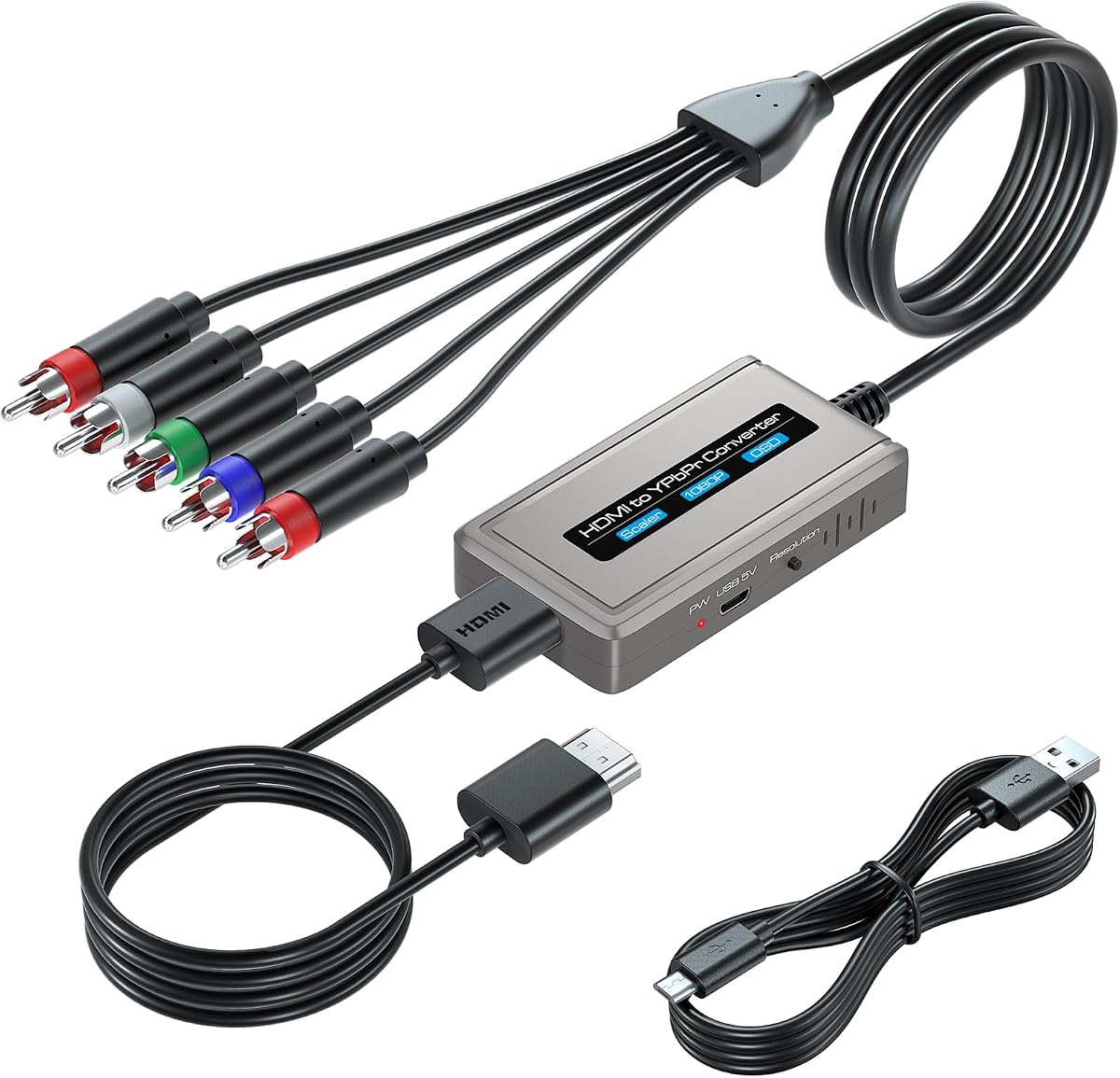


This converter is designed to turn analog component signals into digital HDMI outputs. It is ideal for connecting older game consoles and DVD players to modern TVs.
We may earn a commission when you buy through this link, at no additional cost to you.
It supports a wide range of resolutions including 1080p which ensures sharp video quality. The device adheres to HDMI V1.4 standards for reliable signal transmission.
Keep in mind that this unit only works in one direction from component to HDMI. You cannot use it to connect a modern HDMI device to an old TV.
Buy this if you need to upgrade an old DVD player or console to work with an HDTV. It is a straightforward solution for legacy video sources.
The adapter works with HDTVs and projectors that require HDMI inputs for digital signals.
It supports HDCP 1.4 which helps with content protection for compatible devices.
We may earn a commission when you buy through this link, at no additional cost to you.
This adapter converts analog component video into HDMI for newer displays. It is built to handle various video sources like game consoles and media players.
We may earn a commission when you buy through this link, at no additional cost to you.
It supports up to 1080p resolution and includes uncompressed audio support for clear sound. The warranty coverage offers peace of mind for long term use.
Note that this device does not scale video signals so input resolution must match display capabilities. Ensure your source and display are compatible before purchase.
Choose this for reliable component to HDMI conversion with strong audio support. It is a solid choice for users needing a consistent connection for legacy gear.
Supports uncompressed 2 channel LPCM to maintain high quality audio output.
Includes a five year warranty which shows confidence in product durability and quality.
We may earn a commission when you buy through this link, at no additional cost to you.
This device allows you to connect modern HDMI sources to older component displays. It is useful for projectors or TVs that lack HDMI inputs.
We may earn a commission when you buy through this link, at no additional cost to you.
It supports high definition inputs up to 1080p and includes an on screen display to check resolutions. The setup is straightforward and requires no drivers.
It does not scale video which means your input resolution must fit the display limits. You may need to adjust your source settings for best results.
Pick this if you need a basic HDMI to component link at a low cost. It works well for standard definition or high definition content on older screens.
The OSD feature helps you verify input and output resolutions on the screen.
Provides separate analog stereo audio outputs alongside the video signal.
We may earn a commission when you buy through this link, at no additional cost to you.
This kit provides the converter plus an HDMI cable to get started quickly. It converts analog component video to digital HDMI for modern displays.
We may earn a commission when you buy through this link, at no additional cost to you.
It supports up to 1080p resolution and delivers stable video signals. The included cable saves you from buying extra accessories separately.
Like other models it does not scale video so input must match display capabilities. Ensure your source device outputs a compatible resolution for best results.
Opt for this if you want a complete package for component to HDMI conversion. It is convenient for users who need a ready to use solution.
Comes with an HDMI cable to reduce the need for additional purchases.
Handles common resolutions like 480p and 1080p for various sources.
We may earn a commission when you buy through this link, at no additional cost to you.
This adapter is designed for devices with female component ports connecting to HDMI. It maintains the original video quality without scaling or alteration.
We may earn a commission when you buy through this link, at no additional cost to you.
You can expect vibrant colors and smooth playback from this converter. The compact design makes it easy to carry or hide behind displays.
It requires male component inputs so check your device ports before using it. This specific connector type means it may not work with all sources.
Select this for a high quality component to HDMI connection without extra processing. It is great for preserving video integrity on HDTVs and projectors.
Transfers video signals accurately to maintain authentic unaltered quality.
Its compact and lightweight form factor allows for easy transport.
We may earn a commission when you buy through this link, at no additional cost to you.
This converter includes a built-in scaler to adjust video resolution for older TVs. It comes with necessary cables so you can set it up right away.
We may earn a commission when you buy through this link, at no additional cost to you.
You can select output resolutions using a switch which helps match your display capabilities. The on screen display shows current input and output settings clearly.
The need for external power and slightly higher cost might be considerations for some buyers. However the included accessories and scaling add significant value.
Choose this for maximum flexibility when connecting HDMI sources to component TVs. It solves resolution mismatches and offers a complete setup out of the box.
The built-in scaler allows up or down scaling to fit display needs.
Includes HDMI and component cables along with power cable for convenience.
We may earn a commission when you buy through this link, at no additional cost to you.
This model offers similar functionality to the previous pick with scaling capabilities. It converts HDMI signals to component video for older displays or projectors.
We may earn a commission when you buy through this link, at no additional cost to you.
The included cables make setup quick and the OSD helps verify resolution settings. It supports a wide range of devices including game consoles and streaming sticks.
External power is required for operation which means you need a USB power source. This adds a small step to the connection process but ensures stability.
Use this when you need to adapt HDMI sources to component displays with scaling. It is a practical tool for retrofitting old screens with modern inputs.
Works with Fire TV Sticks PS3 PS4 and other HDMI output devices.
On screen display shows current resolution so you can confirm settings.
We may earn a commission when you buy through this link, at no additional cost to you.
This converter turns analog composite inputs into digital HDMI outputs for modern TVs. It is useful for VCRs and older DVD players without component ports.
We may earn a commission when you buy through this link, at no additional cost to you.
It supports up to 1080p output and works with various TV formats like NTSC and PAL. The setup is simple and requires no drivers or software.
Keep in mind that it only works with composite inputs and not component signals. You will need to provide external USB power for operation.
Select this for connecting older composite devices to HDMI displays. It is a budget friendly option for users with legacy video equipment.
Handles NTSC SECAM and PAL formats for international device compatibility.
Requires a 5V USB power source for operation during use.
We may earn a commission when you buy through this link, at no additional cost to you.
This converter features a durable aluminum housing and a built-in scaler for flexible resolution handling. It converts HDMI signals to component for older displays.
We may earn a commission when you buy through this link, at no additional cost to you.
The design helps with heat dissipation and longevity. It supports multiple resolutions and shows them on screen for easy verification.
Cost is higher than basic options but the build quality and features justify the price. You still need external power to run the unit.
Invest in this for a premium solution to connect HDMI sources to component displays. It offers reliability and advanced features for demanding setups.
Aluminum casing provides better durability and heat management than plastic.
Use the switch to choose the best output resolution for your display.
We may earn a commission when you buy through this link, at no additional cost to you.
This adapter includes an aluminum housing and a scaler to adjust video resolution. It is designed to connect modern HDMI devices to older component TVs.
We may earn a commission when you buy through this link, at no additional cost to you.
The built-in scaler helps match resolutions so you can display content on older screens. An OSD menu lets you check input and output settings easily.
As with similar models external power is needed and it costs more than basic adapters. The build quality and features offer a stable solution for users.
Choose this for a durable converter with scaling features for HDMI to component needs. It works well for home theater setups needing legacy display support.
Compatible with HDTVs projectors and monitors with component inputs.
Plug and play setup makes installation quick and straightforward.
We may earn a commission when you buy through this link, at no additional cost to you.
Selecting the right converter depends on your devices and display capabilities. Consider these factors to ensure compatibility and performance.
First determine if you need to go from HDMI to component or component to HDMI. These directions are not interchangeable and specific units are built for one direction only.
Always check product descriptions to confirm the input and output types match your setup.
Check the resolutions supported by the converter and your display. Some units support up to 1080p while others may have limits.
Ensure the input resolution can match the output capabilities to avoid signal loss.
Some converters include a scaler to adjust resolution for older displays. This feature is useful if your display does not support the source resolution.
If you do not need scaling a basic model may be more affordable and sufficient.
Many converters also handle audio signals. Look for units that support stereo audio outputs if your display does not carry sound.
Ensure the audio format matches your needs like PCM or analog stereo outputs.
Aluminum housings can offer better durability and heat dissipation than plastic. Premium units often include better shielding for stable signal transmission.
Higher build quality may mean a longer lifespan for your converter.
Some converters require external USB power while others draw power from the port. Check if a power cable is included or if you need to supply it.
Ensure you have a power source available for external power models.
Kits that include HDMI or component cables can save money and hassle. Check what accessories are provided in the box.
Buying a complete kit reduces the need for additional purchases.
Brands that offer warranties show confidence in their products. Look for companies with responsive customer support for troubleshooting issues.
A longer warranty can protect your investment from defects.
Connect the converter between your source device and display using the appropriate cables. Ensure inputs and outputs match the converter type.
Plug in any required power source and turn on the devices in order. Check the output resolution settings on your source if possible.
Keep the converter in a well ventilated area and avoid overheating. Clean gently with a dry cloth to remove dust from ports and housing.
No converters are directional and cannot be reversed. You must choose the unit that matches the input and output of your devices. Using the wrong type will result in no signal.
Many units require external power via a USB cable to function correctly. Check the product description to see if a power supply is included. Some models may draw power from the source but external is often needed.
Most standard converters listed support up to 1080p resolution and do not support 4K. Check specific specs if you need higher resolution support. Legacy displays usually do not require 4K.
Look for three colored ports on the back of your TV labeled Y Pb Pr or Component. If your TV only has HDMI you may need a different adapter type. Check your TV manual for port details.
Most modern converters have minimal delay which is suitable for video playback. However gaming may show slight latency depending on the model. Review specs for delay or lag claims.
Yes these converters work with consoles that have component or HDMI outputs depending on the model. Ensure your console output matches the converter input type. Check compatibility lists for your specific console.
Verify all cables are connected securely and the converter is powered. Check that your source and display resolutions are compatible. Ensure you are using the correct converter direction for your setup.
Most units are plug and play and require no drivers. You can connect them and use them immediately. Some models may need resolution adjustments via switch or OSD.
We reviewed ten options that offer varying features and prices. Choose the model that fits your resolution and power needs.
Prioritize direction and compatibility to ensure a working setup. Consider premium units if you need scaling or better build quality.
Always check current prices and availability before purchasing. Deals may vary over time on online retailers.