
Adesso EasyTouch 130SB Wired Mechanical Keyboard
4.6Editor score
Built-in smart card reader
Red mechanical switches
Large print size keycaps
This guide compares the top ten keyboards with built-in smart card readers for secure login and authentication in enterprise and government environments.
Finding the right keyboard with a smart card reader is essential for secure access in modern workplaces. These devices combine typing comfort with built-in security features to streamline authentication processes efficiently.
We evaluated ten top models based on security certifications, ergonomic design, and connectivity options. Each product was assessed for compatibility with common smart card standards and overall build quality.
Every pick highlights unique strengths like spill resistance or mechanical switches. Keep in mind that stock availability and pricing can change rapidly across different online retailers today.
4.6Editor score
4.6Editor score

4.7Editor score
The following table provides a side-by-side overview of key specifications for all ten keyboards included in this comprehensive security and usability comparison review.


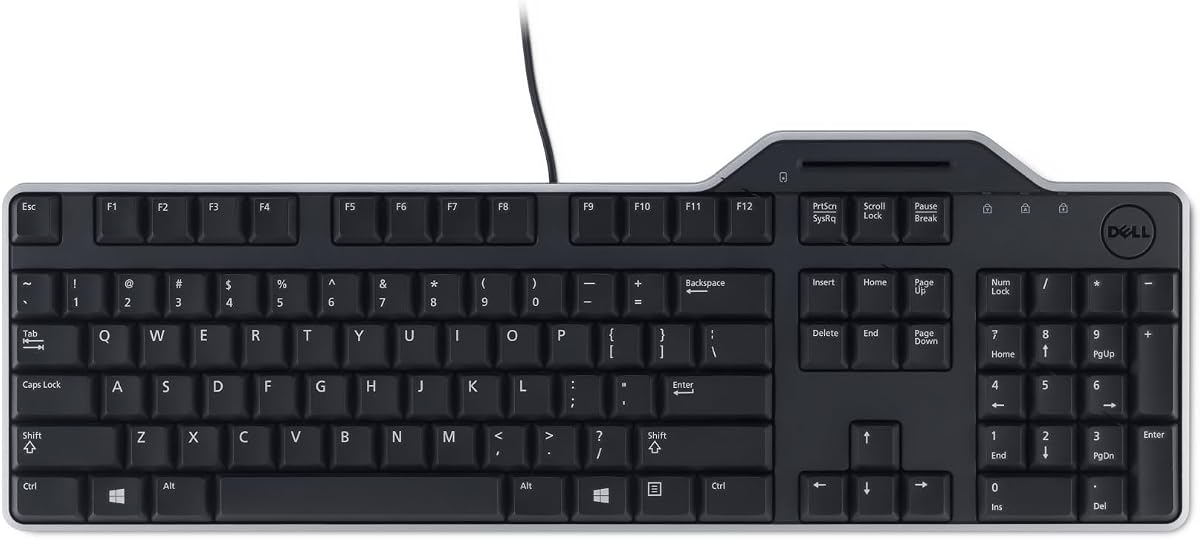
The Dell KB813 stands out as a top choice for secure office environments needing integrated authentication. It combines a standard typing experience with a built-in smart card reader for seamless login access.
We may earn a commission when you buy through this link, at no additional cost to you.
Its spill-resistant design protects against accidental liquid damage while the ergonomic layout supports comfort during long typing sessions. The detachable palm rest adds extra support for users who type extensively daily.
While it lacks wireless capabilities and flashy design elements, its focus on durability and security meets core enterprise needs effectively. Users benefit from reliable data transfer without battery dependencies.
This keyboard is ideal for government offices or corporations requiring consistent secure access. It balances practicality with essential security features for professional workstations needing reliable card authentication.
The built-in reader allows users to authenticate without needing separate external devices or dongles for card access.
Spill resistance and sturdy construction ensure the keyboard lasts longer in busy shared workspaces with frequent handling.
We may earn a commission when you buy through this link, at no additional cost to you.
The Adesso TruForm AKB-150SB-TAA is built for government procurement needs with strict Trade Agreement Act compliance. It integrates a secure smart card reader for trusted authentication across secure networks.
We may earn a commission when you buy through this link, at no additional cost to you.
Its split ergonomic design promotes natural hand positioning to reduce strain during prolonged use. Users also gain quick access to web tools via dedicated multimedia hotkeys positioned at the top row.
Though the split layout may require adjustment time and the cost is higher than basic models, the ergonomic benefits justify the investment. It supports multiple international smart card standards for broad compatibility.
This model suits federal agencies or contractors needing compliant hardware. It provides a balanced mix of security, comfort, and functionality for specialized procurement requirements today.
Designed specifically to meet US Trade Agreement Act specifications for reliable government and military supply chain procurement.
The split key zones and sloped shape encourage neutral wrist posture to minimize fatigue and long-term joint stress.
We may earn a commission when you buy through this link, at no additional cost to you.
The Cherry KC 1000 delivers high-level security with FIPS 201 and EMV 2000 Level 1 certifications for trusted data protection. It includes a dedicated chip card terminal for secure authentication needs.
We may earn a commission when you buy through this link, at no additional cost to you.
Its slim design and one-handed smart card module operation make it suitable for restricted desk spaces. The keyboard supports Windows, MacOS, and Linux drivers for flexible cross-platform deployment.
While it lacks extra media buttons and has a compact form that limits some standard typing comfort, its security focus is unmatched. The secure PIN entry ensures safe password input without shoulder surfing.
This keyboard is perfect for IT departments handling sensitive data requiring compliance standards. It offers a straightforward secure interface ideal for secure workstation setups needing certified hardware.
FIPS 201 and EMV approvals guarantee the device meets rigorous federal and financial industry security protocols.
The thin profile saves desk space while maintaining full functionality for secure login tasks in tight areas.
We may earn a commission when you buy through this link, at no additional cost to you.
The Adesso EasyTouch 130SB brings premium mechanical keyboard features to secure authentication tasks. It includes red switches for tactile feedback and a dedicated Copilot AI hotkey for productivity boosts.
We may earn a commission when you buy through this link, at no additional cost to you.
Large print keycaps improve legibility in low light conditions while the built-in reader supports secure banking and web login processes. With 50 million keystroke durability it withstands heavy daily use.
Users may find the mechanical switches louder than membrane types and the price higher than standard office models. The large keycaps also occupy slightly more space which might be tight in small desks.
This keyboard suits power users needing both typing performance and security compliance. It bridges modern productivity needs with robust authentication features for advanced workstation environments.
Dedicated Copilot hotkey enables instant AI assistance for coding or writing tasks without switching applications manually.
Large print keycaps and high contrast design support users with visual challenges for clearer key identification.
We may earn a commission when you buy through this link, at no additional cost to you.
The Dell Keyboard Smartcard USB offers an affordable entry point for secure office access with essential smart card functionality. It maintains the comfort users expect from standard Dell business keyboards.
We may earn a commission when you buy through this link, at no additional cost to you.
Its low-profile keys ensure quiet typing suitable for open offices while the full-size layout includes a numeric keypad for data entry tasks. The spill-resistant surface adds practical protection against daily accidents.
This keyboard lacks advanced ergonomic adjustments or multimedia keys but delivers reliable performance for everyday secure login needs. The wired USB connection guarantees consistent power without battery concerns for shared use.
Ideal for bulk deployments or tight budgets this model meets core security requirements. It provides solid build quality and essential smart card integration at a competitive price point.
This option delivers essential smart card integration without extra features that drive up the cost significantly.
Low-profile keys reduce typing noise to maintain a focused environment in open office spaces with nearby workers.
We may earn a commission when you buy through this link, at no additional cost to you.
The Kensington KB201C focuses on regulatory compliance for federal agencies requiring Common Access Card support. It meets TAA standards and includes robust smart card authentication features for secure network access.
We may earn a commission when you buy through this link, at no additional cost to you.
Users benefit from quiet-click keys that minimize noise and a full-size layout supporting efficient data entry. The keyboard comes with a three-year limited warranty for added peace of mind.
Its user rating reflects mixed feedback on comfort and build material quality compared to premium models. However for strict compliance needs it remains a practical choice for government procurement channels.
This keyboard is best suited for organizations needing verified compliance for security protocols. It offers a reliable entry point for teams requiring guaranteed standards adherence.
Ensures all security protocols meet federal mandates for Common Access Card and FIPS-201 authentication compliance.
Quiet-click key switches allow for peaceful typing that avoids disturbing nearby colleagues in shared workspaces.
We may earn a commission when you buy through this link, at no additional cost to you.
The Lenovo Smartcard Wired Keyboard II complements ThinkPad and business desktop setups with consistent aesthetic and functional standards. It includes essential smart card reader support for secure authentication protocols.
We may earn a commission when you buy through this link, at no additional cost to you.
Its standard US English layout ensures familiarity for users while maintaining a compact footprint on the desk. The lightweight build facilitates easy transport for hybrid work environments requiring secure devices.
Lacking spill resistance or multimedia keys limits its versatility compared to other options but it serves Lenovo users well. The straightforward design prioritizes essential typing and security without complexity.
This keyboard is ideal for teams standardizing on Lenovo hardware needing secure login solutions. It provides a reliable plug-and-play experience for dedicated enterprise workstation setups.
Designed to match Lenovo hardware standards for seamless integration with existing business workstation configurations.
Lightweight and compact build makes it easy to carry between office and home for hybrid secure work.
We may earn a commission when you buy through this link, at no additional cost to you.
The HP USB Business Slim Smartcard Keyboard emphasizes physical protection with its built-in spill drain system to protect internal electronics from liquid damage. It pairs this with standard membrane switches for quiet typing.
We may earn a commission when you buy through this link, at no additional cost to you.
Slim design saves desk space while LED indicators show lock states clearly at a glance. The six-foot cable ensures flexible placement even on larger desks or near wall outlets for connection.
Membrane switches may feel less responsive to tactile users but they deliver quiet performance for shared environments. The spill protection adds a practical layer of durability against everyday accidents in busy areas.
Ideal for general office environments prioritizing device longevity this keyboard balances basic needs well. It suits users seeking a secure simple layout without complex features or high costs.
Built-in spill drain channels liquids away from electronics to extend keyboard lifespan in high-risk work areas.
LED indicators provide immediate status visibility for Caps and Scroll Lock states without checking system settings.
We may earn a commission when you buy through this link, at no additional cost to you.
The Cherry Secure Board 1.0 supports both contact and contactless RF/NFC smart card authentication for versatile deployment. It includes secure encryption modes ideal for thin client environments needing high security.
We may earn a commission when you buy through this link, at no additional cost to you.
GS approval and ISO 7816 compliance ensure the keyboard meets strict German security standards for professional use. The design prioritizes data integrity through encrypted communication channels during authentication steps.
While powerful this model may be complex to configure for standard office users without specialized IT support. Its focus remains on high-security applications rather than general consumer typing comfort or features.
This keyboard is best for security-conscious organizations needing contactless card integration. It offers advanced protection capabilities for specialized workstation setups in regulated environments.
Supports both contact and RF/NFC cards for broader compatibility with modern digital identification systems and workflows.
Optimized for thin client architectures to enhance security without requiring heavy local processing resources.
We may earn a commission when you buy through this link, at no additional cost to you.
The NEW OEM Dell KB813t is an authentic replacement unit designed for seamless integration with Dell business systems. It includes all standard features including the essential smart card reader for secure login needs.
We may earn a commission when you buy through this link, at no additional cost to you.
As an OEM unit it matches original equipment specifications exactly ensuring reliable performance without unnecessary customization. The standard black design fits professional environments while maintaining a clean aesthetic.
Users should note this model focuses on core functionality rather than extra ergonomic or multimedia enhancements. It serves as a practical solution for replacing worn out hardware in corporate fleets.
Ideal for IT managers needing verified OEM replacements this keyboard delivers reliability and consistency. It meets baseline security requirements efficiently for existing Dell workstation deployments.
Guaranteed compatibility with Dell systems through authentic OEM specifications for reliable hardware replacement needs.
Streamlined design prioritizes essential typing and authentication without extra features that complicate deployment.
We may earn a commission when you buy through this link, at no additional cost to you.
Choosing the right keyboard with a smart card reader requires balancing security features ergonomic comfort and environmental durability for your specific work environment needs.
Look for keyboards that meet FIPS 201 or Common Access Card (CAC) standards to ensure compliance with federal or corporate security protocols. These certifications guarantee the smart card reader uses encrypted secure communication channels.
Always verify that the device supports the specific card standards your organization requires to avoid compatibility issues during deployment.
Since you may type for extended periods choose models with split key zones or wrist rests to reduce strain on your wrists and forearms. Good ergonomics prevent fatigue and long-term repetitive strain injuries.
Prioritize keyboards with adjustable tilt or soft-touch palm rests if you plan to use the device for eight or more hours daily.
Select units with spill-resistant construction or internal drain systems to protect against accidental liquid damage in busy workspaces. Membrane switches typically offer quiet operation while mechanical switches provide better tactile feedback for heavy typing.
Check the rated keystroke lifecycle to ensure the keyboard withstands frequent use without premature wear or key failure.
Most secure keyboards use wired USB connections to maintain power stability and reduce signal interference risks. Wireless options exist but may require additional authentication hardware or battery management for the reader module.
Ensure the cable length fits your desk layout so you do not face strain on the port or excessive clutter near the workstation.
Confirm that the keyboard supports your primary OS such as Windows macOS or Linux through provided drivers and software support. Cross-platform compatibility simplifies deployment across mixed-device environments.
Test the smart card reader functionality on your system before bulk purchase to verify driver stability and authentication speed.
Government and military procurement often require TAA compliance to ensure products meet US trade agreement standards. Verify the vendor documentation to confirm eligibility for federal contracting or specialized industry regulations.
Keep documentation ready for audits to prove the devices meet all required regulatory standards for secure authentication.
Standard full-size layouts with numeric keypads enhance productivity for data entry tasks while compact models save desk space. Large print keycaps or high-contrast text improve visibility for users with visual impairments.
Consider keyboards with dedicated hotkeys for common tasks to streamline workflow and reduce navigation time during secure sessions.
Look for products offering at least a one-year limited warranty to protect your investment against manufacturing defects or premature failure. Manufacturer support availability is crucial for resolving driver or authentication issues quickly.
Prioritize brands known for responsive customer service to minimize downtime if the smart card reader requires troubleshooting.
Connect the keyboard to your computer using the provided USB cable and ensure the smart card reader is properly seated and recognized by your operating system. Install any required drivers to enable authentication functionality.
Insert your smart card into the reader slot or hold it near the NFC zone to authenticate login credentials. Keep your hands dry to prevent damage to the card contacts during usage.
Clean the keyboard regularly with compressed air to remove dust and use a soft damp cloth to wipe spills before liquid penetrates internal components. Store the keyboard in a cool dry place when not in use.
Most models offer drivers for both Windows and macOS ensuring broad compatibility. However always check the product specifications to confirm your specific operating system version is supported for seamless functionality.
Prioritize keyboards certified for FIPS 201 or Common Access Card compatibility to meet government security requirements. These ensure the smart card reader handles authentication through encrypted secure channels.
Many business-grade keyboards feature spill-resistant designs to protect against accidental liquid damage. Look for models with built-in drain systems for added safety in shared workspaces.
Yes wireless options exist but they require careful authentication setup to prevent signal interference. Wired models are generally recommended for higher security needs due to stable physical connections.
Keep the reader slot clean of dust and debris using compressed air regularly. Avoid bending the card contacts and always store your smart card in a protective sleeve.
Quality models are rated for five to fifty million keystrokes depending on switch technology. Regular cleaning and gentle handling can extend their useful life significantly.
The Dell KB813 leads as the top overall choice for combining security with practical ergonomics. The Adesso EasyTouch 130SB offers premium mechanical features for power users needing AI integration.
Prioritize FIPS or CAC certifications based on your industry compliance needs. Ergonomic design and spill resistance remain critical for long-term user comfort and device protection.
Always verify current availability and pricing before purchasing to ensure you secure the best deal for your environment.