
Acer Gadget Auto Face Tracking Tripod
4.6Editor score
No app needed for tracking
Includes detachable mini ring light
Extends up to 64.4 inches
Finding the right AI Gimbal with Tripod can transform your mobile content creation journey. These devices combine stabilization with intelligent tracking and built-in support for hands-free shooting. Whether you are a vlogger or a traveler, having the right tool ensures your footage remains smooth and focused.
We have carefully evaluated ten leading products based on their stabilization quality, tracking accuracy, and versatility. Each entry in this list offers unique features like extension rods, fill lights, and app compatibility. Our goal is to help you find the perfect match for your specific shooting needs and budget constraints.
Each product review highlights key strengths and potential limitations to give you a clear picture. Prices and availability can change frequently so always verify the latest details before purchasing. This guide covers everything from budget-friendly options to premium bundles designed for professional mobile filmmaking workflows and daily use.
4.6Editor score

4.4Editor score

4.3Editor score
As an Amazon Associate we earn from qualifying purchases.
The following table provides a side-by-side comparison of all ten products featured in this guide. Review the specifications to understand the differences in tracking capabilities, battery life, and included accessories before making your final decision.




The Insta360 Flow 2 Pro is a standout choice for creators who demand advanced features. With a rating of 4.4 stars, it offers a seamless blend of stability and intelligence. Its Apple DockKit compatibility sets it apart by allowing native tracking in over 200 iOS apps.
We may earn a commission when you buy through this link, at no additional cost to you.
One of its most impressive capabilities is active zoom tracking, which maintains focus even at 15x zoom. This is perfect for capturing sports or performances from a distance. The multi-person tracking ensures entire groups stay framed, making it ideal for family gatherings or team events.
While the price is higher than many competitors, the included AI tracker and professional lighting justify the cost. The build quality is robust, and the 10-hour battery life supports full-day shoots without interruption. The free tilt mode adds a unique creative angle not found elsewhere.
Creators seeking the highest level of mobile filmmaking control should consider this bundle. It simplifies the workflow by removing the need for external tracking devices. For those invested in the Apple ecosystem, this offers the most integrated experience available today.
This feature allows the gimbal to control tracking directly within supported apps without needing the specific gimbal app open.
The system keeps your subject in focus even when you digitally zoom into the camera during recording.
We may earn a commission when you buy through this link, at no additional cost to you.
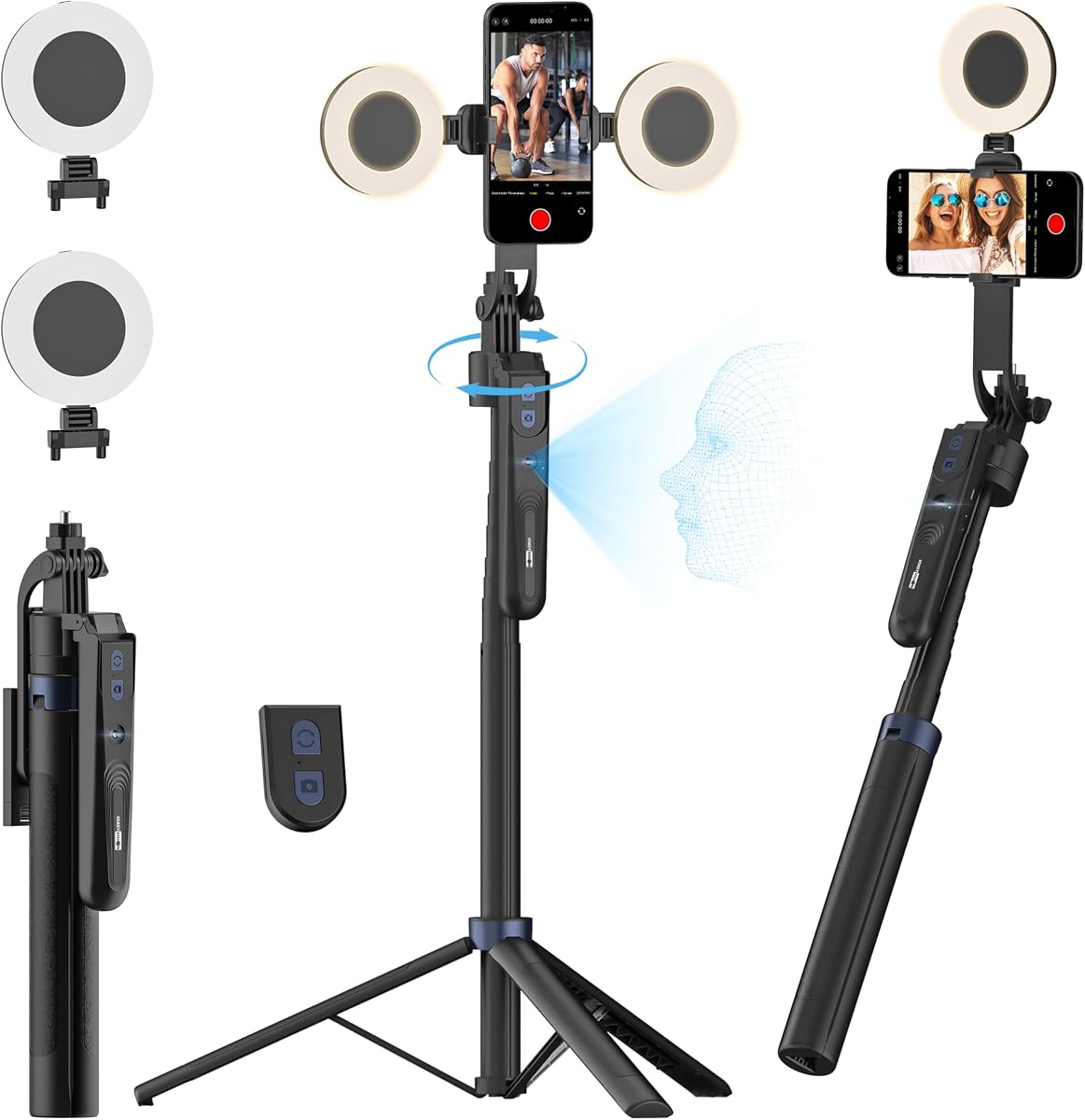
The Acer Gadget Auto Face Tracking Tripod offers exceptional value for those starting their content creation journey. It holds a high rating of 4.6 stars, reflecting its reliability and ease of use. Unlike many competitors, it does not require a specific app to function.
We may earn a commission when you buy through this link, at no additional cost to you.
Its standout feature is the ability to track faces directly without software intervention. This makes it incredibly simple to set up for live streams or recording sessions. The detachable remote control adds flexibility, allowing you to start and stop recording from a distance.
While it lacks the advanced app integration of premium models, its mechanical stability is impressive. The quad-foot design ensures the tripod remains steady even when fully extended. The included ring light provides adequate illumination for indoor settings without needing extra gear.
This is the ideal choice for beginners who want immediate results without a complex setup. It covers all the basics effectively at a fraction of the cost of high-end gimbals. If your primary goal is stable tracking without app friction, this delivers solid performance.
The device uses onboard sensors to recognize faces directly, meaning you do not need to download or open specific software.
It can be used as a desktop stand, a floor tripod, or a handheld stabilizer to suit different shooting environments.
We may earn a commission when you buy through this link, at no additional cost to you.
The DJI Osmo Mobile 8 stands out for its native tracking capabilities that include audio reception. With a 4.3 star rating, it offers a premium experience designed for serious content creators. The combination of tracking and audio handling makes it a comprehensive tool for solo vloggers.
We may earn a commission when you buy through this link, at no additional cost to you.
Its intelligent tracking lets you follow subjects freely while maintaining sharp focus. The built-in tripod and selfie stick add significant flexibility without requiring extra attachments. The ultra-comfortable grip reduces wrist strain during long shooting sessions, enhancing usability over time.
One limitation is the removal of the DJI Mimo app from Google Play, which requires manual downloads for Android users. However, the 10-hour battery life ensures you can shoot through long events without worrying about power. The one-tap editing feature simplifies post-production significantly.
For those needing a complete all-in-one solution with audio capabilities, this is a strong choice. It balances professional features with portability effectively. If you prioritize a smooth ecosystem experience and audio integration, this model is worth the investment.
The module allows you to connect a microphone directly to the gimbal while the AI tracks your movement simultaneously.
The gimbal allows continuous horizontal rotation to capture immersive pans without hitting mechanical limits.
We may earn a commission when you buy through this link, at no additional cost to you.
The AOCHUAN Smart V3 brings an impressive extension length to the market. Rated at 4.5 stars, it offers an extension rod that reaches up to 70 inches for high-angle shots. This makes it exceptionally useful for group photos where height and distance are important.
We may earn a commission when you buy through this link, at no additional cost to you.
Its intelligent image stabilization ensures smooth footage even when you are moving quickly. The detachable magnetic remote allows you to control the setup from up to 32 feet away. This feature adds a layer of convenience for solo shooters who need flexibility.
While it is bulkier than some compact models, the functionality it provides is robust. The fill light helps maintain image quality in low-light conditions. The gesture controls offer a hands-free way to start and stop recording without touching your phone.
If you need a tripod that extends significantly without needing separate gear, this is a compelling option. It is well-suited for travel and outdoor sports where reaching higher angles is necessary. Consider this if your workflow demands extended reach and remote control.
The rod extends to over 70 inches allowing you to capture high-angle group shots without a ladder or external stand.
You can detach the remote and place it on the ground to control the camera from a significant distance.
We may earn a commission when you buy through this link, at no additional cost to you.
This variant of the Flow 2 Pro is designed to be universally compatible with both Android and iPhone. It shares the powerful AI tracking features of the white model but maintains a versatile approach for different operating systems. The rating of 4.2 stars reflects its reliability and performance.
We may earn a commission when you buy through this link, at no additional cost to you.
Active zoom tracking allows you to get close-ups of fast action without losing focus. This is particularly useful for sports or dynamic events where distance changes quickly. The integrated professional lighting ensures your face is well-lit even in darker environments.
The inclusion of a teleprompter adds value for scripted content creators. It allows you to read text while recording without looking away from the camera. However, mastering all the creative modes may take some practice to utilize fully.
For creators who switch between devices or need a tool that supports all smartphones, this is a top contender. It balances professional features with broad compatibility. If you want the full suite of Flow 2 features without device restrictions, choose this bundle.
The system works seamlessly with both Android and iOS devices expanding your options beyond a single ecosystem.
You can attach a teleprompter to read scripts directly in front of the lens while recording.
We may earn a commission when you buy through this link, at no additional cost to you.
The Insta360 Flow 2 Plus offers a robust set of tools for modern creators. With a 4.2 rating, it excels in tracking multiple people simultaneously which is great for group content. It also includes animal tracking, making it perfect for pet videos.
We may earn a commission when you buy through this link, at no additional cost to you.
Second-screen control allows you to use another phone as a remote control or monitor. This is highly useful for framing shots accurately before you start recording. The AI editing tools in the app help you create highlights automatically from your footage.
While it requires specific apps to unlock its full potential, the tracking precision is excellent. The built-in tripod provides stability for long sessions without holding the device. The 10-hour battery life ensures you can work through extended periods of creative time.
If you often film groups or pets and want smart editing features, this model delivers well. It bridges the gap between hardware and software effectively. For those who value smart AI tools to simplify their workflow, this is a strong option.
The tracking system recognizes and frames all people in the shot automatically ensuring everyone remains visible.
The app analyzes your footage to automatically create short highlight clips set to music.
We may earn a commission when you buy through this link, at no additional cost to you.
The standard Flow 2 in grey offers a powerful set of features in a compact package. It shares the foldable design that makes it easy to carry in a bag. It has a 4.2 rating indicating solid performance for everyday use and travel.
We may earn a commission when you buy through this link, at no additional cost to you.
Its gesture control system is intuitive and responsive. You can start or stop recording simply by raising your hand. This hands-free operation is ideal for solo creators who need to manage the camera remotely. The multi-person tracking ensures groups stay in frame.
While it does not include some of the advanced Pro features like active zoom, it remains a versatile tool. The included remote control allows for precise adjustments without touching your phone. It is a reliable option for vlogs and travel videos.
If you want a balance of portability and smart features, this model fits well. It provides all the essential tools for stable and smart tracking. For creators looking for a compact travel companion, this is a convenient choice.
Simple hand movements allow you to start and stop recording without pressing buttons on the device.
The gimbal folds down to a small size that fits easily into a standard carrying case or bag.
We may earn a commission when you buy through this link, at no additional cost to you.
This bundle combines the Osmo Mobile 8 with a dedicated Mic Mini Transmitter for high-quality audio. With a 4.6 star rating, it offers superior audio and video stability. The Mic Mini allows you to receive wireless audio directly through the gimbal while tracking is active.
We may earn a commission when you buy through this link, at no additional cost to you.
The seamless integration means you do not need to manage a separate microphone setup. This simplifies your workflow and reduces cable clutter. The 3-axis stabilization ensures your video remains smooth even while you are walking and talking.
While the price is higher due to the included transmitter, the value is clear for creators who need crisp audio. The gimbal also includes built-in lighting to ensure your face is well-lit. It is a complete package for professional vlogs and interviews.
If audio quality is as important as video quality for your content, this bundle is excellent. It removes the need for a separate recording device. For those seeking a streamlined recording experience, this model is highly recommended.
The bundle includes a wireless microphone that connects directly to the gimbal for cleaner audio recording.
The gimbal can charge your phone while filming and also powers the mic transmitter when used.
We may earn a commission when you buy through this link, at no additional cost to you.
The DJI Osmo Mobile 7P offers a quick and easy setup with its magnetic design. With a 4.5 rating, it is praised for its seamless stability and user-friendly experience. The multifunctional module adds audio and lighting capabilities when attached.
We may earn a commission when you buy through this link, at no additional cost to you.
Its dual-lens enhanced tracking ensures accurate subject following even in dynamic scenes. The built-in extension rod and tripod allow for creative angles without extra gear. One-tap editing helps you produce polished videos quickly without extensive post-production effort.
While the module is a separate accessory in some configurations, the core gimbal is highly capable. The 10-hour operating time is sufficient for long travel days. It provides a robust solution for daily recording and live streaming needs.
For those who value ease of use and quick editing, this is a solid choice. It balances advanced features with practical daily usability. If you want a reliable tool that simplifies your workflow, this model is worth considering.
The magnetic design allows you to attach your phone quickly without using clamps or adjusting screws.
The app provides preset shot suggestions to help you capture professional-looking angles easily.
We may earn a commission when you buy through this link, at no additional cost to you.
The USKEYVISION tripod brings a versatile solution for mobile shooting. It is designed to be a 3-in-1 device that works as a desktop stand, selfie stick, and floor holder. With a 4.4 rating, it offers reliable performance for various use cases.
We may earn a commission when you buy through this link, at no additional cost to you.
Its auto face tracking allows it to rotate 360 degrees to follow your movements. This is particularly useful for live streaming on platforms like TikTok or YouTube. The dual detachable ring lights offer three color modes and three brightness levels.
While it does not offer the same stabilization as a mechanical gimbal, it provides good stability for static shots. The adjustable knobs allow you to set specific pitching angles for creative shots. It is a practical tool for home studios and vlogging.
If you need a versatile floor stand with lighting and tracking capabilities, this is a great option. It covers the basics of a home studio setup without requiring multiple purchases. For budget-conscious creators, it offers excellent value and functionality.
This device functions as a desk stand, a floor tripod, and a handheld selfie stick all in one unit.
Two separate lights provide even illumination and reduce shadows on your face during recording.
We may earn a commission when you buy through this link, at no additional cost to you.
Choosing the right AI Gimbal with Tripod requires understanding your specific needs and the features that matter most for your content style. This guide breaks down the key factors to consider before making a purchase.
Modern gimbals use AI to track faces or bodies. Look for models that offer reliable tracking even in challenging light conditions. Some advanced models support multi-person tracking which is essential if you frequently film groups.
Shooting sessions can last for hours so battery life is critical. Aim for a model that offers at least 10 hours of continuous use to avoid interruptions during long shoots. Ensure it also has charging capabilities for your phone if possible.
The built-in tripod is a crucial feature for hands-free recording. Check if the extension rod allows you to capture high or low angles comfortably. A stable tripod base ensures your video remains steady without needing a separate stand.
Integrated lighting helps maintain video quality in low-light environments. Some gimbals include fill lights that are essential for vlogging and live streaming. Check if the brightness and color temperature are adjustable to suit different scenes.
Ensure the gimbal works with your preferred recording apps. Some models offer native tracking across 200+ apps while others require a specific proprietary application. This affects how smoothly you can record directly within your social media platforms.
If you travel often or shoot on the go, a foldable and compact design is vital. A lightweight unit is easier to carry in a backpack. Consider the folded dimensions to ensure it fits comfortably in your travel gear.
Good video often requires good audio. Some premium models include built-in audio reception modules for microphones. This allows you to capture clear sound while tracking video without needing complex external wiring.
Controls like gestures or remotes enhance your ability to shoot solo. A detachable remote allows you to start recording from a distance. Gesture controls let you manage the camera without touching your phone which is useful for dynamic shots.
To get the best results always balance your phone on the gimbal properly before turning it on. Most models have a calibration process that ensures smooth movement and reduces motor strain during operation.
Keep your device clean by wiping it with a soft cloth after each use. Avoid exposing it to rain or excessive moisture as electronic components can be sensitive to water damage over time.
Store the gimbal in its protective case when not in use to prevent dust buildup. If you plan to store it for a long period ensure the battery is partially charged to maintain its health and longevity.
Not always. While many premium models like Insta360 and DJI offer native tracking in popular apps some require their own specific software. Always check the product details to see if it supports your favorite recording app directly.
A tripod provides a stable static base for your camera but does not move. A gimbal stabilizes the camera while it moves to prevent shaky footage. Some models combine both features allowing for stationary and moving shots.
Yes many of these models support live streaming on platforms like Instagram TikTok and YouTube. They allow you to move freely while keeping the camera focused on you for a professional look.
Most modern gimbals are designed for both iPhone and Android. However some advanced AI features like DockKit are exclusive to iOS. Always verify compatibility with your specific phone model before purchasing.
The tripod legs usually unfold from the handle. On models with extension rods you simply twist or pull to extend the handle to the desired height. Ensure the locking mechanism is secure before placing your phone.
Most magnetic clamps can hold phones with cases but very thick protective cases may affect balance. It is best to use a standard or slim case for optimal performance to ensure the phone sits balanced on the gimbal.
We have explored ten excellent options ranging from budget-friendly tripods to professional-grade gimbals with advanced AI tracking. Each model offers unique strengths depending on whether you prioritize battery life, app integration, or portability.
For creators who need a comprehensive tool for group shots and professional quality, the Insta360 Flow 2 Pro or DJI Osmo Mobile 8 are top contenders. If you are just starting, the Acer Gadget offers solid features at a budget-friendly price.
Remember to check current pricing and availability as deals can change frequently. Selecting the right tool will significantly improve the quality of your content and make your workflow more efficient for future projects.