
TP-Link TL-SG105
4.7Editor score
Five gigabit ethernet ports
Plug and play setup
Fanless metal design casing
This guide compares the top Eero Ethernet switch options for mesh networking including PoE gateways and gigabit switches to optimize your home or business
Finding the right Ethernet switch for your Eero mesh system is crucial for maximizing wired backhaul and connecting multiple devices efficiently without wireless interference or bottlenecks in your network setup.
We evaluated ten leading products ranging from dedicated Eero PoE gateways to third-party managed and unmanaged switches based on port speed, power delivery, ease of setup, and overall network performance metrics.
Each pick below highlights key strengths and trade-offs to help you choose the ideal hardware for your specific needs while noting that availability and pricing may fluctuate frequently on major retail platforms.
4.7Editor score

4.4Editor score

4.8Editor score
The following table provides a side-by-side comparison of all ten selected products highlighting their core specifications port counts and key capabilities to help you quickly identify the right fit for your network infrastructure needs.




The Amazon eero PoE Gateway stands out as a powerful all-in-one solution for users seeking a robust wired network foundation that also powers access points directly without extra hardware components.
We may earn a commission when you buy through this link, at no additional cost to you.
Its standout qualities include two 10 Gigabit Ethernet ports delivering speeds up to 9.4 Gbps and eight 2.5 Gigabit PoE ports capable of powering up to eight eero PoE 6 or six eero PoE 7 access points.
While the gateway offers significant speed and power advantages it requires a substantial upfront investment and is designed specifically to work seamlessly within the eero mesh ecosystem rather than generic setups.
Homeowners needing a centralized high-speed network that powers multiple access points efficiently should strongly consider this gateway as it simplifies infrastructure and reduces cable clutter significantly.
This device combines routing and switching capabilities eliminating the need for separate units and streamlining network management through a single intuitive interface accessible via the eero app.
With 140W of pooled power included it removes the need for individual power adapters for PoE devices making installations cleaner and more professional especially in office or commercial spaces.
We may earn a commission when you buy through this link, at no additional cost to you.
The TP-Link TL-SG105 is a reliable and cost-effective option for users needing basic wired connectivity expansion without requiring advanced configuration or Power over Ethernet capabilities for powered devices.
We may earn a commission when you buy through this link, at no additional cost to you.
Key strengths include its five gigabit Ethernet ports that support auto negotiation for optimal speed and a fanless metal design that ensures quiet durable performance suitable for home offices or small workspaces.
Its main trade-off is the limited port count and lack of management features but for basic connectivity needs this switch offers excellent value and dependability at an accessible price tier.
Budget-conscious users wanting to extend their network reliably with minimal fuss will find this switch meets their requirements perfectly while maintaining strong performance standards for everyday tasks.
No software installation or configuration is needed allowing users to simply connect cables and start using the switch immediately without technical expertise or setup time investment.
Innovative energy-efficient technology reduces power consumption while expanding network capacity helping users save money on electricity costs without sacrificing network performance or reliability.
We may earn a commission when you buy through this link, at no additional cost to you.
The NETGEAR 8 Port PoE Gigabit Ethernet Easy Smart Managed Switch offers a premium balance of performance and control for businesses or power users needing structured network management and reliable PoE delivery.
We may earn a commission when you buy through this link, at no additional cost to you.
Its key strengths include eight PoE+ ports providing a 62W power budget alongside easy smart managed capabilities for configuring VLANs and prioritizing traffic ensuring high quality performance for voice and video applications.
Although it commands a higher price than unmanaged switches the ability to manage network security and monitor ports offers significant value for environments requiring reliability and customization beyond basic connectivity.
Small businesses or advanced home users needing robust control over network traffic and power distribution will appreciate this switch's versatility and dependable performance in demanding network environments daily.
The intuitive software interface allows users to configure VLANs prioritize traffic with QoS and monitor ports easily making advanced network management accessible without enterprise level complexity costs.
Includes uninterrupted PoE and per-port controls for managed power delivery ensuring connected devices remain online even during minor power fluctuations or maintenance activities on the network.
We may earn a commission when you buy through this link, at no additional cost to you.
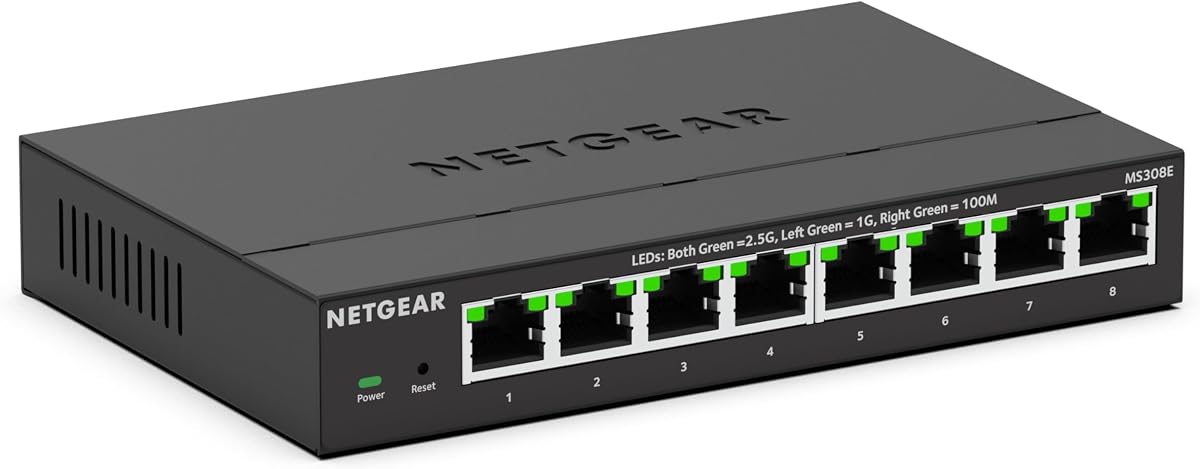
The NETGEAR 8-Port 2.5G Multi-Gig Ethernet Easy Smart Managed Switch delivers next generation wired speeds suitable for high bandwidth networks needing more than standard gigabit throughput for demanding applications.
We may earn a commission when you buy through this link, at no additional cost to you.
Key strengths feature eight 2.5G Ethernet ports supporting speeds beyond gigabit limits and easy smart managed capabilities that enable users to prioritize traffic and monitor network performance efficiently.
Its trade-off includes regional compatibility restricted to the US and Canada plus the need for appropriate cabling but for those within regions this switch offers superior speed and management features.
Users with internet plans exceeding 1Gbps or internal high speed storage networks will benefit from this switch's multi-gigabit capabilities while maintaining ease of use through intuitive management tools.
Auto-negotiating ports detect optimal speeds for connected devices ensuring maximum performance potential is realized without manual configuration when connected to 2.5G capable routers or PCs.
IEEE 802.3az Energy Efficient Ethernet reduces power consumption without compromising high-speed network performance helping lower electricity usage while maintaining fast reliable data transfer.
We may earn a commission when you buy through this link, at no additional cost to you.
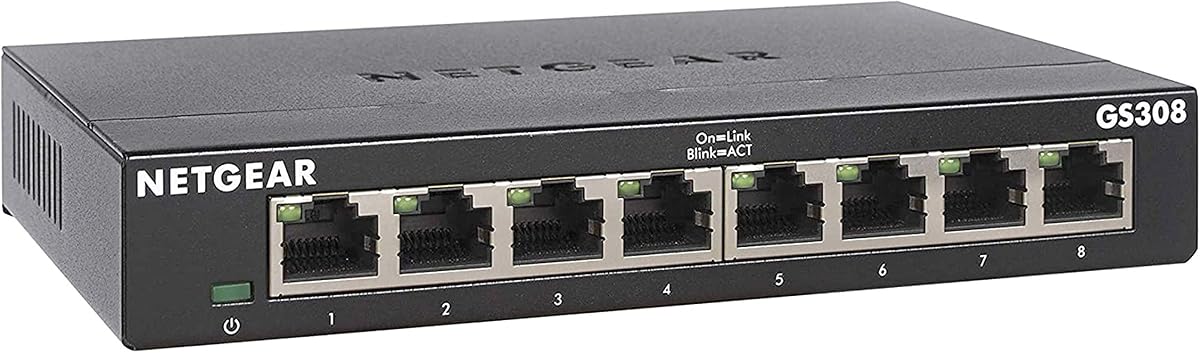
The NETGEAR 8-Port Gigabit Ethernet Unmanaged Network Switch provides a simple reliable solution for expanding wired connections with eight ports ensuring ample space for devices without complex setup requirements.
We may earn a commission when you buy through this link, at no additional cost to you.
Key strengths include fully auto-negotiating gigabit ports and a fanless metal design ensuring silent reliable performance suitable for both home offices and commercial environments needing consistent connectivity.
Its trade-offs include lack of PoE support and advanced management features which limits use cases to basic data connections but for general networking this switch offers strong reliability and value.
Users needing extra wired connections for PCs consoles or printers will find this switch an ideal upgrade delivering solid performance and flexibility with minimal effort or technical knowledge needed.
Compact metal design supports desktop or wall-mount placement for versatile installation allowing users to place the switch conveniently in any room or office space without clutter.
IEEE 802.3x flow control ensures reliable data transfer across all ports reducing packet loss and maintaining high performance even when multiple devices transmit simultaneously on network.
We may earn a commission when you buy through this link, at no additional cost to you.
The NETGEAR 5-Port Gigabit Ethernet Easy Smart Managed Network Switch offers a compact solution with basic network management features ideal for small offices needing organized traffic control without full enterprise complexity.
We may earn a commission when you buy through this link, at no additional cost to you.
Key strengths feature easy smart managed essentials to configure VLANs and prioritize traffic ensuring high quality video or voice data transmission on small business networks needing organized connectivity.
Its trade-offs include limited port count and some learning curve for management software but for environments needing organized network segmentation this switch delivers robust functionality in a small package.
Small business owners wanting to segment networks or prioritize traffic without investing in enterprise gear will find this switch provides essential management features in a reliable affordable compact device.
Port-based 802.1p/DSCP QoS guarantees high quality of video or voice data transmission ensuring critical applications perform smoothly even when network bandwidth is shared among many devices.
Compact metal design supports desktop or wall-mount placement ensuring the switch remains sturdy and reliable in various environments while maintaining a professional appearance on desks or walls.
We may earn a commission when you buy through this link, at no additional cost to you.
The Amazon eero Pro 6E mesh wifi router supports internet plans up to 2.5 Gbps and provides direct access to the new 6 GHz band when using Wi-Fi 6E devices for lower latency connectivity.
We may earn a commission when you buy through this link, at no additional cost to you.
Key strengths include wired speeds up to a gigabit and wireless speeds up to 1.6 Gbps enabling gigabit+ internet plans and network coverage up to 2000 square feet supporting 100+ connected devices.
While it requires a subscription for advanced security features and costs more than basic routers its TrueMesh technology and high capacity make it ideal for modern households needing comprehensive wireless coverage.
Users upgrading to Wi-Fi 6E standards wanting future proof connectivity with reliable wired ports will find this router delivers consistent performance and easy management through the eero app daily.
eero patented TrueMesh technology intelligently routes traffic to reduce drop-offs and dead spots ensuring reliable connectivity throughout your home even when multiple devices compete for bandwidth.
Use any single eero as a gateway to replace your current router or add it to your existing eero network to extend wifi coverage seamlessly across multiple rooms or floors.
We may earn a commission when you buy through this link, at no additional cost to you.
The Amazon eero 6 mesh wifi router covers up to 1500 square feet with wifi and supports wifi speeds up to 900 Mbps ensuring whole-home Wi-Fi 6 coverage for modern households needing reliable speeds.
We may earn a commission when you buy through this link, at no additional cost to you.
Key strengths include TrueMesh technology that intelligently routes traffic to reduce drop-offs and dead spots along with a built-in Zigbee smart home hub eliminating the need for separate smart home hubs.
Its trade-offs include lower maximum speeds compared to Pro models and limited wired ports which may require additional switches for extensive wired setups but offers excellent value for general wireless coverage.
Users needing reliable coverage without dead spots and built-in smart home integration will find this router provides a balanced solution delivering smooth video streaming and device connectivity effortlessly.
eero 6 connects compatible devices on your network with Alexa so there is no need to buy separate smart home hubs for each device simplifying your connected home setup significantly.
With cross-compatible hardware you can easily add eero products as your needs change allowing gradual network expansion without replacing existing routers or access points already installed.
We may earn a commission when you buy through this link, at no additional cost to you.
The Amazon eero PoE 7 tri-band Wi-Fi 7 mountable access point delivers wireless speeds up to 3.9 Gbps and features Power over Ethernet eliminating power cables for a cleaner install without sacrificing performance.
We may earn a commission when you buy through this link, at no additional cost to you.
Key strengths include one 10 GbE port and one 10 GbE PoE+ port delivering up to 9.4 Gbps of wired throughput as an access point or gateway supporting 200+ connected devices effectively.
While its high price and need for dedicated PoE infrastructure limit its appeal to advanced users or commercial deployments it offers cutting edge performance and cleaner installation for professional environments.
Businesses or tech enthusiasts needing maximum speed and minimal cabling will find this access point delivers unmatched throughput and reliability ensuring seamless performance for data-intensive workflows daily.
Tri-band wifi boosts multi-gigabit backhaul speeds for data-intensive workflows smooth video conferencing and smart home systems ensuring consistent performance across all connected devices simultaneously.
Proprietary TrueChannel and TrueRoam software helps avoid network interference and congestion so you stay connected to fast reliable wifi from room to room without interruptions or drops.
We may earn a commission when you buy through this link, at no additional cost to you.
The Amazon eero 7 dual-band mesh Wi-Fi 7 router helps you future-proof your network and make the most of Wi-Fi 7 performance starting today while supporting internet plans up to 2.5 Gbps.
We may earn a commission when you buy through this link, at no additional cost to you.
Key strengths feature two auto-sensing 2.5 GbE ports and wireless speeds up to 1.8 Gbps supporting 120+ devices and 2000 square feet of coverage ensuring plenty of reliable Wi-Fi 7 performance.
Its trade-offs include dual-band versus tri-band architecture but the inclusion of multi-link operation and TrueMesh software keeps you on the optimal most reliable wifi connection possible automatically.
Users seeking an affordable entry into Wi-Fi 7 with strong wired capabilities will find this router delivers solid performance and flexibility while backing connectivity with comprehensive support warranty coverage.
Wi-Fi 7 exclusive features like multi-link operation enable better performance by aggregating connections ensuring fast reliable data transfer even when single link speeds fluctuate or congest.
Use any single eero as a gateway to replace your current router or add it to your existing eero network to extend wifi coverage seamlessly without requiring complete system replacement.
We may earn a commission when you buy through this link, at no additional cost to you.
Choosing the right Ethernet switch for your Eero network depends on several key factors ranging from port speed and count to power delivery and network management capabilities needed for your specific setup.
Evaluate how many devices you need to connect and their required bandwidth whether using standard gigabit ports or multi-gigabit speeds for high performance needs to determine the minimum specifications.
Selecting a switch with extra ports and higher speeds than currently required ensures your network remains future-proof and avoids the need for frequent hardware upgrades as demand grows.
If you plan to connect powered devices such as access points or cameras ensure the switch supports PoE or PoE+ and provides sufficient total wattage to power all connected devices simultaneously.
A switch with integrated PoE reduces cable clutter and simplifies installation by eliminating the need for separate power adapters at each device location across your network.
Unmanaged switches offer plug and play simplicity suitable for basic home setups while managed switches provide traffic prioritization and security features ideal for businesses needing organized network control.
Assess whether you need advanced features like VLANs and QoS to prioritize critical traffic before deciding on a managed switch since they are more complex to configure.
Look for switches with durable metal casings and fanless designs to ensure reliable silent operation especially when placing the device in living spaces or offices where noise matters.
Flexible mounting options including desktop and wall mount provide installation versatility helping you place the switch conveniently without occupying valuable surface space or creating tripping hazards.
When integrating third party switches consider whether they work well with your existing Eero gateway or access points to avoid connectivity issues or limited performance on mesh networks.
Dedicated Eero PoE gateways offer seamless integration and optimized features but third party options may provide better cost efficiency if advanced Eero ecosystem features are not required.
Balancing cost against features is critical since premium switches offer advanced capabilities but basic unmanaged models meet most home needs at significantly lower prices.
Investing more upfront in quality hardware can reduce maintenance and replacement costs over time providing better long term value especially for critical network infrastructure.
Energy efficient switches reduce power consumption through intelligent power management features helping lower electricity bills while maintaining high performance and reliability for network operations.
Look for certifications like IEEE 802.3az Energy Efficient Ethernet to ensure the switch adapts power usage based on actual network load for optimized efficiency.
Reliable warranty terms and responsive technical support are essential to resolve potential issues quickly and maintain network uptime especially when relying on switches for critical connectivity.
Choose brands with proven track records for customer service and long warranties to protect your investment and ensure peace of mind regarding your network infrastructure.
Begin by connecting the switch to your primary router or gateway using an Ethernet cable ensuring the port used on the router supports the required speed for optimal performance.
Connect your devices to the available ports on the switch and verify link lights illuminate to confirm successful connections before configuring any advanced settings or network changes.
Keep the switch in a well ventilated area to prevent overheating and periodically check for firmware updates to maintain security and performance standards for your network.
Yes you can use a standard Ethernet switch with your Eero system to expand wired connectivity. Simply connect the switch to one of the Ethernet ports on your Eero gateway or router and plug your devices into the switch ports.
If you are using Eero PoE access points then a PoE switch is necessary to power them without separate adapters. However for standard Eero access points a regular switch suffices since they have their own power supplies.
Managed switches allow you to configure settings like VLANs and traffic prioritization while unmanaged switches work out of the box without configuration. Unmanaged switches are simpler for home use while managed switches offer control for businesses.
The number depends on the switch's port count. A five port switch supports five devices while eight port models support eight. You can connect additional switches to increase capacity further if needed.
Using an Ethernet switch does not increase your internet speed from your ISP but it can reduce wireless congestion and provide stable wired connections for devices which improves overall network performance and reliability.
Gigabit switches offer speeds up to 1Gbps while multi-gigabit switches provide 2.5Gbps or higher. Multi-gigabit is beneficial if you have internet plans exceeding 1Gbps or need faster local network transfers.
The Amazon eero PoE Gateway stands out for those wanting a seamless integrated solution while the TP-Link TL-SG105 offers excellent value for budget conscious users needing basic wired expansion.
Prioritize your needs by evaluating port count speed requirements and PoE support to find a switch that aligns with your network goals and ensures reliable connectivity for all your devices.
Remember that product availability and pricing may change so verify current details before purchasing to secure the best deal for your specific network setup and requirements today.