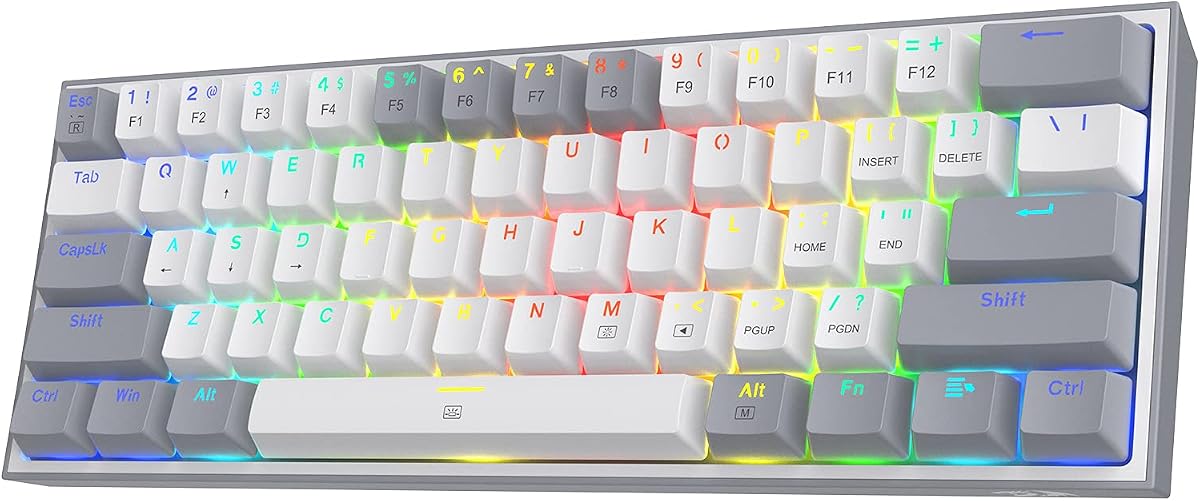
Redragon K617
4.6Editor score
Hot-swap switches
Compact 60 layout
RGB lighting modes
This guide compares the top 65 percent keyboards for gaming, evaluating layout, switches, and features to help you choose the perfect compact board.
Finding the right 65 percent keyboard for gaming means balancing compact size with essential controls. These boards save desk space while keeping arrow keys and navigation clusters. Gamers value them for efficient movement and a clean setup that supports long sessions comfortably.
We compared ten models based on build quality, switch types, connectivity options, and customization features. Our analysis includes wired and wireless designs across various price points. Each selection offers unique strengths for different gaming styles and desktop environments.
Each pick below highlights key performance traits, pros, and cons to guide your decision. Prices fluctuate frequently so check current listings before purchasing. Use this guide to find a board that matches your needs for speed and comfort.
4.6Editor score

4.5Editor score

3.9Editor score
This table provides a side-by-side comparison of all ten keyboards. Look for layout type, connectivity, and unique features to find the best match for your gaming setup.



The RK ROYAL KLUDGE R65 stands out as a top pick for gamers seeking a compact 65 percent keyboard with premium features. It features a gasket mount design that reduces noise and enhances typing comfort. Its hot-swappable switches allow for easy customization without soldering.
We may earn a commission when you buy through this link, at no additional cost to you.
This keyboard includes custom pre-lubed cream switches that offer a smooth and quiet typing experience. The PBT keycaps ensure durability and prevent shine over time. A high-quality aluminum volume knob adds functionality for quick audio adjustments during gameplay.
While it lacks wireless connectivity, the USB connection provides stable performance. The RGB lighting is vibrant and customizable through software. Some users may prefer more layout variations or a wider color range in future models.
If you want a reliable and customizable mechanical keyboard for gaming, this model delivers excellent value. Its combination of features and build quality makes it a strong choice for most users looking for a compact board.
The gasket mount and sound-absorbing materials reduce vibration for a smoother feel.
QMK/VIA support allows deep customization for macros and key assignments.
We may earn a commission when you buy through this link, at no additional cost to you.
The M65 brings wireless convenience to the 65 percent form factor. It connects via Bluetooth, 2.4GHz wireless, or USB-C. Its gasket mount design ensures a high-quality typing experience. The keyboard supports up to three devices for seamless switching.
We may earn a commission when you buy through this link, at no additional cost to you.
Cream switches provide a tactile feel without being too loud. The aluminum volume knob and vintage design add a unique aesthetic. The battery life supports long gaming sessions without frequent charging. PBT keycaps ensure long-lasting durability.
Some users might miss advanced software features like QMK/VIA. The price is higher than comparable wired models. However, the wireless freedom justifies the cost for many gamers.
Choose this keyboard if you value wireless flexibility and premium features. It suits users who need to switch between multiple devices regularly. Its design and performance make it a standout choice.
Switch between three devices easily with dedicated wireless buttons.
Enjoy up to 240 hours of use with RGB off.
We may earn a commission when you buy through this link, at no additional cost to you.
The Redragon K617 is an ideal entry-level keyboard for gamers on a budget. It features a compact 60% layout that maximizes desk space for mouse movement. The hot-swap sockets allow you to change switches easily without tools.
We may earn a commission when you buy through this link, at no additional cost to you.
Stock linear switches are quiet and smooth for a silent gaming environment. RGB lighting offers multiple modes to customize your setup. The keyboard is durable enough for daily gaming sessions and has a clean aesthetic.
Lacking dedicated arrow keys may be inconvenient for some users. The build quality is basic but sufficient for the price. It does not include wireless options or advanced software features.
This keyboard is perfect for beginners or those who prioritize value. If you need a simple and cost-effective solution for gaming, the K617 is a great start. It offers essential features without a high cost.
Get reliable mechanical typing at a price point most can afford.
Customize your typing experience by swapping switches effortlessly.
We may earn a commission when you buy through this link, at no additional cost to you.
The MK-Box is a portable keyboard designed for gaming and office work. It has 68 keys including arrow keys and function keys for full functionality. The blue switches provide a distinct click sound that many typists enjoy.
We may earn a commission when you buy through this link, at no additional cost to you.
Its compact size makes it easy to carry in a bag. The detachable USB cable helps with portability. LED backlighting offers basic modes without RGB complexity. The dual kickstand allows for adjustable typing angles.
It lacks RGB color options and wireless connectivity. The switch feel is loud which may not suit shared spaces. However, it remains a solid choice for budget users.
Choose this if you need a reliable and compact keyboard. It works well for travel or small desks. While basic, it offers essential features for the price.
Includes arrow keys for navigation without sacrificing too much space.
Compact build and detachable cable make it easy to transport.
We may earn a commission when you buy through this link, at no additional cost to you.
The Origins 2 offers unique customization with its drop-in housing system. You can change the look of your keyboard without buying a new one. It features hotswap sockets for switch changes and an 8k polling rate for fast response.
We may earn a commission when you buy through this link, at no additional cost to you.
The high-profile design elevates the keys for comfortable typing. HyperX NGENUITY software allows for key binding and macro recording. O-ring mounts improve acoustic performance and reduce wobble on stabilizers.
The high-profile form factor may not suit everyone. The price is higher than standard models. Yet, the flexibility makes it stand out among gaming keyboards.
Ideal for users who want to personalize their setup deeply. If you appreciate innovation in keyboard design, this is a strong option. It balances gaming performance with aesthetic customization.
Change the color of your keyboard quickly with drop-in housings.
8K polling ensures minimal input lag during intense gameplay.
We may earn a commission when you buy through this link, at no additional cost to you.
The RK68 offers both wireless and wired modes for flexibility. It features hot-swap sockets to change switches easily. The red switches are quiet and linear, ideal for open offices. It supports up to three devices for switching.
We may earn a commission when you buy through this link, at no additional cost to you.
The large battery provides long continuous usage. The 65% layout keeps arrow keys while staying compact. RGB lighting is bright with multiple dynamic modes. Software allows for key binding and customization.
It lacks a dedicated volume knob. The RGB is single-color blue not full spectrum. Despite this, it offers great value for multi-device users.
Best for users needing reliable wireless performance. It suits those who want silent keys without extra cost. Consider this for a balanced and practical gaming solution.
Quiet red switches allow typing without disturbing others.
Large capacity battery supports extended use without recharging.
We may earn a commission when you buy through this link, at no additional cost to you.
The Falchion Ace includes a unique interactive touch panel for volume and macros. It is designed to be compact yet feature-rich. ROG NX mechanical switches offer fast actuation and stability. The PBT keycaps provide a premium feel.
We may earn a commission when you buy through this link, at no additional cost to you.
The touch panel allows quick access to shortcuts and app switching. Stabilizers are lubricated to reduce friction. ROG software supports extensive customization. The build quality is solid with a minimalist design.
The touch panel may require time to master. The price is high compared to basic models. Still, it offers a distinct advantage for creative workflows.
Choose this for its unique features and build. It suits users who value innovation. If you like control beyond standard keys, this keyboard delivers.
Use the touch panel for quick adjustments without extra peripherals.
Lubricated stabilizers ensure smooth keystrokes on larger keys.
We may earn a commission when you buy through this link, at no additional cost to you.
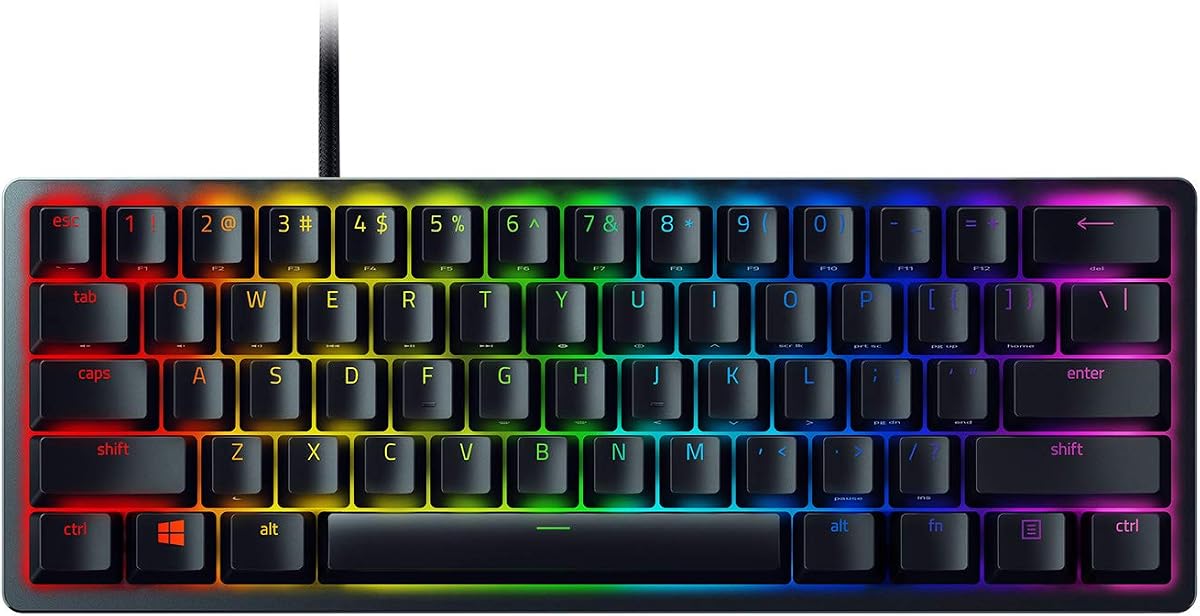
The Huntsman Mini uses optical switches for incredibly fast actuation. It is designed for competitive gaming where speed matters. Chroma RGB offers extensive lighting customization. The Snap Tap feature prioritizes directional inputs for FPS games.
We may earn a commission when you buy through this link, at no additional cost to you.
Its aluminum construction is durable and stable. PBT keycaps resist shine and wear over time. Synapse software supports deep customization for macros. It lacks arrow keys which may be a drawback.
If you need dedicated arrow keys, this may not work. The optical switches are loud. Yet, the performance is top-notch for serious gamers.
Best for players focused on reaction speed. The Snap Tap feature is a unique tool for movement. Consider it if you can adapt to a 60% layout.
Use light instead of metal contacts for faster signal.
Prioritize input for faster directional changes.
We may earn a commission when you buy through this link, at no additional cost to you.
The F65 is built for a rich and thocky sound profile. It features a gasket mount and five-layer sound dampening. Wireless connectivity includes Bluetooth and 2.4GHz. The large battery supports long usage without recharging.
We may earn a commission when you buy through this link, at no additional cost to you.
South-facing RGB ensures compatibility with Cherry profile keycaps. Hot-swap sockets allow full customization. The flex-cut plate adds to the typing feel. It includes robust software for macros.
The weight may be high for portability. Charging takes longer than standard models. However, the sound quality is exceptional for enthusiasts.
Ideal for users who value acoustic performance. It suits those who enjoy a tactile and satisfying typing feel. Choose this for a premium wireless experience.
Multi-layer dampening creates a deep and rich sound.
Extended battery life for long sessions on one charge.
We may earn a commission when you buy through this link, at no additional cost to you.
The V3 HE uses Hall Effect magnetic switches for adjustable actuation. It supports Rapid Trigger for quick reset of keys. The 8000Hz polling rate offers near-zero latency. This keyboard is designed for competitive esports players.
We may earn a commission when you buy through this link, at no additional cost to you.
You can adjust actuation from 0.1 to 4.0 mm. Snap Tap prioritizes directional inputs. PBT keycaps are durable. The Synapse Web setup allows customization without heavy software.
The price is a major drawback. Web-based setup might be slow for some users. However, the features are unmatched for competitive play.
Best for serious FPS players. The precision and speed are critical advantages. If you can afford it, this is a top tool.
Allows keys to reset faster than traditional switches.
Set the exact point to register a keystroke.
We may earn a commission when you buy through this link, at no additional cost to you.
Choosing the right 65 percent keyboard involves evaluating layout, switch type, and connectivity. This guide breaks down the key factors to consider before purchasing.
The 65 percent layout balances compactness with essential navigation. It includes arrow keys which many 60 percent boards lack. This makes it easier for gamers who need quick directional inputs without a full keyboard.
Mechanical switches come in linear, tactile, and clicky varieties. Linear switches are smooth and quiet for rapid gaming. Tactile switches offer feedback which some prefer. Choose based on your personal comfort and noise tolerance.
Hot-swap sockets let you change switches without soldering. This is useful if you want to customize your typing feel later. Look for boards that support both 3-pin and 5-pin switches for flexibility.
Wired keyboards offer stable connection and no charging. Wireless options add convenience and reduce clutter. Ensure the wireless version has a low latency 2.4GHz mode for gaming.
Materials like aluminum or steel provide durability. PBT keycaps resist wear better than ABS. Check for features like gasket mounting which reduces vibration and improves sound.
Software allows for macros and custom keybinding. Some boards support QMK/VIA for advanced customization. Ensure the software is user-friendly and compatible with your system.
RGB lighting adds aesthetic value and functionality. South-facing LEDs are better for custom keycaps. Check brightness levels and mode options to match your setup.
Prices range from budget to premium. Set a budget and prioritize features you truly need. Sometimes a mid-range board offers the best balance of quality and cost.
Start by connecting the keyboard to your PC and installing any required software. Calibrate the lighting and macros to suit your game settings. Ensure the switches are aligned properly.
Clean the keyboard regularly using a soft brush and compressed air. Use a microfiber cloth for the surface. Do not spill liquids. For PBT keycaps, mild soap and water can help maintain texture.
Store the keyboard in a dry place when not in use. If wireless, charge it periodically. For wired models, unplug gently to protect the cable. Regular maintenance extends the keyboard lifespan.
Yes, it is excellent for gaming. It saves desk space while keeping arrow keys. This layout allows fast movement and easy access to essential controls without clutter.
Linear switches are often preferred for gaming due to their smooth and quiet action. Clicky switches may be distracting in shared spaces. Tactile switches provide feedback that some gamers find helpful.
Hot-swap boards are worth it for long-term users. They let you try different switches without soldering. This saves money if you change your mind later.
Use a soft brush to remove dust. Compressed air can blow out debris. Wipe keycaps with a damp cloth. Avoid harsh chemicals that might damage the plastic.
Yes, it is suitable for work too. The compact size leaves room for a mouse. It keeps essential keys for navigation and function access which are needed for productivity.
Wired models provide stable connection and zero latency. Wireless models offer convenience but require charging. For competitive gaming, wired is preferred for reliability.
Basic functions work without software. Software is needed for macros and RGB customization. Some brands use cloud-based apps which are easy to install.
The top picks offer distinct strengths for gamers. The RK ROYAL KLUDGE R65 delivers overall value. The Huntsman V3 HE sets the standard for precision.
Prioritize features that match your gaming needs. If space is tight, choose compact layouts. If you need silence, opt for linear switches and dampening.
Prices change frequently so verify current offers. A 65 percent keyboard can greatly enhance your gaming setup with style and performance.