
Epson Workforce Pro WF-7820
3.7Editor score
High-speed printing
Dual-sided copy
Large paper capacity
Wireless connectivity
Compare the top A3 printers for home and office use. This guide reviews speed, quality, and features to help you choose the best wide-format printer today.
Finding the right A3 printer can transform your workflow by allowing you to print large documents, blueprints, and creative projects with ease. Whether you run a small business or manage a busy home office, having access to wide-format printing capabilities is essential for professional results. These machines handle everything from presentations to posters, ensuring your work looks sharp and polished every time you hit print.
We have carefully evaluated the leading models available on the market to bring you a curated list of the most reliable and efficient options. Our analysis focuses on print quality, speed, connectivity options, and long-term cost effectiveness. We looked at user feedback and technical specifications to ensure each recommendation meets the high standards expected by professionals and enthusiasts alike in today's competitive environment.
Each pick in this guide highlights specific strengths that cater to different needs, from budget-conscious buyers to those seeking premium performance. You will see detailed breakdowns of features, pros, and cons to help you make an informed decision. Please note that prices and availability can change frequently, so checking the current listings is always recommended before making your final purchase.
3.7Editor score

4.0Editor score

4.3Editor score
This side-by-side comparison highlights the key specifications and capabilities of the top ten A3 printers to help you quickly identify the model that fits your specific needs and budget.



The Epson EcoTank Photo ET-8550 stands out as a top choice for anyone needing high-quality wide-format printing without the hassle of frequent cartridge replacements. It features a unique six-color ink system that delivers vibrant colors and sharp text suitable for creative projects and professional photos. This printer is designed to handle everything from standard documents to large art prints with consistent accuracy.
We may earn a commission when you buy through this link, at no additional cost to you.
Its standout feature is the EcoTank system which uses high-yield ink bottles instead of traditional cartridges. This design reduces waste and significantly lowers the cost per page compared to standard inkjet models. The included ink lasts up to two years for typical use, ensuring you spend less time managing supplies and more time creating content.
While the upfront investment is higher than basic models, the long-term savings are substantial for high-volume users. Some users might find the physical size larger than expected, but the benefits of reduced maintenance and superior print quality outweigh this trade-off for most professionals.
This printer is ideal for photographers, designers, and small businesses that require reliable wide-format output. We recommend it for anyone seeking a balance between professional photo quality and everyday document printing without the ongoing cost of proprietary cartridges.
The EcoTank system eliminates the need for frequent cartridge purchases by using large refillable ink bottles that can last for years.
Claria ET Premium inks and a high-accuracy printhead ensure that every print is vibrant sharp and professional-grade.
We may earn a commission when you buy through this link, at no additional cost to you.
The Epson Workforce Pro WF-7820 offers an excellent entry point for businesses needing wide-format capabilities without breaking the bank. It delivers high-speed black prints and features a durable design suitable for heavy workloads in an office environment. This all-in-one unit handles printing scanning copying and faxing with ease.
We may earn a commission when you buy through this link, at no additional cost to you.
Its PrecisionCore Heat-Free technology ensures fast first-page-out times while consuming less energy than traditional laser printers. The DURABrite Ultra inks provide instant-dry results that are resistant to water and fading which is crucial for important documents. You can also benefit from a large 250-sheet paper capacity to minimize interruptions during bulk jobs.
The main limitation is that it relies on genuine Epson cartridges which can add to ongoing costs. The color print speed is also slower than the black speed which might impact productivity for color-heavy tasks. However for general office use the reliability and speed make it a solid contender.
We recommend this printer for small offices or workgroups that need reliable A3 output at a reasonable price. It is best suited for users who prioritize document speed and fax capabilities over high-volume photo printing.
The 50-sheet auto document feeder allows you to scan or copy multiple pages without manual intervention saving valuable time.
Epson Smart Panel app enables quick navigation and control from your mobile device for seamless remote printing.
We may earn a commission when you buy through this link, at no additional cost to you.
The Epson Workforce WF-7710 is engineered for professionals who demand high-quality borderless prints up to 13 by 19 inches. It features PrecisionCore technology that delivers sharp text and vivid colors perfect for marketing materials or creative projects. The design emphasizes productivity with automatic two-sided printing to reduce paper waste.
We may earn a commission when you buy through this link, at no additional cost to you.
A major advantage is the large 250-sheet paper tray which can hold up to 20 sheets of photo paper or 10 envelopes. This versatility means you do not need to swap trays frequently when switching between document and photo tasks. Connectivity options include Wi-Fi Direct and Ethernet ensuring reliable network integration.
The price point is significantly higher than standard office printers which may not suit every budget. The physical footprint is also substantial requiring dedicated space in your workspace. Despite these costs the performance and quality justify the investment for power users.
This model is perfect for print shops graphic designers or professionals needing borderless A3 prints regularly. If you require consistent high-fidelity output and can accommodate the size and cost this printer delivers exceptional results.
Support for envelopes and photo paper in the main tray reduces the need for manual adjustments during mixed jobs.
Wi-Fi Direct allows direct printing from devices without a router simplifying the process for remote or temporary setups.
We may earn a commission when you buy through this link, at no additional cost to you.
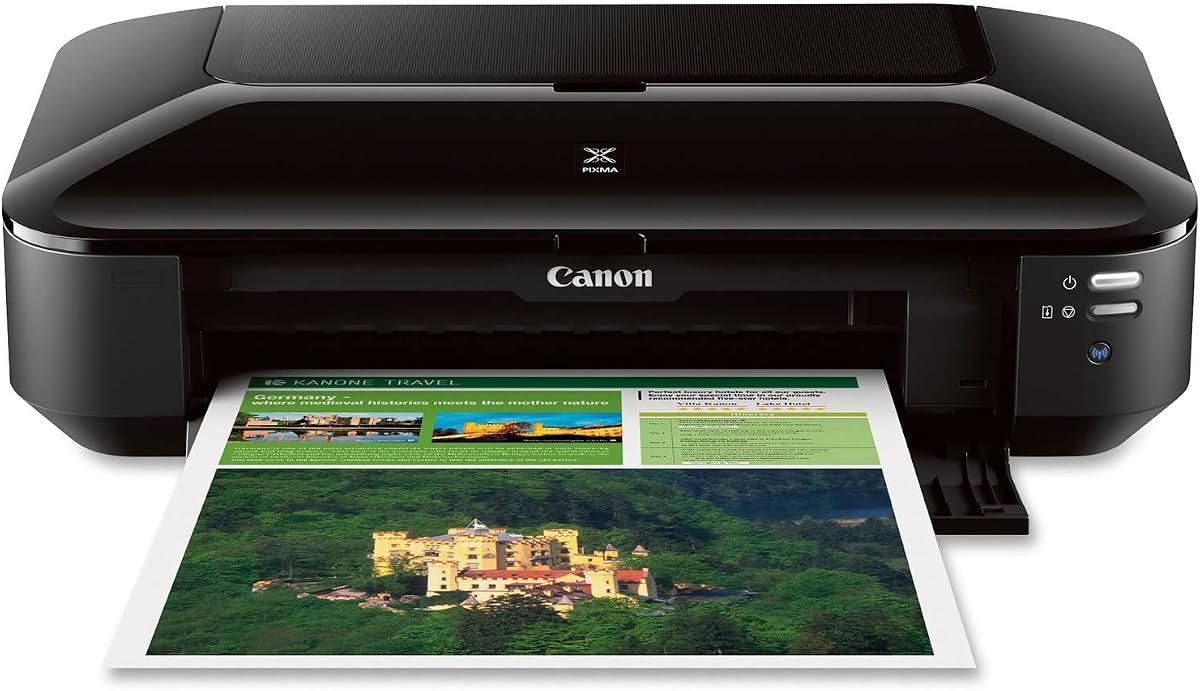
The Canon Pixma iX6820 is a versatile business printer designed for seamless integration with cloud services and mobile devices. It features fine print head technology that ensures precise dot placement for sharp text and detailed images. The five individual ink tank system allows you to replace colors independently reducing waste and cost.
We may earn a commission when you buy through this link, at no additional cost to you.
AirPrint compatibility makes it exceptionally easy to print from Apple devices without installing additional drivers. Google Cloud Print and Pixma Printing Solutions further extend its usability for modern workflows. The high resolution ensures that your documents look professional and polished every time.
Its 150-sheet auto sheet feeder is smaller than some competitors which might require more frequent refills for large jobs. Additionally being an older model it may lack some newer smart features found in recent releases. However it remains a reliable choice for basic wide-format needs.
This printer suits small offices or freelancers who rely heavily on cloud connectivity and mobile printing. If you need a reliable machine for standard A3 documents and value ease of use this model offers good value.
The five-ink system means you only replace the color that runs out keeping costs down and waste minimal.
Cloud compatibility lets you send print jobs from anywhere ensuring you can manage documents on the go.
We may earn a commission when you buy through this link, at no additional cost to you.
The Epson EcoTank ET-15000 is built for high-volume environments that need wide-format printing without frequent ink changes. It supports a monthly duty cycle of up to 33000 pages making it suitable for busy offices. The Supertank system provides affordable ink that keeps running costs low over time.
We may earn a commission when you buy through this link, at no additional cost to you.
Connectivity includes USB LAN and Wi-Fi ensuring flexible integration into various network setups. It handles printing faxing copying and scanning making it a complete office solution. The resolution up to 4800 by 2400 dpi ensures excellent readability for all types of documents.
Color printing speed is relatively slow at 9 ppm which may not suit urgent color document needs. The initial price is also significant requiring a budget that can handle the upfront investment. But for high-volume printing the efficiency gains are substantial.
We recommend this for offices with high daily print volumes that want to reduce long-term ink expenses. If reliability and cost per page are your primary concerns this model is a strong candidate.
Designed for heavy workloads the ET-15000 can handle thousands of pages monthly without performance degradation.
Built-in LAN support ensures stable connections for large office networks where Wi-Fi might be unreliable.
We may earn a commission when you buy through this link, at no additional cost to you.
The Epson Workforce Pro WF-7840 is designed to meet the demands of an office environment with reliable wide-format output. It features a 500-sheet capacity that allows for uninterrupted printing during busy periods. The DURABrite Ultra ink dries quickly to ensure smudge-free results ideal for handling documents immediately after printing.
We may earn a commission when you buy through this link, at no additional cost to you.
Epson Connect Solutions enable productivity on the go through email print and smart panel apps. You can print from almost anywhere using AirPrint or Android printing services. The wireless connection is robust and supports multiple device types without hassle.
The speed ratings are decent but not the fastest in this category compared to laser alternatives. You are also locked into Epson's proprietary ink system which can affect long-term costs. However the reliability and connectivity make it a solid office tool.
This printer is ideal for small to medium businesses needing a dependable all-in-one machine for wide documents. If you need consistent fax and scan capabilities with wireless ease this model fits well.
The instant-dry pigment inks prevent smearing allowing you to handle printed documents immediately.
Remote print apps let you manage jobs from your smartphone saving time and increasing office flexibility.
We may earn a commission when you buy through this link, at no additional cost to you.
The HP OfficeJet Pro 9135 brings artificial intelligence to the table by optimizing print formatting for web pages and emails. It supports single-pass duplex scanning which doubles efficiency compared to traditional duplex scanners. The dual-band Wi-Fi ensures a stable connection even in congested office environments.
We may earn a commission when you buy through this link, at no additional cost to you.
HP AI technology automatically removes unwanted content ensuring your prints are clean and professional. The 4.3-inch touchscreen provides a phone-like interface that is intuitive and easy to navigate. It also supports a 3-month trial of Instant Ink to help manage supply costs.
The system locks out non-HP chips which means you must use genuine cartridges or the Instant Ink service. This can limit flexibility for users who prefer third-party options. The initial subscription requirement is a trade-off for the convenience of automatic delivery.
We recommend this for offices looking to modernize with smart features and reduce manual formatting tasks. If you appreciate automated efficiency and want a secure reliable printer this model is a great pick.
HP AI adjusts layouts automatically to prevent wasted pages and awkward formatting in your documents.
Single-pass duplex scanning allows you to scan two sides at once saving significant time on document prep.
We may earn a commission when you buy through this link, at no additional cost to you.
The Brother INKvestment MFC-J6960DW offers impressive speed and ink capacity for small businesses needing wide-format printing. It prints up to 11 by 17 inches with speeds of up to 31 pages per minute in black. The MAXIDRIVE technology helps maintain consistent output even during heavy loads.
We may earn a commission when you buy through this link, at no additional cost to you.
It includes a trial for a refresh subscription which delivers ink automatically to your door before you run out. The 500-sheet capacity combined with a 100-sheet multipurpose tray provides excellent flexibility for different paper types. Connectivity includes wireless Ethernet and USB for broad compatibility.
While the color output is professional it is optimized for documents rather than high-end photography. The ink system uses specific cartridges that may limit compatibility if you look for alternative options. Still the value and speed are competitive.
We recommend this for small businesses prioritizing speed and supply management. If you want a reliable machine that keeps up with demand without constant maintenance this model is worth considering.
The refresh subscription ensures you never face downtime due to empty ink cartridges by ordering automatically.
Cloud apps like Google Drive and Dropbox are accessible directly from the printer's touchscreen for easy file retrieval.
We may earn a commission when you buy through this link, at no additional cost to you.
The Epson Workforce WF-7710 is engineered for professionals who demand high-quality borderless prints up to 13 by 19 inches. It features PrecisionCore technology that delivers sharp text and vivid colors perfect for marketing materials or creative projects. The design emphasizes productivity with automatic two-sided printing to reduce paper waste.
We may earn a commission when you buy through this link, at no additional cost to you.
A major advantage is the large 250-sheet paper tray which can hold up to 20 sheets of photo paper or 10 envelopes. This versatility means you do not need to swap trays frequently when switching between document and photo tasks. Connectivity options include Wi-Fi Direct and Ethernet ensuring reliable network integration.
The price point is significantly higher than standard office printers which may not suit every budget. The physical footprint is also substantial requiring dedicated space in your workspace. Despite these costs the performance and quality justify the investment for power users.
This model is perfect for print shops graphic designers or professionals needing borderless A3 prints regularly. If you require consistent high-fidelity output and can accommodate the size and cost this printer delivers exceptional results.
Support for envelopes and photo paper in the main tray reduces the need for manual adjustments during mixed jobs.
Wi-Fi Direct allows direct printing from devices without a router simplifying the process for remote or temporary setups.
We may earn a commission when you buy through this link, at no additional cost to you.
The HP OfficeJet Pro 9730 is designed for offices that need vibrant and screen-accurate wide-format prints. It features the world's first wide-format printer with P3 color gamut ensuring your designs look exactly as intended. The 11 by 17 inch ADF handles large documents efficiently with single-pass duplex scanning.
We may earn a commission when you buy through this link, at no additional cost to you.
HP Wolf Pro Security protects your data from cyber threats which is vital for businesses handling sensitive information. The 4.3-inch touchscreen makes navigation simple and supports dual-band Wi-Fi for reliable connectivity. HP AI optimizes formatting so your prints always look neat and professional.
The Instant Ink subscription is convenient but locks you into HP's ecosystem and limits third-party options. Firmware updates can enforce these restrictions making it difficult to use non-genuine cartridges. This trade-off is often accepted for the security and automation benefits.
We recommend this for offices prioritizing color accuracy and data security. If you need precise output and robust protection this model is a strong choice for professional work.
The P3 color gamut provides a wider range of colors ensuring prints match your screen for precise design work.
HP Wolf Pro Security safeguards your network and data giving you peace of mind in a connected office environment.
We may earn a commission when you buy through this link, at no additional cost to you.
Selecting the right A3 printer involves evaluating several key factors that affect performance cost and suitability for your specific needs.
Print quality is crucial for ensuring your documents and photos look professional. Look for printers with high DPI settings like 4800 x 2400 dpi or higher to get sharp text and vibrant colors. PrecisionCore or similar technologies often deliver more consistent results than standard inkjet engines.
Prioritize models with high DPI and advanced engine tech to guarantee professional-grade output for all your wide-format projects.
Speed affects how quickly you can finish large jobs. Check the ppm ratings for both black and color printing since color is often slower. Fast first-page-out times are also important for reducing wait periods between tasks.
Select printers with high ppm ratings to ensure you can meet tight deadlines without unnecessary delays.
Decide between traditional cartridges and tank systems. Cartridge systems have lower upfront costs but higher per-page expenses. Tank systems like EcoTank offer much lower costs per page and reduce waste.
Choose a tank system for high-volume needs and cartridges for occasional use to save money long-term.
Modern offices require flexible connectivity. Wi-Fi Ethernet and AirPrint compatibility are essential for seamless printing from various devices. Wi-Fi Direct allows printing without a network which is useful for temporary setups.
Ensure the printer supports Wi-Fi AirPrint and Ethernet to accommodate different devices and work styles.
A large paper tray reduces the frequency of refills which saves time during busy periods. Look for models with at least 250 sheets or higher for better productivity. Some models support special trays for envelopes and photo paper.
Opt for printers with large trays and versatile paper support to minimize interruptions during work.
Consider if you need scanning copying and faxing capabilities. An all-in-one unit consolidates multiple devices saving space and money. Auto document feeders make scanning multi-page documents much easier.
Choose an all-in-one model if you need scanning or faxing to streamline your office workflow.
For businesses data security is paramount. Look for features like HP Wolf Pro Security or secure wireless protocols. These features protect your documents from unauthorized access and cyber threats.
Prioritize models with strong security protocols to protect sensitive business data.
Mobile apps and cloud integration enhance flexibility. Apps like Smart Panel or HP Smart allow you to manage tasks remotely. Cloud support lets you print directly from services like Google Drive.
Choose printers with robust mobile apps to maintain productivity even when you are away from your desk.
Keep your printer in a cool dry place away from direct sunlight to maintain optimal performance. Dust and humidity can clog printheads or damage internal components. Use the printer regularly to prevent ink from drying out in the nozzles.
Run the built-in cleaning utility if you notice gaps in prints or faded text. This ensures the printhead remains clear and ready for high-quality output. Always use the recommended paper type to avoid jams and maintain print quality.
Update firmware periodically to ensure security and feature availability. Check the manufacturer's website or app for notifications. If you use a tank system refill ink only when the sensor indicates low levels to avoid air entering the system.
An A3 printer can handle paper sizes up to 11 by 17 inches or 13 by 19 inches. It is ideal for architects engineers designers and businesses that need to print blueprints posters or large spreadsheets.
Generally yes the upfront and ink costs can be higher than standard models. However tank systems significantly reduce the cost per page making them more affordable for high-volume users over time.
Yes you can print standard sizes like A4 or Letter on A3 printers. The extra paper capacity ensures that even regular documents look sharp and professional.
Most modern A3 printers support wireless printing via Wi-Fi Ethernet and mobile apps. This allows you to print from smartphones tablets or laptops without needing a physical connection.
It depends on your volume and the system. Tank printers can last up to two years with regular use while cartridge models may need replacement after hundreds of pages.
Turn off the printer and check the paper tray for misaligned sheets. Use the recommended paper type and do not overload the tray to prevent jams.
Many models include a flatbed or large feeder for scanning up to 11 by 17 inch documents. Check the specifications to ensure the scanner matches your needs.
Yes most manufacturers offer a one-year limited warranty that covers defects and malfunctions. Extended warranties are available for additional coverage beyond the initial term.
We have reviewed ten top A3 printers ranging from budget-friendly options to premium models designed for high-quality output. Each model offers unique strengths such as low-cost tank systems fast speeds or advanced AI features.
When choosing consider your specific needs such as print volume required features and budget. Tank printers save money long-term while models with advanced connectivity suit mobile workflows best.
Always check the latest prices and availability before purchasing as deals change frequently. This guide helps you narrow down the best choice for your workspace.