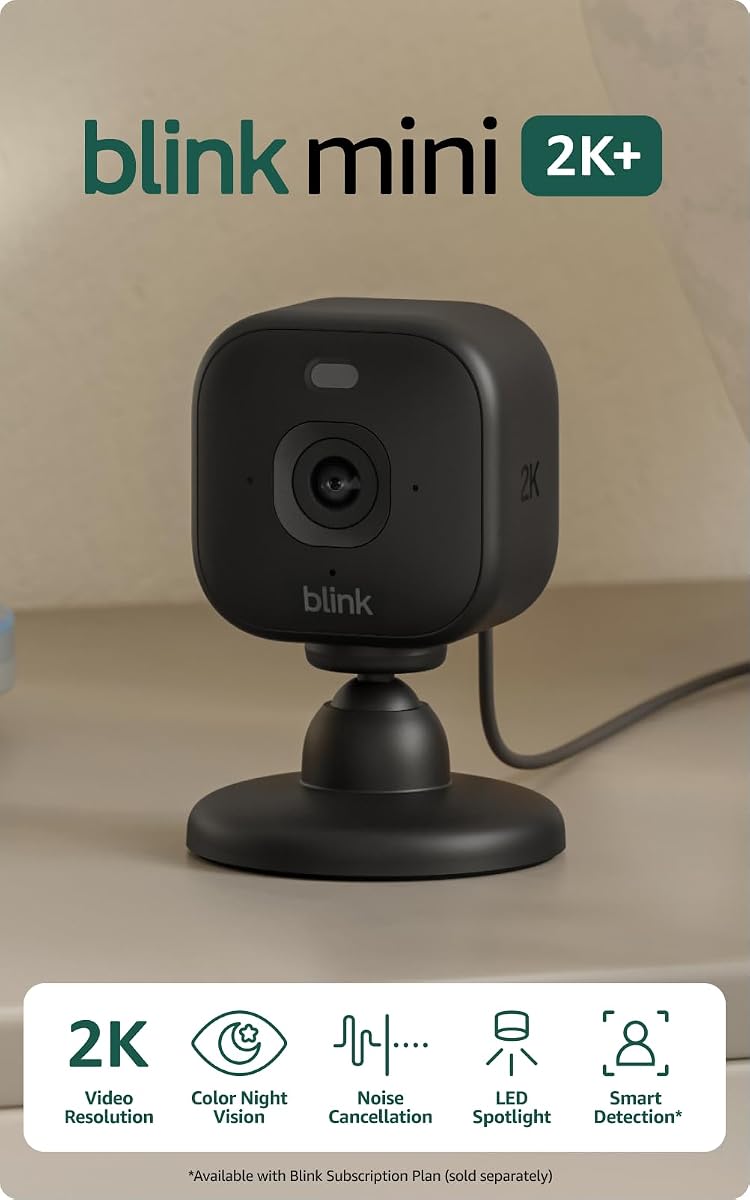
Blink Mini 2K+
4.4Editor score
2K video resolution clarity
Plug-in power source
Two-way audio communication
Compact indoor design
Discover the top Airbnb security cameras for October 2026. We compare ten reliable models with video quality, smart alerts, and privacy features for hosts.
Securing your rental property is essential for peace of mind. A reliable Airbnb security camera helps monitor entryways and common areas without invading guest privacy. It ensures safety while maintaining trust with your visitors.
We evaluated ten top-rated models based on video clarity, storage options, and ease of use. Each camera offers unique features like night vision, motion detection, and two-way audio. Our analysis focuses on value and performance for short-term rentals.
Every pick highlights key strengths and potential trade-offs for hosts. These cameras help you manage access and deter incidents effectively. Remember that prices and availability change frequently, so verify details before purchasing your ideal security solution today.
4.4Editor score

4.7Editor score

4.5Editor score
This table provides a side-by-side overview of the ten selected security cameras. Compare their video resolution, battery life, storage options, and key smart features to find the right match for your rental property needs.


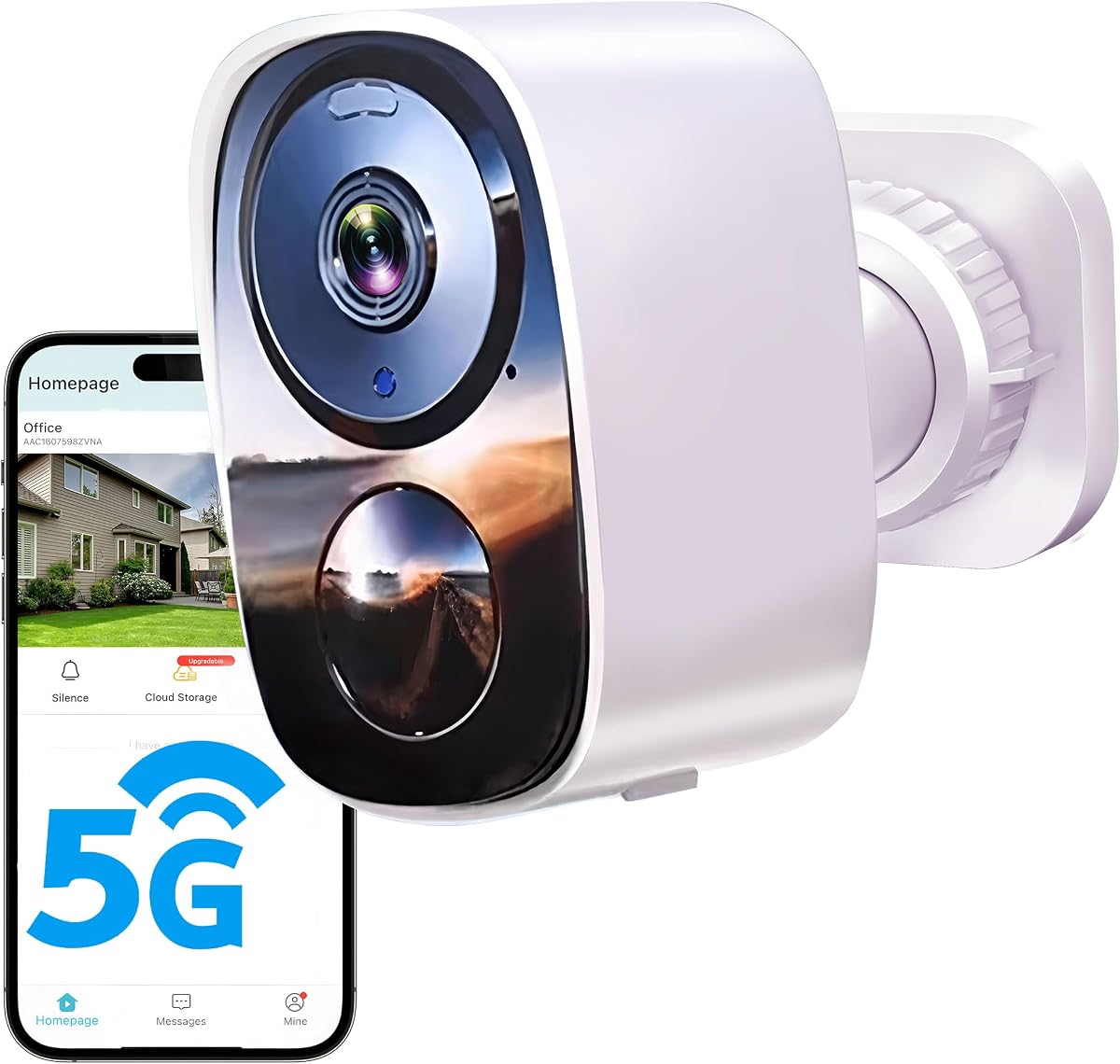
The Ring Indoor Cam stands out as a top choice for hosts needing reliable indoor monitoring. With a rating of 4.7, it delivers clear 1080p HD video and color night vision to keep an eye on common areas day or night.
We may earn a commission when you buy through this link, at no additional cost to you.
Its standout feature is the manual privacy cover, allowing you to ensure privacy when guests are in private spaces. Live View and two-way talk help you communicate instantly, while AI alerts reduce false positives from pets or shadows.
The main trade-off is that cloud storage requires a separate Ring Protect subscription. While local recording isn't available, the app interface is intuitive, making it easy to access history or download clips when you need them.
Hosts seeking a trusted brand with strong smart home integration should buy this. It balances performance, ease of use, and guest privacy features better than most competitors in the indoor security category for rentals.
The manual privacy cover lets you physically block the lens and mic during private moments, building trust with your guests while still keeping the unit ready for security checks.
Access live feeds in real time with 1080p HD resolution. The camera offers a clear view of entrances and living spaces, ensuring you can spot any activity without delays.
We may earn a commission when you buy through this link, at no additional cost to you.
The Blink Mini 2K+ offers exceptional value for hosts needing multiple indoor cameras. Rated 4.4, it provides sharper 2K resolution than many budget models, letting you see details like faces or packages with clarity.
We may earn a commission when you buy through this link, at no additional cost to you.
Its compact design blends into decor while the enhanced audio with noise cancellation makes conversations clearer. Two-way talk feels natural, and motion detection alerts keep you informed without constant checking of the app.
While smart person detection requires a subscription, basic recording features are accessible with a free trial. The need for a power outlet limits placement options compared to battery models but ensures continuous operation.
This kit is ideal for hosts wanting affordable dual-camera coverage. You get more resolution and audio quality per dollar than most competitors, making it a smart choice for monitoring high-traffic indoor zones.
Purchasing this kit gives you two cameras ready to monitor multiple rooms. This dual setup ensures broader coverage of your property without doubling the setup effort or cost.
The 2K video resolution captures more detail than standard 1080p models. Zoom in to identify faces or small items clearly, enhancing your ability to review incidents accurately.
We may earn a commission when you buy through this link, at no additional cost to you.
The eufy Security 4K Indoor Camera delivers top-tier performance with no subscription fees. Rated 4.5, its 4K recording captures fine details, while local storage keeps your data private and cost-effective over time.
We may earn a commission when you buy through this link, at no additional cost to you.
Pan and tilt capabilities plus AI auto-tracking ensure you don't miss movement across the room. The spotlight helps with color night vision and deters visitors, while smart home integration offers flexible control.
The main downside is the higher initial price compared to basic models. However, avoiding monthly costs makes it affordable long-term. You also sacrifice outdoor versatility since it is designed strictly for indoor monitoring.
Invest in this if you want the highest clarity and privacy. It suits hosts who prioritize premium video quality and prefer keeping footage locally without recurring payments for cloud services or storage.
Store footage locally on an SD card without needing a cloud plan. This feature saves money over years while ensuring your data remains under your own control.
Capture every detail with 4K resolution. Whether it is a guest or an incident, the image quality allows precise identification without grainy or blurred footage.
We may earn a commission when you buy through this link, at no additional cost to you.
This dual-pack offers unique window-mounted placement for entry monitoring. While a user rating isn't available yet, its 3MP resolution and color night vision promise clear footage even in low light conditions around your property.
We may earn a commission when you buy through this link, at no additional cost to you.
The magnetic mount simplifies installation without drilling, keeping your walls intact. Two-way audio lets you communicate with visitors, and motion detection alerts help you track access to windows or patios easily.
Local microSD or cloud storage gives you flexibility, but the camera depends on nearby WiFi and a window surface. It is less ideal for remote spots away from power or network connections.
Hosts with windows needing quick setup will find this useful. The 2K resolution adds value, and the two-pack ensures you can monitor multiple entry points simultaneously without major structural changes.
Use the magnetic mount to place cameras on windows without drilling holes. This keeps your property in pristine condition while still securing key entry points for monitoring.
Capture full-color video in darkness using advanced night vision. This helps identify details that traditional black-and-white cameras might miss in low light scenarios.
We may earn a commission when you buy through this link, at no additional cost to you.
This four-camera set covers large outdoor areas effectively. Rated 4.3, it offers 2K video and weather resistance, making it suitable for driveways, yards, and fences where constant monitoring is needed.
We may earn a commission when you buy through this link, at no additional cost to you.
Battery power allows flexible placement away from outlets, and the siren adds deterrence. Local and cloud storage options mean you can choose how to keep records based on your privacy preferences.
The reliance on 2.4GHz WiFi may limit speed in some homes. Regular charging cycles are necessary for peak performance, though the long standby time minimizes interruptions to your security routine.
Use this for extensive outdoor monitoring needs. Four cameras provide broad coverage, and the mix of battery and power options gives you adaptability for different areas around your rental property.
With four cameras in one system, you can monitor multiple zones simultaneously. This ensures no blind spots on your perimeter, enhancing overall property security.
An integrated siren and white light alarm deter intruders immediately when motion is detected. This active response helps protect your property beyond just recording footage.
We may earn a commission when you buy through this link, at no additional cost to you.
The Blink Outdoor 4 impresses with a two-year battery life. Rated 4.1, it is designed for hassle-free outdoor monitoring with 1080p HD video and a wireless design that fits any location.
We may earn a commission when you buy through this link, at no additional cost to you.
Its enhanced motion detection ensures you get relevant alerts, while person detection via subscription helps filter out irrelevant activity. The Sync Module Core included manages connections effectively for three cameras.
Local storage isn't included with the base unit, requiring cloud use. Plus, the 1080p resolution is standard compared to newer 2K models, which might limit detail in low-light conditions.
This system suits hosts wanting minimal maintenance. The long battery means fewer charging interruptions, making it reliable for remote areas or hard-to-reach spots around your rental property.
The two-year battery life means you rarely need to swap cells. This convenience reduces maintenance needs and keeps your outdoor coverage consistent over long periods.
Place cameras anywhere without worrying about power outlets. The battery power gives you flexibility to cover patios, decks, or distant entry points easily.
We may earn a commission when you buy through this link, at no additional cost to you.
The Ring Outdoor Cam handles various weather conditions well. Rated 4.5, it brings reliable HD video and color night vision to outdoor spots, ensuring visibility around your driveway or porch.
We may earn a commission when you buy through this link, at no additional cost to you.
Its rechargeable battery means you can move it easily as needs change. Two-way talk allows you to address visitors remotely, and the Ring app keeps all devices in one simple interface.
Subscription plans are needed for saved clips, similar to other Ring products. Also, the battery may drain faster in high-traffic areas, requiring occasional recharging to stay functional year-round.
Choose this for adaptable outdoor security. The weather resistance ensures durability, and the Ring ecosystem makes it easy to expand or manage other devices alongside this camera.
Mount on walls or place on flat surfaces with ease. The design fits various spots around your property, ensuring you cover key areas effectively.
Swap the battery pack to recharge instead of replacing units. This sustainability feature saves money and keeps your camera operational for long durations without hassle.
We may earn a commission when you buy through this link, at no additional cost to you.
This pair offers flexible indoor and outdoor versatility. Rated 4.2, it delivers 360 pan coverage without cloud costs, using local storage to keep your footage private and free forever.
We may earn a commission when you buy through this link, at no additional cost to you.
Continuous wired power ensures 24/7 recording without battery worries. The AI auto-tracking and sound alarms add layers of security that respond automatically to guests or visitors entering your zones.
The need for wired power reduces placement flexibility compared to battery units. However, the reliability of constant recording outweighs this limitation for hosts wanting uninterrupted monitoring of specific areas.
Invest here for a cost-effective permanent setup. The combination of indoor and outdoor durability alongside no fees makes this a strong long-term choice for diverse property needs.
One camera covers an entire room or yard with full rotation. This wide angle reduces the need for multiple cameras in open spaces around your property.
Rain or shine, the IP66 rating keeps the camera safe from elements. This durability ensures reliable performance even in harsh outdoor conditions year-round.
We may earn a commission when you buy through this link, at no additional cost to you.
The Tapo camera focuses on essential indoor monitoring. Rated 4.4, it provides reliable 1080p video with night vision, making it a straightforward option for checking common areas in your rental.
We may earn a commission when you buy through this link, at no additional cost to you.
Its simple setup and basic controls make it accessible for all tech levels. Two-way audio allows quick communication, while local storage keeps costs low without requiring a subscription service.
While it lacks advanced AI or battery power, it performs well for static indoor spots. The limited feature set means fewer bells and whistles, which some users may prefer for simplicity.
Choose this for basic, cost-effective security. If you need a straightforward indoor camera without complex settings, this model delivers consistent performance at a competitive price point.
This camera covers core security needs without complexity. Its budget-friendly nature makes it ideal for hosts who want reliable video without high-end features.
Store footage on a microSD card without monthly fees. This feature keeps your data private and accessible, offering a straightforward way to manage recordings.
We may earn a commission when you buy through this link, at no additional cost to you.
This camera highlights free cloud storage as a key benefit. Rated 4.3, it offers 2K video and AI motion detection, ensuring your recordings are accessible without extra fees or subscriptions.
We may earn a commission when you buy through this link, at no additional cost to you.
The battery lasts up to six months depending on usage, and the spotlight enhances night vision. Dual-band WiFi reduces connection issues, while the siren adds a strong deterrent to unwanted visitors.
Battery performance varies with temperature and motion frequency. Also, the siren sound may be disruptive to neighbors, so placement should consider privacy and noise regulations.
Consider this for a balance of features. The free cloud and high resolution offer significant value, making it a practical choice for hosts wanting reliable outdoor monitoring.
Access your recordings in the cloud without paying monthly fees. This feature offers convenience for checking past events without worrying about storage limits or costs.
AI motion detection helps filter out false alerts. By focusing on real movement, you receive relevant notifications and save battery life for important events.
We may earn a commission when you buy through this link, at no additional cost to you.
Selecting the right security camera for your Airbnb requires balancing privacy, resolution, and features. This guide outlines critical factors to consider before you buy.
High-resolution video ensures you can identify faces and small details clearly. Look for at least 1080p HD, but 2K or 4K offers sharper images for critical zones.
Prioritize higher resolution for entry points and high-traffic areas.
Storage determines how you keep footage. Local SD cards offer privacy and zero fees, while cloud services provide remote access but often need subscriptions.
Choose storage that matches your budget and privacy preferences.
Battery cameras allow flexible placement but need recharging, while plug-in models offer continuous power. Consider the location and accessibility of power outlets.
Battery suits remote spots; plug-in suits high-use areas.
Guest trust is essential. Cameras with physical privacy covers or indoor-only use respect boundaries while still securing common areas like entryways.
Ensure privacy controls align with your rental policies.
Motion detection is standard, but AI filters reduce false alarms from pets or shadows. Look for person detection to get only relevant notifications.
AI alerts save time and improve accuracy for hosts.
Outdoor cameras must withstand rain and heat. IP65 or IP66 ratings ensure the device survives harsh weather conditions reliably.
Check ratings carefully for outdoor exposure.
Stable WiFi is crucial. Dual-band support prevents dropouts, while strong signal range ensures continuous connection even at distance from routers.
Ensure your network supports the camera's needs.
Initial price is only part of the cost. Consider monthly fees for cloud services versus upfront hardware costs when evaluating total value.
Factor in long-term subscription expenses.
Start by mounting the camera in a visible area near entry points. Ensure it captures clear footage without pointing directly at private spaces like bedrooms or bathrooms to respect guest privacy.
Set up alerts through the app to receive notifications only when necessary. Configure motion zones to ignore streets or busy areas to reduce false alarms and keep your phone clean.
Regularly update firmware to patch security vulnerabilities and improve performance. Clean the lens periodically to maintain video clarity, especially for outdoor models exposed to dust or rain.
Airbnb allows security cameras in common areas like entryways but prohibits them in private spaces like bedrooms. Always disclose camera locations in your listing to maintain transparency and trust with guests.
Not all cameras require subscriptions. Models with local storage options let you keep footage on SD cards without fees. Check product details before buying to avoid monthly costs.
Battery life varies from months to years depending on usage. High motion activity drains batteries faster. For 24/7 recording, consider plug-in models to avoid interruptions.
Guests should not access camera feeds. Use secure apps with strong passwords. Ensure cameras are disclosed as per platform rules and set privacy settings to restrict external access.
1080p HD is standard and sufficient for most needs. For higher detail, choose 2K or 4K models. Higher resolution helps identify faces and small items during incidents.
Use cameras only in common areas and never in private spaces. Add features like privacy covers or disable audio recording in sensitive zones to maintain guest comfort.
Most smart cameras need internet for alerts and remote viewing. Local recording without internet is possible with SD cards but limits remote access during incidents.
Prices range from affordable to premium models. Consider total costs including storage and potential subscriptions. Choose a camera that fits your budget while meeting security needs.
Our top picks include the Ring Indoor Cam for ease of use, the Blink Mini 2K+ for budget-friendly multi-camera setups, and the eufy 4K for premium resolution without fees.
Focus on privacy, resolution, and storage to ensure your camera respects guests while securing your property. Select features that align with your specific rental needs and policies.
Always check current availability and pricing before purchase. Our recommendations offer reliable choices for 2026, but market conditions change rapidly.