
Ergonomic Mouse & Keyboard Tray Under Desk
4.4Editor score
20×11.8 inch surface area
Up to 2.76 inch desk fit
Smooth slide mechanism included
Compare the top 10 clamp on keyboard trays for ergonomics and space saving. Find the best under desk solution for your office setup today.
Clamp on keyboard trays offer a practical solution for reclaiming valuable desk space while improving ergonomic posture. These under desk platforms slide out smoothly to support your keyboard and mouse, keeping your work surface clear for documents and monitors. They attach securely without drilling, making them ideal for renters or shared offices where permanent modifications are not allowed.
We evaluated ten top rated models based on stability, ease of installation, and compatibility with different desk types. Our analysis focused on clamp strength, tray dimensions, and additional features like tilt adjustments or storage options. Each product was assessed for its ability to support standard peripherals while maintaining a sleek profile under the desk.
Each pick below highlights specific strengths such as budget friendliness, premium adjustability, or corner desk compatibility. We include detailed specifications and real world use cases to help you decide which tray fits your workflow. Please note that prices and availability may change, so check the current listings before purchasing to ensure the best deal.
4.4Editor score

4.4Editor score

4.3Editor score
The following table provides a side by side overview of all ten products we reviewed. It highlights key dimensions, desk thickness limits, and unique features to help you quickly compare options and find the right fit for your workspace needs.


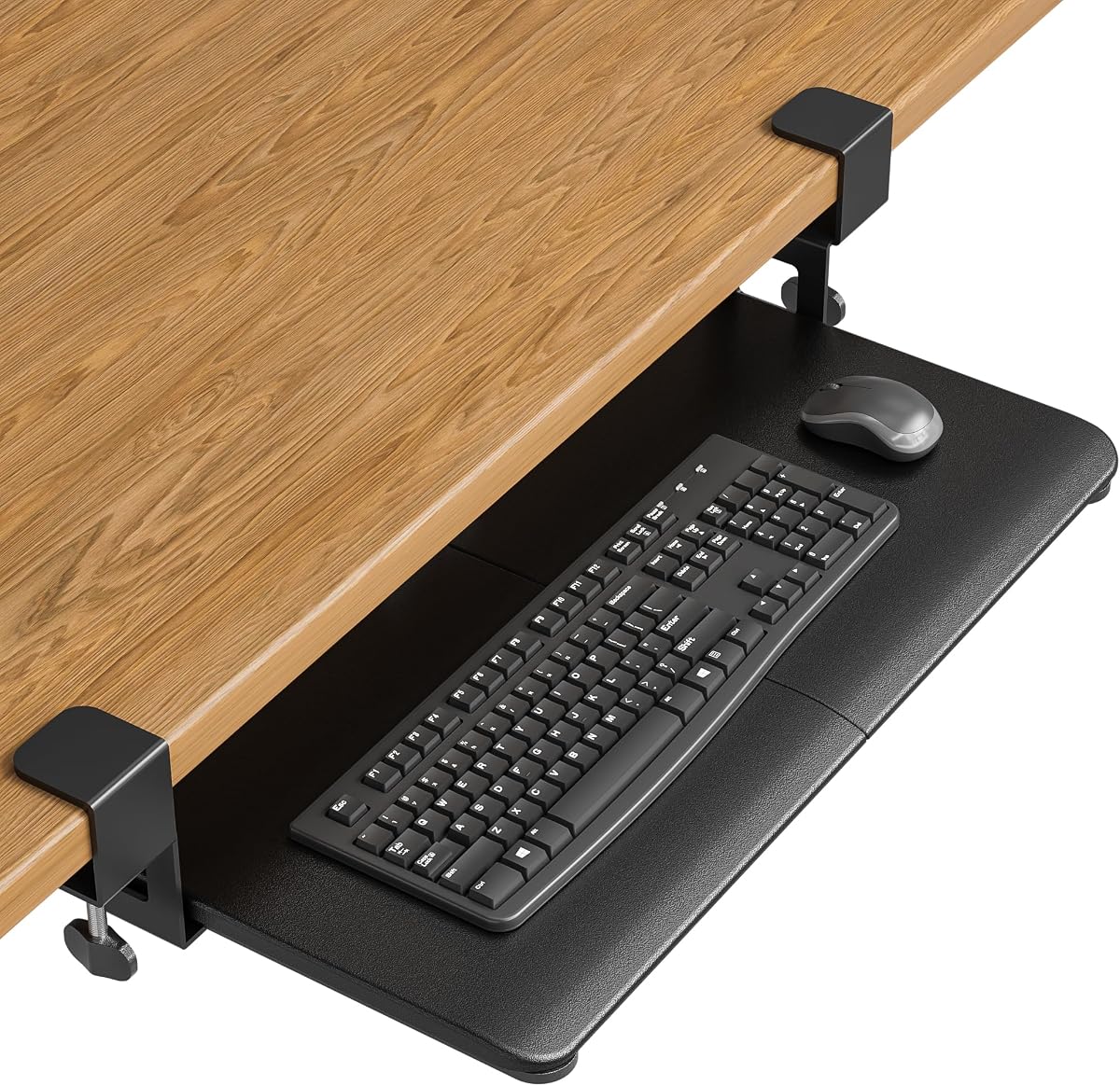


The VIVO MOUNT-KB05E is a classic under desk keyboard tray that delivers solid performance for everyday office tasks. With a rating of 4.4 stars it stands out for its simplicity and effectiveness in freeing up desk space. The tray measures 26.8 by 11 inches providing ample room for standard keyboards and mice.
We may earn a commission when you buy through this link, at no additional cost to you.
Its design focuses on core functionality with a smooth slide mechanism that allows you to pull the tray out when typing and push it back when not in use. The sturdy C-clamps secure the unit to desks up to 1.25 inches thick without drilling which preserves the surface integrity. This makes it ideal for shared workspaces or rented offices.
While it lacks advanced tilt features the ergonomic positioning still helps reduce wrist strain by lowering the keyboard below desktop level. The main trade off is that it only fits flat desks without beveled edges which may limit options for some furniture styles. However for most standard setups the fit is reliable and stable.
This tray is best suited for users who want a no fuss solution to organize their workstation. If you prioritize desk space and ease of installation over premium adjustability this model offers excellent value. It is a recommended choice for home offices and professional desks alike.
The under desk placement clears the main surface for monitors or documents.
All hardware included allows for setup without any drilling or tools.
We may earn a commission when you buy through this link, at no additional cost to you.
The VIVO Mount-KBST1 offers enhanced customization with both height and width adjustments to suit varied user needs. It features a spacious design that supports keyboards and mice with separate zones and includes a wrist pad for comfort. The tray is built to handle desks up to 3.4 inches thick which is among the most forgiving in its class.
We may earn a commission when you buy through this link, at no additional cost to you.
Key strengths include the five height set points that let you dial in the perfect typing angle. The adjustable width allows the tray to fit different desk depths ensuring the keyboard sits comfortably without obstruction. The split design helps organize your workspace by giving dedicated areas for input devices.
On the downside the tray does not work with beveled edges and the premium features come at a higher price than basic models. The complexity of installation is slightly higher due to multiple adjustment points which may take extra time to configure. However the flexibility it provides is worth it for demanding setups.
This tray is ideal for users with non standard desk sizes or those who need height adjustments for ergonomic reasons. It works well for professionals who spend long hours typing and need a tailored fit. Consider this option if you value adjustability over a simple setup process.
Five height points and width settings allow precise positioning for comfort.
Supports thick desks up to 3.4 inches without structural issues.
We may earn a commission when you buy through this link, at no additional cost to you.
The VIVO MOUNT-KB04CB distinguishes itself with a single clamp that allows 360 degree rotation for ultimate placement flexibility. This design enables you to tuck the tray away when not in use or angle it toward different users sharing the desk. The tray holds up to 11 lbs and fits desks up to 2 inches thick.
We may earn a commission when you buy through this link, at no additional cost to you.
The rotation feature is its standout benefit providing options to clear the area completely for large projects. It works well in crowded workspaces where you need to maximize every inch of surface area. The installation is straightforward since only one clamp is required to secure the unit.
A limitation is that it cannot be used on desks with beveled edges and the 360 clearance requires about 32 inches of space around the clamp. Users may find the rating slightly lower due to stability concerns when fully extended. Despite this the flexibility it offers is unmatched in this category.
Choose this tray if you need to adapt your workspace frequently or share a desk with others. It suits environments where versatility matters more than fixed ergonomic precision. It is a practical tool for dynamic work settings.
Pivots a full circle to store away or angle for different tasks.
When rotated under the desk it frees up surface for other items.
We may earn a commission when you buy through this link, at no additional cost to you.
The BONTEC tray is engineered for flat desk undersides and offers a wide platform for comfortable mouse movement. Its 11.8 inch depth provides more room than many standard trays allowing vertical mice or larger devices. The no-drill C-clamps attach securely to desks up to 1.97 inches thick.
We may earn a commission when you buy through this link, at no additional cost to you.
Key strengths include the protective pads that prevent scratches and improve grip during use. The slide mechanism allows smooth extension and retraction so you can access your keyboard easily. It supports up to 11 lbs ensuring stability for typical office setups.
On the downside compatibility depends heavily on your desk structure as curved or beveled edges will not work. You must verify the desk width exceeds 31.3 inches to ensure smooth operation. This requirement adds a step to the selection process.
This tray is best for users with standard flat desks who need extra depth for ergonomics. It is a practical choice for offices with clean understructures and straightforward layouts. Verify your desk dimensions before purchasing to avoid fit issues.
The 11.8 inch depth accommodates large mice and keyboards comfortably.
Pads included on clamps prevent damage to your desk surface.
We may earn a commission when you buy through this link, at no additional cost to you.
The VIVO MOUNT-KB05HT is a premium option that combines tilt adjustments with robust clamping to support varied desktops. It offers nine tilt settings ranging from positive to negative angles to find the most ergonomic position. The clamps rotate 90 degrees independently allowing custom placement on complex desks.
We may earn a commission when you buy through this link, at no additional cost to you.
Its main strengths are the extensive adjustability and ability to fit desks up to 3.4 inches thick. The side brackets let you set the clearance under the desk to match your seating height. This level of control helps reduce wrist strain during long work sessions.
The premium features do come at a higher cost and it still excludes beveled edges like most trays. Installation involves more steps to adjust the tilt and clamp angles which requires patience. However the comfort and flexibility make it worth the investment for serious users.
Choose this tray if you need precise ergonomic control and have a thick or corner desk. It suits professionals who prioritize long term comfort and setup flexibility. It is a top choice for high end home offices.
Nine tilt settings let you dial in the perfect typing angle.
Swivel clamps adapt to corner setups and thick surfaces easily.
We may earn a commission when you buy through this link, at no additional cost to you.
The VIVO MOUNT-KB10C is designed specifically for L-shaped workstations with swivel clamps that lock onto two desk sides. This design ensures a solid hold without damaging the desktop and maintains stability during use. The tray measures 26.8 by 11 inches providing ample room for peripherals.
We may earn a commission when you buy through this link, at no additional cost to you.
Key strengths include the ability to fit corner setups where standard trays might slip or lean. The clamps rotate 90 degrees to match the corner angle making installation straightforward. It supports up to 11 lbs and slides smoothly to free up surface area.
A limitation is that it only fits desks up to 1.25 inches thick and excludes beveled edges. If your desk is thicker you may need to seek alternative options. However for standard corner desks this model is purpose built and highly effective.
This tray is ideal for users with corner desks who need dedicated space for their keyboard. It works well in home offices or studios where the desk shape limits placement options. Consider it if you need a specialized solution for L-shaped layouts.
Swivel clamps secure to L-shaped desks without damaging the surface.
Designed to hold firmly on two sides for a steady typing feel.
We may earn a commission when you buy through this link, at no additional cost to you.
The VIVO MOUNT-KB05-4D adds a pencil drawer to a standard tray to store small items within easy reach. This feature helps keep pens and clips off the main desk while maintaining a tidy workspace. The tray itself is 26.8 by 11 inches with a combined extension of 18.5 inches.
We may earn a commission when you buy through this link, at no additional cost to you.
Its main benefit is the extra storage that complements the keyboard and mouse space below the desk. The drawer slides smoothly and adds utility without requiring additional shelving or organizers. It supports up to 11 lbs overall ensuring stability for typical office gear.
A trade off is that the drawer adds weight and height which may reduce clearance under the desk slightly. It still only fits desks up to 1.25 inches thick and excludes beveled edges. This limits compatibility but suits most standard desks.
Choose this tray if you need storage for small office supplies alongside your keyboard. It is best for compact workspaces where every inch of organization matters. Verify your desk thickness before purchasing to ensure a proper fit.
The pencil drawer holds supplies keeping them off your main surface.
Keeps the desktop clear for documents and monitors during work.
We may earn a commission when you buy through this link, at no additional cost to you.
This ergonomic board tray offers excellent value with a wide surface and adjustable clamps for varied desks. It measures 20 by 11.8 inches and includes a back baffle to prevent keyboard slippage during use. The clamps fit desks up to 2.76 inches thick which is a rare feature at this price.
We may earn a commission when you buy through this link, at no additional cost to you.
Key strengths include the low cost and simple design that gets the job done quickly. The slide mechanism is smooth and the installation takes about five minutes with included hardware. It supports up to 11 lbs and provides enough space for standard setups.
The trade off is that it lacks premium adjustments like tilt or height settings. You should measure your desk length to ensure the clamp to clamp distance fits within your workspace. Despite this simplicity it performs well for daily tasks.
Choose this tray if you need a budget friendly solution without compromising on size or stability. It suits renters or shared offices where cost and speed matter. It is a practical pick for entry level ergonomic upgrades.
A budget price that still delivers stability and keyboard protection.
Clamps accommodate desks up to 2.76 inches thick easily.
We may earn a commission when you buy through this link, at no additional cost to you.
The VIVO DESK-EXT24 is a foldable platform that can serve as a keyboard tray or extra storage surface. It features reinforced brackets that support up to 44 lbs and fits desks from 0.5 to 3.5 inches thick. The 90-degree folding design lets you tuck it away when not in use.
We may earn a commission when you buy through this link, at no additional cost to you.
Key strengths include the high weight capacity which supports speakers or heavy monitors if needed. The broad thickness range makes it compatible with almost any desk type. You can also use it as a wrist support or printer platform depending on your needs.
Unlike traditional trays it does not slide in and out so you must manually fold it for access. This adds steps to daily use but offers versatility for different tasks. The limited warranty and support provide added peace of mind.
Choose this extender if you need a multi-purpose platform that adapts to changing workflows. It works well for shared desks where flexibility is key. It is a practical solution for varied office equipment.
Press levers to fold it out of the way when not in use.
Supports up to 44 lbs for heavy devices like printers.
We may earn a commission when you buy through this link, at no additional cost to you.
The Mount-It! tray is a reliable option for renters due to its no-drill clamp design and lifetime warranty. It features a 27 by 11 inch platform that supports full size keyboards and provides a neutral typing position. The slide mechanism is smooth and sturdy for daily access.
We may earn a commission when you buy through this link, at no additional cost to you.
Key strengths include the US-based support team and comprehensive warranty that cover long term needs. The clamps attach securely to desks up to 2.2 inches thick without damaging the surface. This makes it ideal for shared offices or temporary workspaces.
A limitation is that it is not compatible with glass desks and the thickness limit is moderate. Ensure your desk is within range before purchasing to avoid issues. However for most wooden desks the fit is secure and stable.
Choose this tray if you need a durable solution that protects your furniture and offers long term coverage. It suits users who value customer service and warranty protection. It is a solid investment for home offices.
Clamps secure without drilling which is ideal for rented spaces.
Includes a lifetime warranty with responsive US-based support.
We may earn a commission when you buy through this link, at no additional cost to you.
Selecting the right tray depends on your desk type, desired ergonomics, and budget constraints.
Clamp on trays have specific limits on how thick a desk they can hold. Models range from 1.25 inches to over 3 inches. Always measure your desk edge before purchasing.
Choose a tray that matches your desk thickness to ensure a secure fit without slipping.
The surface size should accommodate your keyboard and mouse comfortably. Standard trays range from 20 to 30 inches in length and 11 to 12 inches in depth. Consider vertical mice or oversized keyboards when deciding.
Ensure the tray width fits your available space under the desk without obstructing legs or drawers.
Some trays offer tilt settings or height adjustments to reduce wrist strain. Adjustable features allow you to find a neutral position for long typing sessions. Check for multiple tilt angles if you need precise ergonomic control.
Prioritize models with tilt or height options if you experience wrist pain or type frequently.
Most trays use C-clamps that require a flat unobstructed desk edge. Drilling is not needed for these but beveled or rounded edges may not work. Verify your desk underside is clear of beams or brackets.
Select a no-drill clamp option if you want to preserve your desk surface integrity.
Sturdy materials like metal or reinforced plastic ensure the tray holds up under daily use. Check the weight capacity which usually sits around 11 lbs for standard trays. High capacity models support heavier devices like monitors or printers.
Look for reinforced brackets and protective pads to prevent desk damage over time.
Some models include pencil drawers or wrist pads for extra utility. Foldable designs save space when not in use while rotating clamps offer flexibility. These additions can improve workflow efficiency.
Consider features like drawers or folding mechanisms if you need to maximize storage or adaptability.
Reputable brands provide warranties ranging from one year to lifetime coverage. US-based support teams can assist with installation issues or replacements. This support is valuable for long term product reliability.
Check warranty terms and support availability to ensure help is available if needed.
Prices vary based on adjustability and build quality. Basic models are affordable while premium ones cost more for extra features. Determine your essential needs to find the best balance.
Balance the features you need with your budget to avoid overspending on unnecessary extras.
To install your tray align the clamps with your desk edge and tighten them securely. Ensure the surface is flat and free of obstructions before starting. Follow the included instructions to adjust the height or tilt if your model supports it.
For daily use slide the tray out when typing and push it back when not needed. Keep the rails clean to maintain smooth motion. Check the clamps occasionally to ensure they remain tight and stable.
Maintain your tray by wiping it clean with a damp cloth and avoiding harsh chemicals. If you notice any slipping or movement re-tighten the clamps immediately. Store it in a safe position when not in use to prevent accidental damage.
Most models require a screwdriver for tightening the clamps but do not need drilling. The installation is simple and usually takes less than ten minutes. Ensure you have basic tools ready for a secure setup.
They can work if the desk edge meets the thickness limits and is flat. Ensure the height is adjustable to match your standing position. Verify clearance under the desk for legs when seated or standing.
Beveled rounded or lipped edges often prevent proper clamp placement. Curved undersides also block installation. Always check the product notes to ensure your desk edge is flat and smooth.
Measure the total length from clamp to clamp which can exceed tray width. Most models need around 25 to 35 inches of edge space. Verify your desk width before purchasing to ensure a proper fit.
Standard trays accommodate most keyboards but split models may need extra width. Check the tray dimensions against your keyboard size. If in doubt choose a wider platform to prevent crowding.
Most models include a smooth surface but separate mouse pads are not always included. Some kits come with wrist rests but verify the package contents. You may need to buy a mouse pad separately.
Our top picks include the VIVO MOUNT-KB05E for overall value, the Mount-It! tray for renters, and the VIVO Premium for adjustability. Each model offers unique benefits depending on your desk and workflow. Consider your priorities like budget or storage before making a final choice.
Prioritize a tray that fits your desk thickness and provides enough space for your keyboard and mouse. Look for features like tilt or height adjustments if ergonomics are a concern. A secure installation ensures long term stability.
Prices and availability may change so check the current listings before purchasing. Review the latest specs and customer feedback for the most accurate information. Choosing the right tray can significantly improve your workspace comfort.