
Lamzu Atlantis Mini Champion Edition
4.6Editor score
30000 DPI PAW3950 Sensor
Ultra-light 51g Wireless Design
Optical Switches for Longevity
This guide compares the best claw grip gaming mouse for small hands based on sensor performance, weight, shape, and features to help you choose the right fit
Finding the right claw grip gaming mouse for small hands is essential for precision and comfort during long sessions. A good model combines a compact shape, lightweight design, and high-quality sensor to ensure responsive control without strain.
We evaluated ten top-rated mice using criteria like ergonomics, sensor accuracy, build quality, and wireless performance. Each product was analyzed for its suitability for claw grip users with smaller hand dimensions to provide an accurate comparison.
Each pick highlights key strengths and trade-offs to help you decide based on your priorities. Prices and availability can change, so verify current details before purchasing to ensure you get the best value for your setup.
4.6Editor score

4.2Editor score

4.4Editor score
This table provides a side-by-side look at all ten models to help you compare specs and features quickly. Review the sensor type, weight, and design details to find the best match for your gaming style.



The Gwolves Skoll Mini SK-S Black is a top budget option for small hand claw grip users. It features a 3389 sensor and lightweight 50g design suitable for precise movements.
We may earn a commission when you buy through this link, at no additional cost to you.
Its honeycomb shell reduces weight significantly while maintaining durability. The ergonomic shape fits small hands well for claw grip styles. Detachable cable adds versatility for travel.
Trade-offs include the wired connection which limits mobility compared to wireless. Customization options are basic but sufficient for most gamers needing reliable performance.
Buy this if you want a lightweight ergonomic mouse under 50 dollars. It delivers solid performance for competitive play without breaking the bank.
At 50g this mouse minimizes fatigue and allows rapid flicks during intense gaming sessions.
The 16000 DPI sensor ensures accurate tracking across different surfaces without jitter or delay.
We may earn a commission when you buy through this link, at no additional cost to you.
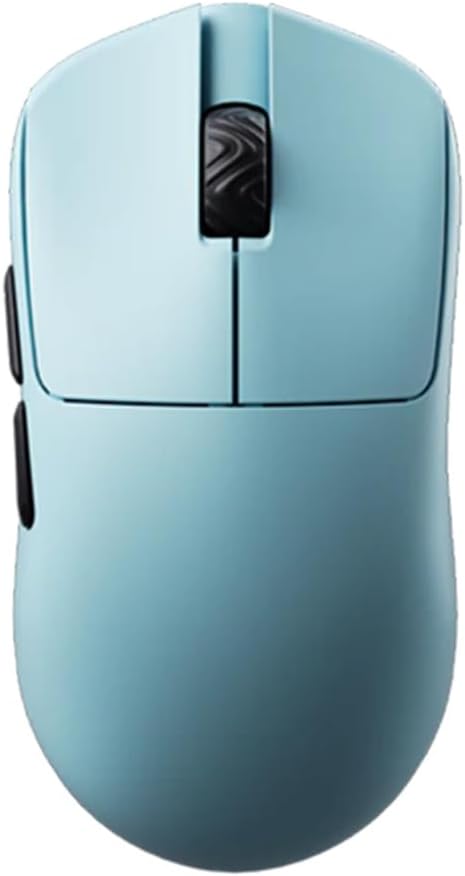
The Lamzu Atlantis Mini Champion Edition stands out as a premium choice for competitive small hand players. It uses a PAW3950 sensor and optical switches for precision.
We may earn a commission when you buy through this link, at no additional cost to you.
Its 51g weight and symmetrical shape support agile claw grip movements. Dust proof encoders and 8K compatibility ensure smooth reliable wireless performance for esports.
The main drawback is the higher price point compared to other models. However the advanced features and build quality justify the cost for serious gamers.
Buy this if you need top tier specs and wireless freedom. It is ideal for players demanding the best sensor and switch performance available.
Optical switches provide faster actuation and longer life than mechanical switches reducing input lag.
Encoders protect against dust ingress ensuring consistent scroll performance over time.
We may earn a commission when you buy through this link, at no additional cost to you.
The Bloody V7 Ergonomic is an excellent choice for those prioritizing comfort and macros. It offers a dedicated ergonomic design tailored for claw grip users.
We may earn a commission when you buy through this link, at no additional cost to you.
With 8 programmable buttons and macro scripting support it suits players needing complex commands. The rubberized coating enhances grip stability during intense sessions.
The sensor DPI is lower than competitors but adequate for general gaming. Its heavier build may be less ideal for rapid flicks requiring extreme speed.
Buy this if you value ergonomics and automation features. It is well suited for players using extensive macros or custom control setups.
Advanced scripting allows automating complex in game actions for improved efficiency in strategic games.
Textured coating ensures the mouse stays secure in hand even during sweaty or high pressure play.
We may earn a commission when you buy through this link, at no additional cost to you.
The Pulsar X3 LHD Crazylight is a rare find for left handed claw grip users. It delivers top performance with a lightweight design and high end specs.
We may earn a commission when you buy through this link, at no additional cost to you.
Featuring a 32000 DPI sensor and optical switches it ensures precision. The DOT skates offer smooth gliding on various surfaces for better control.
As a left handed specific model it limits right handed compatibility. The price is premium but reflects the niche build and high quality components.
Buy this if you are left handed needing a quality claw grip mouse. It solves a major gap in the market for leftie gamers.
Tailored shape ensures comfort and control for left handed players avoiding awkward hand positions.
Included UHMW PE skates provide low friction for seamless movement on hard mousepads.
We may earn a commission when you buy through this link, at no additional cost to you.
The Pulsar X2H Mini Wireless offers great value for wireless gamers needing a small ergonomic mouse. It combines a PAW3395 sensor with optical switches for reliable performance.
We may earn a commission when you buy through this link, at no additional cost to you.
With 100 hours of battery life and low latency wireless it suits daily gaming. The narrow waist design supports aggressive claw grip styles for precise aiming.
Being a renewed product may imply minor cosmetic imperfections though functionality remains high. The narrow waist might feel tight for those preferring more support.
Buy this if you want reliable wireless performance at a lower price. It is a smart choice for gamers prioritizing battery and sensor specs.
Extended battery reduces charge frequency allowing uninterrupted gaming sessions without frequent maintenance.
Tapered waist allows fingers to sit higher for enhanced control during claw grip movements.
We may earn a commission when you buy through this link, at no additional cost to you.
The Corsair IRONCLAW Wireless SE is packed with features like RGB and macro buttons. It is designed for versatility but may be too large for small hands.
We may earn a commission when you buy through this link, at no additional cost to you.
Its high DPI sensor and massive battery life support long use. Surface calibration adapts to different desks for consistent tracking during gameplay.
The ergonomic shape targets larger hands which may not suit small palm or claw users. Weight can be an issue for those seeking lightweight speed.
Buy this if you need extensive programmability and RGB. It suits gamers prioritizing features over compact ergonomics for small hands.
Auto calibration adjusts tracking to different surfaces ensuring consistent cursor behavior everywhere.
10 buttons allow complex command mapping for improved productivity in gaming and work.
We may earn a commission when you buy through this link, at no additional cost to you.
The V8 Gaming Mouse is ideal for claw grip users seeking an ultra light symmetrical option. It uses a PAW3950 chip and Kailh optical switches for speed.
We may earn a commission when you buy through this link, at no additional cost to you.
The web based driver allows easy adjustments without installing software. At 36g it minimizes hand fatigue and maximizes speed for competitive FPS games.
Web driver limitations may restrict advanced macro settings. The symmetrical shape may feel less supportive for palm grippers preferring ergonomic curves.
Buy this if you want a light versatile mouse with quick setup. It suits players who prefer simplicity and fast wireless responsiveness.
Browser based settings allow instant changes without downloads or system restarts.
36g design enables rapid movements and reduces wrist strain during marathon sessions.
We may earn a commission when you buy through this link, at no additional cost to you.
The Pulsar X2H Wireless White offers the same performance as the black version but with a sleek look. It features a PAW3395 sensor and optical switches for accuracy.
We may earn a commission when you buy through this link, at no additional cost to you.
Nordic MCU ensures low latency wireless performance. The white shell adds a fresh aesthetic to gaming setups. Compact design suits small hands for claw grip.
White mice may show wear more easily than black ones. Performance is identical to the black model so value depends on visual preference.
Buy this if you want a clean modern mouse without sacrificing specs. It fits those prioritizing style and consistent performance.
Advanced processor ensures smooth fast wireless communication for responsive gameplay.
White finish complements light themed desk setups for a cohesive aesthetic.
We may earn a commission when you buy through this link, at no additional cost to you.
The V6 Gaming Mouse features a solid shell design for durability without holes. It uses a PAW3950 chip and Kailh optical switches for precision tracking.
We may earn a commission when you buy through this link, at no additional cost to you.
No holes mean better dust protection and cleaner look. At 40g it remains lightweight for claw grip users needing speed and control without compromise.
Solid shell may feel warmer than honeycomb models during long use. Web driver limits customization but offers ease of access for most settings.
Buy this if you want a clean durable lightweight mouse. It suits players who dislike holes but still want high performance specs.
Solid design prevents dust buildup and offers a sleek professional look.
Kailh switches provide consistent actuation and long durability for daily gaming.
We may earn a commission when you buy through this link, at no additional cost to you.
The BenQ Zowie S2-C is built for simplicity and reliable performance without software. It features a symmetrical shape perfect for small hands using claw grip.
We may earn a commission when you buy through this link, at no additional cost to you.
Driverless operation means plug and play with no installation. Matte finish ensures grip stability and a clean look. Paracord cable reduces drag for smooth movement.
DPI options are limited compared to modern sensors. Wired connection limits mobility but ensures stable connection without battery concerns.
Buy this if you want a no fuss reliable mouse for esports. It is ideal for players prioritizing simplicity and consistent hardware.
No software required reduces setup time and avoids driver conflicts.
Textured shell improves grip and resists fingerprints during use.
We may earn a commission when you buy through this link, at no additional cost to you.
Choosing the right claw grip gaming mouse for small hands requires considering several factors to ensure comfort and performance. This guide explains key elements to look for.
Ergonomics determines how well the mouse fits your hand shape. Claw grip users need a mouse with a pronounced hump at the rear and a narrow waist to allow finger arching. Symmetrical models often suit small hands better but check the size charts.
Prioritize a mouse that supports natural finger positioning to reduce strain.
A high quality sensor ensures accurate tracking without jitter or spin outs. Look for recent Pixart sensors like PAW3950 or 3395 which offer high DPI and IPS capabilities. Good sensors maintain accuracy even during fast flicks.
Always choose a sensor with high tracking accuracy and responsiveness.
Lightweight mice reduce wrist fatigue and improve speed. Most claw grip users prefer mice under 60g for better control. Build quality should be solid despite light weight to prevent flex or rattling.
Balance lightness with durability for long lasting performance.
Optical switches are becoming standard for faster actuation and durability. Ensure the mouse has tactile feedback that suits your play style. Button placement must be easy to reach without adjusting hand posture.
Select switches that minimize double clicking and offer responsive feel.
Modern wireless mice offer low latency comparable to wired ones. Choose wireless for freedom of movement or wired for consistent power. Ensure battery life is sufficient if you pick wireless models for extended play.
Decide based on your preference for mobility versus power stability.
While focused on claw grip consider if the mouse also supports fingertip or palm grips. Symmetrical shapes generally offer more versatility. Ensure the size fits your hand dimensions comfortably to avoid strain.
Confirm that the grip style matches your natural holding preference.
Software allows adjusting DPI polling rate and macros. Web based drivers are convenient while full apps offer more control. Choose a mouse with intuitive settings to tailor performance to your needs.
Look for software that lets you adjust settings easily.
Mouse skates affect glide smoothness on different surfaces. High quality PTFE or UHMW PE skates reduce friction for better speed. Ensure the skates are replaceable for maintenance.
Prioritize smooth glide for precise tracking and less friction.
Hold the mouse with fingers arched and palm hovering slightly above the body. This posture reduces contact area for faster flicks and better control. Avoid gripping too tightly to prevent fatigue.
Clean the mouse surface and skates regularly with a soft cloth. Dust and oils can degrade grip and glide quality. Replace skates when worn to maintain smooth movement.
Store the mouse in a dry place away from direct sunlight. For wired mice coil cables loosely to avoid internal damage. Keep firmware updated for best performance and bug fixes.
Most claw grip users prefer mice between 40 to 60 grams. This range minimizes wrist strain while allowing rapid movements. Heavier mice may limit flick speed and increase fatigue.
Yes modern wireless mice offer low latency similar to wired. They provide freedom of movement without compromising performance. Look for lightweight models to avoid added weight.
Check manufacturer dimensions and compare with your palm length. Aim for a mouse that allows your fingers to rest comfortably without overreaching. Read reviews from users with similar hand sizes.
Optical switches offer faster actuation and longer life which suits rapid clicking. They reduce mechanical debounce delay improving responsiveness. For claw grip precision these switches are highly recommended.
Most claw mice support fingertip grip but palm grip may feel unsupported. Claw mice often have a high rear hump which may not suit palm users fully. Consider ergonomic models if palm grip is primary.
Not all models need software for basic use but software enables customization. Look for mice with onboard memory to save settings without running apps. Web drivers simplify this process for many users.
The top picks like the Lamzu Atlantis Mini and Pulsar X2H offer excellent performance for small hands. Each model balances lightweight design with sensor accuracy for competitive needs.
Prioritize ergonomics and switch quality to ensure comfort over long sessions. A mouse that fits well reduces fatigue and enhances your control during gameplay.
Prices change frequently so check current listings before buying. Select the model that matches your play style and budget for the best experience.