
Thrustmaster T-Flight Hotas One
4.5Editor score
Modular flight stick design
Plug and play setup
Adjustable joystick resistance
Find the perfect controller for Star Wars Squadrons with our expert guide comparing top flight sticks, controllers, and hotas systems for immersive space
Finding the right controller for Star Wars Squadrons can transform your space combat experience. Whether you prefer a standard gamepad or a dedicated flight stick, the right hardware brings you closer to the action.
We compared ten top-rated controllers based on ergonomics, precision, and compatibility. Our analysis covers everything from budget-friendly options to high-end hotas systems designed for serious simulation enthusiasts.
Each pick highlights unique features and performance strengths. Note that product availability and pricing may change over time, so check current listings before making your final purchase decision today.
4.5Editor score

4.3Editor score

This side-by-side comparison outlines the key specifications and features of each top-rated controller to help you find the ideal match for your flight simulation needs.




This bundle pairs a limited edition wireless controller with a professional charging stand. It offers a solid base for Xbox users who want official Star Wars branding without a full flight setup.
We may earn a commission when you buy through this link, at no additional cost to you.
The textured grip ensures your hands stay secure during intense dogfights. With a quick charge feature, you can spend more time flying and less time waiting for power.
While it lacks advanced flight features, its compatibility with Windows 10 makes it versatile. The 3.5mm jack supports your favorite headsets for clear comms.
Ideal for casual fans who prioritize design and convenience. It is a reliable entry point for those starting their Squadron journey on Xbox or PC.
The controller features authentic Star Wars graphics approved by Disney and Lucasfilm. This makes it a collectible piece for dedicated fans of the franchise.
The included stand charges your controller in under three hours. This is significantly faster than standard chargers found with other brands.
We may earn a commission when you buy through this link, at no additional cost to you.
The Direwolf 4 is a PC-focused controller with highly customizable mechanics. Its unique tension adjustment system lets you fine-tune the stick feel to match your specific flying style.
We may earn a commission when you buy through this link, at no additional cost to you.
It supports multiple platforms including Android and Switch, making it a flexible choice. The upgraded vibration provides immersive feedback without overwhelming your gameplay experience.
You can switch between trigger modes for precision or speed. This adaptability is perfect for players who also enjoy racing or shooter games outside the Star Wars universe.
This controller is best for PC enthusiasts who value customization. The learning curve for software settings is worth it for the improved tactile control.
You can adjust the tension ring from 40gf to 80gf. This ensures stable recentering and zero drift over millions of usage cycles.
The FORCESWITCH triggers allow you to choose between micro and linear modes. This gives you control over how sensitive your inputs are during missions.
We may earn a commission when you buy through this link, at no additional cost to you.
This controller features mechanical buttons that are significantly faster than standard membrane ones. It is designed for gamers who demand quick response times during critical combat moments.
We may earn a commission when you buy through this link, at no additional cost to you.
The mini-stick modules offer surgical precision endorsed by professional gamers. You can remap four additional back buttons directly on the pad or using the software.
While the response is quick, some users report connection nuances. The USB-C cable ensures stable data transmission but limits wireless freedom.
It is a strong option for competitive players who prefer wired setups. The mechanical switches provide a distinct tactile advantage for rapid maneuvers.
The buttons activate 64% faster than standard options. This reduced distance ensures every command is executed instantly.
The ESWAP X2 features S5 NXG mini-stick modules. These are designed for high accuracy and reduced wear over time.
We may earn a commission when you buy through this link, at no additional cost to you.
The X52 is a classic flight control system known for its reliability. It uses magnetic non-contact sensors to provide long-lasting precision for your flight simulations.
We may earn a commission when you buy through this link, at no additional cost to you.
The multifunction LCD display lets you check commands without alttabbing. You can program over 280 commands ensuring all your aircraft actions are at your fingertips.
The 3D twist with rudder lock is essential for complex sims. It allows you to manage yaw independently or lock it to prevent accidental inputs.
This system is ideal for desktop enthusiasts who want a dedicated cockpit feel. Its robust build makes it a staple for serious simulation pilots.
The sensors are non-contact which eliminates physical wear. This ensures consistent accuracy over years of heavy usage.
With over 280 commands you have everything under your fingers. The modes allow you to switch profiles instantly during gameplay.
We may earn a commission when you buy through this link, at no additional cost to you.
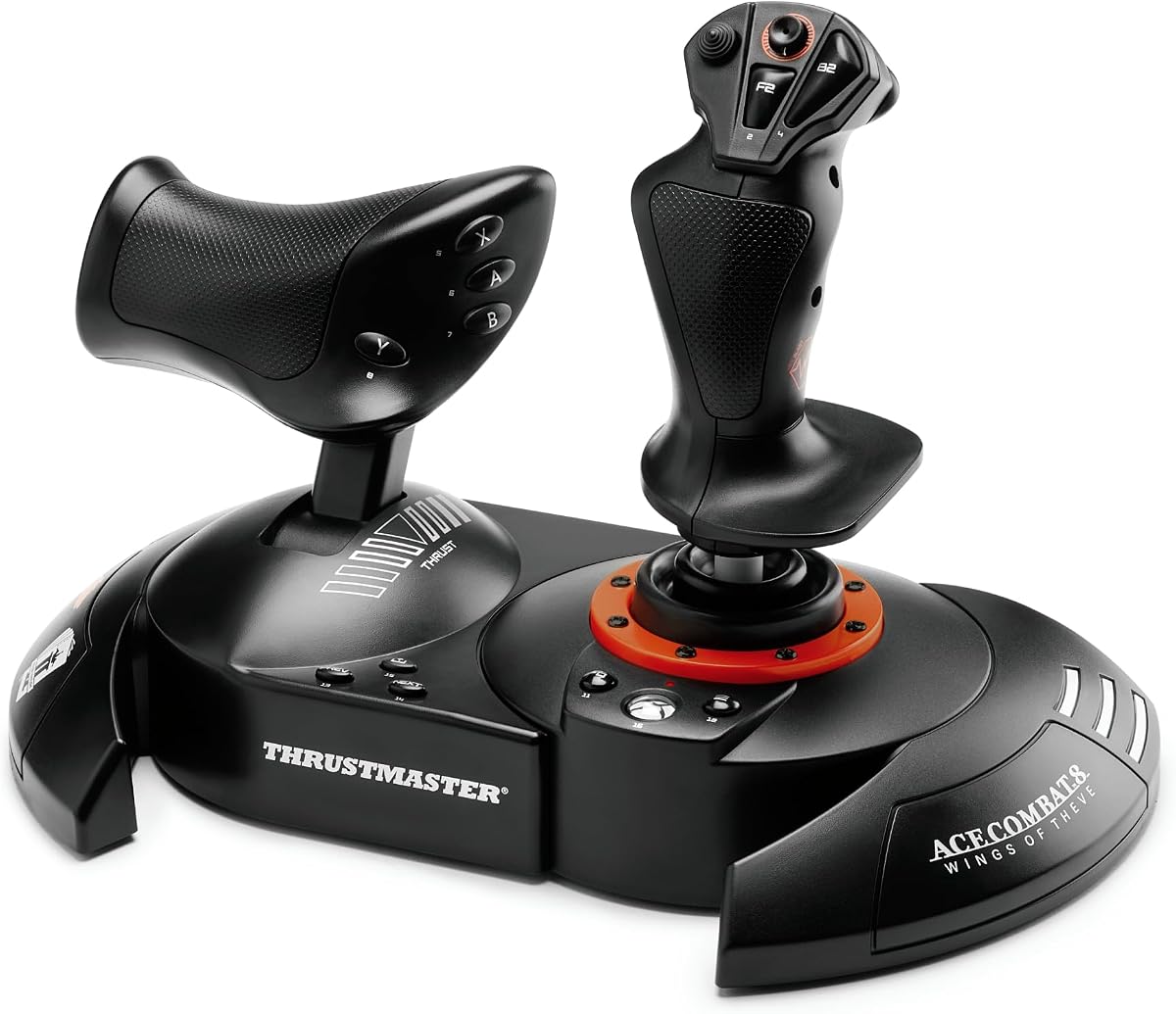
This flight stick and throttle system delivers true hands-on flying at an accessible price. The throttle is detachable allowing you to use it on your lap or desk.
We may earn a commission when you buy through this link, at no additional cost to you.
The design is comfortable for extended play with adjustable resistance. It works seamlessly with Xbox Series X and Windows PC without complex drivers.
You can expand the system with rudder pedals if you want more realism. It suits beginners who want a genuine flight experience without breaking the bank.
It is the best value for newcomers to space sims. The plug and play nature makes it the perfect first step into HOTAS flying.
The throttle unit is separate from the joystick. This allows for versatile setups depending on your desk or lap space.
It is compatible with Thrustmaster rudder pedals. The sliding rail system allows for smooth addition of more controls.
We may earn a commission when you buy through this link, at no additional cost to you.
The VelocityOne offers high-resolution Hall-Effect sensors for incredibly smooth control. Its dual throttle design includes swappable detents for precise thrust reference points.
We may earn a commission when you buy through this link, at no additional cost to you.
A full-color display provides real-time flight data and tuning options. The RGB lighting adds immersion to your cockpit setup during night missions.
It supports a fully expandable ecosystem for a complete cockpit. The left or right handed design ensures comfort for everyone regardless of handedness.
This is the ultimate choice for dedicated simulation enthusiasts. It brings professional grade features to your home setup with unmatched precision.
16-bit Hall-Effect sensors ensure zero drift over time. This guarantees consistent input accuracy even after hundreds of hours.
The display shows real-time flight data on the unit. This allows you to tune performance without needing to check the screen.
We may earn a commission when you buy through this link, at no additional cost to you.
The Tarantula 8K uses TMR sticks to eliminate physical contact and drift. Its 8000Hz polling rate over wired connection ensures every input is registered instantly.
We may earn a commission when you buy through this link, at no additional cost to you.
It features dual mode triggers that you can switch between analog and micro switch. This flexibility is great for games requiring both precision and speed.
You get lockable back buttons and extra front buttons for macros. This allows advanced customization that speeds up your in-game execution significantly.
Best for competitive players who need rapid response. The wired connection guarantees stability for serious gaming sessions without wireless latency.
The controller scans inputs 8000 times per second. This ensures smooth control and instant response for every command.
The sticks use magnetic technology to prevent drift. This ensures long-lasting anti-stick reliability over years of use.
We may earn a commission when you buy through this link, at no additional cost to you.
This controller is officially licensed for Ace Combat 8 and designed for Xbox and PC. It offers absolute combat precision with 16-bit technology and 16 action buttons.
We may earn a commission when you buy through this link, at no additional cost to you.
The built-in vibration motor gives you feedback for impacts and turbulence. The detachable throttle lets you customize the layout to your gaming style.
Thrustmaster uses proprietary H.E.A.R.T. technology for surgical precision. This ensures that the stick does not degrade over time even after intense dogfights.
It is a strong choice for licensed flight sim fans. The vibration adds a tactile layer that standard controllers lack during combat.
Hall Effect AccuRate Technology guarantees precision without wear. This means your controls stay accurate even after intense dogfighting.
Feedback for impacts is built into the grip. You feel every missile launch and cannon burst directly in your hand.
We may earn a commission when you buy through this link, at no additional cost to you.
The X56 is designed for military-grade space and flight simulation precision. It includes all control surface options required for aspiring combat pilots.
We may earn a commission when you buy through this link, at no additional cost to you.
RGB backlighting helps you see controls in dim environments. The twin throttles with friction adjusters give you nuanced control over thrust.
Mini analog sticks allow you to control gimballed weapons separately. This level of granularity is unmatched by standard gamepads.
It is ideal for those who want a full-scale control deck. The renewed option offers value for experienced simmers wanting top tier hardware.
Mini sticks let you control pitch roll and yaw easily. You can manage gimballed weapons separately from the main craft.
The advanced 4-spring system lets you adjust stick force. This allows customization for different aircraft types and play styles.
We may earn a commission when you buy through this link, at no additional cost to you.
The Vader 5 Pro delivers ultra-low latency with 3ms wired response. Its FORCEFLEX joysticks let you physically adjust stick tension in seconds for any game.
We may earn a commission when you buy through this link, at no additional cost to you.
You get 8 extra buttons to map commands like jump or reload. This helps you react faster without taking your thumbs off the sticks.
The 4-motor vibration brings stronger feedback to combat and exploration. You feel trigger vibration and grip feedback together for a more immersive experience.
It is a top contender for PC and Switch users. The low latency and customization make it a powerful tool for versatile gaming.
You can adjust stick tension from 40gf to 100gf. This allows precise control for racing or fast aiming for shooters.
Switch between micro mode and hall effect linear mode instantly. One controller adapts to shooters and racing games effortlessly.
We may earn a commission when you buy through this link, at no additional cost to you.
Choosing the right controller for Star Wars Squadrons depends on your play style and setup. This guide outlines the key factors to consider before making a decision.
Ensure the controller works with your system. Some options are designed specifically for Xbox or PC while others support multiple platforms like Switch.
Always check the product description for supported operating systems before purchasing.
Wired connections offer stability while wireless provides freedom. For fast-paced combat latency can be a deciding factor.
Consider a wired connection if you prioritize instant response.
Comfort is vital for long flights. Look for textured grips and balanced button layouts that reduce hand fatigue.
Choose a model that fits your hand size naturally.
Programmable buttons let you map complex commands. Software support can enhance the controller by allowing macros.
Check if the controller allows remapping directly or requires extra tools.
High-quality materials ensure longevity. Hall Effect sensors prevent stick drift over time.
Invest in a unit with proven durability features.
Controllers range from affordable basic pads to premium flight systems. Determine how much you are willing to spend.
Balance cost with the features that matter most to you.
Some flight sticks support pedals and additional accessories. This allows for future upgrades as you progress.
Consider a modular system if you plan to expand later.
For wireless controllers battery capacity is critical. Look for models that offer long charge cycles.
Quick charge capabilities can save you downtime during gaming.
Connect the controller via USB or Bluetooth depending on the model. Follow the on-screen prompts to ensure proper driver installation.
Adjust the controller settings in the game to map your preferred buttons. Calibrate the sticks if your software offers this option.
Store the controller in a cool dry place to extend battery life. Keep the grips clean with a soft cloth to maintain texture.
A flight stick is not necessary but offers a more immersive experience. Standard controllers work perfectly fine for most players. It depends on how deep you want to dive into flight simulation.
Many modern controllers are plug and play on Windows. However advanced features often require specific software from the manufacturer. Check the product page for details on software requirements.
Yes standard Xbox controllers work well with Star Wars Squadrons. They provide reliable input and are widely supported. Consider them if you want a cost-effective solution.
The Thrustmaster T-Flight Hotas One is often cited as the best budget hotas. It offers a balance of price and functionality. This makes it ideal for beginners.
Compatibility varies by model. Some support Mac via Bluetooth or USB. Always verify Mac support in the specifications list.
Drift is often caused by stick wear. Look for controllers with Hall Effect sensors to minimize this risk. Keeping the sticks clean also helps performance.
Wired connections generally offer lower latency. Wireless provides convenience but may suffer from interference. Choose based on your priority for speed or freedom.
Yes many of these controllers work with various flight simulators. Compatibility often depends on the standard driver support. Check with the developer for specific titles.
We have reviewed ten top controllers ranging from basic pads to advanced hotas systems. Each offers unique strengths tailored to different gaming needs and budgets.
Consider your primary platform and how much customization you need. A dedicated flight stick may be worth the investment for serious simulation fans.
Prices and availability change frequently so check the latest listings. Make sure to verify compatibility before placing your order to ensure satisfaction.