
Corsair K55 RGB PRO
4.3Editor score
Dynamic RGB backlighting
Six dedicated macro keys
IP42 spill resistant
This guide compares the top Corsair mechanical keyboards for gaming and productivity, covering switches, layouts, and features to help you choose the right
Choosing a high-quality mechanical keyboard is essential for gamers and professionals who demand precision and durability. Corsair offers a wide range of options tailored to different needs, from compact designs to full-featured hubs.
We evaluated ten top Corsair models based on build quality, switch performance, software integration, and user feedback. This list highlights the strengths and weaknesses of each keyboard to help you make an informed decision.
Each pick includes detailed specifications, pros, cons, and expert analysis to guide your selection. Please note that product availability and pricing can change, so always verify current details before purchasing.
4.3Editor score

4.0Editor score

4.5Editor score
The following table provides a side-by-side comparison of the top ten Corsair mechanical keyboards, highlighting key specifications and unique features for easy selection.


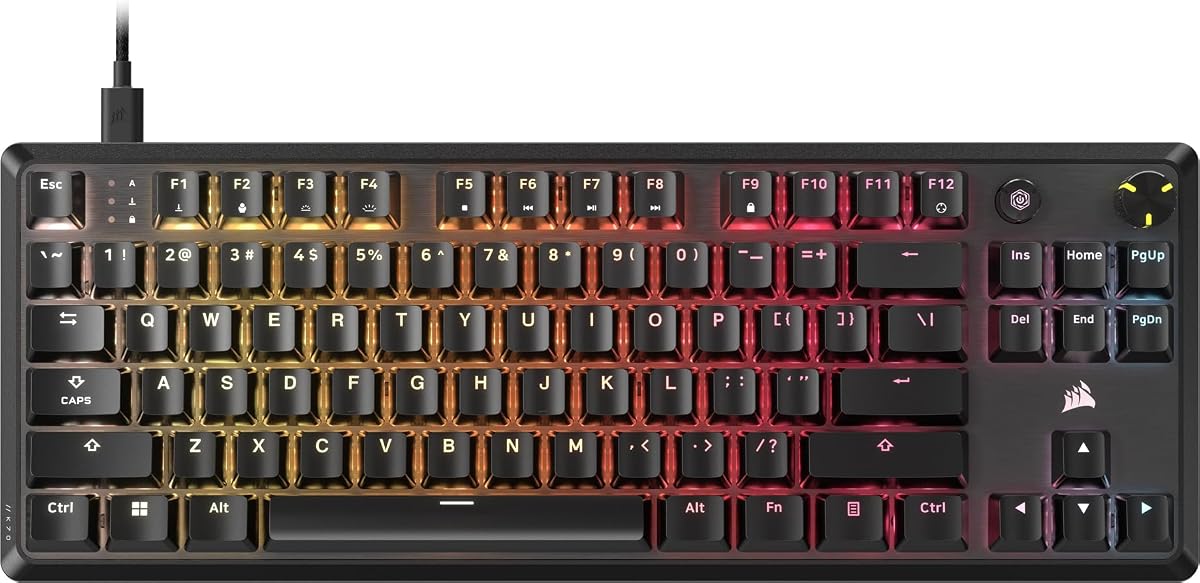


The CORSAIR K70 CORE RGB stands out as a reliable choice for gamers seeking a balanced experience. With a rating reflecting its solid performance, this keyboard offers smooth linear switches and a durable build.
We may earn a commission when you buy through this link, at no additional cost to you.
Its pre-lubricated MLX Red switches provide responsive keystrokes enhanced by sound dampening layers. The aluminum top plate ensures stability, while the magnetic palm rest adds comfort during long sessions.
While it lacks high polling rates found in elite models, the 1000Hz polling is sufficient for most users. The media dial offers convenient control without interrupting gameplay or work tasks.
This keyboard is ideal for those wanting a premium feel without the highest cost. It delivers consistent performance and comfort, making it a strong recommendation for general gaming setups.
Pre-lubricated switches reduce friction for smoother keystrokes and a more satisfying tactile feel.
The multi-function rotary dial allows quick volume adjustments and media playback control.
We may earn a commission when you buy through this link, at no additional cost to you.
The Corsair K100 RGB represents the pinnacle of gaming keyboard technology. Its high rating underscores its status as a top-tier option for enthusiasts seeking maximum performance.
We may earn a commission when you buy through this link, at no additional cost to you.
Powered by AXON technology, it delivers 4000Hz polling and 1mm actuation for unmatched speed. The OPX optical switches ensure longevity with 150 million keystroke guarantees and smooth travel.
While the cost is significant, the included features justify the investment for competitive gamers. The integration with Elgato Stream Deck adds unique productivity tools for streamers.
Choose this keyboard if you need the fastest response times and premium materials. It excels in both gaming and creative workflows with its versatile control wheel and lighting.
Hyper-processing technology enables four times faster throughput for instant key registration.
Six macro keys integrate with Elgato software for seamless command and control setup.
We may earn a commission when you buy through this link, at no additional cost to you.
The CORSAIR Vanguard 96 RGB offers a unique blend of full functionality in a compact frame. Its rating indicates strong user satisfaction for those needing space efficiency.
We may earn a commission when you buy through this link, at no additional cost to you.
This layout includes arrow keys and a numpad in a size similar to a TKL board. The integrated LCD screen allows customization for animations or system monitoring.
With 8000Hz polling, it rivals high-end gaming boards in responsiveness. Virtual Stream Deck integration enhances productivity by mapping complex commands directly to the keyboard.
Ideal for users with limited desk space who refuse to compromise on features. It bridges the gap between productivity and gaming with its versatile design.
The 96 percent layout retains full keyboard functionality while reducing desk footprint.
Display system stats or custom animations on the built-in color screen.
We may earn a commission when you buy through this link, at no additional cost to you.
The Corsair K70 CORE RGB provides a cost-effective entry into mechanical gaming keyboards. With a consistent rating, it offers essential features without the premium price tag.
We may earn a commission when you buy through this link, at no additional cost to you.
Features include pre-lubricated switches and sound dampening for a quieter typing experience. The aluminum top plate adds durability, and onboard storage saves up to five profiles.
While it uses ABS keycaps which may shine over time, the value proposition is strong. It lacks some advanced features found in higher-end models but delivers reliability.
This model suits budget-conscious gamers who want a mechanical experience. It offers a robust platform for everyday gaming and typing tasks.
Save up to five custom profiles directly on the keyboard for easy access.
Two layers of foam reduce noise and vibration for a quieter environment.
We may earn a commission when you buy through this link, at no additional cost to you.
The Corsair K70 CORE TKL RGB optimizes desk space while maintaining performance. Its high rating reflects satisfaction with the improved switch technology.
We may earn a commission when you buy through this link, at no additional cost to you.
Pre-lubricated MLX Red v2 switches offer stability and responsiveness. Sound dampening layers and lubricated stabilizers create a pleasant acoustic profile for typing.
The TKL layout leaves more room for mouse movement, aiding in aiming. While it lacks a numpad, the media control dial adds functional convenience.
Recommended for gamers who prioritize mouse space and tactile quality. It balances compact design with a high-quality typing experience.
The v2 linear switches provide smoother travel and reduced wobble.
Enhanced sound dampening minimizes unwanted ping and clack noise.
We may earn a commission when you buy through this link, at no additional cost to you.
The Corsair Galleon 100 SD combines a keyboard with Stream Deck functionality. Its rating suggests a niche appeal for streamers and power users.
We may earn a commission when you buy through this link, at no additional cost to you.
A large five-inch color LCD provides real-time information and customization. Stream Deck keys allow instant control of apps and games without switching devices.
With 8000Hz polling, it ensures rapid response times. However, the cost and complexity may not suit casual users looking for a simple keyboard.
Ideal for content creators needing integrated command tools. It offers a unique combination of typing and system control.
Eliminate external devices by integrating macro controls directly into the keyboard.
Use the large display to monitor hardware or favorite content streams.
We may earn a commission when you buy through this link, at no additional cost to you.
The Corsair K55 RGB PRO is an affordable option for budget-conscious buyers. It achieves a solid rating by offering essential gaming features at a low cost.
We may earn a commission when you buy through this link, at no additional cost to you.
While it uses membrane technology, it includes dedicated macro keys and RGB zones. The IP42 rating provides protection against spills and dust accidents.
This keyboard is not mechanical but offers durability and comfort with a palm rest. It suits users transitioning from standard keyboards to gaming peripherals.
Recommended for entry-level setups or casual gaming. It provides reliable performance without a significant financial investment.
IP42-rated design safeguards internal components from minor liquid accidents.
Detachable palm rest reduces wrist strain during extended usage.
We may earn a commission when you buy through this link, at no additional cost to you.
The renewed Corsair K70 CORE RGB offers a high-value entry point. With an impressive rating, refurbished units often exceed expectations for performance and quality.
We may earn a commission when you buy through this link, at no additional cost to you.
This model retains all mechanical features but excludes the palm rest. It provides the same reliable switches and media controls as the new version.
The steel grey finish adds a distinct look to the standard black options. Buyers should verify warranty terms when purchasing renewed items.
Ideal for users seeking quality at a reduced price. It delivers the core experience without extra accessories.
Renewed units provide access to premium features at a lower price point.
High ratings suggest consistent refurbishment standards and performance reliability.
We may earn a commission when you buy through this link, at no additional cost to you.
The renewed Corsair Vanguard 96 combines compact design with high performance. Its strong rating highlights the value of refurbished units for this model.
We may earn a commission when you buy through this link, at no additional cost to you.
Features include an LCD display and 8000Hz polling for speed. The dual-tone color adds visual appeal, while the layout maximizes desk space.
Note that iCUE support may be limited compared to new models. This makes it a great choice for users comfortable with existing setup options.
Best for those wanting high-end features at a budget price. It offers robust performance for gaming and productivity tasks.
The color scheme provides a unique aesthetic compared to standard black models.
The 96 percent layout retains full functionality in a smaller footprint.
We may earn a commission when you buy through this link, at no additional cost to you.
The Corsair K60 RGB TKL offers optical speed in a compact form. Its rating reflects enduring appeal for users prioritizing speed and durability.
We may earn a commission when you buy through this link, at no additional cost to you.
OPX optical switches deliver 1mm actuation and high reliability. The brushed aluminum frame ensures longevity, while polycarbonate keycaps resist wear.
Features a detachable USB Type-C cable for easy portability. It lacks the latest software features but maintains core gaming performance.
Recommended for users valuing simplicity and switch speed. It is a reliable choice for competitive gaming on a budget.
Light-based actuation ensures faster and more consistent input registration.
Detachable Type-C cable enables quick setup and travel-friendly transport.
We may earn a commission when you buy through this link, at no additional cost to you.
Selecting the right Corsair keyboard involves evaluating layout, switch type, and connectivity options.
Choose a layout that fits your desk space and usage needs. Full-size keyboards offer a numpad, while tenkeyless models save space for mouse movement. The 96 percent layout balances both options effectively.
Prioritize compact layouts if you have limited desk space or prefer larger mouse sweeps.
Mechanical switches define typing feel and response. Linear switches like MLX Red provide smooth keystrokes, while optical switches offer faster actuation. Consider your preference for tactile feedback versus speed.
Select optical or linear switches for competitive gaming to minimize input lag.
A higher polling rate improves response time. Standard keyboards offer 1000Hz, while advanced models reach 8000Hz. Gamers benefit from faster polling for precise actions.
Look for 4000Hz or higher rates if you play competitive shooters.
Materials like aluminum frames ensure durability. Double-shot keycaps resist wear and fading over time. Check for additional features like sound dampening layers for better acoustics.
Invest in robust build quality to ensure longevity and stability during use.
Corsair keyboards rely on iCUE for customization. Check for compatibility with streaming software or virtual deck features. This enhances macro programming and lighting effects.
Ensure the model supports iCUE and any third-party tools you use.
Wired connections are standard for stable performance. Some models offer detachable cables for easier transport. Ensure your port type matches your system, such as USB Type-C.
Opt for detachable cables if you travel frequently or need portability.
Features like LCD screens or media dials add utility. These allow quick access to system stats or volume controls. Decide if these extras are worth the cost for your workflow.
Prioritize media dials or screens if you need on-the-fly control.
Connect the keyboard to your system and install iCUE software to configure settings. Customize RGB lighting and key bindings to suit your gaming or work preferences.
Clean the keyboard regularly with compressed air to remove dust from under keycaps. Use a soft cloth to wipe the surface and avoid liquid spills to maintain longevity.
Store the keyboard in a cool, dry place when not in use. If it has a detachable cable, disconnect it carefully to prevent port damage.
Linear switches like MLX Red offer smooth travel ideal for rapid inputs. Optical switches provide faster actuation speeds for competitive play. Choose based on your preference for tactile feedback versus speed.
Most Corsair keyboards work with Mac but may have limited software support. The iCUE app supports macOS for lighting and macro features. Always check the specific product page for Mac compatibility details.
Some models like the K70 CORE include magnetic wrist rests. Others offer detachable or no wrist rest depending on the package. Check product specifications to confirm inclusion before purchasing.
Yes, Corsair keyboards feature per-key RGB lighting customizable via iCUE. You can create custom lighting effects and sync them with other devices. This allows personalized setups for any aesthetic.
Use the Corsair iCUE software to check for firmware updates. Connect the keyboard via USB and follow the prompts to install updates. Keeping firmware updated ensures stability and new features.
Some models like the K55 RGB PRO have IP42 spill resistance. Mechanical boards generally lack waterproofing but may have protective coatings. Clean spills immediately to prevent damage to switches.
The top picks highlight versatile options from budget-friendly K55 to premium K100. Each model addresses specific needs from speed to space efficiency.
Prioritize features that match your workflow, such as polling rate for competitive play or layout for desk space. A well-chosen keyboard enhances both productivity and enjoyment.
Always verify current availability and warranty terms before finalizing your purchase. Prices and models may update frequently so checking the latest info is wise.