
Thermalright Assassin X120 Refined SE
4.7Editor score
Four heat pipes with AGHP
TL-C12C PWM fan included
Supports modern Intel and AMD sockets
This guide compares the top 10 CPU Air Cooler Fan Heatsink models for performance, noise, and compatibility to help you choose the right cooling solution for
Finding the right CPU Air Cooler Fan Heatsink is essential for maintaining optimal system temperatures. A good model ensures your processor runs efficiently without thermal throttling during intense workloads or gaming sessions.
We evaluated ten leading models based on cooling performance, noise levels, build quality, and socket compatibility. Each product offers unique features tailored to different budgets and case constraints.
Every pick highlights key specifications and real-world performance data. Please note that prices fluctuate frequently, so verify current costs before making your final purchasing decision today.
4.7Editor score

4.8Editor score

4.8Editor score
The following table provides a side-by-side overview of all ten models. It highlights critical dimensions, heat pipe counts, and fan specifications to help you quickly identify the best fit for your specific case and motherboard setup.
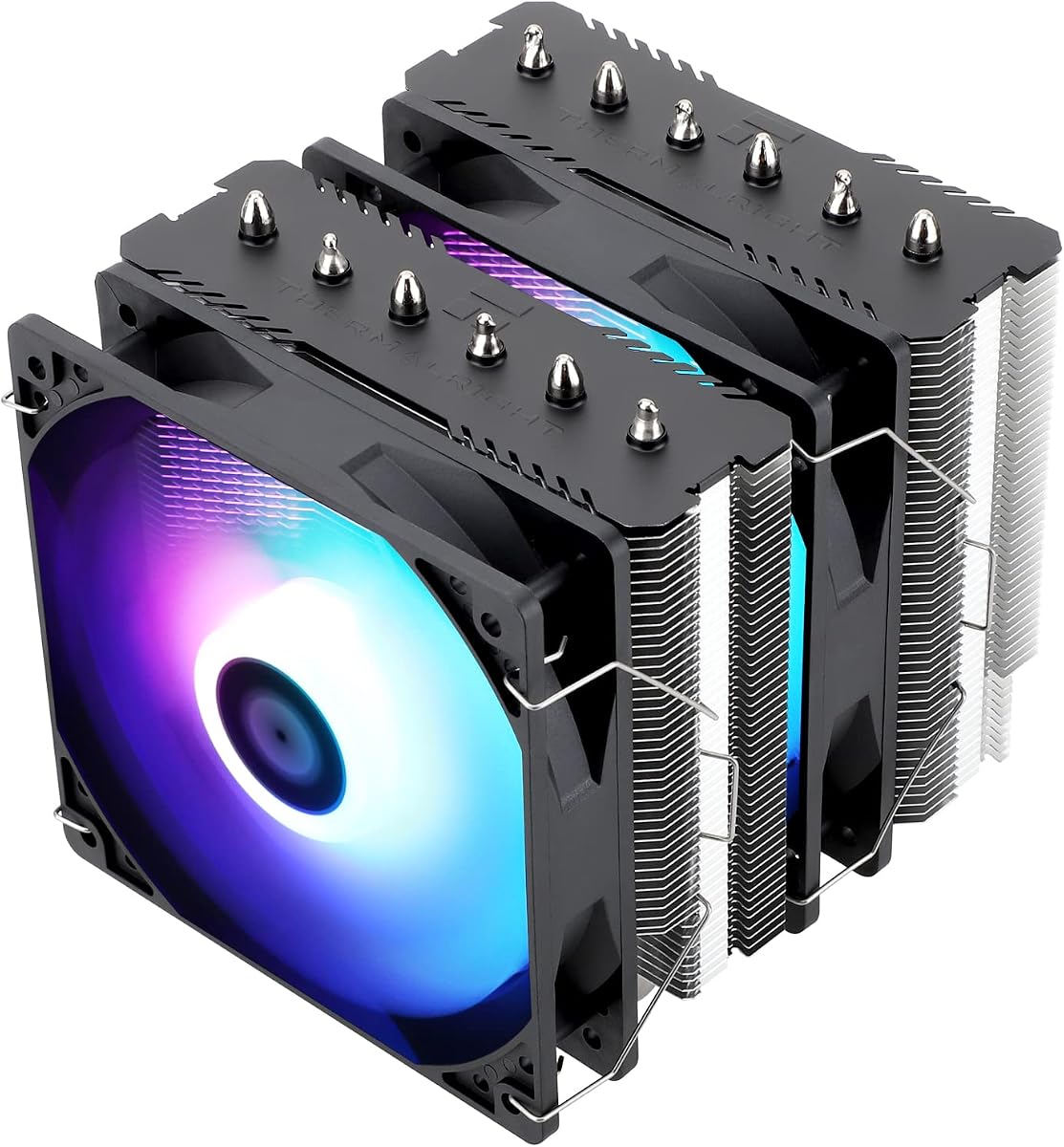


The Thermalright Assassin X120 Refined SE stands out as an affordable yet powerful cooling solution. With a solid 4.7 rating, it delivers reliable thermal performance for mid-range processors without breaking the bank.
We may earn a commission when you buy through this link, at no additional cost to you.
Its four heat pipes utilize AGHP technology to ensure consistent heat transfer regardless of orientation. The TL-C12C PWM fan maintains low noise levels while providing sufficient airflow to keep temperatures in check during demanding tasks.
While it lacks the aesthetic flair of RGB models, its performance speaks for itself. The 148mm height fits most cases comfortably, and the metal fasteners ensure a secure fit across various Intel and AMD sockets.
If you need dependable cooling on a strict budget, this model is an excellent choice. It balances cost and capability effectively, making it a top contender for budget-conscious builders seeking thermal stability.
AGHP solves inverse gravity effects, ensuring heat pipes work efficiently whether installed vertically or horizontally in your case.
Supports a wide range of sockets including the latest AM5 and LGA1700, future-proofing your build for potential upgrades.
We may earn a commission when you buy through this link, at no additional cost to you.
The Thermalright Peerless Assassin 120 SE ARGB offers robust cooling performance with its dual tower design. Rated at 4.7, it handles high TDP processors effectively while adding a touch of visual flair with ARGB lighting.
We may earn a commission when you buy through this link, at no additional cost to you.
Six sintered heat pipes and a pure copper base ensure rapid heat dissipation. The dual TL-C12C-S fans provide maximum airflow, and the ARGB lights sync with your motherboard for a cohesive aesthetic look in your system.
Installation requires some attention to RAM clearance, but the cutouts generally accommodate standard modules. The weight is significant, so ensure your case can support the cooler without bending the motherboard during transport.
For gamers or creators needing top-tier air cooling without paying premium prices, this model delivers. It combines performance and style efficiently, making it a versatile choice for modern gaming builds.
Two fans moving air through the tower create a pressure differential that pushes heat away from the CPU quickly and efficiently.
The ARGB lighting can be customized via software, allowing you to match your case fans or motherboard RGB zones perfectly.
We may earn a commission when you buy through this link, at no additional cost to you.
The Noctua NH-D15 chromax.Black is widely recognized as a reference standard for air cooling. With a 4.8 rating, it consistently outperforms many liquid coolers in thermal tests while maintaining near-silent operation.
We may earn a commission when you buy through this link, at no additional cost to you.
Its extra-wide dual-tower design utilizes two NF-A15 fans and six heat pipes to dissipate massive amounts of heat. The all-black design fits seamlessly into modern builds without clashing with other components.
Included accessories like the NT-H1 thermal paste and SecuFirm2 mounting system make installation straightforward. The offset mounting option helps balance clearance issues for high-performance scenarios.
While it commands a premium price, the performance and reliability justify the investment. It is the ideal pick for enthusiasts who prioritize silence and thermal efficiency above all else.
Noctua fans use advanced blade geometry and fluid dynamic bearings to minimize vibration and noise, even at full speed.
The six-year warranty reflects Noctua confidence in product durability, giving you peace of mind for long-term use.
We may earn a commission when you buy through this link, at no additional cost to you.
The Noctua NH-U12A chromax.Black excels in balancing performance and size. Rated 4.8, it delivers top-tier cooling in a compact 120mm tower format that fits almost any standard case.
We may earn a commission when you buy through this link, at no additional cost to you.
Dual NF-A12x25 fans provide immense static pressure to push air through the fins. This design ensures efficient heat transfer without obstructing PCIe slots or overhanging RAM modules.
The all-black aesthetic blends well with sleek setups. Installation is supported by SecuFirm2 mounting systems that allow easy swapping between Intel and AMD platforms.
If you need maximum cooling in a smaller area, this is the definitive choice. It offers premium build quality and performance that matches larger dual-tower solutions.
Despite being a 120mm cooler, its performance rivals larger units thanks to optimized fan engineering and dense fin design.
Designed to fit most tower cases without blocking critical expansion slots, making it versatile for various motherboard layouts.
We may earn a commission when you buy through this link, at no additional cost to you.
The Thermalright Assassin X 120R Digital ARGB Black stands out with its integrated digital screen. Rating a 4.7, it offers real-time temperature readings directly on the heatsink for easy monitoring without software.
We may earn a commission when you buy through this link, at no additional cost to you.
Its single tower design with four heat pipes ensures effective heat dissipation. The top cover displays CPU temperatures and usage stats, which is particularly useful for tuning and diagnostics.
The fan operates at higher RPM to move air efficiently, which can be slightly louder than passive models. However, the visual feedback justifies this trade-off for many enthusiasts.
If you want a practical monitoring tool alongside your cooling, this model delivers. It blends aesthetics with utility, making it a great option for tech-savvy users.
The digital screen updates instantly, showing current CPU temperature and fan speeds directly on the cooler.
ARGB lighting allows you to change colors to match your build theme or indicate system status visually.
We may earn a commission when you buy through this link, at no additional cost to you.
The Noctua NH-D15 is the original classic dual-tower air cooler. Rated 4.8, it has been the gold standard for years, offering exceptional cooling with minimal noise.
We may earn a commission when you buy through this link, at no additional cost to you.
Two NF-A15 fans spin quietly while moving vast amounts of air through the fins. Its dual-tower structure provides immense surface area to keep even overclocked CPUs cool.
Noctua builds these units to last, backed by a six-year warranty. The mounting system is robust and ensures consistent contact pressure across different motherboard generations.
For those who trust a proven design, this remains a top recommendation. It is reliable, quiet, and simply works exceptionally well for a long time.
The design has been tested in thousands of builds, proving its ability to handle high heat loads consistently.
High-quality materials and strict manufacturing standards ensure the cooler maintains performance for many years.
We may earn a commission when you buy through this link, at no additional cost to you.
The Noctua NH-D15S chromax.Black is a refined version of the classic NH-D15. Rated 4.8, it optimizes the design for better compatibility while keeping cooling power high.
We may earn a commission when you buy through this link, at no additional cost to you.
The asymmetrical shape moves the fan forward, ensuring it does not overlap high-profile RAM modules. It also keeps clearance from the PCIe slot intact on most boards.
Despite having a single fan, the performance is impressive thanks to the large surface area. The SecuFirm2 mounting makes it easy to install and remove when needed.
If you need a high-end cooler that plays well with other components, this is ideal. It is perfect for systems where motherboard clearance is a critical constraint.
By shifting the tower, it creates more room for tall memory kits without sacrificing cooling performance.
The NF-A15 fan is so efficient that one unit is often enough to handle the heat load of a dual tower.
We may earn a commission when you buy through this link, at no additional cost to you.
The Noctua NH-D9L is designed for small form factor builds. Rated 4.7, it provides a dual tower structure that fits inside low-profile cases without blocking RAM or PCIe slots.
We may earn a commission when you buy through this link, at no additional cost to you.
Its height of 110mm makes it perfect for ITX or HTPC chassis. The NF-A9 fan ensures that the system stays quiet while handling standard CPU loads efficiently.
Because of its size, it may not be suitable for high-end overclocking. However, for office PCs or home theaters, it offers great reliability and noise control.
If space is your main constraint, this model is a lifesaver. It brings Noctua quality to restricted environments where larger coolers simply cannot fit.
The low profile ensures it fits in many cases where standard towers would interfere with the side panel.
Despite being smaller, it uses the same high-grade materials and bearings as larger Noctua coolers.
We may earn a commission when you buy through this link, at no additional cost to you.
The Noctua NH-U12S is a classic single tower solution. Rated 4.8, it combines excellent compatibility with a quiet and efficient cooling design for standard systems.
We may earn a commission when you buy through this link, at no additional cost to you.
The slim profile means it does not overhang RAM or block expansion slots. The NF-F12 fan uses focused flow blades to direct air precisely where it is needed.
This model is versatile for ATX and Micro-ATX builds. It fits well in most standard cases and provides ample cooling for mid-range processors.
For a reliable balance of height and performance, this is a great option. It offers the proven Noctua build quality in a more manageable size.
The fan blades direct air precisely into the fins, increasing efficiency without increasing noise.
It works well with standard layouts, ensuring you do not have to change other components to fit the cooler.
We may earn a commission when you buy through this link, at no additional cost to you.
The Thermalright Peerless Assassin 120 SE offers high-end specs at an attractive price. Rated 4.8, it delivers performance that rivals much more expensive coolers in the market.
We may earn a commission when you buy through this link, at no additional cost to you.
Six heat pipes and dual fans provide massive airflow for rapid heat dissipation. The nickel-plated pipes not only look good but also prevent corrosion for long-term durability.
The offset layout ensures better clearance for graphics cards and memory modules. Installation is straightforward, but be careful to align it correctly with the motherboard backplate.
If you need maximum cooling performance on a budget, this model is unbeatable. It is a fantastic choice for modern systems requiring robust thermal solutions.
Plated heat pipes prevent corrosion and oxidation over time, keeping the cooler looking new for years.
Two fans working together push more air than a single fan, improving overall cooling efficiency significantly.
We may earn a commission when you buy through this link, at no additional cost to you.
Selecting the right CPU air cooler fan heatsink involves considering several factors beyond just price. This section breaks down what to look for to ensure you make the best choice for your specific needs.
Look at the number of heat pipes and the surface area of the fins. More pipes and larger towers generally mean better heat dissipation. Check reviews for thermal results under load to see real-world performance.
Prioritize models that match your CPU power to ensure it can handle the heat without throttling.
Noise is measured in decibels. Lower dB ratings mean quieter operation. Larger fans can move more air at lower speeds, reducing noise. Look for PWM fans that adjust speed based on temperature.
Choose a cooler with high-quality bearings to avoid rattling and ensure long-term silence.
Ensure the cooler supports your current motherboard socket. New processors may require specific mounting kits. Check if the brand includes brackets for your platform.
Future-proofing is key if you plan to upgrade your processor without buying a new cooler.
Measure your case height limit before buying. High-performance coolers can be very tall and may touch the side panel. Check width to ensure fans do not block RAM slots.
Aim for a height that fits your case with some room for airflow management.
Look for aluminum fins and copper bases. High-quality soldering and plating prevent rust and ensure heat transfer. Check the warranty period as a sign of manufacturer confidence.
Durable materials will withstand years of use and occasional accidental bumps.
Some coolers offer RGB lighting or black finishes to match your build. Decide if you want visual features or prefer a standard look. Many budget options are purely functional.
Choose based on your personal preference for visual style in your system.
Prices vary widely. Determine a budget range and compare features. Sometimes spending more gives better warranty or fan quality. Avoid very cheap models that skimp on thermal paste.
Balance cost against performance to get the best value for your money.
Mounting systems vary in complexity. Look for designs that include clear instructions and pre-applied paste. Check if you need the motherboard backplate for mounting.
Simpler installation saves time and reduces the risk of damaging your board.
Before installing, clean your CPU surface thoroughly. Apply a pea-sized amount of thermal paste to ensure no bubbles trap air. Secure the mounting brackets firmly to guarantee good contact.
Regularly dust the fins and fan blades using compressed air. Dust buildup can trap heat and reduce performance over time. Keep the cooler clean for optimal airflow.
Check the fan speed settings in BIOS periodically. Ensure PWM is enabled so the fan slows down at idle. This helps save power and reduces unnecessary noise.
Noctua models like the NH-D15 are famous for quiet performance. They use specialized fans that move a air at low speeds. This makes them ideal for home theaters or offices where silence matters.
Most models come with the fans needed for operation. Some allow you to swap fans if you prefer a different style. Always ensure any replacement fan fits the dimensions.
Check the case specifications for maximum CPU cooler height. Compare this to the cooler height listed in the product data. Leave a few millimeters of gap for airflow.
Liquid coolers can handle more heat but risk leaks. Air coolers like these are safer and often quieter. For most users, a high-end air cooler is sufficient.
Thermal paste usually lasts several years before drying out. If you notice rising temperatures after a few years, consider reapplying paste. This restores efficient heat transfer.
ARGB coolers add visual flair but cost more. If you want a plain build, standard models work just as well. Choose based on your preference for color.
We have reviewed ten top CPU Air Cooler Fan Heatsink models to help you find the perfect balance of performance and price. Whether you need a budget option or premium cooling, our list covers the best choices.
Prioritize cooling power and case fit above all else. Noise and aesthetics are secondary but still important for your overall experience. Choose a model that fits your specific build needs.
Remember that prices change frequently. Check the current deals before finalizing your purchase to get the best value possible for your PC build.