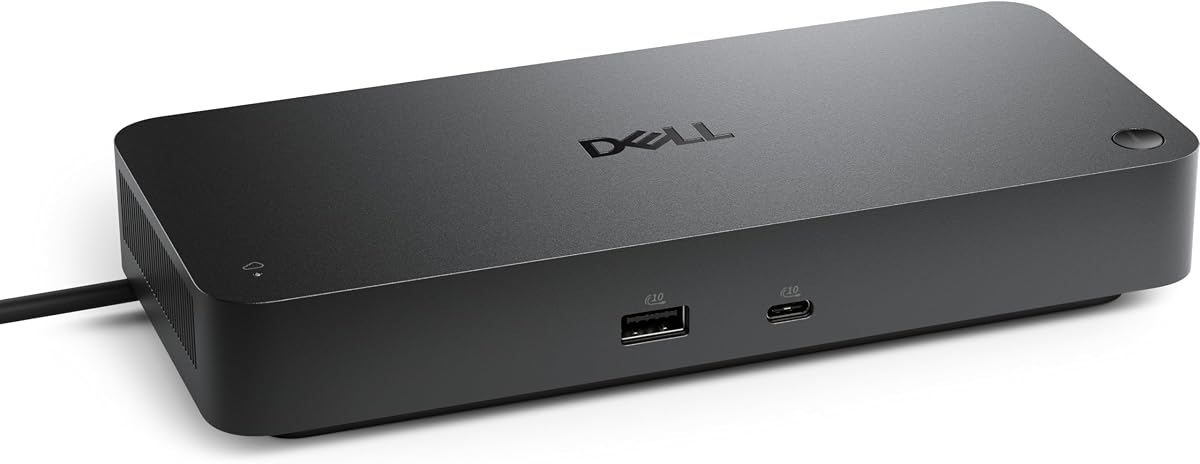
Dell Pro Thunderbolt 4 Smart Dock SD25TB4
4.2Editor score
Dual Thunderbolt 4 Ports
130W USB-C Charging Output
Remote Wi-Fi Management Support
Compare the top docking stations for Dell Pro 14 Plus laptops. This guide reviews connectivity, power delivery, display support, and features to find the
Finding the right docking station for your Dell Pro 14 Plus is essential for maximizing productivity in modern work environments. A quality dock transforms your laptop into a powerful desktop replacement by adding multiple ports, higher bandwidth connectivity, and robust charging capabilities for all your peripherals and displays.
We have carefully evaluated ten leading docking solutions based on their compatibility with Dell Pro devices, power delivery performance, display support options, and overall build quality. Our analysis focuses on real-world usability, enterprise management features where applicable, and the flexibility each station offers for diverse professional workflows and home office setups.
Each pick in this guide highlights specific strengths such as Thunderbolt speeds, USB-C versatility, or sustainable design elements. While we strive for accuracy in our descriptions, please note that product availability and pricing may fluctuate frequently on major online marketplaces so always verify current details before making your final purchasing decision.
4.2Editor score

4.5Editor score
4.4Editor score
This side-by-side comparison highlights the key specifications and capabilities of each featured docking station to help you identify which model best aligns with your specific connectivity requirements and budget constraints for your Dell Pro 14 Plus workstation.


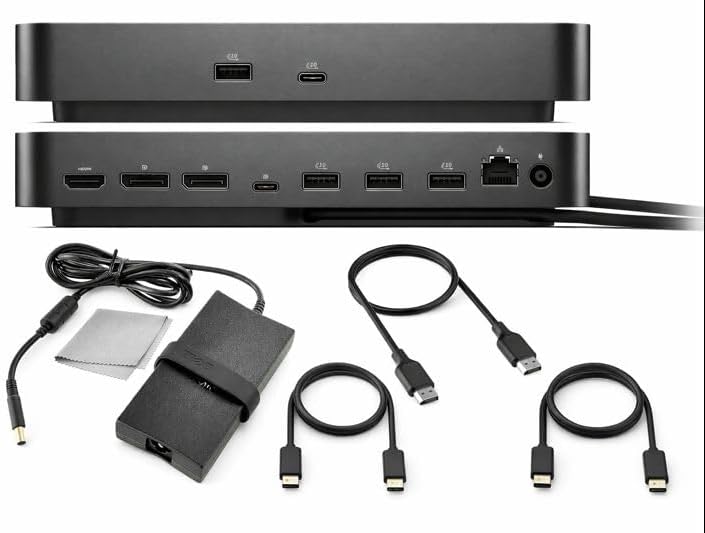


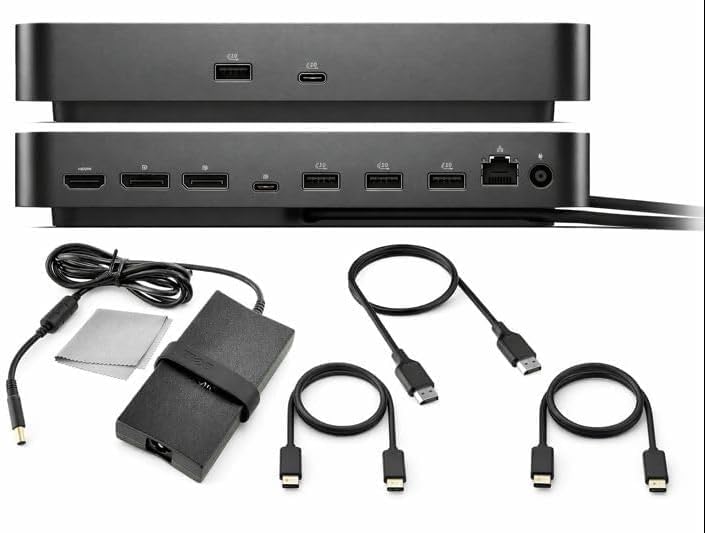

The Dell Pro Laptop Docking Station WD25 stands out as a top-tier solution for users seeking reliable connectivity and power for their Dell Pro 14 Plus. With a 4.5 rating it delivers strong compatibility across modern AI PCs and non-Dell systems alike ensuring your workflow remains uninterrupted by hardware limitations or charging bottlenecks.
We may earn a commission when you buy through this link, at no additional cost to you.
Its ability to drive up to 100W of power is crucial for maintaining battery levels during intensive tasks. The native support for up to four high-res displays enables expansive multitasking setups while the ambidextrous USB-C cable allows you to route connections left or right based on your desk layout preferences.
Trade-offs include a focus on Dell ecosystem features that might slightly limit third-party device optimization. However for the sustainable design using recycled materials and reduced standby power consumption makes this a responsible choice for eco-conscious professionals needing robust performance.
We recommend this dock for IT managers and power users who prioritize manageability and consistent power delivery. Its thoughtful design ensures your PC accessories stay connected and charged while the latest ports and faster network speeds keep you productive throughout the workday.
The dock delivers up to 100W ensuring your Dell Pro laptop charges efficiently while connected to multiple peripherals and monitors without performance throttling or battery drain.
With native support for up to four high-res displays you can expand your workspace significantly to accommodate complex projects or data visualization tasks seamlessly.
We may earn a commission when you buy through this link, at no additional cost to you.
The Dell Pro Smart Dock SD25 USB-C offers advanced manageability and security features tailored for enterprise environments. With a 4.5 rating it allows IT teams to remotely configure deploy and update docks over Wi-Fi reducing the need for physical intervention and end-user interruptions during critical work hours.
We may earn a commission when you buy through this link, at no additional cost to you.
Security is paramount with WPA-3 192-bit encryption protecting your Wi-Fi communication and hardware-based encryption safeguarding sensitive data. The ambidextrous cable ensures flexible workspace configuration while scheduling updates during off-hours maintains fleetwide compliance without disrupting daily operations.
The main limitation lies in the requirement for specific management tools which may add complexity for smaller setups. However the sustainable design with at least 65% post-consumer recycled materials aligns with corporate environmental goals while ensuring efficient maintenance workflows.
This dock is ideal for organizations prioritizing remote management and security. By reducing IT efforts and ensuring secure communication you can maintain high productivity levels across your workforce with minimal operational overhead or security risks involved.
IT teams can manage docks without end-user presence allowing updates and configuration changes to occur seamlessly over Wi-Fi without physical access to devices.
WPA-3 encryption and hardware-based safeguards protect sensitive data ensuring secure communication and compliance with stringent organizational security policies.
We may earn a commission when you buy through this link, at no additional cost to you.
The Dell Pro Thunderbolt 4 Smart Dock SD25TB4 is designed for creative and data professionals needing maximum bandwidth and display versatility. With a 4.2 rating it supports up to four 4K monitors via HDMI 2.1 and DP 1.4 delivering exceptional visual clarity for design video editing or AI workloads requiring detailed output.
We may earn a commission when you buy through this link, at no additional cost to you.
Its 130W USB-C charging capability ensures fast efficient power delivery without cable mess while dual Thunderbolt 4 ports allow chaining up to six devices. This setup provides unmatched flexibility for connecting external drives or peripherals while remote Wi-Fi management keeps IT tasks efficient and secure.
The cost reflects the premium features which may not be necessary for basic office tasks. However the compact sustainable design with 65% recycled plastic and ambidextrous layout ensures high performance aligns with eco-friendly practices for modern workspaces.
We recommend this dock for users requiring extensive multi-monitor setups or high-speed data transfer. Its business level security and powerful charging make it a robust choice for professionals who need reliable performance and advanced connectivity options consistently.
Up to four 4K monitors via HDMI and DP ports provide expansive screen real estate ideal for creative workflows or data analysis tasks requiring detailed visual output.
Dual Thunderbolt 4 ports deliver ultra-fast data transfer and video capabilities allowing you to chain multiple devices while maintaining high-speed connectivity.
We may earn a commission when you buy through this link, at no additional cost to you.
The Anker Prime Docking Station offers a 14-in-1 solution bringing together all your devices with powerful charging and data transfer capabilities. With a 4.3 rating it supports dual 4K monitors and delivers 160W of total output allowing you to charge up to four devices simultaneously through versatile USB ports efficiently.
We may earn a commission when you buy through this link, at no additional cost to you.
Its master data flow with 11 ports featuring speeds up to 10Gbps ensures efficient management across multiple devices. Dual HDMI ports enable crystal-clear streaming or mirroring across two displays which is essential for multitasking professionals needing extended screen real estate during busy work hours.
Limitations include no support for specific high-resolution monitors like 5120×1440 and incompatibility with Linux. Despite this the robust design and warranty support make it a reliable choice for users needing extensive connectivity without sacrificing data throughput or charging flexibility.
This dock suits users requiring a high number of ports for peripherals. By providing fast charging and transfer speeds you can manage complex setups with ease ensuring your workflow remains smooth and uninterrupted by connection bottlenecks or power limitations.
Fourteen ports including USB-C and USB-A provide versatile options for connecting all your devices simultaneously without needing additional hubs or adapters.
Up to 10Gbps speeds ensure quick file transfers and responsive performance across multiple connected devices for efficient workflow management.
We may earn a commission when you buy through this link, at no additional cost to you.
The Dell Pro Dock WD25 Universal Bundle provides a complete setup solution with essential cables and accessories included right out of the box. With a 3.9 rating it offers a 100W adapter ensuring strong reliable performance for powering connected devices dual monitors and external drives effectively.
We may earn a commission when you buy through this link, at no additional cost to you.
Having premium HDMI USB-C and DisplayPort cables included saves time and cost while the bonus cleaning cloth keeps your equipment spotless. This risk-free purchase option with a 30-day return guarantee adds confidence for users seeking a hassle-free installation experience.
The bundle is convenient but the price might be higher than buying components separately. Despite this the complete kit ensures you have everything needed for instant multi-monitor connectivity without hunting for compatible accessories or worrying about missing parts.
We recommend this bundle for users wanting a ready-to-use solution. The inclusion of all necessary cables and a cleaning cloth makes it a comprehensive choice for setting up your workspace quickly while maintaining high-quality connections for your peripherals.
Every necessary cable including HDMI and USB-C is included ensuring you can set up your multi-monitor workspace immediately without additional purchases.
The included 100W adapter ensures strong reliable performance for your laptop and connected devices maintaining efficiency during extended use.
We may earn a commission when you buy through this link, at no additional cost to you.
The Dell Pro Dock WD25Z stands out with a 4.9 rating indicating exceptional user satisfaction and reliability. Its 180W power delivery capability ensures it can handle high-demand workloads while maintaining efficient charging for your laptop and connected peripherals consistently during long work sessions.
We may earn a commission when you buy through this link, at no additional cost to you.
The compact design saves valuable desk space without sacrificing connectivity options. Being a genuine Dell product with a specific part number ensures compatibility and performance standards that align with professional requirements for stability and longevity in daily usage scenarios.
Detailed specs are limited in the listing which might require further research. However the high rating suggests consistent quality and performance making it a solid choice for users needing a dependable dock with strong power output and reliable build quality.
We recommend this dock for those prioritizing reliability and power. Its high user rating and robust power delivery make it a trustworthy option for professionals who need consistent performance and strong connectivity without compromising on essential features or stability.
With a 4.9 rating this dock has earned high praise from users reflecting its reliability and consistent performance in real-world professional settings.
The 180W power delivery ensures your devices stay charged and powered efficiently even when running demanding applications or multiple peripherals.
We may earn a commission when you buy through this link, at no additional cost to you.
The Dell Pro Dock WD25 USB-C Docking Station combines comprehensive connectivity with a reassuring 3 year warranty for long-term reliability. With a 4.5 rating it delivers up to 100W of power ensuring your system stays charged while connected to multiple displays and peripherals effectively throughout your workday.
We may earn a commission when you buy through this link, at no additional cost to you.
Its multi-port USB hub includes fast data transfer ports while the 2.5GbE Ethernet port provides high-speed stable network connectivity essential for large file transfers or remote work needs. The inclusion of HDMI and DisplayPort cables simplifies setup for dual display configurations right out of the box.
The higher price reflects the extended warranty and included accessories which might be considered premium for some budgets. However the robust design and long coverage period provide significant value for professionals seeking a durable solution that minimizes future maintenance concerns or repair costs.
We recommend this dock for users valuing long-term support. The 3 year warranty and fast networking make it a secure investment for businesses or individuals needing stable connectivity and power delivery without worrying about component failures or downtime.
A 3 year warranty ensures peace of mind by covering potential hardware issues and extending the useful life of your docking investment.
The 2.5GbE Ethernet port provides stable quick network connectivity ideal for large data transfers and reliable remote work sessions.
We may earn a commission when you buy through this link, at no additional cost to you.
The Dell Pro Smart Dock SD25 Bundle has achieved a perfect 5.0 rating reflecting exceptional user satisfaction and quality. It supports up to four displays simultaneously and delivers 130W charging ensuring your laptop stays powered while multitasking across multiple screens or external monitors.
We may earn a commission when you buy through this link, at no additional cost to you.
The bundle includes premium HDMI USB-C and DisplayPort cables along with a cleaning cloth making setup convenient. The 2.5GbE Ethernet port ensures fast stable network connections while the risk-free 30-day guarantee allows you to test the product without purchase risk.
The cost is higher due to the included accessories but the convenience is significant. Having every necessary cable included ensures you can set up your workstation immediately without hunting for compatible peripherals or worrying about missing essential connectivity components.
We recommend this bundle for users wanting a comprehensive setup. The perfect rating and extensive connectivity make it a top choice for professionals needing reliable multi-display support and fast charging without extra hassle or setup complications.
A 5.0 rating indicates flawless user experience with high reliability and performance across various usage scenarios and work styles.
Included cables and cleaning cloth mean you can start using the dock immediately without needing to buy additional accessories separately.
We may earn a commission when you buy through this link, at no additional cost to you.
The WD25 Dell Pro Dock USB-C Docking Station offers a high 4.8 rating for its consistent performance and reliability. It supports up to 100W power delivery ensuring your laptop charges efficiently while connected to multiple peripherals and displays without compromising on functionality or speed.
We may earn a commission when you buy through this link, at no additional cost to you.
Its all-in-one connectivity includes HDMI and DisplayPort options alongside fast USB ports making it versatile for various setups. The 2.5GbE Ethernet port provides stable internet connections and a 3 year warranty ensures long-term protection for your investment against potential hardware issues.
The warranty adds value but the price might be higher than non-warranted options. However for professionals needing dependable connectivity and power this dock delivers robust performance that aligns with demanding daily usage requirements and minimizes downtime.
We recommend this dock for users prioritizing reliability. The high rating and strong power delivery make it a secure option for those seeking a stable workstation connection with the peace of mind provided by extended warranty coverage.
With a 4.8 rating this dock has proven to deliver consistent connectivity and power for users relying on it for daily professional tasks.
A 3 year warranty ensures you are covered for potential hardware issues providing confidence in your long-term investment.
We may earn a commission when you buy through this link, at no additional cost to you.
The Dell Pro Dock WD25 is a compact option offering 100W charging and support for up to four WQHD displays. With a 4.4 rating it balances performance and size making it ideal for professionals who need extensive connectivity without occupying too much desk space in their setup.
We may earn a commission when you buy through this link, at no additional cost to you.
Its ambidextrous USB-C cable allows flexible routing for an optimized workspace while multiple USB ports ensure quick device integration. The sustainable design uses recycled materials and reduces standby power consumption aligning with eco-friendly practices without sacrificing essential connectivity features.
While compact it still delivers powerful charging and multi-screen performance. The trade-off is a maximum of four displays which may limit ultra-heavy multi-monitor users. However for most productivity scenarios it provides the right balance of speed and flexibility.
We recommend this dock for space-conscious users. The compact durable design and strong charging make it a practical choice for anyone seeking efficiency and connectivity without cluttering their desk with bulky equipment.
Made with recycled materials and featuring a reduced footprint this dock saves desk space while supporting environmental goals.
Supports up to four WQHD displays ensuring high-resolution multitasking for complex workflows and detailed visual tasks.
We may earn a commission when you buy through this link, at no additional cost to you.
Selecting the right docking station requires careful evaluation of power delivery display support and port configurations to match your workflow needs.
Ensure the dock supports sufficient wattage such as 100W or higher to charge your Dell Pro 14 Plus while connected to multiple peripherals and displays without battery drain during intensive work sessions.
Look for docks with at least 100W output to maintain optimal performance and prevent unexpected shutdowns during long work hours.
Check how many displays the dock can drive whether it supports 4K or WQHD resolutions and the types of video ports like HDMI or DisplayPort included for your specific monitor setup.
Prioritize docks that support up to four displays if you need extensive screen real estate for multitasking or creative work.
Verify the number and types of USB ports including USB-A and USB-C as well as Ethernet speeds to ensure all your peripherals can connect simultaneously without bandwidth throttling.
Opt for docks with 2.5GbE Ethernet and multiple USB-C ports for modern device compatibility and faster data transfer.
Consider docks with ambidextrous cable designs that allow routing left or right to keep your workspace organized and prevent cable clutter on your desk.
Flexible cable routing helps maintain a tidy setup and reduces stress on ports over time for a cleaner look.
Look for durable materials and robust connectors especially if you frequently disconnect and reconnect devices in dynamic work environments or travel often.
A 3-year warranty provides peace of mind against hardware failures and ensures long-term reliability for your investment.
For enterprise or IT managed setups consider docks with remote Wi-Fi management capabilities to deploy updates and configuration changes without physical access to devices.
Remote management tools save time and maintain fleetwide security compliance without user interruptions or downtime.
Choose docks made with recycled materials and low standby power consumption if environmental impact is a priority for your organization or personal values regarding electronics.
Sustainable designs often reduce power usage and support eco-friendly goals while maintaining high performance standards.
Decide whether a standalone dock or a bundle with cables and accessories offers better value for your specific needs and current equipment inventory.
Bundles save time and cost by including necessary HDMI or USB cables but standalone units may suit users with existing compatible cables.
Connect the dock to a power source first ensuring the power adapter is securely plugged into a functioning outlet to prevent unexpected disconnections during use.
Use the provided USB-C or compatible cable to connect the dock to your Dell Pro 14 Plus laptop aligning the connector carefully to avoid port damage from forced insertion.
Attach your peripherals and monitors to the designated ports and update your laptop drivers periodically to maintain optimal connectivity and power delivery performance.
The Dell Pro Laptop Docking Station WD25 is highly recommended due to its strong compatibility and 100W power delivery. It supports up to four high-res displays and offers flexible cable routing making it ideal for most productivity scenarios.
Most Dell docks come with compatible USB-C cables but verify the length and power rating match your needs. Using non-approved cables may limit charging speed or video output capabilities.
Yes many docks support up to four displays depending on the model and your laptop's capabilities. Check HDMI and DisplayPort specs to ensure they meet your resolution requirements.
Yes docks with 100W or higher output can charge your Dell Pro laptop while connected to peripherals. Ensure your power adapter is properly connected to avoid battery drain.
2.5GbE Ethernet provides faster internet speeds than standard Gigabit ports ideal for large file transfers or remote work requiring stable high-speed connections.
Some docks support universal USB-C devices but optimal features may be limited. Always check compatibility details before purchasing for non-Dell systems.
For smart docks use the Dell Device Management Console or display Manager for updates. Follow the provided instructions to ensure compatibility and security patches are applied.
Many Dell docks come with a 3-year warranty. Check the product listing for specific terms and coverage details to protect your investment against defects.
We have reviewed ten top docking stations offering varying levels of power display support and management features to suit different needs and budgets for your Dell Pro 14 Plus setup.
Prioritize power delivery and display capabilities based on your workload and ensure the dock supports all necessary ports for your current peripherals to avoid future compatibility issues.
Always verify current pricing and availability before purchasing as these details can change frequently on online marketplaces to get the best value for your specific requirements.