
ANK-L336 Mini eGPU Enclosure
3.8Editor score
Supports ATX SFX and Flex PSUs
Compatible with Windows Linux and MacOS
Features 85W PD fast charging
Discover the top-rated Egpu Enclosures for 2026 to upgrade your laptop graphics. This guide compares features, compatibility, and performance across ten
External GPU enclosures transform standard laptops into powerful desktop workstations by connecting discrete graphics cards via high-speed interfaces. These devices are essential for creators, gamers, and professionals who need significant graphical power without sacrificing portability or desk space.
Our team evaluated ten distinct Egpu Enclosures based on bandwidth capabilities, power supply support, thermal management, and overall connectivity options. We focused on models that support Thunderbolt 4, Thunderbolt 5, and USB4 protocols to ensure compatibility with modern Windows and Linux systems.
Each pick highlights specific strengths such as AI acceleration support, compact form factors, or high-wattage power delivery for demanding GPUs. Please note that availability and pricing may fluctuate over time so always verify current stock before making your final purchase decision.
3.8Editor score

4.0Editor score
5.0Editor score
The following table provides a side-by-side comparison of the ten top-rated Egpu Enclosures available this month. Review the key specifications and features to determine which unit best suits your specific performance needs and hardware setup.


The Razer Core X V2 stands out as a top contender in the Egpu Enclosures market due to its forward-looking Thunderbolt 5 support and robust chassis design. It achieves a solid rating for its ability to handle massive power demands while maintaining signal integrity across various connected devices.
We may earn a commission when you buy through this link, at no additional cost to you.
This enclosure features a modular design that allows users to swap out graphics cards without tools using included thumbscrews. The active cooling system ensures that even under heavy loads during rendering or gaming sessions the internal components remain within safe thermal limits.
While it offers impressive performance capabilities users should note that the graphics card and power supply must be purchased separately. This separation allows for customization but requires additional budget planning before setting up the full external graphics workstation.
We recommend this unit for professionals and enthusiasts who need a future-proof solution that can scale with upcoming GPU releases. Its compatibility with Thunderbolt 5 ensures that bandwidth bottlenecks are minimized for years to come.
Support for Thunderbolt 5 provides up to 80 Gbps bandwidth allowing for near-native desktop performance when connected to compatible laptops.
The tool-free installation system makes upgrading GPUs simple without needing screwdrivers or technical expertise beyond basic cable management.
We may earn a commission when you buy through this link, at no additional cost to you.
The Sonnet Breakaway Box 850 T5 is engineered for users who demand maximum power and connectivity options in a single package. With an 850W power supply built-in it removes the need for external adapters and ensures stable power delivery to high-end graphics cards.
We may earn a commission when you buy through this link, at no additional cost to you.
This model includes a dedicated Thunderbolt 5 dock port alongside multiple USB ports and an Ethernet connection. This integration simplifies desk setups by allowing peripherals to connect directly to the enclosure rather than the laptop itself.
The primary drawback is its premium price tag which may not fit every budget. Additionally compatibility is strictly limited to Windows systems meaning Mac users cannot take advantage of these high-performance features.
For professional creatives running complex workflows in rendering or AI training this unit offers the reliability and throughput needed to maintain efficiency. It is an ideal choice for those building a permanent high-performance workstation.
The combination of 850W power and Thunderbolt 5 speed ensures that even the most power-hungry GPUs perform without throttling or latency.
Integrated USB and Ethernet ports reduce cable clutter by centralizing connections at the graphics box instead of the host device.
We may earn a commission when you buy through this link, at no additional cost to you.
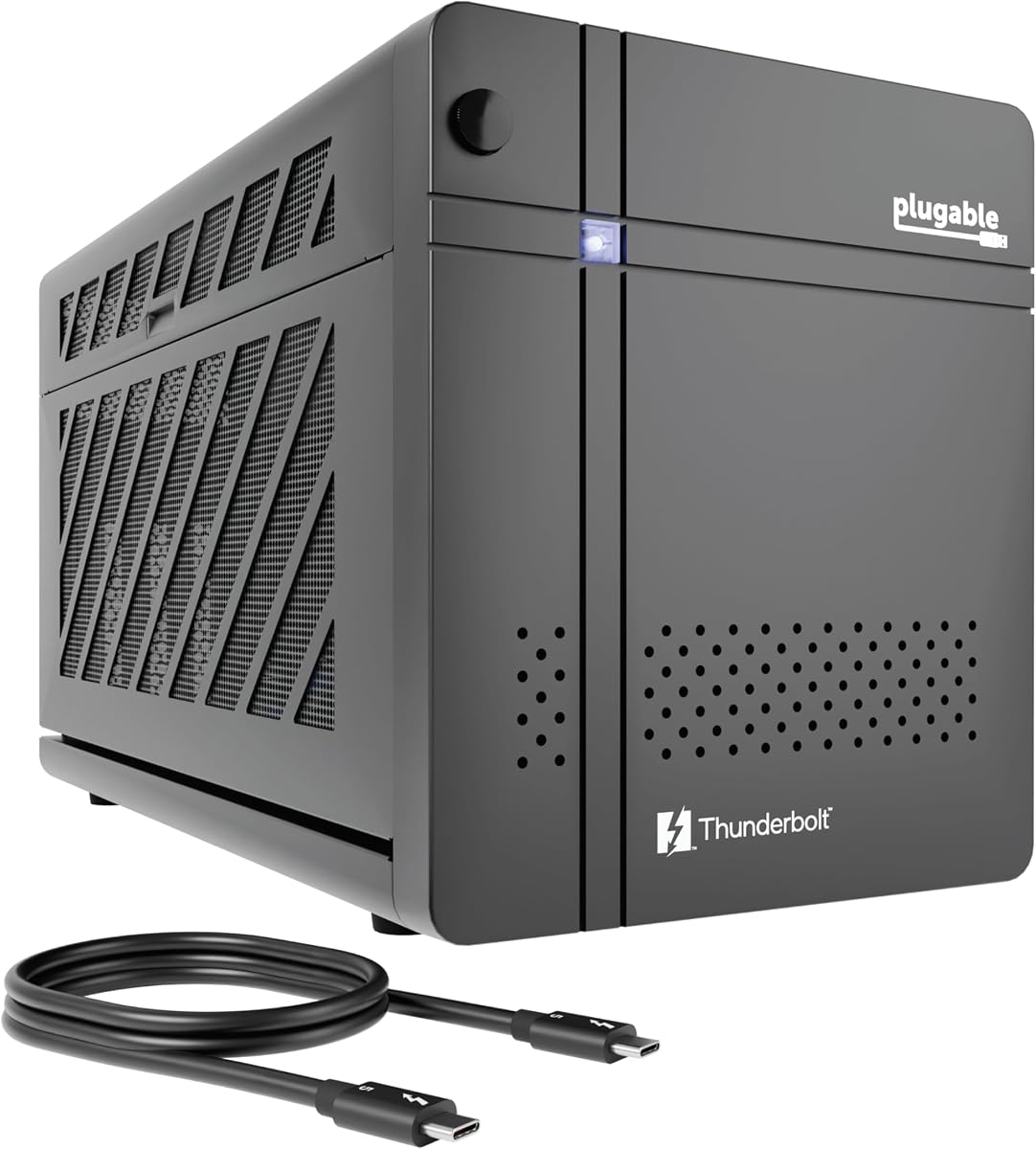
The Plugable Thunderbolt 5 AI eGPU Enclosure is uniquely designed for developers and researchers who need secure offline AI model execution. It supports frameworks like Ollama and LM Studio ensuring that sensitive data never leaves your local perimeter.
We may earn a commission when you buy through this link, at no additional cost to you.
Featuring an 850W ATX 3.1 power supply this unit provides ample power for high-end NVIDIA or AMD GPUs while maintaining 80 Gbps throughput. The build quality and reliability are backed by a lifetime support plan from the North American team.
While it excels in specific AI and development scenarios it may be overkill for casual gaming or general media consumption. However for those needing a dedicated private AI box it offers unmatched security and performance integration.
We highly recommend this enclosure for enterprises or privacy-focused individuals running local language models. Its design prioritizes data security and long-term reliability over flashy aesthetic features.
Running models locally with air gap capabilities ensures that proprietary prompts and data remain completely private without cloud dependencies.
Lifetime support from an experienced connectivity team ensures that any technical issues are resolved quickly with expert guidance.
We may earn a commission when you buy through this link, at no additional cost to you.
This External GPU Enclosure offers a complete solution by including the enclosure power supply cables and even a custom carrying case. It is designed for users who need a ready-to-use kit without hunting for compatible power components separately.
We may earn a commission when you buy through this link, at no additional cost to you.
The aluminum shell provides durability while keeping the weight low enough for portable setups. It supports both Windows and Linux making it versatile for developers who work across different operating systems.
The power supply is rated at 240W which limits it to mid-range graphics cards. Users planning to install high-end power-hungry GPUs should consider a model with higher wattage to avoid performance throttling.
For travelers or students needing occasional graphics boosts this kit provides convenience and simplicity. The included case protects the unit during transit ensuring it remains ready for deployment at any location.
Receiving everything needed in one box reduces setup time and ensures compatibility between the enclosure and power supply right out of the box.
The lightweight aluminum construction and included carrying case make it easy to transport between office and home environments.
We may earn a commission when you buy through this link, at no additional cost to you.
The ANK-L336 Mini eGPU Enclosure is an excellent entry point for users seeking a low-cost solution to expand graphics capabilities. It supports a wide range of power supply types allowing users to repurpose existing hardware if available.
We may earn a commission when you buy through this link, at no additional cost to you.
Its compatibility with gaming handhelds like the ROG Ally X and MSI Claw 8 makes it particularly useful for portable gaming enthusiasts. The 85W PD charging ensures the device can be powered while connected to the enclosure.
While the build quality is more basic compared to premium models it delivers reliable performance for general tasks. The lower cost makes it accessible for budget-conscious buyers who prioritize functionality over aesthetics.
We recommend this model for casual users or those testing eGPU concepts before committing to expensive hardware. It provides a practical way to experience external graphics without a significant financial investment.
Optimized support for gaming handhelds allows users to connect larger desktop GPUs directly to portable devices for better visual fidelity.
The affordable price point and flexible power options reduce the total cost of ownership for users who already have compatible power supplies.
We may earn a commission when you buy through this link, at no additional cost to you.
The VK-Y900 eGPU Enclosure supports specific AI applications like TinyGPU for running local LLM models on Apple Silicon Macs. This capability opens up new possibilities for developers needing to test language models locally without cloud services.
We may earn a commission when you buy through this link, at no additional cost to you.
It features dual Thunderbolt ports allowing for flexible connection setups where one port handles data and the other provides charging. The PCB technology used ensures reliable electrical connections over long periods.
Users should note that this unit is not optimized for gaming or 3D rendering workloads. Its specific design targets developers and researchers who need a cost-effective way to run local inference tasks.
For those interested in AI development on a budget this enclosure provides a specialized tool that is hard to find elsewhere. It bridges the gap between consumer hardware and professional research needs.
Support for TinyGPU allows running large language models locally which is critical for testing privacy and performance in development environments.
ENIG PCB technology provides superior conductivity and resistance to oxidation ensuring the unit remains functional even in varying environmental conditions.
We may earn a commission when you buy through this link, at no additional cost to you.
The Sonnet Breakaway Box 750ex remains a robust choice for users with Thunderbolt 3 systems who need reliable external graphics performance. It supports both Mac and Windows making it a versatile option for mixed hardware environments.
We may earn a commission when you buy through this link, at no additional cost to you.
With a 750W power supply included it can handle a wide range of GPUs. The design includes multiple USB ports and an Ethernet connection which adds significant value to the workstation setup.
While it uses the older Thunderbolt 3 standard it still provides sufficient bandwidth for most modern GPUs. Users with older Macs will find this one of the few options that still maintain compatibility.
We recommend this unit for those upgrading existing workstations rather than buying brand new systems. It offers a proven track record and sufficient power for demanding creative tasks.
Support for Mac systems without M1 chips ensures that existing hardware investments can still leverage external graphics power for creative workflows.
Integrated USB ports and Ethernet allow for a clean desk setup by centralizing connectivity at the external graphics box.
We may earn a commission when you buy through this link, at no additional cost to you.
This Mini eGPU Enclosure is designed for users comfortable with some DIY assembly who want a compact footprint for their graphics solution. It supports standard power supplies so users can reuse existing units if they have them.
We may earn a commission when you buy through this link, at no additional cost to you.
The inclusion of a downstream Thunderbolt port allows for daisy-chaining additional devices which is rare in compact models. This feature adds flexibility to desktop setups that need multiple high-speed connections.
However it requires the user to source their own power supply and ensure compatibility with their specific GPU. This adds complexity but also reduces cost for those who prefer a tailored approach.
We recommend this option for enthusiasts who enjoy technical projects and want to save money by reusing existing hardware. It is less suitable for those seeking a plug-and-play solution.
Support for ATX and SFX power supplies means users can choose the power size that fits their spatial requirements best.
The additional downstream port allows multiple Thunderbolt devices to connect through the GPU dock simplifying cable management.
We may earn a commission when you buy through this link, at no additional cost to you.
The MINISFORUM DEG2 stands out by offering both USB4 V2 and OCuLink interfaces in a single enclosure. This dual capability allows users to switch between high compatibility and pure performance modes instantly via a hardware switch.
We may earn a commission when you buy through this link, at no additional cost to you.
It includes an integrated M.2 NVMe slot which allows for direct storage of AI models or project files on the dock itself. This synchronization feature helps maintain performance consistency when switching between different host devices.
The signal booster built into the unit minimizes latency ensuring that high-bandwidth tasks like 8K rendering run smoothly. This attention to signal integrity makes it suitable for professional workflows.
We recommend this model for users who need maximum flexibility and speed without compromising on connection types. It bridges the gap between standard docking and high-performance storage integration.
Having both USB4 and OCuLink ensures you can optimize for speed on high-end devices while maintaining compatibility with standard Thunderbolt systems.
The M.2 NVMe slot allows you to store heavy assets directly on the dock reducing load times when switching hosts.
We may earn a commission when you buy through this link, at no additional cost to you.
The External eGPU Enclosure with PSU delivers a solid value proposition by providing everything needed in one package. Its 240W power supply handles many standard GPUs while remaining affordable for most users.
We may earn a commission when you buy through this link, at no additional cost to you.
The aluminum shell keeps the unit lightweight which is essential for portability. It includes a carrying case ensuring that the enclosure is protected during travel to work or study locations.
While it lacks some advanced features found in higher-end models it covers the essentials for most casual and semi-professional users. The high user rating reflects its reliability and ease of use.
We recommend this unit for anyone looking for a straightforward solution to boost graphics performance without complex configurations. It is a practical choice for everyday productivity and light creative tasks.
Having the power supply and case included removes the guesswork from setup allowing you to focus on your work immediately.
The custom carrying case ensures durability during transport which is vital for users who move their workstations frequently.
We may earn a commission when you buy through this link, at no additional cost to you.
Selecting the right Egpu Enclosure requires careful attention to power requirements connectivity standards and physical dimensions. This guide outlines the critical factors to consider before making a purchase.
Ensure your laptop supports Thunderbolt 3 4 or 5 or USB4 protocols as this dictates the maximum bandwidth available to the GPU. Mismatched standards can lead to performance bottlenecks where the graphics card cannot reach its full potential.
Check your device specifications or system hardware settings to confirm the interface type before purchasing any Egpu Enclosure.
The power supply unit included or supported by the enclosure must match the wattage needs of your chosen graphics card. High-end GPUs often require 750W or more so verify the PSU rating to avoid instability or hardware damage.
Always choose an enclosure with a PSU wattage that exceeds your GPU requirements by a comfortable margin for future-proofing.
Graphics cards vary significantly in length and width so measure your GPU dimensions against the enclosure specifications. Oversized cards may not fit or could obstruct cooling vents leading to overheating issues.
Verify the maximum supported card dimensions listed in the product details before committing to a purchase.
While Windows and Linux generally offer broad support some enclosures may have limited functionality on Macs especially with newer Apple Silicon chips. Always check compatibility lists to ensure driver support for your operating system.
Research specific OS requirements to prevent driver conflicts or non-functional external graphics setups.
External enclosures must dissipate heat effectively to maintain stable GPU clocks under load. Look for active cooling systems like built-in fans that can ramp up during intensive tasks.
Enclosures without active cooling may struggle to maintain peak performance during long gaming or rendering sessions.
Additional ports like Ethernet or extra USB slots add significant value by allowing your enclosure to act as a docking station. This reduces cable clutter on your desk and simplifies your workspace setup.
Prioritize models with extra downstream ports if you need to connect multiple peripherals directly to the enclosure.
Consider interfaces like Thunderbolt 5 or OCuLink that offer higher bandwidth speeds than older standards. These ensure compatibility with next-generation GPUs without needing to replace the enclosure soon.
Investing in newer connectivity standards now can save money and hassle when upgrading graphics hardware later.
Durable materials like aluminum or steel protect your investment from physical damage during transport. A solid warranty and responsive support team also provide peace of mind for long-term use.
Check the warranty terms and support policies to ensure you are covered in case of hardware defects.
Start by installing your graphics card into the PCIe slot using the provided thumbscrews or tools. Secure the card firmly to ensure proper contact and prevent movement during transport or handling.
Connect the Thunderbolt or USB4 cable to your host device before powering on the enclosure to establish a stable handshake. Always shut down the enclosure safely before disconnecting cables to avoid potential data corruption.
Regularly clean dust from the fans and vents to maintain optimal airflow and prevent overheating. Using compressed air gently can extend the lifespan of internal components significantly.
No not all laptops support external GPU enclosures. Your device must have a Thunderbolt 3 4 or 5 or USB4 port with active support. Check your laptop specifications to confirm this connectivity before purchasing.
Most PCIe desktop graphics cards are compatible but you must verify physical dimensions and power requirements. Ensure your enclosure can support the card length and power supply needs before installing.
Compatibility varies widely. Older Macs with Thunderbolt 3 often work well but newer Apple Silicon Macs have limited support for external graphics. Always check vendor documentation for specific Mac models.
Yes most Egpu Enclosures sold do not include a graphics card or power supply unless stated otherwise. You must purchase these components separately to build a complete setup.
Performance gains depend on your host CPU and the GPU installed. Generally expect significant improvements in gaming frame rates and rendering speeds especially with modern high-bandwidth connections.
Yes many enclosures support AI workloads when paired with compatible GPUs. However specific firmware features may be required for optimized local model execution and privacy compliance.
Thunderbolt 5 offers significantly higher bandwidth which is beneficial for future high-performance GPUs. While not strictly necessary today it is a smart investment for those looking to future-proof their setup.
This can happen due to driver issues or incompatible cables. Ensure you have updated drivers and use the included high-speed cables to avoid connection failures.
We have reviewed ten exceptional Egpu Enclosures that cater to a wide range of needs from casual gaming to professional AI development. Each option offers distinct advantages depending on your power budget and connectivity needs.
Prioritize power supply capacity and interface speed to ensure your chosen unit can handle your GPU and host device effectively. Matching these specifications correctly will lead to the smoothest performance experience possible.
Prices and availability change frequently so check current listings before finalizing your decision. Select the model that aligns best with your technical requirements for a lasting upgrade to your computing setup.