
Integral 4GB Crypto-197
4.1Editor score
FIPS 197 Certified
Brute Force Protection
Waterproof Design
This guide compares the top 10 encrypted USB flash drives for security, speed, and durability to help you choose the best protected storage solution for your
In an era where data breaches are common, securing your files is paramount. Encrypted USB flash drives offer a robust solution by protecting your sensitive information with hardware-based encryption. These devices ensure that only authorized users can access your data, making them ideal for professionals and privacy-conscious individuals.
We have meticulously evaluated ten leading encrypted USB flash drives based on security certifications, encryption standards, build quality, and usability. Our analysis focuses on FIPS compliance, brute-force protection, and cross-platform compatibility. This list covers a range of options from budget-friendly choices to enterprise-grade secure storage solutions.
Each product pick highlights key features, pros, cons, and real-world performance insights to guide your decision. Note that prices and availability may change over time, so verify current listings before purchasing. Our goal is to provide clear, honest comparisons to help you select the right drive for your specific security requirements.
4.1Editor score
4.6Editor score

4.5Editor score
The following table provides a side-by-side comparison of all ten encrypted USB flash drives evaluated in this guide, highlighting key specifications and certifications for quick reference.


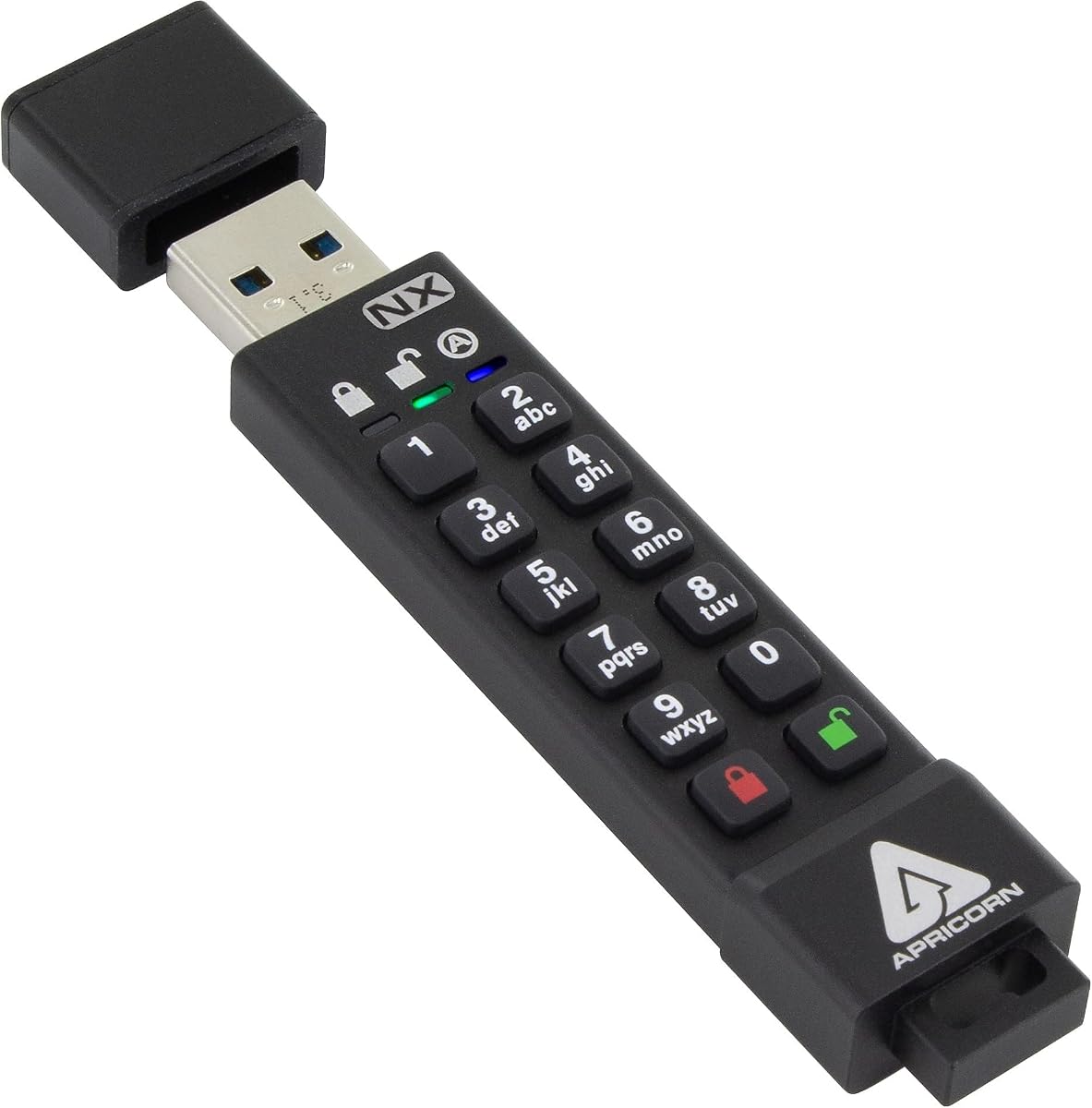
The Apricorn Aegis Secure Key 3 NX stands out as a top-tier secure storage solution. It offers FIPS 140-2 Level 3 validation, ensuring enterprise-grade protection for sensitive data. Its hardware-based encryption eliminates software vulnerabilities, providing peace of mind for professionals handling confidential files.
We may earn a commission when you buy through this link, at no additional cost to you.
This drive features separate admin and user modes, allowing flexible access control. Two read-only modes help prevent accidental data modification, which is crucial for compliance scenarios. The Aegis Configurator Compatibility enables tailored security settings without installing external software on the host machine.
Trade-offs include its premium price and lower storage capacity compared to competitors. However, the robust build and security features justify the investment for those prioritizing data safety over cost. It remains a reliable choice for secure file transfers across multiple devices.
This drive is ideal for government employees, enterprise users, or anyone needing strong encryption standards. Its compatibility with various operating systems and lack of software installation requirements make it versatile. We recommend it for secure data storage where reliability is paramount.
FIPS 140-2 Level 3 validation ensures the drive meets rigorous government security standards for cryptographic modules. This makes it suitable for organizations with strict compliance requirements.
Separate admin and user modes allow administrators to set policies while restricting end-user permissions, enhancing overall security management within an organization.
We may earn a commission when you buy through this link, at no additional cost to you.
The Kingston IronKey Vault Privacy 50 combines high capacity with top-tier security. It uses FIPS 197 with XTS-AES 256-bit encryption to safeguard sensitive data. This drive is perfect for businesses needing reliable storage that adheres to strict security protocols without compromising performance.
We may earn a commission when you buy through this link, at no additional cost to you.
Protection against brute force and BadUSB attacks is built into its digitally-signed firmware. The multi-password option with complex and passphrase modes offers flexibility for different security needs. Dual read-only settings prevent accidental data loss or modification during critical operations.
While the price is high, the extensive security features and large capacity provide value for enterprise use. The setup can be complex due to multiple password options, but this enhances customization. Users seeking robust protection will find these trade-offs acceptable.
This drive suits large corporations and government agencies handling large volumes of confidential data. Its TAA compliance meets procurement standards for federal and enterprise contracts. We recommend it for users needing maximum security on a portable device.
Digitally-signed firmware prevents unauthorized tampering, ensuring the device integrity remains intact against malicious attacks and unauthorized modifications.
Multi-password options including passphrase modes allow for longer, more memorable credentials while maintaining strong security standards against dictionary attacks.
We may earn a commission when you buy through this link, at no additional cost to you.
The Apricorn 128GB Aegis Secure Key 3 NXC offers modern connectivity with robust encryption. It features USB 3.2 Type C for faster transfers and compatibility with newer devices. The FIPS 140-2 Level 3 validated security ensures safe handling of sensitive data across platforms.
We may earn a commission when you buy through this link, at no additional cost to you.
Its USB 3.2 with Type C connector supports both power and data transfer, making it versatile. Separate admin and user modes maintain strict access control without installing software. This design streamlines security management while keeping data protected against unauthorized access.
Users may find the price higher than standard drives, but the secure features justify the cost. Dependency on the USB port or internal battery for power is a minor inconvenience. Overall, it is a strong choice for modern secure workflows.
This drive is suitable for professionals using laptops and mobile devices with Type C ports. Its software-free operation simplifies setup on various systems. We recommend it for those needing secure high-speed data transfer on modern hardware.
USB 3.2 Type C support ensures compatibility with latest devices and provides faster data transfer rates for efficient secure file handling.
256-bit hardware encryption protects data without relying on software, reducing vulnerability risks associated with operating system-level compromises.
We may earn a commission when you buy through this link, at no additional cost to you.
The Integral 4GB Crypto-197 provides strong encryption at an affordable price. It is certified to FIPS 197, offering U.S. Government approved security levels. This makes it a cost-effective solution for individuals and small businesses needing basic secure storage.
We may earn a commission when you buy through this link, at no additional cost to you.
Protection against brute force password attacks automatically erases data after six failed attempts, enhancing security. The durable dual-layer waterproof design protects against physical damage and environmental hazards. Auto-lock features secure data when the drive is removed from a computer.
Its 4GB capacity is limited for large files, but sufficient for documents. Lack of advanced customization options is a trade-off for simplicity and cost. However, its secure entry and zero footprint design make it user-friendly.
This drive is perfect for budget-conscious users needing government-grade security. It works with both PC and Mac without software installation. We recommend it for occasional secure file transfers where cost is a primary concern.
Automatic data erasure after failed access attempts prevents unauthorized access and protects sensitive information from brute force attacks.
Waterproof double-layer design ensures the drive remains functional even after exposure to water or rough handling during travel.
We may earn a commission when you buy through this link, at no additional cost to you.
The iStorage datAshur PRO offers a straightforward PIN-based authentication system. It is FIPS 140-2 Level 3 certified, ensuring compliance with major data regulations. This drive is designed for simplicity, allowing quick setup without software installation across multiple operating systems.
We may earn a commission when you buy through this link, at no additional cost to you.
Its rugged, dust and water-resistant design with IP57 certification protects data in harsh environments. AES-XTS 256-bit hardware encryption secures all transferred files in real time. This makes it reliable for field work or travel where durability is essential.
The limited storage may not suffice for large media files, but works well for documents. The keypad might show wear after extensive use, yet remains functional. Its speed is fast for USB 3.2, balancing security with performance.
This drive suits professionals needing quick secure access without software complexity. It supports Windows, macOS, Linux, and more. We recommend it for users prioritizing ease of use and regulatory compliance.
Certified for GDPR, CCPA, and HIPAA compliance, ensuring adherence to global data protection laws and regulations.
IP57 rating guarantees protection against dust and water immersion, making the drive suitable for demanding physical conditions.
We may earn a commission when you buy through this link, at no additional cost to you.
This secure flash drive combines portability with solid encryption. It uses AES256-bit hardware encryption to prevent brute force cracking, ensuring data safety. The aluminum alloy shell provides a durable and sleek design that is easy to carry anywhere.
We may earn a commission when you buy through this link, at no additional cost to you.
Key unlock design ensures no password trace, and after ten incorrect inputs, the drive resets and wipes data. Automatic lock features secure data if the device is unplugged or idle. This level of protection is vital for preventing unauthorized access.
Compatibility is limited to specific systems and may not support all platforms seamlessly. While the speed is good for USB 3.0, it is not the fastest on the market. The reset function is a strong safety net for lost passwords.
This drive is ideal for personal users needing secure portable storage. Its compact size fits easily on key rings. We recommend it for individuals prioritizing physical security and data erasure features.
The drive locks after 30 seconds of inactivity or when unplugged, ensuring data remains protected even if left connected.
Ten wrong password attempts trigger an automatic reset and wipe, safeguarding data from unauthorized access attempts.
We may earn a commission when you buy through this link, at no additional cost to you.
The Lexar 128GB JumpDrive F35 PRO introduces fingerprint authentication for easy access. It saves up to ten different fingerprints for shared or multi-user scenarios. This feature enhances convenience while maintaining strong security for confidential files.
We may earn a commission when you buy through this link, at no additional cost to you.
With 256-bit AES encryption, your files are protected against unauthorized access. The drive offers up to 400MB/s read speeds, making it fast for large file transfers. Its USB 3.2 Gen 1 interface ensures compatibility and quick data exchange.
Some software may be required for setup, which could be a drawback for zero-footprint preferences. The fingerprint recognition is fast, but limits to ten users may be restrictive. Overall, it balances speed and security well.
This drive suits users who prefer biometric access over passwords. It is great for teams or families needing shared secure storage. We recommend it for those prioritizing speed and modern authentication methods.
Ultra-fast fingerprint recognition under one second allows quick secure access without typing passwords.
400MB/s read speeds enable rapid transfer of large files, saving time during business operations.
We may earn a commission when you buy through this link, at no additional cost to you.
The iStorage datAshur PRO2 32 GB offers enhanced durability with IP68 certification. It is FIPS 140-2 Level 3 certified, ensuring compliance with major data regulations. The PIN authentication system is user-friendly, requiring no software installation.
We may earn a commission when you buy through this link, at no additional cost to you.
This drive is built for tough environments, being dust and water-resistant. Real-time AES-XTS 256-bit hardware encryption protects files even if the device is lost. Compatibility spans Windows, macOS, Linux, and various client systems.
Storage is adequate for documents but may not suffice for media files. The price point reflects its security and durability features. Transfer speeds are decent for USB 3.2, balancing performance and protection.
This drive is ideal for field workers or travelers needing rugged storage. Its simplicity and security features make it reliable. We recommend it for users prioritizing physical protection and compliance.
IP68 certification ensures total protection against dust and water immersion, suitable for extreme conditions.
Meets FIPS standards required for government and enterprise contracts, ensuring regulatory adherence.
We may earn a commission when you buy through this link, at no additional cost to you.
The Kingston Ironkey D500S offers unique security with a dual hidden partition feature. This allows for separate storage spaces, increasing privacy options. FIPS 140-3 Level 3 certification provides military-grade security for sensitive data.
We may earn a commission when you buy through this link, at no additional cost to you.
Brute force and BadUSB attack protections safeguard against various threat vectors. The multi-password option supports complex and passphrase modes for flexible security. Customizable features let users tailor the drive to specific needs.
Setup can be complex due to advanced features. Storage is limited compared to competitors. The rugged zinc casing adds physical protection. Its crypto-erase password offers emergency data protection.
This drive is suited for advanced users needing maximum control. Its security features are top-tier for high-risk environments. We recommend it for users requiring hidden storage and strict compliance.
Dual hidden partition allows separate secure storage areas for added privacy and data segregation.
BadUSB and brute force protection defend against malicious hardware attacks and repeated access attempts.
We may earn a commission when you buy through this link, at no additional cost to you.
The Kingston 8GB D300S offers reliable encryption in a compact form. It uses AES 256 XTS encryption for strong hardware-based data protection. This drive is ideal for those needing a simple, effective secure storage solution.
We may earn a commission when you buy through this link, at no additional cost to you.
Its design is minimalist with no software installation required for operation. The hardware encryption ensures data remains secure even if lost. It works across various systems without compatibility issues.
Limited storage restricts use to essential files. Basic features lack advanced controls like partitions or biometrics. However, its simplicity is a benefit for quick secure transfers.
This drive suits users needing a lightweight secure option. It is great for on-the-go document protection. We recommend it for personal use or light business needs.
AES 256 XTS hardware encryption ensures strong security without relying on software vulnerabilities.
Plug-and-play operation requires no setup, making it accessible for all users.
We may earn a commission when you buy through this link, at no additional cost to you.
Selecting the right encrypted USB flash drive involves evaluating security standards, capacity, and usability features.
Look for drives with FIPS certifications such as 140-2 or 197 to ensure government-approved encryption levels. AES-XTS 256-bit encryption provides strong hardware-based protection against unauthorized access.
Choose drives that offer hardware encryption rather than software to maintain security across different operating systems without vulnerabilities.
Ensure the drive includes features that automatically erase data after a set number of incorrect password attempts. This protects against unauthorized access attempts by malicious actors trying to guess your password.
Drives with self-destruct mechanisms add an extra layer of security ensuring data remains confidential even under attack.
Select a storage capacity that matches your typical file sizes and usage needs. USB 3.0 or higher interfaces provide faster data transfer rates essential for large file transfers.
Consider both read and write speeds to ensure efficient workflow when handling secure files frequently.
Choose drives with rugged designs and water or dust resistance certifications such as IP67 or IP68. These features ensure the drive survives harsh environments and accidental damage.
A robust casing protects the internal electronics ensuring longevity and reliability during travel.
Drives may use PINs, fingerprints, or passwords for access. Select a method that balances security and convenience for your specific use case.
Multi-factor authentication options provide higher security layers suitable for sensitive data protection.
Ensure the drive works seamlessly with Windows, macOS, and Linux systems without requiring additional software installation.
Broad compatibility ensures the drive can be used across different devices and operating systems.
For business or government use, check if the drive meets specific compliance standards like GDPR, HIPAA, or FIPS requirements.
Using compliant drives helps organizations adhere to legal data protection regulations and avoid penalties.
Hardware encryption processes data within the drive itself, offering higher security than software encryption which relies on the host computer.
Opt for hardware encryption to ensure data remains secure even if the connected computer is compromised.
First, install any required software or update firmware following manufacturer guidelines to ensure optimal security and performance.
Second, set a strong PIN or password and enable features like auto-lock to protect data when the drive is disconnected.
Third, store the drive in a safe and dry place, avoiding extreme temperatures and physical stress to maintain durability.
Hardware encryption processes data within the drive itself, making it more secure because it does not rely on the host computer. Software encryption depends on the operating system and can be compromised if the computer is infected with malware. Hardware-based solutions provide better protection.
Most modern encrypted drives operate without software installation, allowing plug-and-play use across different systems. Some models may include optional software for advanced features but basic access is typically software-free for convenience.
Most encrypted drives have strict security measures that erase data after too many failed password attempts to protect against brute force attacks. This means recovery of lost passwords is usually impossible without factory resets which delete stored data.
Yes, drives with FIPS certifications meet stringent security standards required by government and enterprise organizations. They provide the necessary compliance and protection levels for sensitive data handling in regulated environments.
Most modern encrypted USB drives are compatible with both Windows and macOS systems without requiring additional software. Always verify compatibility details before purchase to ensure seamless operation across your devices.
Look for FIPS 140-2 or 197 certifications which indicate government-approved encryption standards. Other certifications like TAA compliance are useful for enterprise procurement and ensuring the drive meets regulatory requirements.
Choosing the right encrypted USB flash drive depends on your specific security needs and usage scenarios. The Apricorn and Kingston options offer top-tier security with various certifications and features suitable for different users.
Prioritize drives with hardware encryption and strong anti-brute force mechanisms to ensure maximum data protection. Consider durability and compatibility for your working environment to avoid disruptions.
Always check current prices and availability before purchasing as these can fluctuate. Select a drive that balances security, capacity, and cost for your best long-term solution.