
HDMI Adapter for N64 Game Cube SNES
4.2Editor score
Includes HDMI cable in package
Supports 720p and 1080p
Simple plug and play design
This guide compares the top GameCube HDMI adapters for modern TVs. We evaluate image quality, compatibility, latency, and features to help you choose the best
Connecting your classic GameCube to a modern HDTV requires a reliable HDMI adapter. These devices convert analog signals to digital formats, preserving the nostalgia of retro gaming while ensuring compatibility with current displays.
We have analyzed ten distinct adapters based on user feedback, technical specifications, and performance metrics. Our comparison covers everything from budget-friendly converters to high-fidelity options with advanced video processing capabilities.
Each pick below highlights specific strengths and weaknesses to guide your decision. Please note that product availability and pricing can change frequently, so verify current details before making a purchase decision.
4.2Editor score

4.6Editor score

4.4Editor score
The following table provides a side-by-side overview of all ten adapters we reviewed. This comparison highlights key specifications and features to help you quickly identify the model that best fits your needs.



The Kaico Gamecube HDMI Adapter stands out as the top choice for enthusiasts seeking high fidelity. With a rating of 4.6 stars, it delivers superior image clarity compared to standard AV cables. Its unique features like Line Doubling and Scanlines enhance the retro look without requiring external power.
We may earn a commission when you buy through this link, at no additional cost to you.
This adapter supports resolutions up to 480p or 576p, ensuring your classic titles look crisp on modern displays. The included programmed remote allows easy menu navigation to toggle between visual effects. Additionally, the USB port simplifies firmware updates to keep performance optimal.
While it offers excellent functionality, it is specifically designed for DOL-001 GameCubes with a Digital Port on the back. This limits compatibility with older models. However, the included 3D printed shelf reduces strain on the digital connector, enhancing durability for long-term use.
If you own a compatible console and want the best visual experience, this adapter is the recommended pick. It balances advanced features with ease of use. The comprehensive warranty and support from Kaico further solidify its position as a premium option.
Ultimately, the Kaico adapter transforms your GameCube setup into a modern gaming station. It respects the original console output while adapting it for high-definition screens. The plug-and-play nature ensures you can start playing immediately without complex installations.
Line Doubling and Scanline features allow users to customize the look of their games to match modern screens or retain retro aesthetics.
The USB port enables straightforward firmware updates, ensuring the adapter stays compatible with future software improvements without needing a computer.
We may earn a commission when you buy through this link, at no additional cost to you.
This adapter is an excellent entry-level option for gamers on a budget. It supports converting signals to 720p and 1080p, making it versatile for various HDTVs. The inclusion of an HDMI cable in the package adds significant value to the purchase.
We may earn a commission when you buy through this link, at no additional cost to you.
Designed for easy use, it operates on a plug-and-play basis without screen lag. This ensures that your gameplay remains responsive. However, it does require an external power supply to function correctly, which is a consideration for setup.
Users should ensure all connections are secure to avoid issues like blue screens or lack of sound. The adapter has undergone strict testing to ensure normal use, but checking the connection is a standard troubleshooting step. Customer service is available for any questions.
Ideal for casual players or those with multiple legacy systems, this adapter offers a cost-effective solution. It allows you to run older consoles on newer TVs with better quality. The simple design reduces the chance of technical complications.
While it lacks some advanced features of premium models, it fulfills the basic requirement of HDMI conversion effectively. It is a solid choice for testing the waters of retro gaming on modern displays without a large investment.
Supports Nintendo 64, GameCube, and SNES, making it a versatile solution for collectors with multiple retro consoles.
Coming with an HDMI cable included saves extra costs and ensures you have everything needed to start playing right away.
We may earn a commission when you buy through this link, at no additional cost to you.
The BITFUNX adapter offers a premium experience with advanced signal processing for precision, colors, and resolution. It supports a wide range of display modes from 240p to 576p. This flexibility makes it suitable for enthusiasts who want to tweak their visual output.
We may earn a commission when you buy through this link, at no additional cost to you.
A standout feature is the GC2SD Gen2 support, allowing storage expansion with microSD cards up to 512GB. This enables easy backup and restoration of game files. Additionally, it supports homebrew software like Swiss for faster loading speeds in SLOT B.
The adapter includes a small black bracket that protects the connection and enhances functionality. It provides zero transmission loss for a clean image. However, using homebrew requires the latest version of Swiss, which adds a layer of technical setup.
For those seeking the highest quality and expanded functionality, this adapter is a top choice. It goes beyond simple conversion to offer storage and software features. The USB port allows for easy firmware updates to maintain performance.
While it requires specific software knowledge for full utilization, the benefits are substantial. It is perfect for collectors who want a unified solution for both standard playback and homebrew gaming. The design ensures durability and stability over time.
The GC2SD Gen2 feature allows backing up game data on microSD cards, protecting your save files and game content effectively.
Full digital HDMI format ensures zero transmission loss, providing excellent image clarity that surpasses standard AV cables.
We may earn a commission when you buy through this link, at no additional cost to you.
This converter focuses on adapting analog RCA inputs to digital HDMI signals. It delivers 1080p output, which is ideal for standard definition consoles. The unit is powered by an external USB cable, providing a stable connection without built-in batteries.
We may earn a commission when you buy through this link, at no additional cost to you.
It supports various TV formats including PAL NTSC3.58 NTSC4.43 SECAM PAL/M and PAL/N. This makes it versatile for users with devices from different regions. The package includes an HDMI cable USB cable and user manual for immediate setup.
Installation is straightforward as it operates on a plug-and-play basis. However, users must connect the USB power cable to a 5V 1A source during use. While it does not support 4K or 3D, it handles 1080p output efficiently.
For users with a mix of devices including VHS VCR DVD players or consoles like PS2 this adapter offers broad utility. It ensures compatibility with modern monitors and TVs. The one-year warranty adds peace of mind for the purchase.
It is a reliable option for converting composite video to digital formats. It works well for those who need a simple solution without complex features. The included accessories reduce the need for additional purchases.
Supporting multiple TV formats like PAL and NTSC allows international users to connect their legacy devices without region issues.
Using external USB power ensures consistent performance without relying on the console's internal power which can be unstable for adapters.
We may earn a commission when you buy through this link, at no additional cost to you.
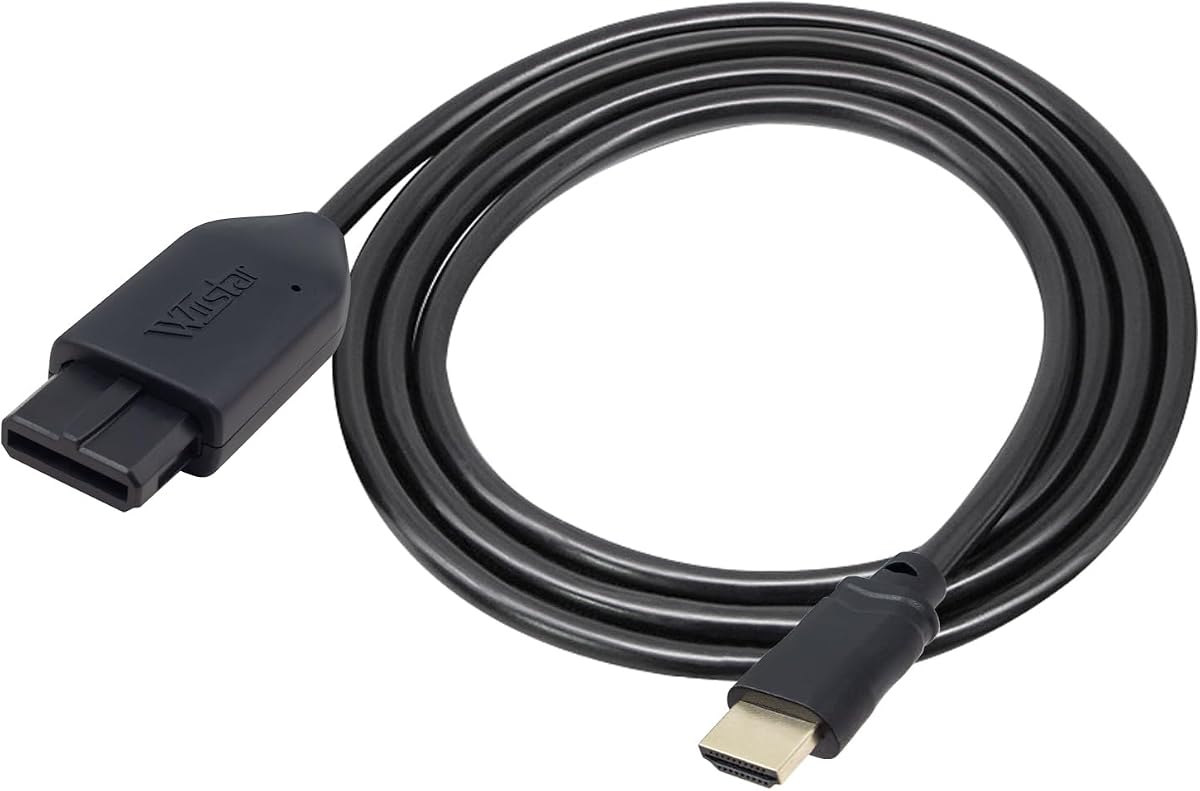
This adapter utilizes S-Video signal output to provide better picture quality than standard AV connections. It converts analog RGB signals from N64 or SNES to digital HDMI. The all-in-one cable design removes the need for extra adapters or cables.
We may earn a commission when you buy through this link, at no additional cost to you.
It outputs at 1080p60Hz which ensures smooth motion in compatible games. Users should note that it does not support 720p60Hz. The lack of extra power requirement simplifies the setup process significantly for most users.
If you experience a blue screen it indicates no video input which requires checking the connection method. The design targets simplicity by integrating the console-specific port directly. This makes for a clean setup on your entertainment center.
Best for users who prioritize ease of use and better than AV quality without paying for premium features. It offers a straightforward path to modern displays. The built-in design reduces clutter compared to separate cables and boxes.
While it has limited resolution flexibility compared to other options it is sufficient for standard gaming needs. It is a practical choice for quick access to retro games on modern screens without complex wiring or external power sources.
The all-in-one cable design with built-in console port eliminates extra cables for the cleanest possible setup.
Using S-Video output provides better color separation and detail than standard composite AV connections.
We may earn a commission when you buy through this link, at no additional cost to you.
This 3-in-1 HD link offers versatile support for NGC N64 and SNES consoles. It features a dedicated switch to toggle between 4:3 and 16:9 aspect ratios allowing flexibility for different TV sizes. The upscaling signal processing ensures good precision and color at this price.
We may earn a commission when you buy through this link, at no additional cost to you.
The detachable design allows you to use high-end or extended HDMI cables if needed. This modularity adds value for users with specific distance requirements. Low latency ensures that your gameplay remains responsive without delay.
Customer service is highlighted with helpful support available 24/7. The replacement policy within 365 days offers strong buyer protection. It is easy to use with well-prepared cables included in the package.
Ideal for gamers who want to switch aspect ratios easily without software settings. It provides a balanced performance for standard gaming setups. The convenience of a toggle switch is a key differentiator from generic adapters.
While it does not offer advanced premium features, it covers all essential needs effectively. It is a solid choice for casual gamers looking for reliable performance. The support and warranty add to its appeal as a trustworthy product.
Support for 4:3 and 16:9 with a toggle switch lets you match your display preference easily without external settings.
The detachable design allows for easy replacement or extension of HDMI cables to suit larger rooms.
We may earn a commission when you buy through this link, at no additional cost to you.
This adapter converts analog signals to crisp digital HDMI signals supporting up to 1080p resolution. It is designed to bring retro gaming to life on modern displays with stable signal transmission. The upgraded power design ensures consistent operation without extra power for normal use.
We may earn a commission when you buy through this link, at no additional cost to you.
It features ultra-low input lag which is critical for responsive performance during gameplay. Users can switch between 4:3 and 16:9 aspect ratios to match their display preferences. This flexibility makes it suitable for various screen sizes and settings.
The plug and play setup ensures you can get gaming in seconds without drivers. However, if you plan to use additional accessories connecting an external power source ensures stable performance. It supports classic consoles like N64 GameCube and SNES.
Ideal for those seeking modern resolution capabilities without complex setups. It offers color accuracy and responsive performance for a satisfying experience. The stable transmission minimizes visual issues during extended play sessions.
While it has no rating yet it offers standard competitive features for its price. It is a practical solution for connecting retro consoles to modern monitors. The focus on lag-free performance distinguishes it in the market.
Supporting resolutions up to 1080p allows classic games to look sharp on large modern HDTVs.
Ultra-low input lag ensures that your inputs are registered instantly, essential for action games.
We may earn a commission when you buy through this link, at no additional cost to you.
This adapter offers a simple and efficient solution for connecting consoles to HDMI displays. It supports SVideo and Composite outputs without needing additional power. The design eliminates messy cables by working directly with the proprietary analogue ports.
We may earn a commission when you buy through this link, at no additional cost to you.
Plug and play functionality means no software installation is required. It works seamlessly with N64 Super Nintendo and Gamecube consoles. The package includes all necessary components to start playing immediately.
Kaico provides 12 months support repair and replace warranty with this adapter. This warranty adds a layer of security for the user. It is designed to ensure reliable connection and consistent performance over time.
Best for users who want a no-fuss connection without extra power adapters. It provides basic conversion effectively without complex setup steps. The clean setup is ideal for casual gamers or retro setups.
While it does not include advanced video processing it fulfills the core need of HDMI connectivity. It is a reliable choice for standard compatibility needs. The warranty coverage makes it a low-risk purchase.
The all-in-one design with no additional power requirement keeps your setup tidy and clutter-free.
12 months support repair and replace warranty ensures that you are protected against defects.
We may earn a commission when you buy through this link, at no additional cost to you.
This adapter is designed to run legacy systems on newer TVs with better gaming experiences. It includes an HDMI cable for a convenient setup right out of the box. The plug and play operation ensures there is no screen lag during gameplay.
We may earn a commission when you buy through this link, at no additional cost to you.
It supports 16:9 conversion which adapts games to modern widescreen displays. No external power supply is needed simplifying the wiring process. Clear and smooth picture quality is the primary focus for this model.
If you experience no sound or blue screen ensure the connection is successful before troubleshooting. Customer service is available to solve any problems after placing an order. Support 30 days return and refund policy adds buyer confidence.
Ideal for those seeking a hassle-free connection without additional power adapters. It delivers standard performance for casual gaming setups. The included cable saves an extra purchase and keeps the setup complete.
While it offers basic functionality, it covers the essential requirements for modern TV connection. It is a practical choice for quick retro gaming access. The return policy provides peace of mind for new buyers.
HDMI cable included in the package ensures you have everything needed to start playing immediately.
30 days return and refund policy allows you to try the product without risk.
We may earn a commission when you buy through this link, at no additional cost to you.
This adapter extracts the S-Video signal path from the AV Multi-Out port for a cleaner image. It supports N64 SNES SFC and GameCube consoles directly. Nickel-plated connectors help resist oxidation and maintain stable signal transmission over time.
We may earn a commission when you buy through this link, at no additional cost to you.
It outputs the original console resolution without upscaling to HD. This preserves the authentic retro look which is desired by purists. The 1.5m HDMI cable included in the package provides flexible setup options for your display.
A micro USB port is included for optional backup power in rare cases like unstable displays. For normal use the console provides sufficient power through the port. This design keeps the setup simple and straightforward for most users.
Best for those who prefer original resolution and cleaner S-Video output over upscaling. It connects easily to modern TVs and monitors without complex settings. The nickel plating ensures the connectors remain stable for long-term use.
While it does not offer modern HD resolution it delivers a clean authentic signal. It is a niche choice for users prioritizing signal integrity. The included cable and backup port add practical value to the package.
Extracting S-Video provides a cleaner and more defined image compared to standard RCA composite cables.
Nickel-plated connectors resist oxidation and ensure stable signal transmission over time.
We may earn a commission when you buy through this link, at no additional cost to you.
Selecting the right adapter involves balancing compatibility, image quality, and features. Below are key factors to consider when choosing a GameCube HDMI adapter.
Ensure the adapter matches your GameCube model. Some adapters require DOL-001 Digital Port consoles, while others work with standard AV ports. Verify before purchase to avoid return hassles.
Check that the adapter supports your specific console model.
Adapters vary from standard upscaling to 1080p or original resolution output. Decide if you prefer modern HD clarity or authentic retro look with native resolution.
Prioritize adapters that match your preferred display quality.
Some models need external USB power, others draw from the console. Ensure you have necessary power sources for stable operation without interruption.
Check if external power is required before buying.
S-Video offers cleaner output than standard RCA composite. Look for adapters that support S-Video extraction for better color and detail.
Choose S-Video support for enhanced visual fidelity.
Modern TVs are widescreen. Select adapters with switches for 4:3 or 16:9 to avoid distorted images.
Aspect ratio flexibility is key for optimal viewing.
Low latency ensures responsive gameplay. High-end adapters minimize lag for a smoother experience, especially for action games.
Prioritize low latency for competitive gaming.
Check if HDMI cables or power adapters are included. Some models include essential cables to reduce setup time and extra costs.
Included accessories save additional purchase efforts.
Look for 12-month warranties and customer support. Reliable support ensures peace of mind if issues arise with the adapter.
Support guarantees protect your purchase value.
Connect the adapter to your GameCube's AV Multi-Out or Digital Port, ensuring the plug is secure. Plug the HDMI cable into the adapter and your TV's HDMI input.
If external power is required, connect the USB power cable to a 5V adapter. Turn on the console and TV, then switch TV input to the connected HDMI channel.
Keep connectors clean and avoid bending cables near the port. Regularly update firmware via USB if available to maintain optimal performance and compatibility.
Not all adapters work with every model. High-end units often require DOL-001 Digital Port consoles. Standard converters work with AV ports, but always check product specs.
It depends on the model. Some draw power from the console, others require USB power. Check the product description to confirm power needs.
Most adapters support digital audio over HDMI. Ensure your HDMI cable is good and TV volume is active. If no sound occurs, check connections.
Some do upscale to 1080p for modern screens. Others preserve original resolution. Check specifications to ensure you get your desired output.
Look for product descriptions mentioning S-Video signal output. Adapters with S-Video support provide better image quality than standard composite.
Yes, adapters connect GameCubes to modern HDTVs and monitors. They allow retro gaming on current displays without complex setups.
We reviewed ten adapters, highlighting top picks like Kaico for overall performance and BITFUNX for premium features. Budget options offer solid entry points for casual gamers.
Prioritize compatibility and image quality based on your needs. If you need S-Video output, look for specific adapters that support this cleaner signal path.
Always check current availability and support policies before purchasing. Prices and features may shift, so confirm details on the product page for the best decision.