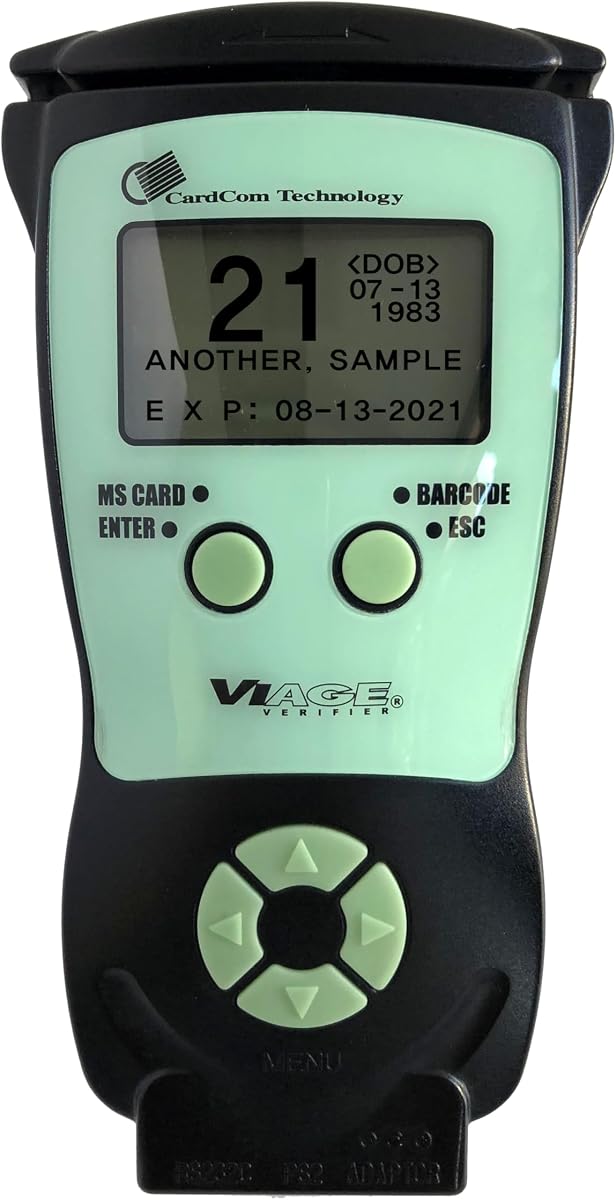
ID Scanner for Bars
4.7Editor score
Dual scanning technology included
Standalone operation capability
Free compliance software
Finding reliable Id Scanners for Age Verification is crucial for bars clubs and retail stores to ensure compliance with local laws. These devices help staff quickly verify customer age while reducing human error during high traffic periods at the point of sale.
We evaluated ten leading models based on scanning speed accuracy ease of use and overall durability. Each product was reviewed for its ability to handle various ID formats including driver licenses passports and military cards across different business environments.
Every pick shows key features pros and cons to help you decide which scanner fits your specific operational needs. Please note that prices and availability can change frequently so check current listings before making your final purchasing decision.
4.7Editor score

4.9Editor score

4.8Editor score
As an Amazon Associate we earn from qualifying purchases.
This side-by-side comparison highlights the unique strengths and limitations of each model to help you select the right device for your venue.


The IDetect ID Scanner stands out as the top choice for businesses needing rapid and reliable age verification. With a near perfect rating it delivers instant validation that keeps lines moving during peak hours.
We may earn a commission when you buy through this link, at no additional cost to you.
Its ability to read and calculate age from IDs across all fifty states plus Canada and Mexico makes it versatile for diverse customer bases. The device integrates seamlessly with computers tablets and POS systems via USB.
While it does not detect holograms or watermarks it provides strong diligence proof by flagging tampered or banned IDs immediately. The durable construction ensures it withstands daily use in busy bars or clubs without failure.
Business owners seeking a robust solution with minimal friction should choose this scanner. It balances speed compliance and ease of use effectively for most standard retail or hospitality environments.
The scanner processes ID data within seconds allowing staff to focus on customer service rather than manual checks.
It notifies users immediately when an ID is tampered with or on a watch list helping prevent underage sales.
We may earn a commission when you buy through this link, at no additional cost to you.
This countertop model offers a straightforward solution for fixed positions where speed and compliance are paramount. It delivers results in less than a second making it ideal for high volume entry points.
We may earn a commission when you buy through this link, at no additional cost to you.
The device includes unlimited standard ID scanning without additional fees which helps businesses manage costs effectively. It also offers optional fake ID detection powered by industry-leading authentication technology for added security.
Since it relies on plug-in power it is designed for permanent installation rather than mobile scanning tasks. The absence of batteries ensures continuous operation but limits flexibility if you need to move the device.
Retailers who need a stationary unit that requires no complex setup will appreciate this scanner. It simplifies the verification process while keeping detailed logs for potential inspections.
Scan data can be configured to meet specific auditing needs ensuring your business remains compliant with local laws.
Staff simply scan the barcode on the back of the ID to see instant age and expiration status clearly displayed.
We may earn a commission when you buy through this link, at no additional cost to you.
The AgeVisor Mini offers a compact design suitable for counters with limited space. It features motion-activated scanning which allows for one-handed operation without needing to press a button.
We may earn a commission when you buy through this link, at no additional cost to you.
Its ability to scan IDs from all states Canadian provinces and military options makes it versatile for different venues. The device calculates age automatically and provides clear notifications for underage or expired IDs.
While the rating is lower than some competitors it still offers lifetime software upgrades and US based support at no extra cost. The optional DMVCheck service adds verification power if you need deeper validation.
Businesses looking for a small reliable unit with loyalty tracking capabilities should consider this model. It balances basic functionality with useful features like customer visit counts.
Scanning triggers automatically when an ID is placed near the sensor reducing wear on physical buttons and speeding up workflow.
The screen tracks customer visit counts helping you identify frequent visitors or new clients easily.
We may earn a commission when you buy through this link, at no additional cost to you.
This premium scanner combines age verification with robust customer relationship management tools. It is ideal for venues that want to track loyalty or identify repeat visitors effectively.
We may earn a commission when you buy through this link, at no additional cost to you.
With over twelve hours of battery life and a spare battery included it supports long shifts without interruption. The ability to save two photos per record adds a layer of security for VIP or banned lists.
While the cost is higher the included features like cloud sync and remote device locking provide significant value. It supports WiFi and USB export options for flexible data management.
Nightclubs or high-end bars seeking a comprehensive solution for both compliance and customer engagement will find this device invaluable. It goes beyond simple scanning to manage your patron database.
Highlights new versus repeating clients and assigns loyalty memberships with a single press to a button.
You can locate your scanner via GPS or lock data remotely if the device is lost or stolen.
We may earn a commission when you buy through this link, at no additional cost to you.
This model offers a great balance of affordability and functionality for small businesses. It reads both magnetic stripe and 2D barcodes ensuring broad ID coverage across different formats.
We may earn a commission when you buy through this link, at no additional cost to you.
The device works independently without needing an external connection which makes it perfect for quick checks at the door. Free software and ID updates ensure you stay compliant without extra subscription fees.
While it lacks advanced CRM tools it covers the essential needs of age verification efficiently. The ergonomic design makes it comfortable to hold during repeated use throughout a shift.
Retailers or smaller venues on a tight budget should find this scanner meets all core requirements. It provides necessary compliance features without unnecessary complexity or ongoing costs.
Supports both magnetic stripe and 2D barcode scanning to handle a wider range of ID cards reliably.
Works independently without connecting to external devices or systems for convenient deployment.
We may earn a commission when you buy through this link, at no additional cost to you.
The Smart Plus model features an extra large five inch LCD screen which makes results easy to read from a distance. It shares many powerful features with the V2 model but focuses heavily on display visibility.
We may earn a commission when you buy through this link, at no additional cost to you.
It supports full customer relationship management allowing you to track venue occupancy and assign loyalty memberships. The battery lasts over twelve hours and supports export to Excel for external reporting.
While it is powerful it may be more than what a small retailer needs. The price reflects the advanced capabilities but it ensures you have a robust tool for larger venues.
Businesses needing a clear visual interface and detailed customer tracking will appreciate this device. It combines portability with comprehensive data management tools effectively.
The extra large LCD screen ensures staff can see age status and warnings clearly even in low light areas.
Scan and customer records can be exported in Excel format via WiFi or USB for further analysis.
We may earn a commission when you buy through this link, at no additional cost to you.
This scanner is built for durability and is rated IP68 and MIL-STD-810H for drops dust and moisture. It is ideal for environments where equipment might face harsh conditions during nightly use.
We may earn a commission when you buy through this link, at no additional cost to you.
It features a swappable battery allowing for minimal downtime during long shifts. The device supports a wide range of IDs including passports and Employment Authorization Cards for versatile verification.
While optional fake checks require credits standard verification remains free. The included scanning decal helps deter fraud by alerting customers that IDs are being verified at the entrance.
Clubs or outdoor venues needing a tough reliable unit should choose this model. It balances durability with useful compliance logging features for better operational control.
Rated for drops dust and moisture ensuring reliable performance even in demanding nightlife environments.
Recharges fully in under ninety minutes to keep the scanner ready for back-to-back shifts.
We may earn a commission when you buy through this link, at no additional cost to you.
The Quantum Edge V3 is designed for rugged environments where spills or dust are common. It features a water and dust seal to protect internal components from everyday accidents.
We may earn a commission when you buy through this link, at no additional cost to you.
It vibrates in the hand and uses audio signals to alert users to no-entry persons providing multiple feedback channels. The device is ready to use immediately upon taking it out of the box.
A carry case is included for transport and protection during downtime. The WiFi connection allows for easy data transfer to multiple devices without complex cabling.
Venues needing a durable handheld unit with immediate usability will appreciate this model. It combines physical resilience with straightforward operation for busy staff.
Small quantities of dust cannot enter the enclosure ensuring the scanner operates smoothly even in dirty environments.
Audible and vibration alerts ensure staff notice results even in noisy environments like crowded bars.
We may earn a commission when you buy through this link, at no additional cost to you.
This countertop model mirrors the design of other stationary units by focusing on reliability and ease of use. It operates fully without a computer which simplifies setup for small teams.
We may earn a commission when you buy through this link, at no additional cost to you.
You can customize data logging to meet specific auditing or compliance needs ensuring you are ready for inspections. The scanner provides clear Go or No-Go results for instant decision making.
It supports manual entry for passports and damaged IDs which adds flexibility when barcodes are unreadable. The design prioritizes compliance with state laws including those in Pennsylvania and Utah.
Venues with fixed entry points should find this scanner straightforward and effective. It removes the need for complex IT support while maintaining accurate records.
Complies with key ID verification laws including Pennsylvania SB 688 and Utah Code 32B-1-407 for legal safety.
Configure scan data to meet your business auditing or compliance needs with flexible and exportable logging.
We may earn a commission when you buy through this link, at no additional cost to you.
The Swish S1 is an optical card scanner designed primarily for document capture rather than active scanning. It captures high resolution images of IDs using a camera based device for archiving purposes.
We may earn a commission when you buy through this link, at no additional cost to you.
It uses a wide scanning slot to avoid damaging thin or fragile cards which is useful for preserving older documents. The included Scan-ID app reads 2D barcodes automatically when available.
Since it is Windows only it may not fit environments using Macs. The lack of moving parts ensures longevity but manual entry is needed for IDs without barcodes.
Businesses needing image archiving alongside verification should consider this tool. It offers a safe way to scan documents without the risk of mechanical jamming.
No moving parts or rollers mean there is no risk of damaging thin or fragile identification cards during scanning.
Fully TWAIN compliant and works with hundreds of other scanning applications including healthcare systems.
We may earn a commission when you buy through this link, at no additional cost to you.
Selecting the right scanner involves considering your venue size workflow and specific compliance needs to ensure the device fits your operations.
Fast scanning is critical during peak hours to prevent lines from forming. Look for devices that verify age in under two seconds to keep service smooth and customers happy.
Prioritize models with instant results to maintain efficiency during busy nights.
If you need to move the scanner around the venue battery life becomes essential. Portable units should last at least one shift on a single charge to avoid interruptions.
Check for swappable batteries or fast charging options for continuous operation.
Your scanner must read the types of IDs your customers carry including passports and military cards. Ensure the device supports all fifty states and relevant international IDs.
Choose a model that handles both barcodes and manual entry for damaged cards.
Detailed logs are necessary for audits and inspections to prove your business checks IDs properly. Look for systems that allow flexible data retention and export options.
Select a device with built-in compliance logs to simplify record keeping tasks.
Laws and ID formats change over time so your scanner must stay current. Ensure the manufacturer offers free or affordable updates to support new ID types.
Lifetime software upgrades provide long term value for your investment.
Decide if you need a standalone unit or one that integrates with your POS system. Wired USB connections are stable but wireless options offer more flexibility.
Choose a connection method that matches your existing tech infrastructure.
Bars and clubs often have messy environments where spills or drops occur. Choose a scanner with water or dust protection if it will be used in such areas.
Look for rugged ratings like IP68 to ensure the device survives daily wear.
Beyond the upfront price check for hidden fees like subscriptions or fake check credits. A device with all included features reduces ongoing expenses significantly.
Compare total cost of ownership to find the best value for your budget.
Start by placing the scanner near the entry point or point of sale for easy access. Ensure it is connected to power or charged if it is a portable model before beginning use.
Train staff to swipe the barcode smoothly and wait for the result before handing the ID back. Do not force cards into the slot to avoid damaging the sensor or the document.
Keep the device clean by wiping the scan area with a soft cloth regularly. Avoid exposing it to extreme water or heat to maintain its longevity and accuracy over time.
Most top models support all fifty states plus Canada and military IDs. Always check the specific compatibility list to ensure it covers your state if you operate in multiple regions.
Many scanners offer lifetime free software updates but some require credits for advanced fake ID detection. Review the pricing details carefully to understand any recurring costs before buying.
Yes many scanners analyze encrypted barcode data against security databases to detect fakes. However accuracy varies so use them as part of a broader verification process rather than a sole check.
Not all units require a computer as many standalone models have built-in screens for results. Desktop scanners often need a PC to display data though.
Portable scanners typically last over twelve hours on a single charge. Check if the model includes a spare battery to ensure continuous use during long shifts.
Most devices offer a manual entry option for damaged IDs so you can still verify age manually. This ensures you can keep moving through lines even if the barcode is scratched.
Many modern scanners comply with key state laws like those in Pennsylvania and Utah. Always verify with local regulations to ensure your chosen device meets all legal requirements.
The IDetect ID Scanner and IDVisor Smart V2 lead the pack for overall performance and customer management features. They offer robust tools that help businesses stay compliant and efficient.
For those seeking affordability the ID Scanner for Bars provides solid capabilities without unnecessary complexity. It is a strong choice for smaller venues needing reliable verification tools.
Always check current prices and availability before making a final decision. Your best choice depends on your specific needs budget and the volume of traffic you handle daily.