
NOYAFA NF-488 POE Cable Tester
4.5Editor score
Affordable multi-function design
Backlit LCD for dark areas
Detects standard and passive POE
This guide compares the top inline POE testers for 2026, evaluating features like voltage detection, OLED displays, and compatibility with IEEE standards to
Finding a reliable inline POE tester is essential for network technicians who need to verify power delivery without disrupting service. These tools help identify voltage levels, detect passive versus standard POE, and ensure your devices receive the correct power safely and efficiently.
We analyzed ten top-rated models based on user feedback, technical specifications, and real-world performance in field conditions. Each product was evaluated for ease of use, accuracy of readings, and compatibility with common network equipment like switches and injectors.
Every selection below highlights key strengths and potential limitations to help you match the right tool to your specific installation needs. Please note that product availability and pricing may change over time, so always check current listings before purchasing your equipment.
4.5Editor score

4.1Editor score

4.1Editor score
The following table provides a side-by-side comparison of all ten selected models. It highlights key capabilities such as testing modes, display types, and specific standards supported to help you quickly identify which tool fits your workflow requirements.


The TRENDnet TC-NTP1 is a robust inline POE tester designed for professionals who need reliable data on network power. With a rating of 4.1 stars, users appreciate its ability to handle 4PPoE and PoE+ standards without needing external batteries.
We may earn a commission when you buy through this link, at no additional cost to you.
Its standout feature is the Gigabit port support, which ensures that high-speed data flow is not interrupted during testing. This is crucial for modern networks where bandwidth is critical. The NDAA compliance also makes it a preferred choice for government projects.
While it does not have a modern OLED screen, the LCD is functional and easy to read. The step button allows you to lock onto specific readings like wattage, which is helpful when monitoring power levels over time without distraction.
This tool is ideal for IT managers and government contractors who need verified compliance and speed. If you need a straightforward device that handles high wattage and meets strict standards, the TC-NTP1 is a strong recommendation for your toolkit.
Being NDAA compliant means this device meets the strict sourcing requirements often demanded by federal and state contracts in the US and Canada.
The ability to test in real time without batteries allows you to move quickly between ports and devices without carrying extra power sources.
We may earn a commission when you buy through this link, at no additional cost to you.
The PoE-T100 stands out for its bright OLED display, which provides excellent visibility in dark server closets or outdoor environments. It is rated 4.1 stars by users who value precision in measuring voltage, current, and polarity simultaneously.
We may earn a commission when you buy through this link, at no additional cost to you.
This device supports self-powered operation, drawing energy directly from the POE or DC line. This means you never have to worry about battery life during critical installs. It also offers distinct modes for PD simulation and inline testing for comprehensive diagnostics.
The main trade-off is the price, which is higher than basic models. However, the clarity of the OLED screen and the ability to differentiate between standard and passive POE make it worth the investment for frequent users.
For network engineers working on complex 802.3bt installations, this tool provides the detailed data needed to ensure safety and performance. It is a premium choice for those who prioritize clear visual feedback and advanced testing modes.
The OLED screen ensures that you can read real-time power data instantly, even in low-light conditions where other LCDs might fail.
You can simulate a powered device to test switches or measure inline power without a device attached, offering versatile troubleshooting options.
We may earn a commission when you buy through this link, at no additional cost to you.
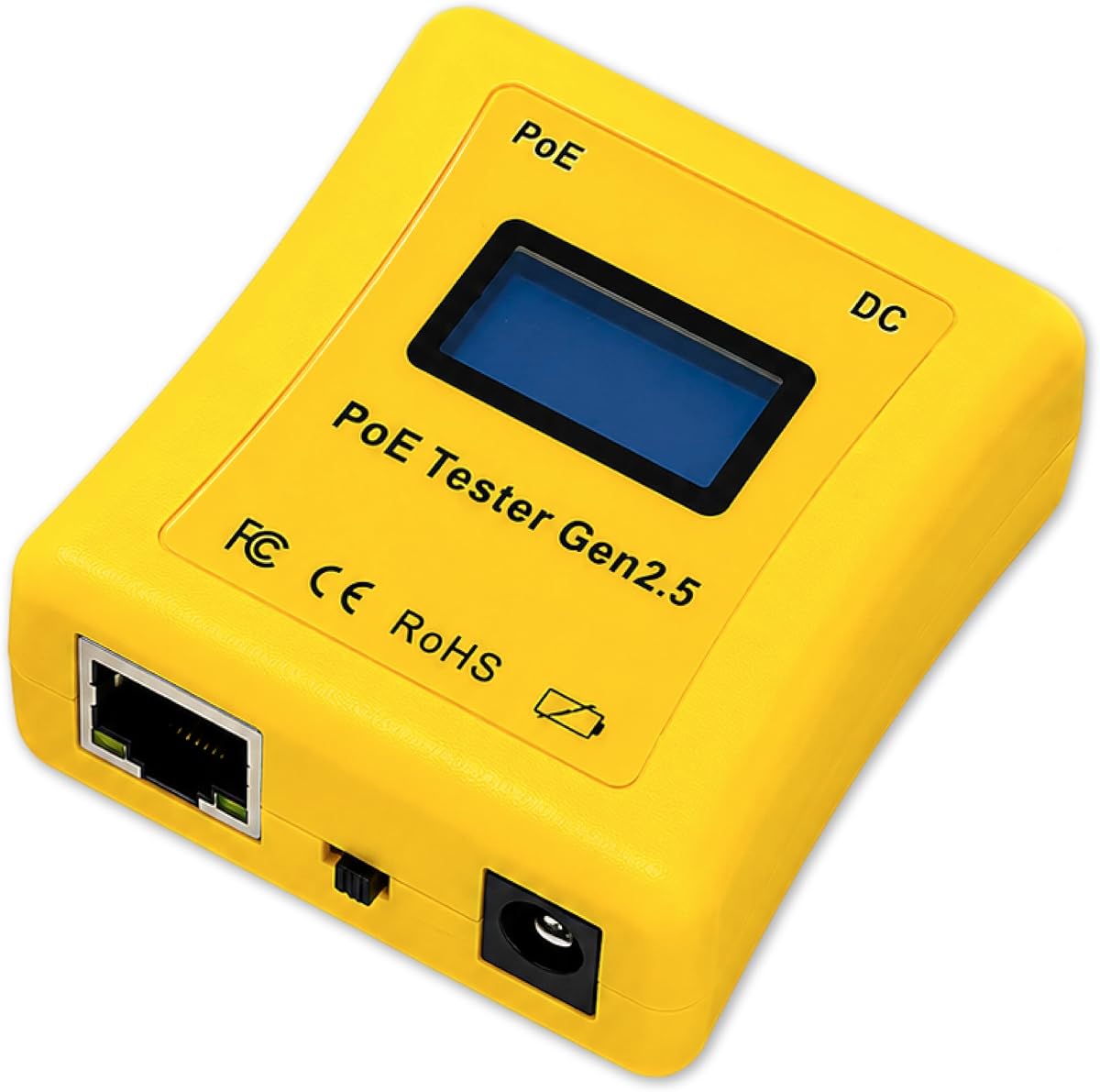
The NOYAFA NF-488 is an excellent entry-level option for technicians who need basic POE verification without breaking the budget. With a strong 4.5 rating, it is praised for its ease of use and helpful backlight for dark cabling panels.
We may earn a commission when you buy through this link, at no additional cost to you.
It offers more than just POE testing; it also checks for continuity and loop-back issues on the cable. This multifunctional approach saves time when you need to verify both data and power connections in one step during installation.
While it may not have advanced features like OLED displays, it gets the job done reliably for standard installations. The backlight is a crucial feature for working in unlit wiring closets where standard screens would be hard to read.
This is the perfect tool for students, hobbyists, or small IT shops. If you need a reliable device to check for power and faults without spending a lot, the NF-488 is a smart and economical choice.
Beyond POE testing, it checks continuity and loop-back issues, allowing you to troubleshoot data faults alongside power issues effectively.
Given its price and feature set, it offers exceptional value for anyone needing a reliable backup tester for routine network checks.
We may earn a commission when you buy through this link, at no additional cost to you.
The PoE Texas tester is designed for portability, offering a compact ergonomic design that fits easily into a shirt pocket. It has a solid 4.3 rating from users who appreciate its ability to simulate a powered device without a physical unit.
We may earn a commission when you buy through this link, at no additional cost to you.
It is particularly useful for detecting power loss in the cable run itself. This helps you identify if a cable is too long or damaged before connecting your expensive equipment, saving time and preventing device failure.
The lack of a large display is a trade-off for its size, but the cycling LCD provides necessary voltage and current data. The ability to work without batteries means you can leave it in your tool bag ready to use at a moment's notice.
This tool is best for field technicians who move between sites constantly. If you need a lightweight, pocket-sized tester that still provides critical power data and can test switches remotely, this is a great addition to your kit.
By detecting power loss in the cable, you can verify that your cable run is sufficient to deliver power to the end device before installation.
The simulate mode allows you to test if a managed switch is delivering the right power levels without needing to plug in a camera or phone.
We may earn a commission when you buy through this link, at no additional cost to you.
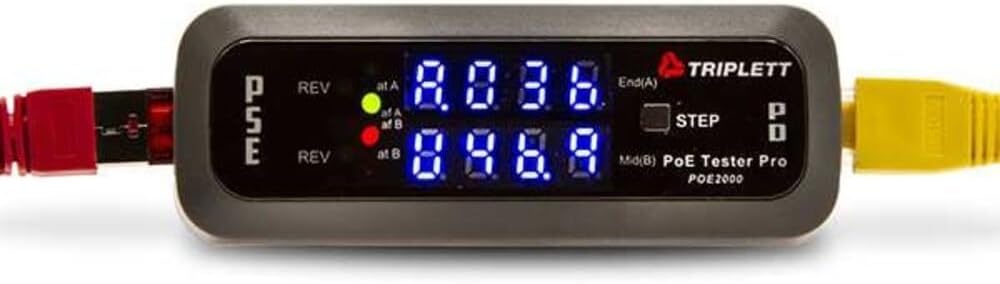
The Triplett POE2000 offers a simple approach to testing with dual LED indicators that show power source details. While it has a lower rating of 3.5, it is still used by technicians who prefer a no-nonsense device for quick checks.
We may earn a commission when you buy through this link, at no additional cost to you.
It can differentiate between end span and midspan power sources, which is helpful when tracing where power is coming from in complex setups. The step button cycles through voltage and current, providing essential data without a complex screen.
However, the interface is quite basic compared to modern models with digital readouts. Users looking for detailed real-time graphs may find this limiting. It is better suited for simple verification tasks rather than deep diagnostics.
For those who prefer older, simpler tools that just give the basics, this model is functional. If you need to quickly check if a port is live and if the polarity is correct, it gets the job done.
Knowing whether power comes from an end span or midspan helps you understand your network architecture and avoid connection conflicts.
The straightforward design minimizes buttons and settings, allowing you to focus on the LED indicators without navigating menus.
We may earn a commission when you buy through this link, at no additional cost to you.
The Triplett POE3000 builds on previous models with clearer LED indicators for IEEE standards like 802.3af and at/bt. It is designed for professional environments where quick identification of power standards is vital for safety and compatibility.
We may earn a commission when you buy through this link, at no additional cost to you.
It features a step button to display voltage, current, and power in sequence, giving you detailed data without clutter. The visual indicators for reversed polarity help prevent damaging sensitive equipment due to incorrect cabling or connectors.
While it is a reliable tool, some users feel the display could be more modern. It prioritizes function over flashy features, which suits professionals who need quick verification over data logging or screen-based menus.
For professional installers working with various IEEE standards, this tester offers the reliability you expect. If you value a trusted brand and clear visual feedback, the POE3000 is a solid professional choice.
The ability to detect 802.3af and at/bt standards via LEDs ensures you are using compatible power sources for your devices.
Visual indicators for reversed polarity help prevent accidental damage to connected devices during installation or maintenance.
We may earn a commission when you buy through this link, at no additional cost to you.
The Jonard Tools POE-1 is a versatile tool that combines POE testing with resistance and continuity checks. With a 4.0 rating, it is appreciated for the included belt clip and remote adapter that simplify testing tasks.
We may earn a commission when you buy through this link, at no additional cost to you.
It offers flexible power options, allowing you to run it on the POE line itself or with included AA batteries for unpowered cables. This ensures you are never without power for the tester in the field.
The focus on continuity makes it great for network installers checking Cat6 cables. However, the display is simple, and relying on AA batteries adds bulk. Still, it is a reliable kit for standard tasks.
If you need a complete package that includes accessories like a remote, this is a strong pick. For general cable and POE verification, the POE-1 provides good value and portability for daily field work.
You can verify resistance and continuity on Ethernet cables, ensuring your data lines are intact before testing for power.
The ability to switch between battery and self-power modes means the device can handle both active and unpowered cables.
We may earn a commission when you buy through this link, at no additional cost to you.
This tester stands out by offering cable length measurement up to 300 meters, a feature missing in many other models. With a high 4.6 rating, it is praised for its ability to detect port flash and validate power load simultaneously.
We may earn a commission when you buy through this link, at no additional cost to you.
It uses a rechargeable battery, which eliminates the need for disposable AA cells. This is great for long installs where carrying spare batteries is inconvenient. The auto-shutoff feature helps preserve battery life when the device is not in use.
The main consideration is the need to charge the unit before heavy use. If you forget to charge it, you cannot test passive lines easily. However, the data provided by the battery lasts a long time per charge.
For installers verifying long cable runs, this tool is essential. If you want a modern device with rechargeable power and the ability to check cable distance, this tester is worth the investment.
Measuring cable length up to 300 meters helps you confirm if your cable runs comply with network standards before deployment.
You can locate active ports quickly by detecting the flash signal, speeding up your installation process in dense panels.
We may earn a commission when you buy through this link, at no additional cost to you.
This Inline Cat5/6 DVM is a professional-grade panel tester designed for serious network diagnostics. It handles both Cat5 and Cat6 cables with a simple interface that focuses on essential voltage and network data.
We may earn a commission when you buy through this link, at no additional cost to you.
It offers DVM panel functionality which is preferred by some technicians for quick checks. The build is robust, making it suitable for environments where tools face frequent use. However, the data output is very basic compared to modern devices.
The high cost makes it less ideal for casual users. It is designed for those who need a durable, permanent tool rather than a portable handheld device. It fits well in fixed testing setups.
For professional setups that need a reliable, stationary tester, this model serves well. If you prefer a DVM panel style over handheld units, this device offers the quality you expect from a high-end tool.
The device works well in panel setups, allowing you to test multiple connections efficiently in a server room.
Its robust design ensures it can withstand the rigors of professional daily use in various network environments.
We may earn a commission when you buy through this link, at no additional cost to you.
The NF-488 is a strong contender thanks to its built-in LED lamp, which illuminates dark areas during testing. With a 4.4 rating, users love the added convenience of light when working in dark closets or outdoor cabinets.
We may earn a commission when you buy through this link, at no additional cost to you.
It provides essential loop-back testing and current detection up to 3A. The lifetime friendly service also adds peace of mind for your purchase. It is straightforward to use and covers the basics of network and POE verification effectively.
While it does not have the most advanced features, the combination of light and testing functions makes it a practical choice for daily tasks. The loop-back function helps you diagnose issues without needing a partner to monitor the other end.
For technicians who work in poorly lit areas, this tool is highly recommended. If you need a practical, affordable tester with helpful built-in light, this is a solid choice for your daily toolkit.
The included lamp helps you see connections in dark wiring closets without needing a separate flashlight.
You can diagnose loop issues directly, helping you find problems without needing another team member at the other end of the cable.
We may earn a commission when you buy through this link, at no additional cost to you.
Selecting the right tester depends on your specific network requirements, the types of devices you install, and your work environment.
Ensure the tester supports the IEEE standards used by your devices, such as 802.3af, 802.3at, and 802.3bt. If you work with passive POE systems, look for devices that explicitly mention support for non-standard voltages like 24V or 48V.
Always verify that the device can detect both standard and non-standard POE to avoid mismatched connections.
In dark server rooms or outdoor environments, a clear screen is critical. OLED displays offer high contrast and readability in low light, while LCDs may struggle. Consider a backlight if you often work in dim areas.
Look for devices with clear numeric readouts for voltage, current, and wattage to avoid errors during installation.
Advanced testers offer different modes such as inline testing and PD simulation. PD simulation allows you to test a switch without a connected device, which is useful for verifying power delivery before deployment.
Choose a model that offers modes relevant to your workflow to save time during troubleshooting and setup.
Some testers run on external batteries while others draw power from the POE line itself. Battery-free operation is convenient but may limit functionality if the cable is not live or if the power is weak.
Consider a model with a rechargeable battery if you need to test unpowered cables frequently.
Not all testers include length measurement, but some models can measure cable distance to ensure compliance with standards. This is vital for large installations where cable runs may exceed limits.
If you often verify long runs, look for a tester that offers distance measurement capabilities.
Tools used in the field should be robust. Look for cases that can withstand drops or dust, and check if the device includes protective features like a clip for easy carrying.
Invest in a device with a proven track record of durability to ensure it lasts through long-term use.
For government projects, verify if the tester meets specific compliance standards such as NDAA. This ensures you are using approved components for sensitive installations.
Check documentation to confirm the device meets your legal and regulatory requirements.
Look for extras like LED illumination, loop-back testing, and port flash detection. These features can significantly speed up your work and reduce the need for additional tools.
A tool with versatile functions offers better value by combining multiple tasks into one device.
To begin, plug one end of your tester into the switch port and the other into the device or cable. If your tester has a simulation mode, activate it to check the power source before connecting your final equipment.
Observe the display for voltage and current readings to ensure the power levels match your device requirements. If the display is low, replace or recharge the battery as needed for consistent performance.
Store your tester in a protective case when not in use to prevent dust damage or physical drops. Periodically check the ports for debris to ensure they connect reliably every time.
Most testers work with Cat5e, Cat6, and Cat6a cables. However, ensure the tester supports the speed and power requirements of your cable type. If you are working with shielded cables, verify compatibility.
Not all models require batteries. Some draw power directly from the POE line. Others need batteries to power the display or to test unpowered cables. Always check the device manual before starting.
Active POE follows IEEE standards like 802.3af. Passive POE does not follow these standards and may deliver raw DC power. Ensure your tester supports both types to avoid compatibility issues.
Many testers show polarity with visual indicators or text. Reversed polarity can damage devices. Check the reading before connecting your device to ensure the power is delivered correctly.
Some advanced testers offer length measurement up to 300 meters. If this is important to you, look for models specifically advertising this feature as not all offer it.
Yes, POE testers are designed to work on live ports safely. They are built to handle standard voltage levels without damaging your network equipment. Always follow safety instructions provided by the manufacturer.
Test the device on a known working setup. If the readings match expectations, the device is functioning correctly. If not, check the batteries or replace the unit if it is under warranty.
A well-maintained tester can last several years. Avoid dropping it, keep it clean, and store it properly to extend its life. Regular calibration or checks may help maintain accuracy over time.
Choosing the right inline POE tester depends on your specific needs. The TRENDnet TC-NTP1 offers a great balance of compliance and performance, while the PoE-T100 stands out for its clear OLED display.
Prioritize features like battery-free operation or length measurement based on your workflow. If you work in dark environments, models with backlit screens or LED lights are essential.
Always check current availability and ensure you are buying a product that meets your safety and compliance standards. With the right tool, you can install network devices confidently and efficiently.