
ASRock Intel Arc B570 Challenger 10GB OC
4.7Editor score
10GB GDDR6 memory on 160-bit bus
Xe2-HPG architecture with XMX engines
Dual fan cooling with 0dB silent mode
This guide compares the top ten Intel Arc GPU models for gaming and workstations, highlighting performance features architecture specs and use cases for every
Choosing the right graphics processing unit can define your computing experience whether you game render or train AI models. Intel Arc GPUs offer compelling options across price points with modern architecture features and growing software support for diverse workloads.
We evaluated ten current Intel Arc GPU models based on architecture generation memory capacity cooling design connectivity options and real-world utility for gaming content creation and professional compute tasks. Our analysis focuses on how each card fits specific user needs and system constraints without relying on marketing hype.
Each pick below shows key strengths ideal use cases and important trade-offs to consider before buying. Prices and stock fluctuate so verify current availability and compatibility with your motherboard power supply and case before finalizing your purchase decision today.
4.7Editor score

3.9Editor score

The following table places all ten Intel Arc GPU models side by side so you can quickly compare memory capacity architecture generation cooling design connectivity options and form factor to find the best match for your specific computing needs and system constraints.



This workstation GPU stands out for professionals who need large local memory for AI inference 3D rendering or generative design tasks. With a 3.9 rating and strong specs like 24GB GDDR6 and Xe2-HPG architecture it delivers solid compute power while remaining compatible with Linux multi-GPU deployments.
We may earn a commission when you buy through this link, at no additional cost to you.
The 24GB VRAM enables you to run large quantized models locally without cloud dependencies. Its 197 INT8 TOPS compute powered by 160 XMX engines accelerates AI workloads efficiently. Twin Media Transcoders support AV1 H.264 and HEVC encoding for fast video exports in high resolutions.
Blower-style cooling keeps the card compact but may run warmer during sustained workloads compared to axial fan designs. The 3.9 user rating indicates some buyers encountered driver setup or compatibility hurdles that require patience or vendor support to resolve fully.
Buy this if you need a single GPU with enough VRAM for 70B class models or heavy 3D rendering. It is ideal for engineers researchers and designers who prioritize memory capacity and ISV certification over peak gaming performance.
The 24GB VRAM lets you run 70B quantized models or smaller locally which reduces latency and keeps data private without relying on cloud APIs for inference tasks.
ISV certification ensures drivers are optimized for engineering and design applications reducing crashes and improving stability when using industry software tools for simulations and rendering workflows.
We may earn a commission when you buy through this link, at no additional cost to you.
This GPU delivers excellent value for gamers targeting 1440p resolution with smooth frame rates and modern upscaling features. Its 4.7 rating reflects reliable performance and thermal design while Xe2-HPG architecture ensures compatibility with the latest display technologies and AI enhancements.
We may earn a commission when you buy through this link, at no additional cost to you.
The 10GB GDDR6 memory provides a solid buffer for high-resolution textures in current titles. GPU clock speed reaches 2600 MHz with 19 Gbps memory speed for responsive gameplay. Dual fan cooling with 0dB silent mode keeps noise low during lighter sessions.
XeSS 2 support is still rolling out so some games may not benefit yet from AI frame generation. The card is optimized for gaming and content creation rather than heavy compute tasks so check your game compatibility before relying on upscaling.
Buy this if you want strong 1440p performance without paying premium prices. It fits well in budget to midrange builds where silent operation and modern connectivity matter for long gaming sessions.
The combination of 10GB VRAM and high clock speeds ensures that modern titles run smoothly at 1440p without constant downgrades to lower resolutions or texture settings.
Dual striped axial fans provide effective cooling while 0dB technology stops fans at low loads so you get quiet operation during browsing or idle times without overheating during games.
We may earn a commission when you buy through this link, at no additional cost to you.
This dual-GPU workstation card enables local AI inference for large models without needing multiple separate GPUs or cloud services. While user ratings are unavailable it is purpose-built for researchers and engineers who need high concurrency and flexible task assignment in local LLM deployments.
We may earn a commission when you buy through this link, at no additional cost to you.
Each GPU runs at 2400 MHz with 20 Xe cores delivering 197 TOPS per chip for a combined 394 TOPS. The 48GB VRAM allows entire 70B class models to load locally which cuts latency and preserves privacy for sensitive data workloads.
The PCIe 5.0 x8 plus x8 interface can achieve full bandwidth on consumer boards that support lane bifurcation. Cooling uses a blower fan with vapor chamber to sustain stable temperatures during long inference sessions without thermal throttling.
Buy this if you need to run large LLMs locally on a single card and can handle the investment cost. It is best for technical teams already familiar with model quantization and Linux deployment workflows.
With 48GB VRAM you can load 70B quantized models like DeepSeek or QwQ entirely on one card eliminating the need for multi-card setups or expensive cloud inference services for development.
SR-IOV virtualization lets you allocate GPU resources flexibly across multiple tasks which is useful when running different models or services concurrently on the same hardware in shared environments.
We may earn a commission when you buy through this link, at no additional cost to you.
This card balances performance and cost for users who want 1440p gaming and creative workloads without premium prices. Its 4.6 rating shows strong reliability while Xe HPG architecture and 384 XMX engines offer good AI acceleration and upscaling support for many titles.
We may earn a commission when you buy through this link, at no additional cost to you.
The 8GB GDDR6 on a 256-bit interface delivers excellent bandwidth for 1440p textures and multi-monitor work. Factory overclocked to 2000 MHz it provides smooth gameplay out of the box. Dual-fan cooling with silent mode reduces noise during lighter tasks.
It needs two 8-pin power connectors and a 650W PSU which may require upgrades on older systems. The 2.4-slot design takes more clearance so check case space before purchase to ensure proper fit and airflow around the GPU.
Buy this if you need reliable 1440p performance with modern features like AV1 encoding and XeSS. It is ideal for midrange builds that want to future-proof without overspending on high-end specs.
The 256-bit memory interface ensures that 8GB VRAM delivers enough bandwidth for high-resolution textures in modern games making it a solid choice for 1440p monitors and competitive titles.
384 XMX engines enable AI acceleration for content creation tools which helps when applying filters rendering frames or upscaling assets within supported software without relying on external compute resources.
We may earn a commission when you buy through this link, at no additional cost to you.
This card offers solid midrange performance with a unique aesthetic focus that appeals to builders who value visual identity alongside capability. Its 4.5 rating reflects reliable build quality while 12GB VRAM provides headroom for high-resolution gaming and moderate creative tasks.
We may earn a commission when you buy through this link, at no additional cost to you.
The TORN Cooling 2.0 system helps maintain stable temperatures under load with axial fan design. OC Edition boost clock reaches 2760 MHz for extra performance headroom. Metal backplate and blue breathing light add visual appeal to transparent side panel cases.
The lighting feature may not suit minimal builds and you should verify driver support for light customization if desired. Data on specific benchmarks is limited so check community reviews before buying for exact gaming performance.
Buy this if you want a visually distinct GPU with 12GB VRAM for 1440p gaming. It fits well in enthusiast builds where aesthetics and thermal design matter alongside raw performance.
The blue breathing light and metal backplate create a distinctive look that can match themed builds or RGB setups without needing extra controllers or software integration for lighting effects.
TORN Cooling 2.0 and axial fans provide efficient heat dissipation to prevent thermal throttling during long gaming sessions which helps maintain consistent performance and hardware longevity.
We may earn a commission when you buy through this link, at no additional cost to you.
This dual-GPU card provides exceptional parallel processing power for heavy AI and professional workloads in a compact form factor. While user ratings are not available it delivers massive VRAM and compute for tasks that need high bandwidth and sustained performance.
We may earn a commission when you buy through this link, at no additional cost to you.
Two Arc Pro B60 GPUs work together to handle large-scale rendering and multi-turn dialogues efficiently. The 48GB VRAM supports complex visual computing and large datasets. Turbo cooling uses a large-diameter fan to keep thermals in check during sustained loads.
It occupies dual slots but avoids monopolizing motherboard space which helps with multi-GPU expansions. The lack of public ratings means you should review vendor documentation for performance benchmarks before committing to this specialized workstation solution.
Buy this if you need parallel compute power for AI rendering or enterprise tasks. It suits teams that require high VRAM capacity and can manage specialized deployment workflows.
Two GPUs in tandem allow concurrent inference tasks or model parallelism which boosts throughput for production AI services or research experiments needing high concurrency.
The turbo cooling system exhausts heat directly out of the chassis which prevents thermal buildup during long workloads and maintains stable performance in standard tower cases.
We may earn a commission when you buy through this link, at no additional cost to you.
This bundle provides a complete GPU and power supply solution for builders who want a single purchase that guarantees compatibility and performance. The 5.0 rating reflects smooth setup and reliable power delivery while Xe2-HPG architecture ensures modern gaming features and upscaling support.
We may earn a commission when you buy through this link, at no additional cost to you.
The B570 GPU offers 10GB VRAM and XeSS 2 for enhanced frame rates and image quality. The PRO-650G PSU delivers stable clean power with 80 PLUS Gold efficiency. Dual fan design and 0dB silent cooling keep the system quiet during idle or light use.
ATX3.1 readiness ensures the PSU supports modern power standards which is useful for future upgrades. Buying a bundle may limit your choice of PSU brand or cables but simplifies planning and reduces compatibility risks for first-time builders.
Buy this if you want a hassle-free build with verified parts for 1440p gaming. It suits new builders who value convenience and quiet operation over customizing every component individually.
Purchasing the GPU and PSU together ensures that power requirements are met without guesswork which reduces the risk of instability or insufficient wattage during high-performance gaming sessions.
The combination of efficient GPU cooling and a quality PSU keeps noise levels low which is ideal for home offices or shared spaces where silence matters during daily tasks.
We may earn a commission when you buy through this link, at no additional cost to you.
This low-profile workstation GPU fits mini-towers and SFF cases while providing substantial VRAM and compute for local AI or 3D work. User ratings are not available but its compact design and 16GB memory make it a powerful upgrade for constrained systems.
We may earn a commission when you buy through this link, at no additional cost to you.
The single-slot 167mm card uses a turbo fan and draws only 70W without needing extra PCIe power connectors. 16GB GDDR6 memory supports larger models and datasets while 170 TOPS INT8 compute accelerates inference tasks directly on your workstation.
Its narrow profile limits use in standard mid-towers that need wider clearance for dual-slot cards. You should confirm case dimensions and airflow before purchase to ensure the card fits and stays cool under sustained loads.
Buy this if you need a powerful GPU for a small form factor workstation. It suits IT professionals and edge computing setups where space and power efficiency are priorities.
The low-profile design allows you to upgrade legacy mini-towers without replacing the whole system which is cost-effective for labs or offices that need modern AI compute in tight spaces.
Drawing 70W without external connectors reduces cable clutter and PSU strain which simplifies builds and improves airflow in compact enclosures where space is limited.
We may earn a commission when you buy through this link, at no additional cost to you.
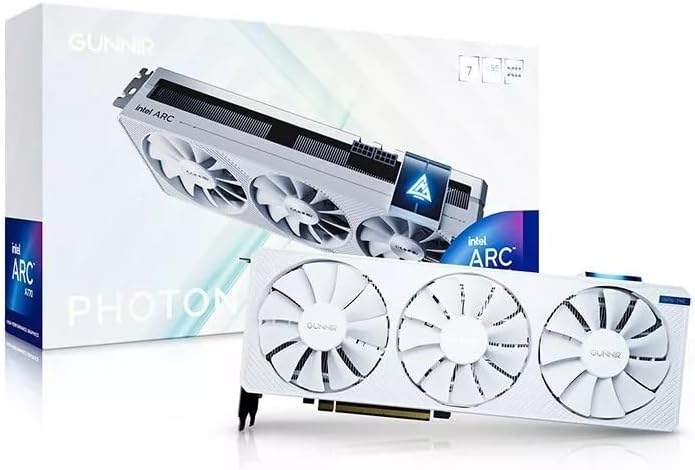
This GPU offers solid 4K readiness and modern connectivity with a distinctive white triple fan design that appeals to builders who want a clean look. Its 4.5 rating reflects reliable performance while 2400MHz speeds provide good headroom for gaming and content creation.
We may earn a commission when you buy through this link, at no additional cost to you.
The 8GB GDDR6 memory on a 256-bit interface delivers enough bandwidth for 4K textures. Triple fan design ensures efficient cooling during long sessions. HDMI and DisplayPort outputs let you connect to the latest monitors with high refresh rates.
White shrouds can show dust or require more frequent cleaning compared to black variants. Verify local stock and warranty support before purchase since distribution may vary by region or retailer for this specific model.
Buy this if you value aesthetics alongside performance and plan to use 4K displays. It fits well in white-themed builds where visual coherence matters as much as raw specs.
The white triple fan design helps unify builds that use white cases and components which reduces visual clutter and creates a polished look without needing extra customization.
HDMI and DisplayPort outputs enable reliable connection to 4K monitors which ensures that high-resolution video and UI rendering work smoothly across modern display standards.
We may earn a commission when you buy through this link, at no additional cost to you.
This GPU excels in multi-monitor productivity setups where display count and low power matter more than raw graphics performance. Its 4.6 rating shows reliable operation while four HDMI outputs let you connect multiple displays without extra adapters or splitters.
We may earn a commission when you buy through this link, at no additional cost to you.
The 4GB GDDR6 memory and 50W power draw ensure efficient operation with minimal heat. Single fan single-slot design fits easily into compact systems. It is ideal for trading desks command centers or office builds that need many screens.
It is not designed for gaming or heavy compute tasks so do not expect high frame rates in modern titles. For light workloads and multi-monitor workflows this card provides excellent value and simplicity without needing a powerful power supply.
Buy this if you need four monitors on one card and want low power consumption. It suits office and control room use where reliability and simplicity matter most.
Four HDMI outputs allow you to connect multiple displays directly which simplifies cabling and reduces the need for adapters or additional graphics cards in standard office setups.
The 50W design draws very little power which reduces electricity use and heat output making it ideal for systems that run continuously without requiring a dedicated high-wattage power supply.
We may earn a commission when you buy through this link, at no additional cost to you.
Choosing the right GPU depends on your workflow target resolution and system constraints. Review these factors to narrow options and match hardware to your actual needs.
VRAM capacity determines how large models textures and datasets you can keep locally. Higher bus width increases bandwidth for faster data transfer during rendering or inference. Choose 12GB or more for AI and 8GB to 10GB for 1440p gaming.
Match VRAM to your workloads since 4GB suits basic display and 24GB supports local large language models without relying on cloud compute.
Newer architectures like Xe2-HPG bring XMX engines and better upscaling. Check the number of Xe cores and XMX engines since they affect AI acceleration and encoding performance. XeSS 2 support grows in more titles over time.
Prefer Xe2-HPG for future-proofing and AI tasks while Xe HPG remains capable for gaming and general creative work.
Blower fans exhaust heat out of the case which helps in multi-GPU setups but may run warmer. Axial fans and dual-fan designs suit single GPU builds with good case airflow. Verify slot width and length to avoid fit issues.
Choose cooling based on your case airflow and how many GPUs you plan to run in parallel.
Power draw ranges from 50W to 200W plus external connectors. Higher TDP needs stronger PSUs and more PCIe power sockets. Confirm your PSU wattage and connectors before purchase to avoid compatibility problems.
Keep headroom for system spikes and choose 80 PLUS Gold rated units for stable clean power during long sessions.
Count HDMI and DisplayPort outputs for multi-monitor needs. Check for DisplayPort 2.1 or HDMI 2.1a to support high refresh rates and 4K or 8K resolutions. Some cards include quad HDMI for productivity setups.
Match outputs to your monitor count and resolution to avoid needing adapters or splitters for your workspace.
ISV certification ensures stability with professional applications. Verify support for frameworks like PyTorch or vLLM if you run local AI models. Check driver update frequency and community feedback for your workflow.
Select cards with professional drivers if you rely on engineering design or rendering software.
PCIe 5.0 cards need boards and CPUs that support the interface. Some cards use bifurcated lanes like x8 plus x8 for dual-GPU builds. Confirm your motherboard supports the slot configuration to avoid bandwidth issues.
Check lane support and slot width before buying to ensure your motherboard fits the card's requirements.
Prices range from budget friendly to premium workstation tiers. Define whether you need AI compute gaming or multi-monitor outputs. Match your budget to priority features instead of chasing highest specs you cannot use.
Invest in the features that directly support your workflows to get the best value from your purchase.
Install the latest drivers from Intel or the card manufacturer before first use. Verify the card detects in system BIOS and device manager to confirm proper seating and power connection.
Set up display outputs by connecting HDMI or DisplayPort and configuring multi-monitor layouts in system settings. Use the provided control panel to enable XeSS upscaling and power profiles for your workflow.
Monitor temperatures during sustained workloads using software tools. Keep case vents clear and replace thermal paste if needed after years. Clean dust regularly to maintain cooling efficiency and prolong hardware life.
Yes modern Arc GPUs include XMX engines for AI acceleration and support frameworks like PyTorch and vLLM. Some models have large VRAM for local LLM inference. Verify the number of XMX engines and VRAM capacity for your AI use case.
Xe Super Sampling is an AI upscaling technology that boosts performance and image quality in supported games. XeSS 2 adds frame generation in some titles. Support expands over time so check game compatibility before relying on it.
Yes Intel provides open-source drivers for Linux. Multi-GPU and virtualization features are supported for server deployments. Some models are optimized for Linux workloads. Check vendor documentation for specific Linux support details.
Many models offer multiple HDMI and DisplayPort outputs. Some have four HDMI for quad-monitor productivity. Verify output count and supported resolutions before purchase to match your monitor count.
Requirements range from 50W to 200W with 8-pin connectors. Confirm your PSU wattage and connector count before purchase. Higher TDP cards need stronger PSUs. Keep headroom for system spikes.
Midrange Arc models deliver solid 1440p performance with XeSS and modern features. Check specific benchmarks for your target titles. Higher VRAM and XMX engines help with textures and upscaling at that resolution.
Yes modern Arc GPUs support AV1 encoding and decoding through twin media transcoders. This speeds video exports and streaming. Verify codec support for your workflow before relying on it.
Low-profile and single-slot models fit compact enclosures. Verify case dimensions and airflow before purchase. Check connector and slot clearance to ensure proper fit and cooling in your build.
The top picks show clear strengths for different workflows. The B570 Challenger offers budget gaming, the Pro B60 24GB serves professionals, and the 48G Turbo enables large local AI inference.
Prioritize VRAM capacity and compute engines if you run AI or rendering tasks. For gaming focus on clock speeds and cooling design. Match outputs and power draw to your case and PSU.
Check current availability and verify compatibility with your motherboard and cooling setup before buying. Prices change so confirm the latest details with the vendor before finalizing your purchase today.