
Harvopu for iPad Pro 13 Inch Case with Keyboard (M5/M4) 2025/2024, Black
4.4Editor score
Seven color backlight options available
Magnetic detachable keyboard design
Built-in rechargeable battery included
Choosing the right keyboard case for your iPad Pro 13 M4 transforms it into a powerful laptop alternative. A good option offers tactile keys, a precise trackpad, and robust protection without adding excessive bulk to your daily carry routine.
Our team evaluated ten leading models based on compatibility, build quality, typing experience, and value. We analyzed official specifications, user feedback, and real-world usage scenarios to identify the standout performers in this rapidly evolving accessory market.
Each pick below highlights unique strengths whether you need premium features or budget-friendly versatility. Please note that product availability and pricing fluctuate frequently so verify details before making your final purchase decision today.
4.4Editor score
4.3Editor score

3.7Editor score
As an Amazon Associate we earn from qualifying purchases.
This side-by-side comparison highlights key specifications across all ten selected keyboard cases to help you quickly identify the model that best matches your specific workflow and budget requirements.



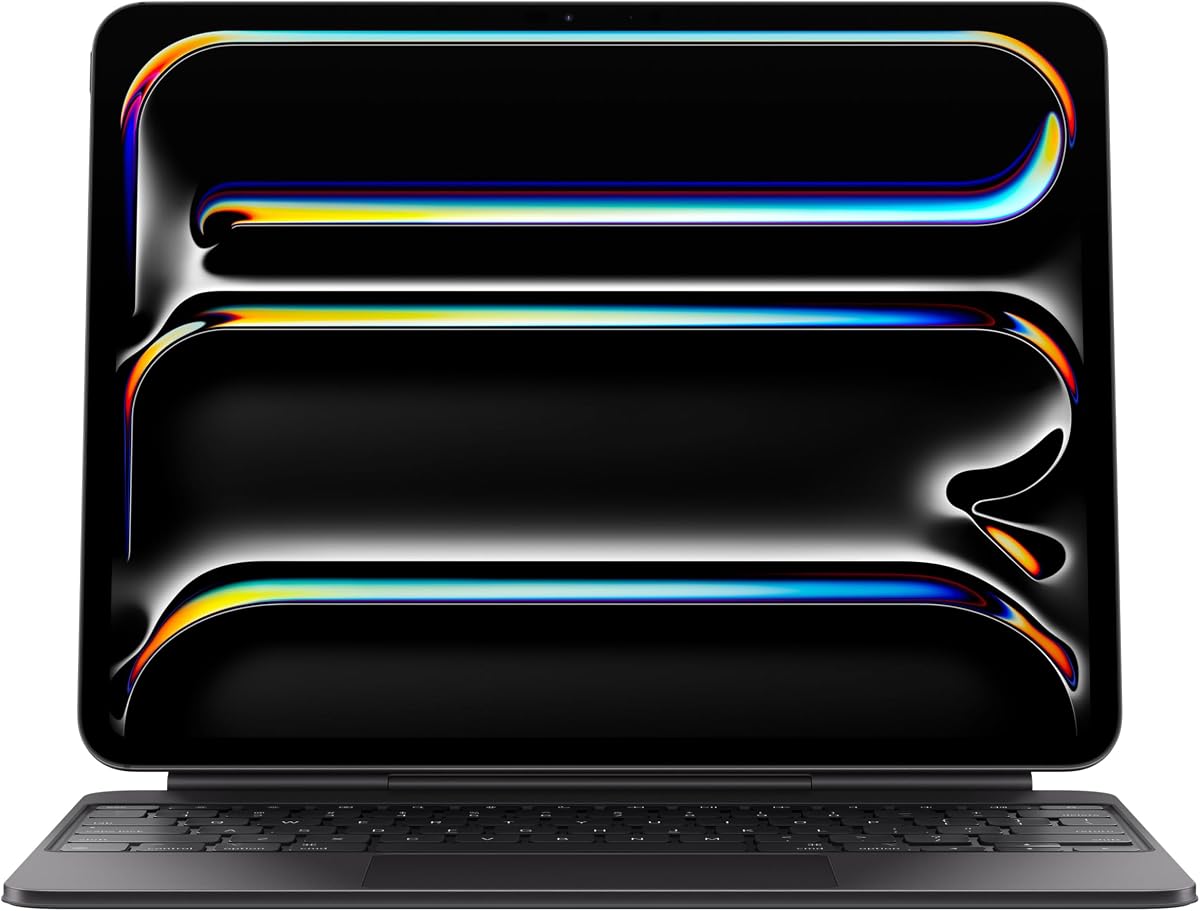
The Apple Magic Keyboard stands out as the premier choice for users seeking a seamless laptop-like experience on their iPad Pro 13 M4. With a 4.3 star rating from verified buyers it delivers premium build quality and intuitive functionality that justifies its status as our top pick.
We may earn a commission when you buy through this link, at no additional cost to you.
Its standout features include a glass trackpad with haptic feedback that mirrors the precision of a MacBook. The scissor mechanism keys provide satisfying tactile feedback while the function row offers quick access to essential system controls without digging into menus.
While expensive the case folds to protect both the front and back of your device. It charges through the USB-C port so you never lose battery life while typing. The cantilever hinge adjusts smoothly to find your perfect viewing angle instantly.
Professionals and students who prioritize typing accuracy and trackpad responsiveness will find this keyboard indispensable. Despite the cost its reliability and integration with iPadOS make it the best overall investment for serious productivity workflows.
The scissor mechanism keys replicate desktop keyboard feel reducing fatigue during long writing sessions.
USB-C pass-through charging keeps your iPad powered without needing separate cables or power banks.
We may earn a commission when you buy through this link, at no additional cost to you.
ESR offers a versatile solution that transforms your iPad into a portable workstation with minimal setup time. Rated 4.2 stars this case balances functionality with flexibility through its magnetic stand design that secures the tablet instantly.
We may earn a commission when you buy through this link, at no additional cost to you.
The quick-set magnetic stand allows you to open the floating cantilever stand to the ideal angle for typing or browsing. The extended multi-touch trackpad supports pinch and swipe gestures enabling precise navigation across apps without touching the screen.
A unique advantage is the detachable back case which gives instant hands-on access when you need to sketch or draw. This dual-purpose design ensures your device remains protected while offering different modes for various tasks throughout your day.
Creative professionals and casual users alike will appreciate the adaptability of this keyboard case. Its sturdy build and magnetic strength provide confidence during travel making it a reliable companion for diverse usage scenarios.
Strong magnets seamlessly combine case and tablet allowing effortless transition between typing and viewing modes.
Detachable case enables instant hands-on access for drawing or reading while maintaining full protection.
We may earn a commission when you buy through this link, at no additional cost to you.
This ESR model shines with its adjustable landscape stand offering flexibility between 20 and 75 degrees for optimal comfort. With a 4.4 star rating it is highly regarded for its magnetic detachable design that supports both typing and drawing workflows.
We may earn a commission when you buy through this link, at no additional cost to you.
The larger click-anywhere trackpad features a surface area 65 percent bigger than standard options providing smoother and more precise control. Full iOS gesture support makes editing browsing and switching apps effortless even with gloves or stylus.
The low-angle magnetic support is ideal for writing or drawing sessions where a flatter position is preferred. Reinforced corners keep your iPad safe from drops while the included stylus holder prevents your pencil from rolling away or getting scratched.
Students and artists who need precise angles and protection will find this case highly accommodating. Its durability and attention to detail make it a strong contender for those seeking versatility beyond basic typing needs.
A 65 percent larger surface area allows for more comfortable navigation and multi-touch gestures without frustration.
Adjustable 20 to 75 degree range adapts to your posture whether working or watching content on the go.
We may earn a commission when you buy through this link, at no additional cost to you.
The typecase Edge brings a unique flair to productivity with eleven backlight colors and three brightness levels to match any environment. Rated 4.2 stars it merges functionality with style through its magnetic closure that keeps your iPad secure during transit.
We may earn a commission when you buy through this link, at no additional cost to you.
Its full-area trackpad ensures precise navigation while the floating cantilever design allows effortless adjustment to your preferred viewing angle. The lightweight profile makes it easy to carry without adding significant bulk to your bag or pocket.
Smart features like instant wake and sleep help conserve energy when you are not actively using the device. A secure magnetic closure ensures safety while offering a designated spot for your Apple Pencil to stay within reach.
Users who value aesthetics and comfort will love the customizable lighting options. This keyboard is a great choice for those working in low light environments who still want a premium feel and reliable performance.
Eleven backlight colors allow you to personalize your setup to match your mood or surroundings effortlessly.
Lightweight design ensures functionality without additional bulk perfect for on-the-go users and daily commuters.
We may earn a commission when you buy through this link, at no additional cost to you.
Logitech delivers a robust keyboard case featuring the biggest trackpad yet for intuitive tracking and gesture control. While it holds a 3.7 star rating its unique Smart Connector ensures seamless connectivity without needing battery charges or pairing steps.
We may earn a commission when you buy through this link, at no additional cost to you.
The flexible kickstand offers infinite possibilities for positioning whether you are typing sketching or watching videos. Its detachable keyboard allows total freedom when you need to use the tablet alone for reading or creative work.
The wireless backlit keyboard glows elegantly to support mood-lit work sessions day or night. Built with durable lightweight materials it keeps your iPad safe from scuffs and scratches so you can take it anywhere with peace of mind.
Pros who need reliable power connectivity and a large trackpad will benefit from this design. Despite the weight the convenience of no charging requirements and versatile modes make it a solid option for heavy daily use.
Instant secure connectivity powered by your iPad ensures no battery charging or pairing is ever required.
The biggest trackpad yet provides intuitive Multi-Touch gesture controls for seamless navigation and app switching.
We may earn a commission when you buy through this link, at no additional cost to you.
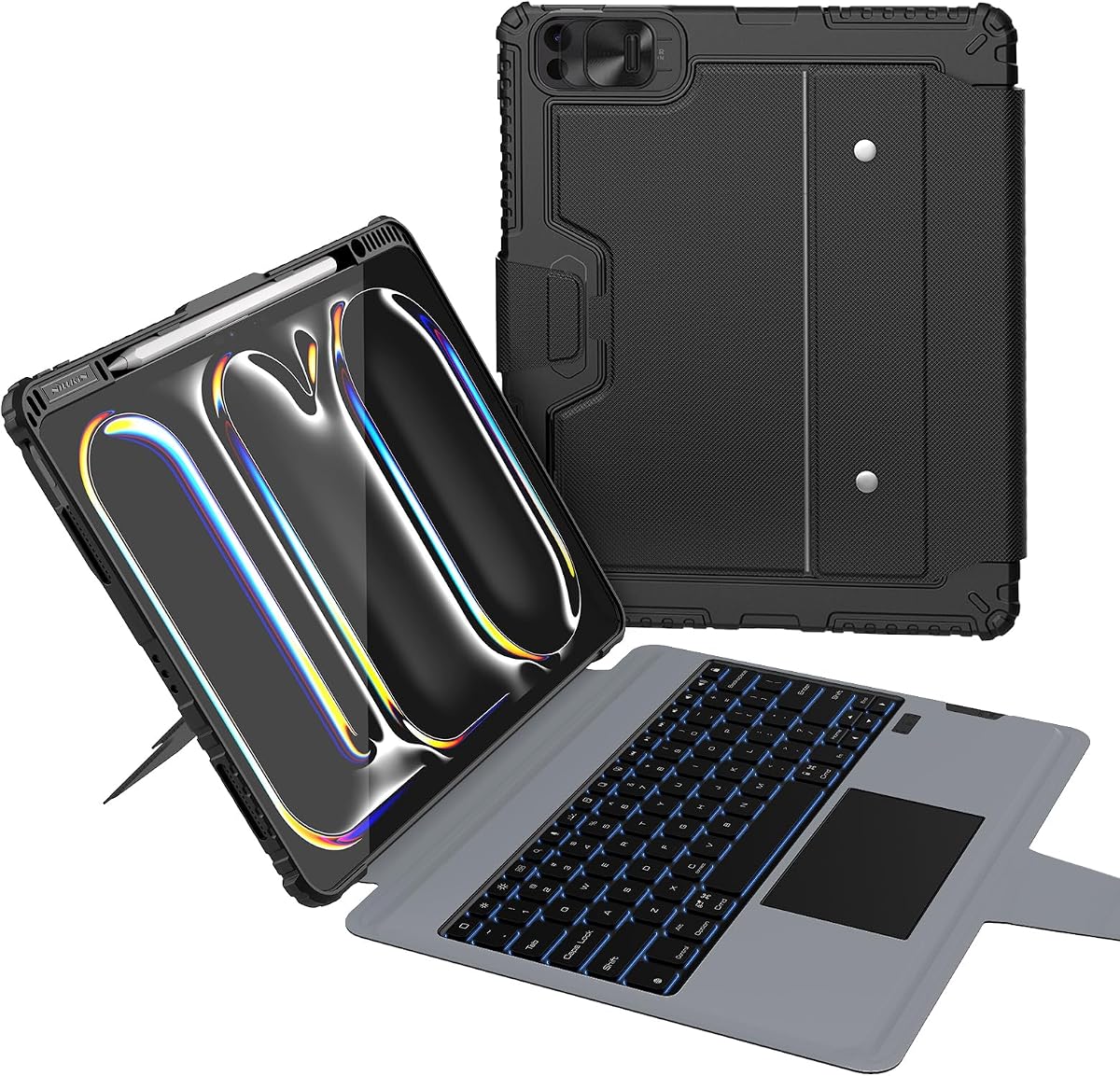
Harvopu offers an impressive value proposition with a high-sensitivity trackpad and colorful backlight options at a budget-friendly cost. Rated 4.4 stars it proves affordability does not mean sacrificing essential features like stable Bluetooth connection and ergonomic angles.
We may earn a commission when you buy through this link, at no additional cost to you.
The keyboard integrates a high-sensitivity multi-function trackpad supporting various gestures for easy scrolling and zooming without a mouse. Keys have a smooth comfortable feel ensuring pleasant typing sessions even during extended writing or data entry tasks.
A built-in 500mAh battery supports long life use and fully charges in just two hours via Type-C cable. Stain-resistant PU material wipes clean easily while the honeycomb mesh design aids heat dissipation to keep your tablet cool.
Students and budget-conscious buyers will find this case exceptionally practical for daily use. Its balance of features and price makes it an easy recommendation for those needing productivity tools without spending a fortune.
Built-in 500mAh battery delivers extended active typing time and enters sleep mode to conserve power efficiently.
Quick easy BT pairing ensures a stable and reliable wireless link for hassle-free setup and usage.
We may earn a commission when you buy through this link, at no additional cost to you.
The Edge+ model stands out for its detachable Wingshell back case and lightweight profile weighing only 110g for travel. With a 4.2 star rating it blends extreme portability with advanced features like strong magnets and a wider hinge for stability.
We may earn a commission when you buy through this link, at no additional cost to you.
The detachable back case seamlessly switches between typing sketching and reading modes to meet work and entertainment needs anytime. A 33 percent larger multi-function trackpad ensures smooth precise navigation whether switching tasks or engaging in design work.
Strong N54H magnets securely attach the keyboard and back case providing a stable connection wherever you go. The magnetic floating stand allows smooth adjustments up to 135 degrees ensuring flexible viewing angles and reliable support for long sessions.
Travelers and remote workers will appreciate the balance of protection and lightweight ease. Its unique versatility makes it a compelling choice for those who need a slim accessory that does not compromise on functionality or style.
A detachable black back case offers protection without bulk while allowing easy transition between typing and reading modes.
Powerful N54H magnets ensure a secure and stable connection between the keyboard and case for reliable use.
We may earn a commission when you buy through this link, at no additional cost to you.
This wireless keyboard earns a remarkable 4.6 star rating thanks to its innovative 360-degree rotating kickstand and transparent hardshell design. It combines functionality with aesthetics ensuring superior protection while highlighting your device's original clean look.
We may earn a commission when you buy through this link, at no additional cost to you.
The built-in omnidirectional rotating stand allows smooth precise angle adjustment for typing drawing or presenting. You can easily lock the viewing angle to maintain a healthy posture and enjoy a comfortable experience during extended work sessions.
Integrated wireless keyboard features vibrant 7-color illumination customizable to suit your mood or surroundings. The responsive trackpad delivers a laptop-like experience for effortless navigation editing and app switching boosting productivity wherever you are.
Users who value a sleek minimal look and maximum flexibility will love this case. Its high durability and precise rotation mechanism make it a top recommendation for anyone needing adaptable viewing positions on a tight budget.
The built-in 360 omnidirectional rotating stand adapts instantly to your needs for typing drawing or presenting easily.
Sleek transparent back highlights your device original design perfectly combining minimalist style with durability.
We may earn a commission when you buy through this link, at no additional cost to you.
Nillkin delivers military-grade protection with a drop tested design that keeps your iPad safe even after serious impacts. With a 4.3 star rating this rugged case features a sliding camera cover and stain-resistant leather that wipes clean instantly after work.
We may earn a commission when you buy through this link, at no additional cost to you.
The laptop-class typing experience features 1.4mm scissor-switch keys giving real travel and feedback for comfortable writing. The full 0-180 degree kickstand range lets you type draw or watch videos in any orientation without compromise or instability.
Weeks between charges are possible thanks to a 500mAh battery delivering up to 100 hours of active typing. A side holder keeps your Apple Pencil within reach while the multi-touch trackpad handles every iPadOS gesture without screen interaction.
Field workers and students in high-risk environments will appreciate this case's resilience and practicality. Its robust build ensures your device remains protected against drops and dust making it a trustworthy tool for demanding daily routines.
Corner air-cushion bumpers and heavy-duty TPU frame keep your iPad safe after off-desk drops onto hard surfaces.
Sliding camera cover keeps your lens protected and privacy intact when you are not actively using the camera.
We may earn a commission when you buy through this link, at no additional cost to you.
TSQQST offers a visually striking option with a crystal-clear hard case and futuristic acrylic panel revealing intricate circuitry details. Rated 4.3 stars it blends minimalist style with rugged protection to guard against drops scratches and impacts throughout the day.
We may earn a commission when you buy through this link, at no additional cost to you.
The fluid 360-degree rotating base supports ergonomic comfort and optimal screen positioning for work creativity or relaxation. Reinforced corners and shock-absorbent edges ensure all-day durability while the wireless keyboard transforms your iPad into a portable workstation instantly.
The luxe-inspired 7-color glow keyboard adds sophistication perfect for low-light productivity or late-night inspiration sessions. A responsive trackpad allows laptop-like navigation and editing enabling digital nomads and professionals to stay efficient on the move.
Design-conscious users and creative professionals will appreciate the unique transparent aesthetic. Its balance of protective features and stylish appeal makes it a standout choice for those who value looking good while staying productive.
The transparent panel revealing intricate circuitry elevates your setup with a sleek tech-inspired look for any workspace.
Showcases your device design while reinforcing corners guard against drops to blend minimalist style with durability.
We may earn a commission when you buy through this link, at no additional cost to you.
Selecting the right keyboard case requires balancing typing comfort, protection, and portability to suit your unique workflow needs.
Ensure the case is specifically designed for the 13-inch M4 or M5 model (A2925, A2926, A3007, A3360, A3361, A3362). Even minor shape differences can prevent secure mounting or block camera ports.
Always verify the model number on the back of your iPad before purchasing to guarantee a perfect and functional fit.
Look for scissor-switch or low-profile keys that offer tactile feedback and key travel to prevent finger fatigue during long typing sessions.
Testing the keys in person or reading user reviews can help confirm the comfort level before committing to a purchase.
A larger trackpad with multi-touch gesture support enables smoother navigation and eliminates the need for a separate mouse during work.
Verify that the trackpad supports iOS gestures like pinch to zoom and three-finger swipe for efficient app switching.
Bluetooth keyboards need independent charging while Smart Connector models draw power from your iPad to reduce extra cables and battery anxiety.
Check the battery life claims and ensure the charging method aligns with your daily routine and port availability.
Select a case with reinforced corners, shock-absorbent materials, or military-grade protection if you frequently travel or work in harsh environments.
Look for stain-resistant fabrics or wipeable surfaces to maintain a clean look over extended periods of regular use.
Consider the combined weight of the iPad and case to ensure it remains comfortable to carry in a backpack or tote bag.
Slimmer designs like cantilever hinges reduce bulk while maintaining structural stability for comfortable viewing angles.
Features like pencil holders, function rows, or color backlighting can enhance convenience and personalization for specific workflows and aesthetics.
Prioritize features that you will use daily to avoid paying for unnecessary extras that add cost and complexity.
Compare prices against the included features to ensure value for money while checking for warranties that cover defects or connectivity issues.
A strong customer support team ensures quick resolution if compatibility or functionality problems arise after purchase.
When first setting up your keyboard case attach it firmly to the magnetic connectors or Smart Connector to ensure a stable link. Allow the device to auto-detect the keyboard and adjust brightness or backlight settings if available.
Regularly clean the keys and trackpad with a soft lint-free cloth to prevent dust buildup and ensure tactile responsiveness. For stubborn stains use a slightly damp cloth with mild soap and dry thoroughly before using again.
Store your iPad in a cool dry place away from extreme temperatures to prolong battery life and case material integrity. If not using for long periods, keep the keyboard in a protective sleeve or the original packaging to prevent scratches.
It depends on the model. Smart Connector keyboards draw power from the iPad so no separate charging is required. Bluetooth keyboards have internal batteries and must be charged via USB-C or micro-USB regularly.
Yes, most cases allow the screen to be accessible. Some detachable designs even let you remove the keyboard completely for unrestricted screen access and drawing with the Apple Pencil.
Yes, all featured trackpads support multi-touch gestures like pinch to zoom, swipe to navigate, and three-finger app switching for seamless integration with the iPad operating system.
Check the model number on the back of your iPad. It should match A2925, A2926, A3007, A3360, A3361, or A3362 for M4 or M5 13-inch models. Compatibility details are usually listed on the product page.
Not simultaneously. You usually need to switch between keyboard mode and drawing mode. Detachable designs allow you to remove the keyboard entirely to use the Apple Pencil for drawing.
Most keyboards are not waterproof. Avoid liquids near the device. If a spill occurs, turn off the iPad and let it dry completely before reconnecting the keyboard to avoid internal damage.
Yes, most cases include adjustable hinges or kickstands. Some models like the cantilever designs offer infinite angles while others provide fixed notches for stable viewing positions.
It varies by model. Premium leather cases may add 1-2 pounds while slim plastic cases add less. Check the total weight in the specifications before buying if portability is critical for you.
We have reviewed the top ten keyboard cases for the iPad Pro 13 M4, highlighting the Apple Magic Keyboard for its premium trackpad and the Harvopu model for its incredible value and feature set.
Prioritize typing comfort and trackpad responsiveness if you plan on heavy daily use. For casual users, a budget-friendly detachable option like the ESR or Nillkin provides necessary protection without overspending.
Remember that prices and availability change frequently so verify the current specs and pricing before making your final purchase decision today.