
RK ROYAL KLUDGE S98 Wireless Mechanical Keyboard w/Smart Display & Knob
4.4Editor score
Smart display screen
Hot-swappable switches
Multiple connection modes
Discover the top keyboards for developers in October 2026. We compare wireless, mechanical, and low-profile models for coding, typing comfort, and productivity.
Finding the right keyboard for developers is crucial for long coding sessions. A good keyboard offers tactile feedback, reliable connectivity, and a layout that enhances workflow efficiency without causing strain.
We evaluated ten top models based on features like programmability, build quality, and cross-platform support. This list covers wireless and wired options designed to meet the diverse needs of modern software engineers.
Each pick highlights key strengths and potential trade-offs to help you decide. Note that availability and pricing may change, so verify current details before purchasing to ensure the best deal for your setup.
4.4Editor score

4.6Editor score

4.2Editor score
This side-by-side comparison helps you quickly assess the key specifications and features of each model to find the perfect match for your development environment.






The Keychron V5 Max stands out as a top contender for developers needing a versatile mechanical keyboard. Its custom design blends performance with usability, featuring a 96% layout that saves space while retaining essential number pad functionality. With a high rating for typing experience, it delivers a premium feel that reduces fatigue during long coding marathons.
We may earn a commission when you buy through this link, at no additional cost to you.
Its standout quality is the seamless integration of wireless and wired connectivity options. You can switch between 2.4 GHz and Bluetooth 5.1 effortlessly, ensuring stable connections across multiple devices. The gasket mount design and sound-absorbing foam create a satisfying thocky sound that many enthusiasts crave. Furthermore, the hot-swappable PCB allows you to change switches without soldering, giving you complete control over your tactile experience.
While it lacks per-key RGB lighting, which might appeal to gamers, developers often prioritize consistency and clarity over flashy effects. The price point is slightly higher than budget options, but the build quality and advanced firmware support justify the investment. The included keycaps and system toggle make transitioning between Mac and Windows environments a breeze.
Ultimately, this keyboard is ideal for professionals who demand reliability and customization. If you need a robust tool that supports efficient workflows without compromising on comfort, the V5 Max is a strong recommendation. It balances modern features with classic mechanical keyboard traits perfectly.
The gasket mount design and upgraded foam layers reduce vibration and noise, making every keystroke feel smooth and consistent.
QMK support allows you to remap keys and create macros tailored specifically to your development environment and coding habits.
We may earn a commission when you buy through this link, at no additional cost to you.
The Logitech MX Keys S offers a compelling option for developers who prefer low-profile keyboards over mechanical ones. Its fluid typing experience mimics a laptop but with better ergonomics, making it a comfortable choice for everyday coding. The smart illumination feature ensures you can type in dimly lit environments without straining your eyes, a common issue in office settings.
We may earn a commission when you buy through this link, at no additional cost to you.
One of its most powerful features is the ability to automate repetitive tasks through Logi Options+. You can create Smart Actions that execute multiple commands with a single keystroke, significantly boosting efficiency. The keyboard connects to up to three devices via Bluetooth or USB receiver, allowing seamless switching between a laptop and a desktop without interruption. The battery life is impressive, lasting up to five months with the backlight off.
However, it does not feature mechanical switches, which some developers prefer for tactile feedback. The fixed layout also means you cannot customize the keycaps or switches physically. While these limitations exist, the overall reliability and software integration make it a strong choice for those prioritizing function and quiet operation over tactile customization.
This keyboard is perfect for developers who value simplicity and efficiency. If you need a quiet, reliable tool that integrates well with productivity workflows, the MX Keys S delivers excellent value. Its recycled materials also add an eco-friendly edge to the package.
Logi Options+ software lets you set up macros for complex coding tasks, saving time and reducing repetitive strain.
With a full charge, the keyboard can last up to five months without backlighting, ensuring you stay productive for weeks.
We may earn a commission when you buy through this link, at no additional cost to you.
The Keychron V6 is a full-size mechanical keyboard designed for developers who need a complete set of keys without compromise. It supports QMK and VIA, offering endless customization possibilities for key remapping and macros. The inclusion of a rotary knob adds convenience for volume control or scrolling through code. This model is particularly suited for desk setups where space is not a limiting factor.
We may earn a commission when you buy through this link, at no additional cost to you.
Its fully customizable nature is a major strength. Every component from the keycaps to the switches can be swapped to suit your preference. The pre-lubed brown switches provide a tactile bump that confirms keypresses without being too loud, ideal for shared workspaces. The screw-in stabilizers ensure that larger keys like space and enter are smooth and rattle-free. The double-shot PBT keycaps resist shine and offer a durable surface for long-term use.
The only notable downside is that it is wired only, lacking wireless connectivity. This limits mobility and clutter-free setups, which might be a drawback for some users. However, for those who prioritize a stable, low-latency connection for coding and data entry, the wired connection is often preferred. The south-facing RGB ensures keycaps do not block light, enhancing visibility.
For developers who need a traditional layout with advanced customization, the V6 is an excellent choice. It provides the reliability of a wired connection paired with the flexibility of a custom mechanical keyboard. It is a robust solution for heavy typists who value tactile feedback and full key access.
Open-source firmware means you can tailor every aspect of the keyboard to match your specific development workflow needs.
The pre-lubed brown switches offer a satisfying tactile bump that reduces typing errors and improves comfort during long sessions.
We may earn a commission when you buy through this link, at no additional cost to you.
The Logitech MX Mechanical brings the comfort of a low-profile keyboard to the tactile world of mechanical switches. It is designed for precision and ergonomics, making it a top choice for developers who spend hours typing. The smart illumination adapts to your environment, ensuring keys are visible without draining the battery unnecessarily. Its build quality is exceptional, feeling solid and premium on the desk.
We may earn a commission when you buy through this link, at no additional cost to you.
A key strength is its low-profile mechanical switches, which provide a satisfying bump without the height of traditional mechanical keyboards. This reduces wrist strain and improves typing speed. The Flow feature allows seamless text and file transfer between computers, enhancing multi-device workflows. Battery life is excellent, lasting up to ten months with backlighting off, which minimizes charging interruptions.
The higher price point might be a barrier for some, and the switches are fixed rather than hot-swappable. However, for those seeking a premium experience with minimal setup, this trade-off is acceptable. The included recycled plastic materials also reflect a commitment to sustainability that aligns with modern corporate values.
This keyboard is perfect for professionals who need a blend of style, performance, and connectivity. If you work across multiple systems and want a keyboard that looks and feels great, the MX Mechanical is a top recommendation. It delivers on comfort and productivity with a touch of luxury.
Low-profile keys reduce wrist strain and improve typing posture, making it easier to code for extended periods.
The battery lasts up to ten months on a single charge when backlighting is off, ensuring reliable performance for weeks.
We may earn a commission when you buy through this link, at no additional cost to you.
The RK ROYAL KLUDGE S98 stands out for its unique smart display that shows information like battery status and connection mode. This feature adds a layer of convenience that is rare at this price point. It supports Bluetooth, 2.4 GHz, and USB-C connections, ensuring you stay connected no matter your setup. The hot-swap PCB allows you to experiment with different switches easily, making it a great entry point for enthusiasts.
We may earn a commission when you buy through this link, at no additional cost to you.
Its sound dampening foams reduce noise effectively, resulting in a creamy typing sound that is pleasant for both you and those around you. The volume knob allows quick adjustments without reaching for on-screen controls. While the build is primarily plastic, the gasket mount design improves stability and comfort compared to typical budget boards. RGB lighting is fully customizable to match your aesthetic.
Software support can be limited compared to major brands, and the plastic construction might feel less premium. However, the value proposition is immense. You get features often found on much more expensive keyboards, including pre-lubed switches and a solid layout. For developers on a budget who want modern features, this is an incredible deal.
This keyboard is a top pick for cost-conscious users who still want customization. If you want a wireless mechanical keyboard with smart features under a hundred dollars, the S98 is a strong contender. It proves that you do not need to spend a fortune to get a great typing experience.
The small screen shows connection mode and battery life at a glance, keeping you informed without needing software.
Integrated dampening foams reduce cavity noise, making every keystroke sound smooth and professional.
We may earn a commission when you buy through this link, at no additional cost to you.
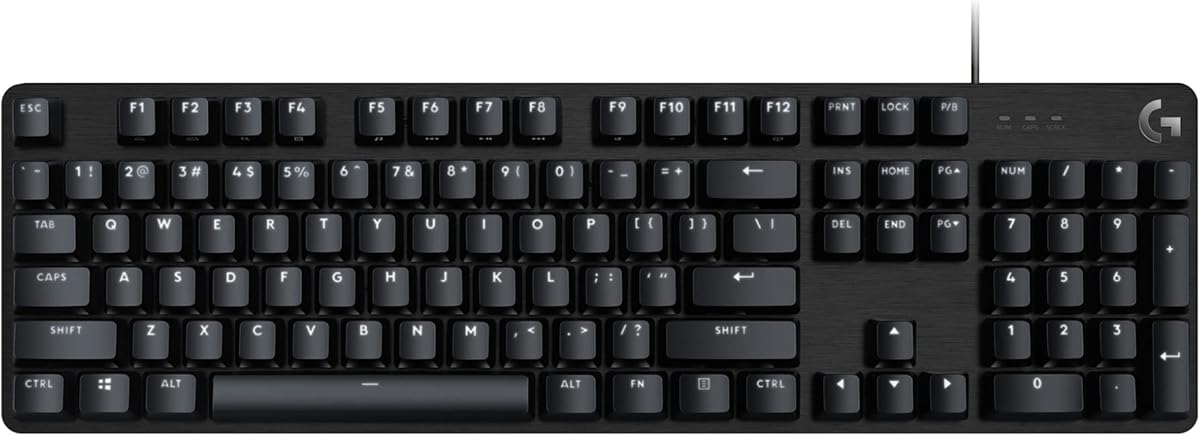
The Logitech G413 SE is a full-size mechanical keyboard built for durability and reliable performance. It features tactile switches that provide clear feedback for every keypress, which is beneficial for accurate coding. The PBT keycaps are heat and wear-resistant, ensuring the legends do not fade over time. Its aluminum top case adds a premium look and feel, making it a robust choice for daily work.
We may earn a commission when you buy through this link, at no additional cost to you.
This keyboard is straightforward, offering media controls directly via the FN key. This allows quick volume adjustments without leaving your text editor. The anti-ghosting technology ensures that all keystrokes register correctly, even during rapid typing. While marketed as a gaming board, its reliability makes it equally suitable for developers who need a no-nonsense tool.
It lacks wireless connectivity and advanced RGB customization, which might limit some users. However, for those who prioritize simplicity and durability, these are acceptable trade-offs. The white backlighting is functional and clean, avoiding distractions during work hours. The price is competitive for a full mechanical keyboard.
This keyboard is ideal for developers who want a dependable wired solution. If you need a sturdy keyboard that works right out of the box without complex software, the G413 SE is a great choice. It balances cost and quality effectively for daily productivity.
Heat-resistant PBT keycaps and a brushed aluminum top ensure the keyboard remains functional and looking new for years.
Tactile switches give clear feedback for every keypress, reducing errors and improving typing speed during long sessions.
We may earn a commission when you buy through this link, at no additional cost to you.
The AULA F75 Pro is a compact 75% mechanical keyboard that saves desk space while retaining essential arrow keys and navigation. It features a tri-mode connection system that allows up to five device connections, making it versatile for complex setups. The gasket mount structure ensures a soft, bouncy feel that enhances comfort. Pre-lubed switches deliver a smooth and creamy sound right out of the box.
We may earn a commission when you buy through this link, at no additional cost to you.
Side-printed PBT keycaps are a standout feature, offering durability while allowing the RGB light to shine through the sides. This unique design adds a stylish look to your desk. The volume knob allows quick access to media controls, which is handy during workflow. The high-capacity battery ensures long usage between charges, reducing interruptions during busy coding sessions.
While the driver software is necessary for full customization, it can be slightly less intuitive than mainstream brands. The smaller layout might take a moment to adjust to if you are used to full-size boards. However, the balance of features and price makes it an excellent choice for developers who value customization and portability.
This keyboard is perfect for those who want a compact yet fully featured mechanical keyboard. If you have limited desk space and want the option to change switches easily, the F75 Pro is a great option. It delivers a high-quality typing experience at a competitive price.
The 75% layout reduces footprint while keeping arrow keys, maximizing desk space for other tools or documents.
Pre-lubed switches and a gasket mount provide a soft, consistent feel that reduces fatigue during extended use.
We may earn a commission when you buy through this link, at no additional cost to you.
The Keychron K10 HE introduces Hall Effect magnetic switches that offer adjustable actuation points. This technology allows you to set how deep a key must be pressed to register, which can improve speed and comfort. The rapid trigger feature lets you reset the key instantly, beneficial for rapid inputs. It features a tri-mode connection system ensuring stable performance across multiple devices.
We may earn a commission when you buy through this link, at no additional cost to you.
The fully upgraded design includes a full-size layout, making it suitable for data entry and coding. The wood accents add a refined, organic touch to the setup. It is compatible with macOS and Windows out of the box, with extra keycaps included for seamless transitions. The hot-swappable nature means you can replace switches easily without soldering.
This technology is still new for some, so there may be a learning curve to fully benefit from the adjustable actuation. The price is premium, reflecting the advanced hardware. However, for developers seeking the highest level of precision and durability, these features are worth the investment. It is a future-proof choice for your desk.
This keyboard is ideal for those who want cutting-edge technology and a refined look. If you need precise control over key actuation and want a keyboard that grows with your workflow, the K10 HE is a top choice. It blends innovation with traditional quality effectively.
You can customize the trigger point of each key, allowing for personalized sensitivity and faster response times.
The rapid trigger mode resets keys instantly, enabling quicker repeated inputs and smoother workflow navigation.
We may earn a commission when you buy through this link, at no additional cost to you.
The AULA F99 combines a 96% compact layout with the features of a full-size board, making it an excellent space-saving solution. It boasts an impressive 8000mAh battery that ensures weeks of continuous use without charging. The gasket mount structure provides a comfortable, responsive typing experience that reduces fatigue. Tri-mode connectivity allows you to switch between devices with ease.
We may earn a commission when you buy through this link, at no additional cost to you.
Its pre-lubed linear switches offer a smooth keystroke perfect for rapid data entry and gaming. The RGB lighting is vibrant with multiple effects to customize your setup. You can customize macros and keys to streamline your workflow, adding efficiency to your daily tasks. The high capacity battery means you rarely have to think about power.
The software can occasionally lag or require updates for full functionality, which might be annoying. The compact layout removes some function keys you might miss initially. However, the battery life and connectivity options make it a strong contender. For developers who work remotely or move around, having a keyboard that lasts days without plugging in is a significant advantage.
This keyboard is perfect for mobile developers who value battery life and compact design. If you need a wireless keyboard that stays powered for long periods and offers solid customization, the F99 is a strong choice. It offers a great balance of portability and full-featured capability.
The 8000mAh battery provides weeks of use on a single charge, ensuring you stay connected during long travels.
Gasket mount structure provides a bouncy, shock-absorbing typing experience that feels premium and reduces strain.
We may earn a commission when you buy through this link, at no additional cost to you.
The Keychron K3 v2 is an ultra-slim wireless mechanical keyboard that maximizes space efficiency. Its low-profile switches offer a unique tactile experience that is fast and comfortable for typing. The 75% layout is perfect for tight desks or travel, keeping essential keys without bulk. It supports QMK firmware for extensive customization, making it a powerful tool for developers.
We may earn a commission when you buy through this link, at no additional cost to you.
The Mac layout is optimized specifically for Apple devices, with dedicated media keys that work seamlessly. You can switch between three devices via Bluetooth 5.1 effortlessly. The aluminum body adds durability despite its thin profile. It is lightweight and portable, making it an ideal companion for remote work or coffee shop sessions. The included keycaps ensure compatibility across systems.
The bottom frame is plastic, which might reduce the premium feel slightly compared to all-metal builds. Stabilizers can have minor rattle out of the box but can be improved. However, the convenience of the form factor and the robust feature set outweigh these minor issues. It is a versatile tool for those who value mobility without sacrificing mechanical quality.
This keyboard is perfect for developers who need a compact, portable mechanical solution. If you work across multiple Mac devices and need a keyboard that fits everywhere, the K3 v2 is a strong choice. It balances style and function for the modern mobile professional.
Built specifically for macOS users, it includes dedicated multimedia keys for seamless workflow integration.
The slim profile and lightweight frame make it easy to slip into a bag for work on the go.
We may earn a commission when you buy through this link, at no additional cost to you.
Choosing the right keyboard involves balancing connectivity, layout, and switch type to match your specific workflow needs and environment.
Mechanical switches come in linear, tactile, and clicky varieties. Developers often prefer tactile switches for feedback or linear for speed. Ensure the switch feel aligns with your typing style to prevent fatigue during long coding sessions.
Decide between wired and wireless. Wireless offers flexibility but may introduce slight latency. If you work across multiple devices, look for multi-device Bluetooth pairing to switch seamlessly between your laptop and desktop.
Full-size keyboards provide a numpad which helps with data entry. Compact layouts like 60% or 75% save desk space but remove keys you might need. Choose a layout that retains the keys you use most frequently.
Look for keyboards with QMK or VIA support. This allows you to remap keys and create complex macros for coding shortcuts. Customizability enhances workflow efficiency and allows you to adapt the keyboard to your specific IDE requirements.
If choosing wireless, check the battery capacity. A long-lasting battery reduces interruptions. Models with quick charging capabilities are beneficial if you are on the go. Ensure the battery life supports your typical work hours.
Materials like aluminum or high-grade plastic impact durability. A sturdy build reduces wobble and improves typing comfort. Look for features like gasket mounting for a more refined feel and better sound dampening.
The height and angle of the keyboard affect wrist posture. Low-profile designs can reduce strain on wrists and fingers. Consider your chair height and desk setup to ensure the keyboard supports healthy posture during extended use.
Regularly clean your keyboard to prevent dust buildup under the keys. Use compressed air to blow out debris and a soft brush to remove larger particles from the surface. This maintains smooth switch performance and extends the lifespan of your device.
Customize your keybindings to match your common coding tasks. Use macro software to set up shortcuts for repetitive commands. Tailoring your keyboard to your workflow significantly reduces repetitive strain and increases productivity over time.
Store your keyboard properly when not in use. If it is wireless, turn off the power to save battery. Keep it in a cool, dry place to prevent moisture damage. Avoid placing heavy objects on top of the keys to prevent damage.
Tactile switches are often preferred for coding because they provide a physical bump that confirms the keystroke. This feedback helps reduce typing errors and prevents bottoming out, which is common during rapid data entry.
Wireless is not strictly necessary but offers flexibility for clean desk setups. If you switch between multiple devices, wireless connectivity makes it easier to move your keyboard without unplugging cables constantly.
QMK support is crucial if you want deep customization. It allows you to remap any key and create complex macros, which can significantly boost efficiency for specific coding languages or workflows.
Low-profile keyboards often place your hands closer to the desk surface, which can reduce wrist extension. This ergonomic benefit may help prevent strain during long typing sessions for some users.
Yes, gaming keyboards are often excellent for coding due to their durable switches and responsive performance. Many developers prefer the reliable feedback of gaming mechanical switches over standard office boards.
Hot-swappable switches allow you to change switches without soldering. This makes it easy to experiment with different feels or replace worn-out keys, extending the keyboard's usability and customization options.
Choose full-size if you need a numpad for numbers frequently. Compact layouts save space and reduce hand movement but require key combinations for missing keys. Your decision should depend on your workflow needs.
High-quality mechanical keyboards can last for years or even decades with regular use. The switches are rated for tens of millions of keystrokes, making them more durable than standard membrane keyboards.
We have reviewed ten top keyboards for developers, ranging from full-size mechanical options to compact wireless models. Each pick offers unique features to support different coding workflows and desk environments.
Prioritize ergonomics and switch feel when making your decision. A comfortable keyboard can significantly impact your daily productivity and long-term health while working on complex projects.
Prices and availability change frequently so verify current details before buying. Ensure the model you choose is in stock to avoid delays in your productivity workflow.