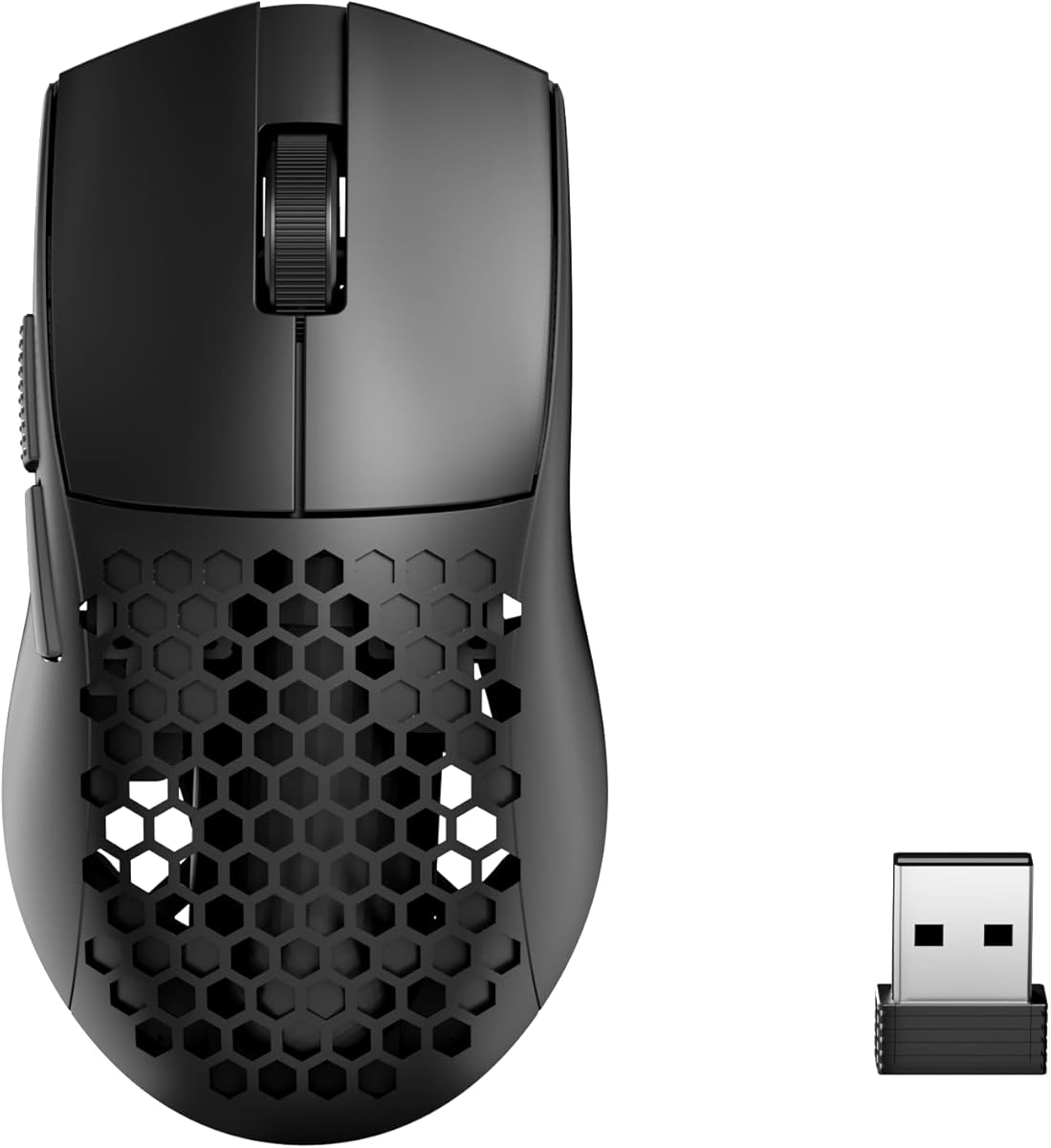
Redragon M725 Honeycomb Shell Gaming Mouse
4.4Editor score
49g honeycomb shell
Tri-mode connectivity
Programmable macro buttons
Discover the top lightweight mouse under 60 grams for FPS gaming. This guide compares precision, battery life, and ergonomics to help you choose.
Finding the right gaming mouse can transform your competitive experience. Lightweight designs under 60 grams reduce fatigue and increase speed. These mice are engineered for rapid flicks and precise tracking during intense matches.
We evaluated ten top models based on sensor accuracy, wireless latency, and build quality. Our analysis focuses on how each mouse performs in fast-paced shooters. We also consider grip style compatibility and battery endurance for long sessions.
Each pick highlights specific strengths like sensor tech, connectivity, or comfort. Ratings reflect user feedback and professional testing standards. Please note that availability and offers may change frequently online.
4.4Editor score

4.5Editor score

4.6Editor score
This section compares the key specifications and standout features of all ten selected models. Use this overview to quickly identify which mouse matches your specific gaming needs and hand size.


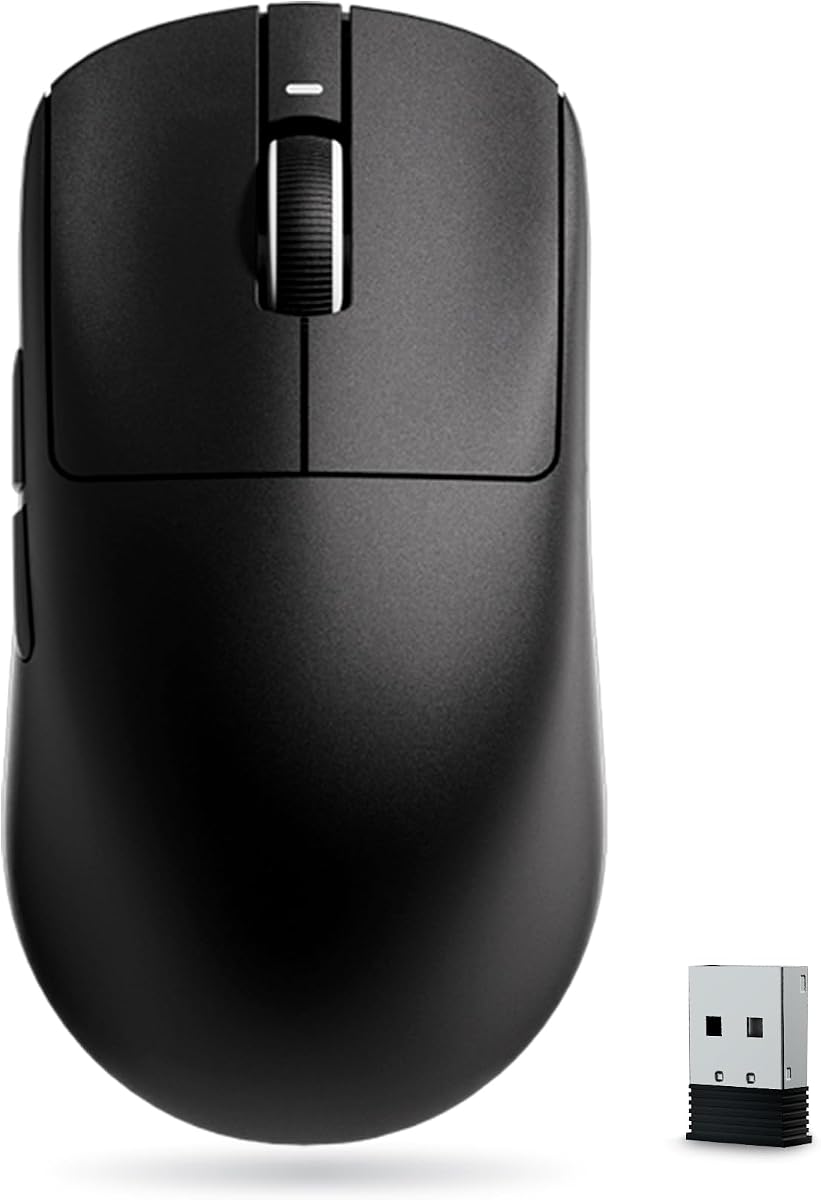

This Logitech G PRO X Superlight 2 stands out as the top choice for serious FPS players. It achieves a 4.5 user rating based on extensive real-world usage data from competitive gamers worldwide.
We may earn a commission when you buy through this link, at no additional cost to you.
The HERO 2 sensor delivers unmatched precision with over 888 IPS tracking speed and up to 44,000 DPI settings. This ensures your aim remains locked even during the fastest flicks without any smoothing or acceleration artifacts.
While the price is higher than budget models, the durability and performance justify the investment. The battery lasts up to 95 hours on a single charge, minimizing downtime during tournaments or marathon sessions.
If you prioritize raw performance and wireless freedom above all else, this mouse is the definitive pick. It combines pro-approved engineering with everyday reliability for the ultimate competitive experience.
The HERO 2 sensor provides zero smoothing and filtering, offering pure mechanical feedback for pinpoint aiming in high-speed shooter games.
With up to 95 hours of continuous use, you can play for days without worrying about finding a charger or interrupting your workflow.
We may earn a commission when you buy through this link, at no additional cost to you.
The Redragon M725 offers incredible value for players seeking a lightweight option without breaking the bank. It holds a 4.4 rating from users who appreciate its balance of features and cost efficiency.
We may earn a commission when you buy through this link, at no additional cost to you.
Weighing just 49 grams, the honeycomb shell design reduces fatigue significantly during long gaming sessions. The 8000 DPI sensor provides sufficient accuracy for most competitive shooter scenarios and general daily use.
Although it lacks the premium build of high-end models, the tri-mode connectivity and programmable buttons add versatility. You can switch between Bluetooth, wireless, and wired modes effortlessly for different tasks.
This mouse is ideal for beginners or those on a tight budget who still want high performance. It delivers the core benefits of lightweight gaming without the premium price tag associated with major brands.
You get essential gaming features like programmable macros and low latency at a fraction of the cost of flagship competitors.
Support for Bluetooth, 2.4GHz, and wired modes ensures this mouse fits seamlessly into any multi-device setup or gaming environment.
We may earn a commission when you buy through this link, at no additional cost to you.
The Razer Viper V4 Pro sets a new standard for premium wireless esports mice. It has earned a 4.6 rating from users who demand top-tier speed and precision for competitive play.
We may earn a commission when you buy through this link, at no additional cost to you.
Powered by Razer HyperSpeed Wireless Gen-2, this mouse achieves true 8000 Hz polling rates with significantly lower latency than standard options. The Focus Pro 50K DPI sensor ensures your every movement translates accurately on screen.
The optical scroll wheel and switches offer mechanical durability with optical precision. While the battery life is impressive at 180 hours, the high polling rate modes will naturally reduce runtime somewhat.
If you want the absolute best wireless technology available, this model is worth the investment. It is designed for pros and enthusiasts who need every millisecond of advantage during critical moments.
Razer HyperSpeed Wireless Gen-2 provides unrivaled speed and reliability, reducing latency by 55% compared to previous generations.
The optical scroll wheel and switches eliminate mechanical bounce, ensuring consistent tracking and reliable clicks over millions of actions.
We may earn a commission when you buy through this link, at no additional cost to you.
ASUS designed the ROG Harpe Ace Mini specifically for players with smaller hands seeking competitive precision. It holds a 4.4 rating from users who appreciate its optimized shape for fingertip grips.
We may earn a commission when you buy through this link, at no additional cost to you.
The semi-symmetrical form factor fits comfortably in the palm, reducing strain during long sessions. With a weight of just 49 grams, you gain speed and agility without sacrificing control over your aim.
The ROG AimPoint Pro sensor offers 36,000 DPI for accurate tracking on any surface. The 105-hour battery life ensures you play for days before needing a recharge on a single charge.
This mouse is perfect for those who find standard sizes too bulky or heavy. It delivers pro-level features in a compact package, making it ideal for competitive gaming on desktop or laptops.
The refined compact shape is tailored for fingertip and claw grips, offering maximum control with minimal fatigue.
The ROG AimPoint Pro sensor delivers pixel-perfect accuracy and responsiveness essential for high-level competitive play.
We may earn a commission when you buy through this link, at no additional cost to you.
The Razer Orochi V2 is engineered for travelers who need a lightweight mouse that never runs out of power. It has a 4.4 rating from users who value its incredible battery efficiency.
We may earn a commission when you buy through this link, at no additional cost to you.
With up to 950 hours on Bluetooth, you can game for months without changing batteries. The compact design makes it easy to slip into a laptop bag for gaming anywhere.
Despite its size, it features a 18K DPI sensor and Razer HyperSpeed Wireless for low latency gaming. The switches are rated for 60 million clicks, ensuring longevity even with daily use.
Choose this model if portability and battery life are your main priorities. It balances lightweight performance with extreme endurance, making it ideal for work and travel.
With up to 950 hours on Bluetooth, this mouse offers the longest battery life in its class for minimal interruptions.
The compact size and under 60g weight make it perfect for gaming on the go without compromising performance.
We may earn a commission when you buy through this link, at no additional cost to you.
The ZORNHER X Mloong MX301 PRO offers a strong balance of ergonomics and performance. It has earned a 4.7 rating, the highest in our list, thanks to its comfortable build.
We may earn a commission when you buy through this link, at no additional cost to you.
The carbon fiber texture provides a premium feel that enhances grip during intense gameplay. Weighing 60 grams, it moves fast but maintains stability for precise aiming without floating sensations.
Its web-based driver eliminates the need for bulky software installation. You can customize DPI and settings easily without affecting system performance or requiring administrator permissions.
This model is an excellent choice for those who want a comfortable grip and high reliability. It combines practical design features with a reliable sensor for consistent performance.
The carbon fiber-inspired texture delivers a unique feel and premium look, reducing the cheap plastic sensation common in lightweight mice.
A simple web-based driver lets you customize settings quickly without bulky software or system load.
We may earn a commission when you buy through this link, at no additional cost to you.
The INPHIC IN10P brings professional-grade features like an 8000Hz polling rate to a broader audience. It has a 4.1 rating from users who value raw technical performance.
We may earn a commission when you buy through this link, at no additional cost to you.
Its solid shell design without holes ensures durability and prevents dust buildup. With 60 grams, it remains light enough for fast reactions while feeling solid in the hand.
The PAW3395 sensor is a top-tier choice for precision tracking. The Kunpeng chip ensures low latency and stability during high-speed wireless transmission modes.
This is a great pick for tech enthusiasts who want high-end specs. It offers a unique mix of durability, speed, and customization options.
An 8000Hz polling rate ensures razor-sharp accuracy and keeps you ahead of the competition in fast-paced matches.
Engineered with a solid shell design, this mouse offers better protection and cleaner internals compared to honeycomb designs.
We may earn a commission when you buy through this link, at no additional cost to you.
The Redragon M916 is designed for speed-focused players. It holds a 4.5 rating from users who value its lightweight build and responsive tracking capabilities.
We may earn a commission when you buy through this link, at no additional cost to you.
Armed with Nordic chipset and 4000Hz report rate, it ensures precise tracking and fast transmission. The natural grip shape allows for comfortable handling during long gaming marathons.
With 49 grams, it is one of the lightest options available. The five programmable buttons let you set keybinds quickly for tactical gameplay advantages.
If you want a lightweight mouse that is easy to control and responsive, this model is a strong contender. It balances performance with simplicity for daily gaming use.
The 4000Hz report rate unleashes the fastest moving performance and lowest consumption available on the market.
The natural structure of the human hand is followed, reducing fatigue during long gaming parties or overtime work.
We may earn a commission when you buy through this link, at no additional cost to you.
The ATK VXE Dragonfly R1 SE+ offers a symmetrical shape suitable for various grip styles. It has a 4.4 rating from users who appreciate its smooth tracking and balanced weight.
We may earn a commission when you buy through this link, at no additional cost to you.
Equipped with the PAW3395 SE sensor and BEKEN chip, it provides ultra-low latency and stable signal transmission. The Huano switches deliver crisp tactile feedback with excellent durability.
At 55 grams, it is light enough for rapid movement without feeling too fragile. The 520mAh battery supports up to 70 hours of continuous runtime without interruption.
Choose this if you need a lightweight mouse that fits comfortably in medium to small hands. It combines reliable components with a versatile shape for consistent performance.
The PAW3395 SE sensor and BEKEN chip provide stable signal with ultra-low latency, ideal for esports titles.
Huano Blue Glow V2 microswitches offer crisp rebound and outstanding durability to avoid double-click malfunctions.
We may earn a commission when you buy through this link, at no additional cost to you.
The GLORIOUS Model O Eternal is a wired option for those who want lightweight performance with style. It holds a 4.4 rating from users who value its aesthetic and durability.
We may earn a commission when you buy through this link, at no additional cost to you.
Its honeycomb shell reduces weight by up to 35% compared to standard models. This ensures faster swipes and effortless control in fast-paced games without compromising comfort.
The dual-zone RGB lighting adds a customizable visual flair to your setup. The mechanical switches are rated for 80 million clicks, ensuring longevity over extended gaming sessions.
This mouse is ideal for players who prefer wired reliability and RGB customization. It offers a classic ergonomic design with modern lightweight features for versatile gameplay.
The honeycomb shell reduces weight significantly while maintaining comfort and durability for better control in games.
Dual RGB zones flood the flared side panels with vibrant color, instantly customized with software.
We may earn a commission when you buy through this link, at no additional cost to you.
Selecting the right lightweight mouse involves more than just picking the lowest weight. You need to consider sensor quality, ergonomics, and connectivity to ensure it suits your play style.
The sensor is the heart of any gaming mouse. Look for high-end sensors like PixArt PAW3395 or HERO 2 that offer precise tracking without smoothing. High DPI ranges allow for easy sensitivity adjustments depending on your game.
Prioritize a sensor with high IPS and acceleration ratings to ensure your aim remains accurate even during fast flicks and movements.
While a low total weight is great, how that weight is distributed matters for stability. A balanced mouse prevents the feeling of it floating uncontrollably during rapid movements.
Ensure the mouse has a solid center of gravity to maintain control while enjoying the benefits of reduced fatigue from lighter materials.
Your hand size and grip style determine the best shape. Symmetrical designs suit claw and fingertip grips, while ergonomic shapes support palm grips. Always try to hold a mouse before buying if possible.
Choose a shape that feels natural in your hand to prevent long-term strain and improve overall accuracy during extended gaming sessions.
Wireless mice offer freedom, but wired mice offer zero latency. Tri-mode connectivity allows you to switch between Bluetooth, 2.4GHz wireless, and wired modes for flexibility across devices.
Decide if you need wireless convenience or prefer the reliability of a wired connection based on your primary usage scenarios.
For wireless models, battery life is critical. Look for mice that offer over 50 hours of use to avoid interruptions during gameplay. Some models also support fast charging or wireless charging pads.
Check how easy it is to recharge the mouse and how long the battery lasts before needing a charge to minimize downtime.
Mechanical switches vary in feel and longevity. Opt for switches rated for 50 million clicks or more to ensure they last. Optical switches are also available for faster actuation.
Consider the tactile feedback you prefer and the durability rating of the switches to match your intensity of use.
Good software allows you to adjust DPI, buttons, and macros easily. Look for intuitive interfaces that do not require constant background running to save system resources.
Ensure the driver software supports your desired level of customization to tailor the mouse perfectly to your needs.
Textured surfaces or grip tape help maintain control during sweaty or intense sessions. Some mice come with carbon fiber textures that enhance grip quality significantly.
Look for mice with anti-slip features to ensure you maintain control without slipping during critical moments.
Clean your mouse regularly using a soft, dry cloth to remove dust and oils that can affect tracking performance on your mousepad. If your mouse has a honeycomb shell, use compressed air to clean out dust from the holes.
Adjust the DPI settings using the software to find your ideal sensitivity. Lower DPI settings provide better precision for aiming, while higher settings allow for faster movement across large screens.
Store your mouse in a safe place when not in use to prevent damage. If it is wireless, turn it off when not in use to preserve battery life and prevent accidental button presses.
Not necessarily, as lighter mice reduce fatigue and increase speed, they can also feel unstable to some players. You should test different weights to find what feels balanced and controllable for your specific grip style.
No, standard high-quality mousepads work well with lightweight mice. However, ensure the surface is clean and consistent to prevent tracking issues with sensitive sensors.
Low battery can cause connection drops or reduced performance. Choose a mouse with sufficient battery life for your sessions, or use a wired mode to ensure uninterrupted gameplay during tournaments.
Yes, modern wireless mice offer latency as low as wired mice, making them suitable for professional play. Many pro gamers now prefer wireless options for the freedom of movement they provide.
Yes, high-quality honeycomb shells are durable and designed to withstand regular use. However, they may require more frequent cleaning to prevent dust buildup in the holes.
Optical switches use light to register clicks, offering faster actuation and no debounce delay. Mechanical switches use physical contacts, providing a traditional tactile feel that many players prefer.
Look for top-tier sensors like PixArt PAW3395 or Logitech HERO. These sensors are tested extensively for accuracy, high DPI, and zero smoothing, making them ideal for competitive gaming.
The ten mice reviewed in this guide offer exceptional performance for FPS gamers seeking speed and precision. From the Logitech G PRO X Superlight 2 to the Redragon M725, each model provides unique advantages to suit different preferences.
When making your decision, prioritize factors that match your play style such as sensor accuracy, ergonomics, and battery life. A mouse that feels comfortable and reliable in your hand will ultimately improve your gameplay results.
Prices and availability can change frequently, so always check current listings before purchasing. Investing in a high-quality lightweight mouse will enhance your gaming experience and keep you competitive in fast-paced matches.