
Thermalright AXP90 X36
4.6Editor score
36mm total height
4 AGHP heatpipes
All-metal platform
TL-9015 slim PWM fan
This guide compares the top 10 low profile CPU coolers for 2026, evaluating performance, noise, height, and socket compatibility for ITX and compact builds.
Choosing the right low profile CPU cooler is essential for building a compact system that stays cool under pressure. These units fit inside tight cases while delivering reliable thermal performance for modern processors.
We evaluated ten leading models based on cooling capacity, noise levels, build quality, and installation ease. Our analysis covers options ranging from budget-friendly picks to premium performers for demanding workloads.
Each selection highlights key strengths and trade-offs to help you match the cooler to your specific hardware. Note that pricing and availability may shift, so always verify current offers before purchasing.
4.6Editor score

4.7Editor score

4.6Editor score
The following table provides a side-by-side look at the key specifications and standout features of each model considered in this guide to help you quickly narrow down your options.



The Noctua NH-L9x65 stands out as the top choice for builders needing reliable cooling in tight spaces. With a 4.7 rating it proves its worth across thousands of user experiences.
We may earn a commission when you buy through this link, at no additional cost to you.
Its optimized NF-A9x14 fan delivers strong airflow while staying whisper quiet thanks to PWM control. The included NT-H1 paste ensures efficient heat transfer right out of the box.
The only real drawback is the price, which is higher than budget alternatives. However, the long-term reliability and ease of installation justify the extra cost for most users.
If you value silence and quality above all else, this cooler is the clear winner for HTPC and ITX systems where noise and size matter most.
The fan design minimizes vibration and noise making it ideal for living room PCs or quiet offices.
It supports both Intel and AMD platforms including the latest AM5 sockets for future proofing.
We may earn a commission when you buy through this link, at no additional cost to you.
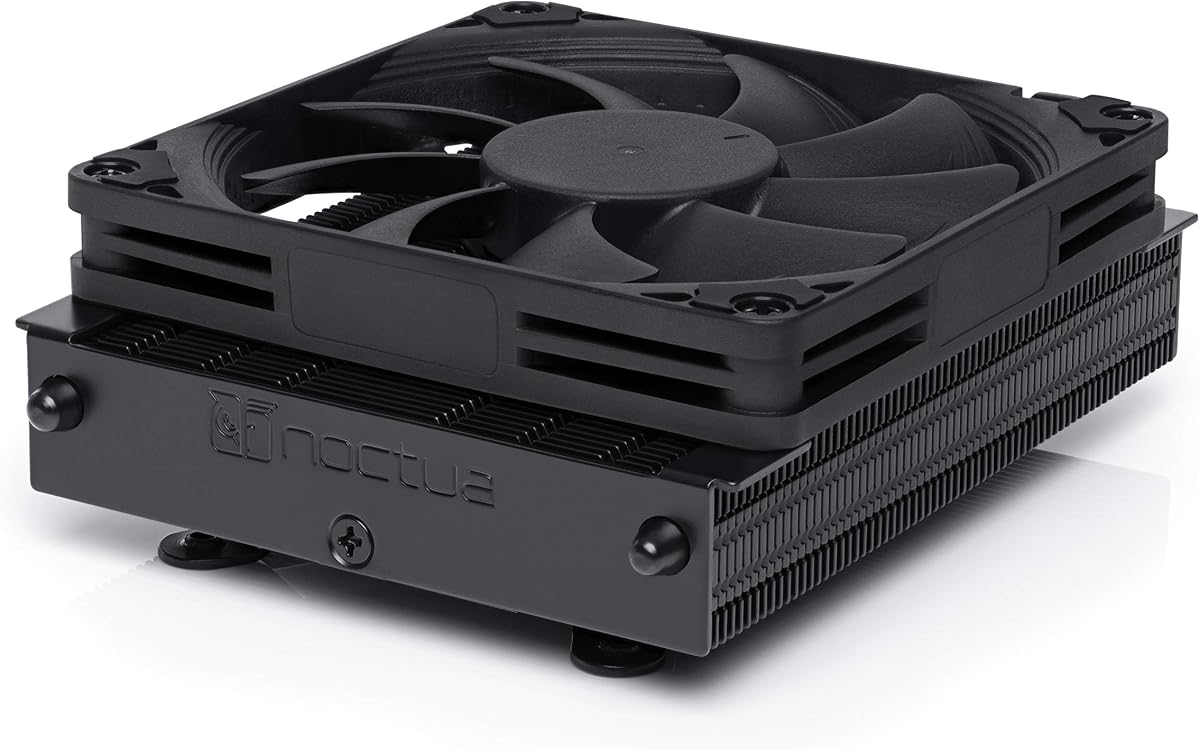
This black version of the NH-L9x65 offers the same top-tier cooling with a stylish monochrome look. It holds a 4.6 rating from users who love its design and function.
We may earn a commission when you buy through this link, at no additional cost to you.
The Low-Noise Adaptor allows for even quieter operation at lower speeds without sacrificing thermal performance. Its footprint clears most RAM slots on modern motherboards.
While it costs more than standard versions the visual appeal and additional accessories make it worth it for aesthetic-focused builds. The mounting system is intuitive.
Choose this if you want the best cooling performance with a premium look that matches black components in your PC build.
The all-black finish complements modern hardware without standing out as an eyesore in transparent cases.
Use the adaptor to reduce fan speed further for silent idle states while keeping PWM control active.
We may earn a commission when you buy through this link, at no additional cost to you.
The AXP90 X36 delivers outstanding value for its price. With a 4.6 rating it proves that budget options can still perform well in small cases.
We may earn a commission when you buy through this link, at no additional cost to you.
Its 36mm height is among the lowest available allowing it to fit in the tightest chassis. AGHP technology improves heat transfer regardless of orientation.
The trade-off is a less refined fan and simpler mounting compared to premium brands. Still it is a practical choice for those on a tight budget.
Pick this cooler if you need extreme clearance and maximum value without sacrificing core cooling capabilities for your ITX build.
Gravity-independent heat pipes ensure consistent cooling whether your case is vertical or horizontal.
The slim design avoids interfering with tall RAM modules or M.2 slots on compact motherboards.
We may earn a commission when you buy through this link, at no additional cost to you.
be quiet! is known for silence and this cooler delivers on that promise. It maintains a 4.5 rating thanks to its focus on low acoustic output.
We may earn a commission when you buy through this link, at no additional cost to you.
With just 45mm height it fits many cases while handling up to 100W TDP efficiently. The 92mm fan is tuned for low noise under load.
It may not handle high-end CPUs as well as larger coolers but it is perfect for office PCs or HTPCs. Installation is straightforward for all users.
If your main goal is keeping your system quiet and cool without high costs this model is a solid pick.
The fan blades are designed to minimize turbulence reducing audible noise even at higher speeds.
Compatible with Intel 1700 and AMD AM5 sockets ensuring support for new hardware releases.
We may earn a commission when you buy through this link, at no additional cost to you.
This cooler is tailored for AMD AM5 users needing extreme compactness. It holds a 4.4 rating from users who appreciate its specialized design.
We may earn a commission when you buy through this link, at no additional cost to you.
At only 37mm it clears nearly any RAM or M.2 slots on ITX boards. The all-black look blends well with modern components.
The warranty offers peace of mind for long-term use. However it is limited to one socket type which might not suit those upgrading later.
Choose this if you have an AM5 system and need the absolute lowest profile possible without compromising brand quality.
Mounting is tuned for the AM5 socket providing better contact and stability than generic coolers.
The slim heatsink design leaves plenty of room for memory upgrades in small form factor cases.
We may earn a commission when you buy through this link, at no additional cost to you.
The AXP-90 X53 strikes a balance between height and cooling power. With a 4.4 rating it appeals to those needing more TDP headroom.
We may earn a commission when you buy through this link, at no additional cost to you.
The 53mm height accommodates more fins improving thermal performance. Black nickel plating adds durability and a sleek look.
It is slightly taller than ultra-slim options but handles heat better. The fan noise is acceptable but not as silent as Noctua.
Opt for this if you need better cooling than the X36 can provide and can spare the extra height in your case.
The extra height allows more surface area for heat dissipation helping with moderate overclocks or sustained loads.
Black nickel plating protects against corrosion and adds a premium feel to the heatsink structure.
We may earn a commission when you buy through this link, at no additional cost to you.
This model offers a 47mm height that fits most cases while maintaining good airflow. It scores a 4.3 from users looking for a practical middle ground.
We may earn a commission when you buy through this link, at no additional cost to you.
AGHP pipes help maintain performance in varied orientations. The black finish looks clean and matches modern parts well.
The fan is adequate but may generate some noise under load. Mounting requires careful alignment but is manageable with patience.
Select this if you want a reliable low-profile cooler that handles everyday workloads well without breaking the bank.
At 47mm it balances thermal capability with compactness making it suitable for many standard ITX cases.
Heat pipes work in any orientation thanks to gravity-independent design ensuring consistent cooling results.
We may earn a commission when you buy through this link, at no additional cost to you.
The IS-67-XT pushes limits with six heatpipes and a 120mm fan. It earns a 4.5 rating from users who need serious cooling in a low-profile package.
We may earn a commission when you buy through this link, at no additional cost to you.
With 67mm height it clears more thermal headroom than most rivals. The larger fan moves more air efficiently at lower speeds.
It will not fit cases with strict height limits but is ideal for those needing power without full tower coolers. Installation is straightforward.
Choose this if you prioritize cooling power over extreme compactness and have room for a slightly taller unit.
The six heatpipes and large fins can absorb more heat allowing better performance under sustained workloads.
A larger fan moves more air at lower RPM reducing noise while increasing cooling efficiency compared to 92mm fans.
We may earn a commission when you buy through this link, at no additional cost to you.
This version emphasizes AGHP technique for consistent cooling regardless of case orientation. It has a 4.3 rating for reliability in vertical and horizontal setups.
We may earn a commission when you buy through this link, at no additional cost to you.
The 47mm height keeps RAM compatibility while the fan stays quiet. Secondary welding improves heat transfer for better thermal results.
It is a practical pick for cases where airflow direction changes or is unknown. The fan quality is decent but not top tier.
Select this if you need orientation independence in your ITX case and value consistent cooling across setups.
The heat pipes work efficiently even when gravity affects traditional wick flow ensuring stable performance.
The 47mm height leaves plenty of clearance for standard memory modules and nearby expansion slots.
We may earn a commission when you buy through this link, at no additional cost to you.
The IS-40-XT is a great entry option for ITX builds. It holds a 4.6 rating thanks to its ease of use and solid value.
We may earn a commission when you buy through this link, at no additional cost to you.
Its 47mm height fits many cases while the upgraded mounting makes assembly easier. The black design looks good with other parts.
While not as high-end as Noctua it performs well enough for standard CPUs. The fan can be loud at full speed but is manageable.
Pick this if you need a simple effective upgrade from stock cooling without spending much or complicating your build.
Upgraded backplate and tools simplify fitting this cooler especially for first time builders.
At a low price it offers significant performance gains over stock coolers for minimal investment.
We may earn a commission when you buy through this link, at no additional cost to you.
Selecting the right low profile CPU cooler involves balancing dimensions thermal performance and noise levels to match your case and workload.
The total height is the most critical dimension since it determines fit in your chassis. Measure from the socket to the lowest obstruction like RAM or GPU.
Always leave 1-2mm margin above the cooler height to avoid physical contact.
Check that the cooler supports your current CPU socket. Some models like the NH-L9a-AM5 are specific to one platform while others support both Intel and AMD.
Verify support for latest sockets like AM5 and LGA1700 for future upgrades.
The TDP rating tells you the heat level the cooler can handle. Higher TDP ratings suit more powerful processors like Ryzen 7 or Intel i7.
Choose a cooler with TDP higher than your CPU for headroom and better performance.
Noise is measured in decibels with lower being quieter. PWM fans allow control but quality matters for smooth operation.
Prioritize models with dB(A) ratings below 30dB for silent operation.
The footprint should not block high RAM or nearby PCIe slots. Look for narrow widths to avoid interference with tall memory modules.
Check manufacturer charts to ensure your RAM height is compatible with the cooler.
Premium coolers often include better materials and longer warranties. Look for full copper or aluminum with solid mounting systems.
A multi-year warranty reflects confidence in product longevity.
Some coolers include clear instructions and pre-applied paste. Others require more steps. Check for included tools or backplates for easier mounting.
A user-friendly mounting system saves time and prevents damage during installation.
Many users prefer all-black or specific color schemes. Aesthetics matter for visible builds with transparent panels.
Choose a design that matches your overall build theme for a cohesive look.
Install the cooler on a clean socket after applying thermal paste evenly across the CPU die. Ensure the cooler sits flat for optimal contact with the processor.
Connect the fan header to the CPU_FAN port on the motherboard to enable PWM speed control and proper system monitoring.
Periodically remove dust from the fins and fan blades using compressed air to maintain airflow and cooling efficiency over time.
A low profile CPU cooler is a heatsink and fan combo designed to be short in height typically under 70mm. These units fit inside compact cases without interfering with RAM or GPU.
Most low profile coolers handle mid-range CPUs well. High-end models like the IS-67-XT or Noctua options can manage moderate loads but not heavy overclocking or sustained high TDP.
Many low profile coolers are quieter at idle but may ramp up under load. High-end models from brands like Noctua are exceptionally quiet even under pressure.
Yes they can be used on ATX boards but the benefit is most clear on ITX or Mini-ITX builds. It saves space and avoids interference in tight cases.
Most premium models include high-quality paste like Noctua NT-H1. Budget options may not include it so check product details before purchase.
Power down your PC and use compressed air to blow dust out of the fins and fan. Do not touch the fan blades directly to avoid damage.
Premium brands like Noctua offer up to six years while others offer two or three. Always check warranty terms for specific models before buying.
We reviewed ten top low profile CPU coolers each offering unique strengths for compact builds. The Noctua NH-L9x65 leads overall while Thermalright offers great budget value.
Prioritize height and TDP to match your case and processor needs. Consider noise levels for living room PCs and build quality for long-term reliability.
Prices and availability change so verify current offers before purchasing to get the best value for your build.