
RedThunder One Handed Gaming Keyboard
4.4Editor score
35 Keys Anti-Ghosting
RGB Backlit Modes
Plug and Play Setup
This guide compares the top ten gaming keypads for performance and ergonomics to help you choose the best one-handed keyboard for your setup.
Gaming keypads offer a specialized way to enhance your performance without cluttering your desk. These devices focus on ergonomics and macro capabilities for faster reaction times.
We compared ten distinct models based on switch type, connectivity options, and overall build quality. Our analysis highlights the strengths and weaknesses of each device for various genres.
Each pick shows specific features like key counts and software support. Please note that prices change frequently so check the current listings before making a final decision.
4.4Editor score

4.3Editor score

4.3Editor score
The following table provides a side-by-side comparison of all ten models evaluated in this guide to help you see the key differences at a glance.




The Razer Tartarus V2 is a highly rated left-handed gaming keypad designed for immersive play. With a 4.3 rating it stands out for its unique mix of comfort and programmability.
We may earn a commission when you buy through this link, at no additional cost to you.
Its mecha-membrane switches offer a tactile feel without the noise of mechanical keys. The 8-way thumbpad provides natural control for movement which is rare in standard keypads.
While it requires software for full macro potential the customization is deep. The Chroma sync allows you to match lights with games and other gear for a unified aesthetic.
This device is ideal for MMO players who need quick access to many skills. Its ergonomic shape supports long sessions and the thumbpad adds a console-like feel to your setup.
The directional thumbpad replaces traditional WASD keys and allows for smoother movement in console-style games.
Razer Hypershift lets you map complex commands to single presses making ability rotations much faster during combat.
We may earn a commission when you buy through this link, at no additional cost to you.
The Redragon K585 offers a tactical layout with 42 keys for extensive command access. It holds a 4.4 rating thanks to its unique feature of allowing switch swapping without soldering.
We may earn a commission when you buy through this link, at no additional cost to you.
Its onboard macro keys let you bind combos instantly across multiple profiles. The pass-through port keeps your desk tidy by letting you plug a mouse directly into the keypad.
The detachable wrist rest adds comfort during long sessions and the RGB lighting is vibrant. However the software interface is not as intuitive as premium brands.
This keypad is perfect for users who want mechanical customization on a budget. The ability to tune the feel of your keys makes it a versatile choice for different play styles.
The upgraded socket accepts standard 3-pin or 5-pin switches so you can change the actuation feel easily.
The USB pass-through port reduces cable clutter and keeps your mouse connection stable and within reach.
We may earn a commission when you buy through this link, at no additional cost to you.
This wireless version of the K585 brings the same tactical layout to a portable form. With a 4.2 rating it balances freedom of movement with robust macro capabilities.
We may earn a commission when you buy through this link, at no additional cost to you.
It supports both Bluetooth and 2.4GHz connections for reliable input. The 15 to 20 hour battery life ensures it lasts through long gaming sessions without interruption.
The magnetic wrist rest and RGB lighting match the wired version. While wireless introduces minor latency risks it is negligible for most non-competitive genres.
Buyers looking for a wireless option under fifty dollars should consider this model. It provides the best of mechanical customization and wireless convenience in a single package.
Switch between Bluetooth for battery saving and 2.4GHz for low latency gaming depending on your immediate needs.
The wireless nature allows you to place the keypad anywhere on your desk without worrying about cable reach.
We may earn a commission when you buy through this link, at no additional cost to you.
The AZERON Cyborg II stands apart with an analog thumbstick that supports WASD or 360 movement. Its 4.3 rating reflects its niche appeal for enthusiasts wanting console control on PC.
We may earn a commission when you buy through this link, at no additional cost to you.
Each button is individually connected without matrices which reduces ghosting issues. The Hall effect technology eliminates drift and allows for precise calibration of movement zones.
It is expensive and the software is complex but the flexibility is unmatched. The ability to store six layouts directly on the device makes it reliable for different games.
This is the top choice for users willing to invest in top-tier ergonomics. The adjustable parts ensure a perfect fit for various hand sizes which is critical for comfort.
The Hall Effect thumbstick supports analog smoothing and dead zone adjustment for smoother movement in compatible titles.
The redesigned main board allows for future software updates and modular enhancements that extend the device life.
We may earn a commission when you buy through this link, at no additional cost to you.
The RedThunder keypad is an entry-level device designed for simplicity and value. With a 4.4 rating it proves you can get basic keypads without spending much.
We may earn a commission when you buy through this link, at no additional cost to you.
Its 35 keys feature anti-ghosting to ensure every input is registered. The macro recording process is straightforward using FN keys which makes it user-friendly for beginners.
The RGB lighting has limited modes and the build is plastic but functional. It saves space and is easy to carry for LAN parties or travel.
This option is best for casual gamers needing a secondary device. The lack of drivers means it works immediately on any system which is a huge plus for portability.
No installation is required so you can plug it in and start customizing macros immediately via the keyboard shortcuts.
The small size and lightweight design make it easy to store in a bag for on the go gaming sessions.
We may earn a commission when you buy through this link, at no additional cost to you.
The Keychron C0 HE is built for high-level FPS gameplay with advanced magnetic switches. A 4.2 rating suggests solid performance but the niche appeal keeps it from being mainstream.
We may earn a commission when you buy through this link, at no additional cost to you.
Its Rapid Trigger technology allows instant key reset for faster movement control. The adjustable actuation lets you fine tune sensitivity which is crucial for competitive titles.
The web-based configurator eliminates the need for heavy software installation. It works on both Windows and macOS making it accessible to a wider range of users.
This device is ideal for gamers focused on reaction speed and precision. The high polling rate ensures every micro move is captured which gives a competitive edge.
Inputs are detected based on real-time travel rather than fixed points allowing for finer control during rapid inputs.
All mapping and RGB settings are done through a browser interface which simplifies updates and keeps drivers light.
We may earn a commission when you buy through this link, at no additional cost to you.
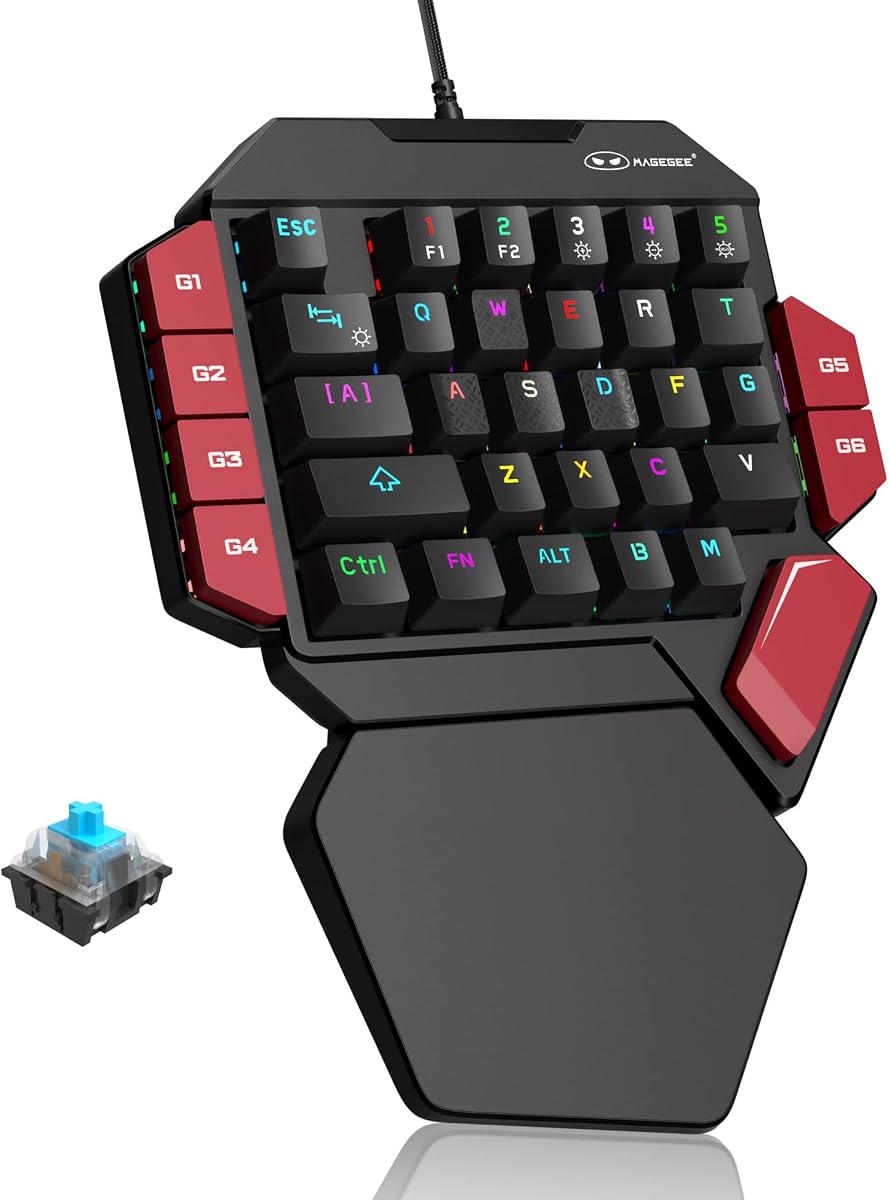
This MageGee model focuses on the classic feel of mechanical switches in a compact layout. It holds a 4.3 rating because it delivers strong tactile feedback at a low cost.
We may earn a commission when you buy through this link, at no additional cost to you.
Blue switches provide a distinct click that confirms every press. The macro recording keys are easily accessible via function combinations which simplifies setup for new users.
The wrist rest is large and provides good support. The RGB lighting is vibrant but less customizable than high end models.
It suits typists who also game and want sound feedback. The durability is solid and the price makes it a great entry point into mechanical gaming keypads.
The blue switches offer a strong mechanical feel that helps you confirm key presses without looking at the keypad.
Six dedicated macro keys allow for quick binding of complex actions without needing advanced software tools.
We may earn a commission when you buy through this link, at no additional cost to you.
The AJAZZ AK029 is an ultra-compact option with 29 keys and Hall Effect technology. It has a 4.5 rating indicating strong satisfaction from users who value speed.
We may earn a commission when you buy through this link, at no additional cost to you.
The 8KHz polling rate delivers fast response times for precise inputs. The web-based driver means no installation is required and profiles live on the device itself.
Its aluminum plate adds rigidity and durability to the unit. The lack of physical contact in switches means there is no debounce delay for instant feedback.
This is a great choice for competitive players who prioritize speed. The compact size saves desk space and the build quality feels sturdy enough for daily use.
The 8KHz rate reduces input lag significantly which helps in fast paced FPS where every millisecond counts.
Profiles are saved to onboard memory so you can switch computers without losing your custom key maps.
We may earn a commission when you buy through this link, at no additional cost to you.
This listing for the Tartarus V2 provides another view of the popular Razer option. It holds a 4.2 rating showing consistent performance for users of the device.
We may earn a commission when you buy through this link, at no additional cost to you.
The mecha-membrane switches balance feel and comfort. The 32 keys are enough for most major games without overcrowding your workspace.
RGB lighting syncs with other Razer hardware for visual consistency. While it requires drivers the setup is straightforward for most users.
It is a solid choice if you want a reliable ergonomic device. The wrist rest helps reduce fatigue during extended play sessions which is a key feature.
The layout is designed to keep all keys within easy reach of your left hand to minimize fatigue.
Chroma sync allows you to match lighting effects across multiple devices for a cohesive setup.
We may earn a commission when you buy through this link, at no additional cost to you.
The Redragon RM104 is a wireless keyboard with a smart knob that works well as a control pad. It has a 4.4 rating for its versatility and battery performance.
We may earn a commission when you buy through this link, at no additional cost to you.
The knob allows volume and lighting control without using keyboard shortcuts. Tri-mode connectivity lets you switch between devices easily which is great for multi system setups.
Battery life is strong at 4000mAh so you can use it for days. The software support enables deep customization for different gaming needs.
Buyers wanting a versatile tool rather than a pure keypad should consider this. It fits well in setups needing audio control and RGB sync without extra peripherals.
The knob allows for quick volume adjustments and mute toggles without needing to search for keyboard shortcuts.
You can switch between Bluetooth and 2.4GHz to fit your connectivity needs and save battery when possible.
We may earn a commission when you buy through this link, at no additional cost to you.
Selecting the right gaming keypad involves evaluating specific factors that affect performance and comfort.
Switches determine how the keys feel under your fingers. Options range from mechanical switches like blue to mecha-membrane for a softer touch. Hall Effect switches provide precision and rapid triggers which is ideal for FPS.
Choose a switch that matches your preferred tactile feedback and noise tolerance.
Connectivity can be wired or wireless. Wired units offer consistent zero latency which is crucial for competitive play. Wireless units provide freedom of movement but rely on batteries.
Decide if cable management or battery life is more important for your desk setup.
Key counts range from 29 to 42 depending on the model. More keys allow for extensive macro binding but take up more desk space. A compact layout leaves room for mouse movement.
Balance the need for macro depth with the available space on your desk.
Macros allow you to execute complex commands with a single press. Some units have onboard memory for storing profiles while others need software. Advanced units offer multi-step recording.
Ensure the device supports the level of macro complexity you need for your games.
Comfort is vital for long sessions. Look for wrist rests or ergonomic shapes that support your hand position. Adjustable parts can help fit different hand sizes.
Prioritize models with wrist support to prevent fatigue during extended gaming.
Software controls how you customize keys and lighting. Some brands require heavy installation while others use web-based tools. Onboard memory allows profiles to stay on the device.
Consider how much time you want to spend on setup versus playing.
Build materials affect durability and stability. Aluminum frames provide rigidity while plastic is lighter. Magnetic wrist rests allow for quick removal when needed.
Check if the construction matches the intensity of your usage habits.
Prices vary significantly from budget to premium models. Higher prices often mean better switches or materials. Budget models still offer good performance for casual play.
Set a budget limit and look for the features that matter most to you.
Start by connecting the device via USB or pairing via Bluetooth. Ensure your drivers are installed if required for full macro functionality.
Use the software to map frequently used actions to the most accessible keys. Save multiple profiles for different games or applications.
Keep the keys clean by gently wiping them with a soft cloth. Store the keypad in a dry place to avoid moisture damage to the switches.
Most keypads work with Windows and macOS. However some software tools may be limited to specific systems. Always check the manufacturer specs for compatibility.
Some units offer plug and play functionality without drivers. Others require software for macro programming and RGB control. Check the product details before buying.
Hall Effect switches use magnetism for input detection. This reduces wear and allows for adjustable actuation points. They are great for competitive precision.
Use a soft brush to remove dust and a damp cloth to wipe the surface. Avoid using harsh chemicals that could damage the switches or keys.
Yes many models have mechanical switches suitable for typing. However they lack the spacebar and full alphabet layout which may slow you down.
Wireless units offer flexibility but add battery concerns. Wired units are generally more stable. Choose based on your desk preference.
A thumbpad is a directional stick on the side of the keypad. It allows for movement control without moving your hand from the keys.
The top picks highlight that performance and ergonomics are critical. The Razer Tartarus V2 offers comfort while the Keychron C0 HE excels in competitive speed.
Prioritize switch type and macro capabilities based on your specific game genres. The budget options still deliver strong value for casual users.
Remember to check current prices before purchasing as deals change often. The right keypad can significantly improve your workflow and gaming experience.