
TP-Link ER605
4.4Editor score
Five Gigabit ports
Up to three WAN links
Advanced security features
This guide compares the top 10 load balancing routers for businesses and power users based on WAN support, security features, and routing performance.
Finding the right load balancing router ensures your network stays online even if one internet connection fails. These devices manage multiple WAN links to optimize speed and reliability for critical operations.
We evaluated ten top-rated models based on port flexibility, security protocols, and ease of management. Each option offers distinct strengths for small offices, remote workers, and enterprise environments alike.
Every pick highlights key specs and real-world performance traits to help you decide. Note that pricing and availability can shift quickly, so verify current details before purchasing your next router.
4.4Editor score

4.7Editor score

4.0Editor score
The following table provides a side-by-side overview of every router featured in this guide. Compare port counts, VPN capabilities, and unique features to find the best fit for your needs.


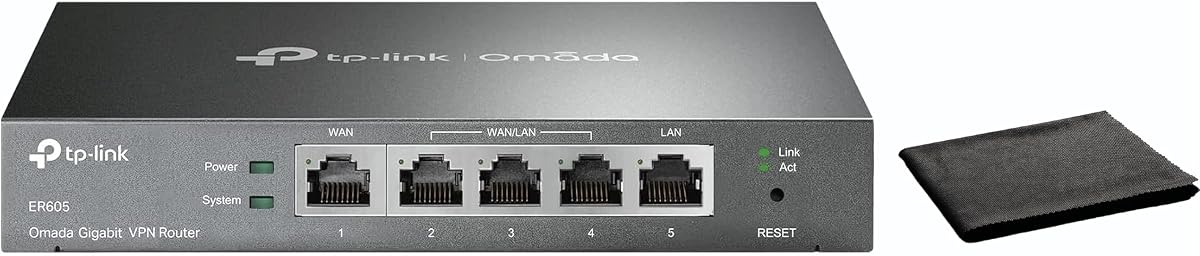

The TP-Link ER605 stands out as a highly affordable option for small businesses needing reliable internet redundancy. It holds a strong user rating and delivers core load balancing features without breaking the bank.
We may earn a commission when you buy through this link, at no additional cost to you.
Its five Gigabit ports allow up to three WAN connections which optimizes bandwidth usage significantly. The built-in VPN support for up to twenty connections ensures secure remote access for distributed teams.
While it lacks premium features like a touchscreen, the SPI firewall and DoS defense provide robust protection. The USB port adds flexibility for mobile broadband backup when primary lines fail.
This router is ideal for cost-conscious offices that still require enterprise-grade security. It balances price and performance exceptionally well for entry-level multi-WAN environments.
With up to three WAN ports, the ER605 optimizes bandwidth usage by balancing traffic across multiple internet lines automatically.
Supports up to twenty VPN connections ensuring secure remote access for teams working from various locations seamlessly.
We may earn a commission when you buy through this link, at no additional cost to you.
The TP-Link ER7206 is designed for professional environments needing high capacity and flexibility. It supports up to four WAN ports and integrates seamlessly with the Omada SDN platform.
We may earn a commission when you buy through this link, at no additional cost to you.
Its ability to handle up to 150,000 associated client devices makes it suitable for large office networks. The SFP WAN port offers fiber connectivity options for faster internet speeds.
While integrating into Omada SDN requires specific controller choices, it enables centralized management across multiple sites. The increased network capacity ensures stability even with many connected devices.
This model is best for businesses expanding their infrastructure who want future-proof networking. It delivers professional-grade routing with robust security and cloud management capabilities.
With support for up to 150,000 client devices, this router handles large networks without performance drops.
Seamless integration into Omada SDN allows centralized control of access points and switches from one interface.
We may earn a commission when you buy through this link, at no additional cost to you.
The Cudy R700 offers enterprise-grade control with full OpenWRT support for advanced users. It connects up to five ISPs automatically rerouting traffic if one connection drops instantly.
We may earn a commission when you buy through this link, at no additional cost to you.
Its complete VPN gateway suite includes WireGuard and OpenVPN for secure remote access. The professional security stack protects your perimeter while keeping critical services accessible.
While the Web GUI is functional, OpenWRT support allows custom QoS policies and VLAN segmentation for pros. This flexibility is ideal for home labs or remote offices needing deep customization.
This router is perfect for tech-savvy users who value control over convenience. It balances cost with powerful networking features that rival more expensive business solutions.
Full OpenWRT support unlocks VLAN segmentation and custom QoS policies for professional-grade network management.
Built-in server and client support for WireGuard and OpenVPN ensures secure site-to-site tunnels easily.
We may earn a commission when you buy through this link, at no additional cost to you.
The Alta Labs Route10 delivers high-performance 10 Gigabit wired routing for advanced networks. It uses a quad-core Qualcomm processor for consistent multi-gigabit performance without bottlenecks.
We may earn a commission when you buy through this link, at no additional cost to you.
Integrated PoE+ output powers access points directly reducing the need for additional adapters. Real-time monitoring allows admins to identify issues and optimize traffic flow instantly.
While it does not broadcast Wi-Fi requiring separate access points, this ensures maximum routing power. It is built for users who need enterprise-grade routing security and segmentation.
This router is best for advanced users wanting top speed and reliability. Its focus on wired performance makes it a powerhouse for demanding home or business networks.
Designed for advanced networks it handles 10 Gigabit wired routing with hardware-accelerated performance.
Select Ethernet ports provide PoE+ to power access points directly through the cable.
We may earn a commission when you buy through this link, at no additional cost to you.
The Omada ER7412-M2 handles massive traffic with ten Gigabit ports and up to eleven WAN balancing. It includes high-security SSL and IPSec VPNs for secure remote access.
We may earn a commission when you buy through this link, at no additional cost to you.
Features like DPI and IPS/IDS protection enhance security significantly against modern threats. Load balancing across eleven lines increases utilization rates for multi-line broadband setups.
While the sheer number of ports might be complex for small setups it ensures scalability. This model is built for businesses needing high throughput and flexible connection options.
It is ideal for growing enterprises requiring reliable multi-gigabit performance. Its security features provide peace of mind for handling sensitive data traffic.
Load balancing on up to eleven WAN ports increases the utilization rate of multi-line broadband connections.
DPI and IPS/IDS protection enhance security against modern threats and attacks effectively.
We may earn a commission when you buy through this link, at no additional cost to you.
The TP-Link TL-R470T+ is a smaller case solution for small offices or internet cafes. It supports up to four WAN ports with advanced load balance capabilities for maximum bandwidth.
We may earn a commission when you buy through this link, at no additional cost to you.
Portal authentication and client account management allow administrators to control access effectively. Marshals bandwidth resource to specific clients based on their unique application environments.
While it uses older 10/100M ports which limit speed it provides robust protection. Lightning protection safeguards your network from surges while IP and MAC binding prevents virus attacks.
This router is best for cost-effective small business setups. It delivers essential load balancing and security features at a very accessible price point.
Provides extensive client account and network management for administrators with supported PPPoE server.
Marshals bandwidth resource to specific clients based on their unique application environments.
We may earn a commission when you buy through this link, at no additional cost to you.
The TP-Link TL-R480T+ is a straightforward 5-port Load Balance Broadband Router. It offers three configurable WAN/LAN ports plus one dedicated LAN and one WAN port.
We may earn a commission when you buy through this link, at no additional cost to you.
This simple configuration works well for basic redundancy needs without complex management. It ensures that if one internet line fails traffic can move to another.
While it lacks modern high-speed ports it provides reliable basic function. The compact design fits easily in small offices where space is limited.
This router is suitable for users needing simple redundancy on a tight budget. It covers the basics of load balancing without extra bells or whistles.
Three configurable WAN/LAN ports allow flexible connection options for different internet sources.
Provides simple load balancing to ensure connection redundancy for home or small office.
We may earn a commission when you buy through this link, at no additional cost to you.
The TP-Link ER-605 offers reliable fast internet with dual WAN ports for seamless load balancing. It features an SPI firewall and bandwidth management for critical applications.
We may earn a commission when you buy through this link, at no additional cost to you.
Easy management includes intuitive web interface and Omada app compatibility. Cloud monitoring allows real-time status and configuration from anywhere at any time.
While it supports only two WAN ports it ensures optimized performance for small businesses. Its versatile design suits various environments from offices to remote work setups.
This router is best for businesses needing solid security and easy setup. Its bandwidth optimization ensures critical tasks remain fast during heavy traffic.
Protect your network with SPI firewall and DoS defense ensuring secure remote access.
Simplify management with intuitive web interface and centralized cloud monitoring for real-time status.
We may earn a commission when you buy through this link, at no additional cost to you.
The Ubiquiti EdgeRouter 4 is a powerful pro networking solution with excellent user ratings. It includes three Gigabit ports and one SFP port for fiber connectivity.
We may earn a commission when you buy through this link, at no additional cost to you.
Its fanless design ensures quiet operation while consuming only 13 Watts. This efficiency makes it ideal for noise-sensitive environments like offices or homes.
While it lacks a web GUI requiring command line interface knowledge its power is immense. Desk wall and rack mount options provide flexible deployment in any space.
This router is best for advanced users comfortable with CLI management. It delivers reliable performance and low latency for demanding network applications.
Fanless design ensures quiet operation while consuming only 13 Watts of power efficiently.
Desk wall and rack mount options provide flexible deployment in any space.
We may earn a commission when you buy through this link, at no additional cost to you.
The Omada Fusion 2.5G delivers outstanding speed with five 2.5G ports for rock-solid connectivity. It features a quad-core CPU to overpower lag ensuring fast processing for heavy loads.
We may earn a commission when you buy through this link, at no additional cost to you.
A 2.51 touchscreen provides instant on-site insights like health scores and alerts. This reduces on-site work by enabling quick troubleshooting without needing a laptop.
Simplified setup via Bluetooth and batch adoption saves time during deployment. License-free cloud management allows remote access from day one with all features available.
This router is best for those wanting modern speed and easy management. Its unique touchscreen and Bluetooth setup make it stand out as a user-friendly business tool.
High-Performance Quad-Core CPU ensures lightning-fast processing to overpower lag effectively.
The 2.51 touchscreen provides instant on-site insights including health scores and real-time traffic.
We may earn a commission when you buy through this link, at no additional cost to you.
Selecting the right load balancing router requires careful consideration of your network needs and budget. This guide explains the critical factors to ensure you make a smart choice.
The number of WAN ports determines how many internet connections you can use simultaneously. Look for routers with at least three ports if you need true redundancy and load distribution.
More ports mean better optimization but also higher cost. Ensure the ports support your internet speeds including Gigabit or 2.5G capabilities.
Routers use different methods like weighted round robin or session-based balancing. Some prioritize speed while others focus on keeping sessions stable.
Choose a method that matches your primary usage. Businesses needing stable connections prefer session-based while speed-focused users may want bandwidth-based balancing.
Secure remote access is vital for modern businesses. Check how many simultaneous VPN connections the router supports.
Ensure it handles necessary protocols like OpenVPN or WireGuard. High-end routers support dozens of tunnels for distributed teams.
Built-in firewalls and DoS protection are essential for perimeter defense. Look for SPI firewalls and IDS/IPS capabilities.
Advanced models offer IP/MAC filtering to block unauthorized devices. Security should be a top priority for any business router.
User-friendly interfaces simplify network administration. Touchscreens or intuitive apps make monitoring easier.
Cloud access allows remote management from anywhere. This is crucial for managing multiple sites without physical visits.
High traffic requires a strong CPU to avoid bottlenecks. Quad-core processors handle encryption and routing efficiently.
Hardware-accelerated VPNs are a bonus for speed. Ensure the router can handle your peak traffic loads without lag.
Consider future bandwidth needs when choosing ports. 2.5G or 10G ports provide longevity.
SFP ports allow fiber upgrades later. Investing in scalable hardware saves money long-term.
Prices range from basic models to enterprise solutions. Determine your minimum requirements before spending.
Affordable options work for small offices while premium ones suit large enterprises. Balance cost with the features you truly need.
Start by connecting your internet modems to the WAN ports on the router. Ensure each cable is secure to maintain stable connections.
Access the web interface to configure load balancing rules and security settings. Save your changes and reboot if necessary to apply them.
Regularly update the router's firmware to keep security features current. Monitor traffic logs to identify potential issues early.
A load balancing router distributes internet traffic across multiple connections to maximize speed and reliability. If one connection fails, it automatically reroutes traffic to keep your network online.
For basic redundancy, two WAN ports are sufficient. If you want to actively balance three different internet lines, choose a router with at least three WAN ports.
Yes, though most home routers lack this feature. Advanced models like the Cudy R700 are perfect for home labs or power users needing multi-ISP support.
It can increase total bandwidth by combining multiple connections. However, single downloads may not exceed the speed of one single ISP line unless configured specifically.
Yes, business routers often include advanced firewalls and encrypted tunnels. They are designed to protect sensitive data against external threats effectively.
No, many models like the Fusion 2.5G include built-in controllers. They work without a separate controller for most essential management features.
We reviewed ten excellent load balancing routers ranging from budget-friendly to premium models. Each offers unique strengths for various office sizes and networking needs.
Consider your WAN port count, security requirements, and management preferences when deciding. The right router ensures stable internet for critical daily operations.
Remember that pricing and availability change frequently. Always check current offers before purchasing to secure the best deal available today.